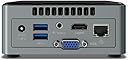
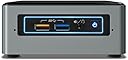
Hace mas de un añito que compre esta maravilla de aparato y paso a contar mi experiencia con el. Voy a dividir la reseña en diferentes partes para que todo quede bien claro. He de decir que soy una persona a la que le encanta la informatica y un maniatico de que mis ordenadores vayan como la seda ,pero que nunca habia montado ningun ordenador ,hasta ahora,me decidi por comprarlo y montarlo y la verdad es que no se puede estar mas contento con la compra. -Primera parte: Voy a explicar un poco a a la gente que es este aparato y para que sirve ya que muchos amigos mios que me lo han visto y no tenian claro que es, y a mucha gente le pasara lo mismo, pues este aparato es igual que un ordenador de sobremesa pero muchisimo mas pequeño y muchisimo mas versatil, lo puedes usar como un ordenador normal como cualquier otro conectado a su pantalla de pc, lo puedes usar como sistema multimedia conectado a la tele del salon,ademas se puede colocar justo en la parte de atras de la tele sujeto a ella y usarlo como una smart tv pero infinitamente mejor, y para finalizar lo puedes usar como un portatil mas o menos ya que es tan pequeño ,que te lo puedes llevar y conectarlo donde quieras,que es lo que yo hago, ademas al ser tan pequeño lo puedes meter como lo tengo yo en el mueble de la sala,conectado a la tele y a todo en general y de paso no rompes la estetica del salon con un aparato mas. Aclarado lo que es este aparato decir tambien que al comprarlo viene vacio y tienes que montar tu los componentes que prefieras,para mi eso tambien es una ventaja muy grande ya que cada uno se lo monta dependiendo de sus necesidades y gastandote mas o menos dinero, un 10 en este aspecto. -2ª Parte es comolo uso yo: Pues decir que yo lo uso como centro multimedia en el salon,lo tengo conectado a la tele de la sala y veo peliculas,series o simplemente navego desde el sofa y tambien lo tengo conectado a mi equipo de musica mediante un DAC y desde el sofa pongo la musica que quiero, una autentica maravilla,lo uso con un teclado inhalambrico que a su vez hace de raton que es otra gozada, y para todo esto lo uso yo. -3ª Parte la instalacion: Empiezo por los componentes, yo compre un disco duro Kingston SSD A400 - Disco duro sólido, 2.5", SATA 3, 120 GB y una memoria ram de 8 gigas de crucial, a la hora de montarlo es relativamente facil y yo sin tener practica segui un tutorial en youtube y listo todo a la primera, eso si con un poco de paciencia. El ssd va como la seda y la memoria de 8gigas de crucial pes una garantia total de perfecto funcionamiento,recomiendo comprar unas memorias ram de un buen fabricante y no cualquier cosa, ya que no te van a dar ningun problema de nada ,siguiendo con las memorias para este ordenador en concreto la memoria tiene que tener esta especificacion ( 204-pin SO-DIMM, DDR3L 1.35 voltios ),comprarlas asi y no tendreis problema alguno,Tambien decir que el ordenador viene con 2 ranuras para las memorias y tu lo convinas como quieres , yo por ejemplo solo compre una de 8 gigas y si quiero en el futuro le meto otra de 8, pero puedes metele 4y 4 tambien,cuestion de gustos. -4ª parte Instalacion windows: En el tema de sofware decir que no he tenido el mas minimo problema de verdad, instalar windows 10 es facil, busca algun tutorial ,paciencia y ya esta.Un vez funciona ya el ordenador lo primero que recomiendo hacer es bajar los drivers de la pagina de intel y actualizar tu ordenador para que no tengas problema alguno . Y como dato y para que elordenador fluya de lujo y te dure mcho yolo que tengo hecho es instalar en el ssd solo windows, osea que no hago descargas de musica ni de pelis ni nada en el ssd ,y asi aumento y mucho su durabilidad y rendimiento, las decargas cuando las hago, las descargo a un disco duro externo y ya esta,mas acil y comodo. -5ª Parte Lo que mas me gusta de el: Pues que es una autentica pasada lo rapido que va,arranca windows en nada,y lo cierra mas rapido todavia,abre los programas super rapido,en resumen que es una maravilla. Yo las pelis me las descargo muy pesadas, de mas de 20 gigas y las mueve sin despeinarse,una gozada. 6ª Parte Lo que menos me gusta: Pues que no puede con las pelis de 4K, su procesador y su grafica integrada no pueden con estas pelis, una pena, pero en mi caso me da igual ya que mi tele no es 4K . Y lo que menos me gusta de esta maravilla es que no se porque motivo los ratones y teclados inhalambricos si los conectas directamente a sus entradas usb tienen cortes de señal y no funcionan bien,se atascan y es desesperante, pero tiene una facil solucion,yo tengo conectado un Hub usb 3.0 al ordenador y y en ese hub conecto el transmisor de mi teclado o del raton problema resuelto,todo sin cortes y como la seda, la solucion es no conectar directamente los transmisores al ordenador,se tienen que conectar a un hub o a algun cable alargador usb para que no haga interferencias. En resumen si lo que quieres es un buenisimo ordenador para uso normal,navegar ver pelis, descargas y demas no lo dudes este pequeñin es una autentica maravilla, y una relacion calidad precio genial.