


🎧 Upgrade your sound game—plug in, play on, and never miss a call or beat!
The Plugable USB Audio Adapter is a sleek, driverless external sound card that adds a 3.5mm headphone and microphone jack to any USB-enabled device. Compatible with Windows, macOS, Linux, Chrome OS, and Raspberry Pi, it offers a compact, durable aluminum design for easy, reliable audio connectivity and is perfect for replacing faulty audio ports or enhancing setups without native 3.5mm jacks.
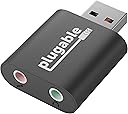



| Asin | B00NMXY2MO |
| Audio Output Mode | Stereo |
| Best Sellers Rank | 80,736 in Electronics & Photo (See Top 100 in Electronics & Photo) 2,563 in Audio & Video Adapters |
| Box Contents | User Guide |
| Brand Name | Plugable |
| Compatible Devices | [Headphones, Speakers, Microphones] |
| Customer Reviews | 4.4 4.4 out of 5 stars (5,211) 4.4 out of 5 stars |
| Global Trade Identification Number | 00819927010654 |
| Hardware Connectivity | USB |
| Hardware Platform | x86_64, ARM (Raspberry Pi OS), x86_64 (macOS), Chrome OS, Linux |
| Item Weight | 15 Grams |
| Manufacturer | Plugable |
| Manufacturer Part Number | USB-AUDIO |
| Maximum Sample Rate | 48 KHz |
| Model Name | USB Audio Adapter |
| Model Number | USB-AUDIO |
| Number Of Items | 1 |
| Number Of Packs | 1 |
| Platform | Linux, Mac, Mac OS X, Windows XP |
| Product Warranty | 2 Year Limited Parts and Labor |
| Signal To Noise Ratio | 95 dB |
| Surround Sound Channel Configuration | 2.1 |
| Upc | 819927010654 |
User
simple solution to a simple audio jack problem
No issues and works as promised. Using it for laptop, one of my laptops has a broken headphone port and looked at something very similar in Maplin it was ridiculously priced like £40?! I also have small microphone attached to my headphones and I plan to do some live streaming and vlogging, the microphone port comes in useful because I currently don't have a job so I can't afford a Shure SM58 which would be my preferred but again, useful to be able to listen to music and make vlogs on a budget or do live stream. I'm using a splitter cable but eventually laptop audio port will break pulling jack out and putting in over time (a few years) so this is really a failsafe for that happening.I will say it's a bit too wide, wide enough to cover a second usb port on laptop which is a bit annoying but there are ways round that like you would just get a USB extension cable if you really wanted to and I guess it has to be wide to accommodate headphone and mic ports. I don't often need both but it's just nice to have the option availableSetup was easy, first time plugging it in, the PC has to recognize it by installing some files which takes maybe a minute or less then it's good to go. Sound replication is the same as putting 3.5mm jack into anything, standard quality, no crackling. I'm definitely making the most of it with Spotify Premium and occasional younow broadcastingOverall it's pretty cheap and cheerful, again good for laptops with a dodgy audio port, no problems, nice extra gadget to add to the collection lol
User
It Works, Superbly
It works and no nonsense. This little gadget is the solution when you wish to use a headset and you only have an integrated sound card as part of your motherboard. No need for a separate audio card or an excellent low cost alternative to replacing a faulty audio card [avoid ASUS DGX; when they go faulty there is no support from ASUS] Simply plug in the adaptor, put in your 2 headset jacks, select in the sound controls menu and that's it. No drivers to worry about, no configuring needed; out of the packet, into your PC and off you go. I can see it may cause a little problem using on a laptop or notebook where usb ports are few and quite close together; the adaptor is quite chunky and could prevent use of another nearby USB port. No problems what-so-ever on PC where you generally have many USB ports available in different locations. It's a joy to have something that does what is says straight from the packet.
User
High Quality But Rather Fragile
I have owned this for around 1 year and worked perfectly well for the majority of that time other than being slightly too large for my USB port when another USB device is plugged into the other port.After that 1 year period, the sound started going in one or both sides of the headphones and was only fixed by moving the adapter around (the headphones worked perfectly fine). The issue started off only occurring rarely, but now it is near impossible to get any sound out of it at all. Finally, the headphone port broke off internally so does not work at all.Decent quality for the price, but unwieldy and fragile.Edit: I have since been offered a replacement and I wish to compliment the customer services on that area. I have improved my rating since due to the original review being posted rather hastily and my overall experience with the product was good.
User
Great, but chunky and MIGHT require a splitter
It works, simply put. I managed to break the aux input on my laptop and needed a bypass.Only minor complaint is that it comes with a dual input - one for a microphone and one for headphones. I'm not sure if it works like this (the seller may want to confirm), but this may mean that if you have a headset with a microphone you will need to use a splitter to separate your inputs, as plugging just into the microphone jack may leave you without sound, and plugging just into the sound jack may leave you without a microphone. Also, it's kind of chunky, so if you have your USB sockets close together on your PC it can cockblock the socket next to it.The actual sound and microphone quality is perfect, though. Performs as advertised, 10/10 would buy again.
User
It works!!
I want to be able to upload data to Polar web site from my heart monitor watch via their sonic link. To do this I need to position the watch near to the PC's microphone. My Dell All-in-One Win 8.1 OS PC has it's stereo microphones on its top edge which won't support the watch and there is no additional microphone input jack socket on this PC. This device simply plugs into a USB socket and accepts my cheap standalone mic sitting on the desk. It also lets me plug in earbuds/phones easily - the audio jack is at the back and awkward to access to unplug the speakers and insert the earphone jack. Sounds quality is good to my ear.Altogether a well made piece of kit that works. Recommended.
User
This worked ... for a while
This is a tricky one. I have been trying to find a way to input analog music into my iMac, which no longer has an audio in capability. Basic USB to 3.5mm cables have not worked as the iMac simply doesn't recognise them as input devices (my guess is that such cables are primarily for trickle charge FROM the computer rather than anything INTO). This device, however, HAS WORKED, and is detected by my iMac. Inputting a 3.5mm cable into one of the 2 sockets can lead to successful capture by the iMac - the other socket does nothing. OK it's worked so why only 3 stars? Well, it's not working any longer! The iMac still detects the device, but playing audio in and trying to record in, say, Audacity, is no longer working. This could be some change in my setup on the iMac but I've sought advice and I don't think so. I don't know why it's stopped, but that's why I only gave it 3 stars.
User
A reasonably-priced solution for damaged jacks without the hassle or adding 3.5mm support for devices that only have usb inputs.
Due to having a damaged input on my laptop; getting any headphones to work in stereo was frustrating. When I found this item, I bought it immediately and got it the next day with free shipping. This adapter is perfect for what I wanted it for and it worked immediately after plugging it in. I'm very happy with this purchase as this product solves my problem and allows me to chose which side of the laptop the headphones plug into (as my laptop has usb ports on both sides).A simple and easy fix for any computer, at a low price with good build quality and satisfying feeling jacks.Overall, this is a fairly priced product, comes as advertised and performs as described without any issues.
User
Quality item
Product is sturdy definitely not flimsy. I am very pleased with my purchase. Thank you seller.
User
Muy bueno
Altamente recomendable, graba y transmite el audio en sterero, es de los pocos que hacen eso, solo no subirle tanto a la fuente que recibe el audio para que grabe buena calidad.
User
Un ottimo prodotto, compatto, che fa cip che promette!
Dopo 4 anni e mezzo che continuo a mettere e togliere le cuffie al mio iMac, ho "rotto" il jack delle cuffie originale.Non volendo ripararlo cercavo un prodotto che mi convertisse una porta usb in una cuffia... e l'ho trovato in questo ottimo prodotto...Si presenta come una chiave USB, che ha ad una estremità il connettore USB, ed all'estremità opposta i due fori per il jack microfono e delle cuffie. Collegato al mio iMac, istruito il mac di usare quello come scheda audio e tutto ha funzionato senza batter ciglio.In poche parole, era proprio quel che cercavo, così posso attaccarci le cuffie analogiche che prediligo.Consigliatissimo se avete un'esigenza simile alla mia.
User
Simple et efficace
Acheté pour que mon fils puisse utiliser un casque avec micro sur un ancien iMac 2007.Sans cet adaptateur, pas de son vers le micro du casque.Une fois branché et les câbles connectés, il suffit de sélectionner l'adaptateur dans les préférences système (en entrée et sortie)Et ça fonctionne parfaitement ! Sans redémarrer.Le gain en audio est d'environ 25%, sans saturation, ni parasites.La connexion est ultra simple : une sortie USB à mettre de préférence sur l'ordinateur plutôt que sur un hub ; 2 autres sorties, en jack 3,5 pour y mettre les deux entrées casques et micro.L'objet est petit, discret et de belle qualité. La finition est parfaite et semble solide.Le tout livré dans un emballage de taille réduite, en plastique.Je n'ai pas testé l'engin sous Windows mais ça ne devrait pas poser de problème.Bref, un bon compromis pour utiliser un casque micro ou pour remplacer une carte son obsolète ou défectueuse.À moins d'être mélomane mais c'est une autre histoire...
User
Impressive for the price
This Plugable 1/8 audio plug to USB adapter works very well for the price. It is easy to use and operates immediately. I found little to no extraneous noise or interference.It is a little wider than a normal USB plug, but that is rarely a problem since I do not need plug in two Usb item on the same side.We have used this adapter as a simple way to connect our Behringer mixer to a computer for recording. It worked with or without connecting headphone. If you try to use headphones to monitor through the computer there will be latency. All USB connectors have some latency. That is why there is a headphone connector on this adapter.If you are looking for the absolute best audio adapter to connect to your computer you should use an audio interface (about $90 - $300 for a decent device).We have also used the adapter to connect a mic directly into the computer without a mixer. When using mics, please take note of any phantom power requirements.I have tried several other adapters. This one seems to be the most consistent and has the lowest noise.Remember, if you are using Audacity, you will need to plug it in, and then start the app. Audacity will not likely identify new USB mics with the app is running. Quit and restart the app.Responding to some reviews:You should read the description.It is designed for TRS, not TRRS plugs. If you have a lavaliere with a TRRS plug, like I do, you will need to use a TRRS to TRS adapter. It is a simple thing and most lavalieres come with the adapter. TRS has two lines in the plug and TRRS has three.Make sure you have the plugs firmly connected. This is sound equipment which means that the noise will occur if you do not connect the devices properly.You can connect headphones in the plug to get immediate, no latency, monitoring. No device has zero latency if you listen through the computer while recording.Check the quality of your mic. Some mics will have cord and connector issues.Check your computer's USB ports. I may be that they are not equally set up. It may also be that they are not exactly the same USB. Check the color of the port. Also, some computers will have slightly different signal strength from one or the other USB ports.Best practice would be to use an audio interface, but many of us try to save money. This item is ay good, low cost alternative for the analog to USB conversion until you move up to an interface.
User
Works perfectly
Does its job
Trustpilot
2 weeks ago
1 month ago