Buy anything from 5,000+ international stores. One checkout price. No surprise fees. Join 2M+ shoppers on Desertcart.
Desertcart purchases this item on your behalf and handles shipping, customs, and support to Colombia.
⌨️ Elevate your control game — compact, wireless, and ready to rule your media kingdom!
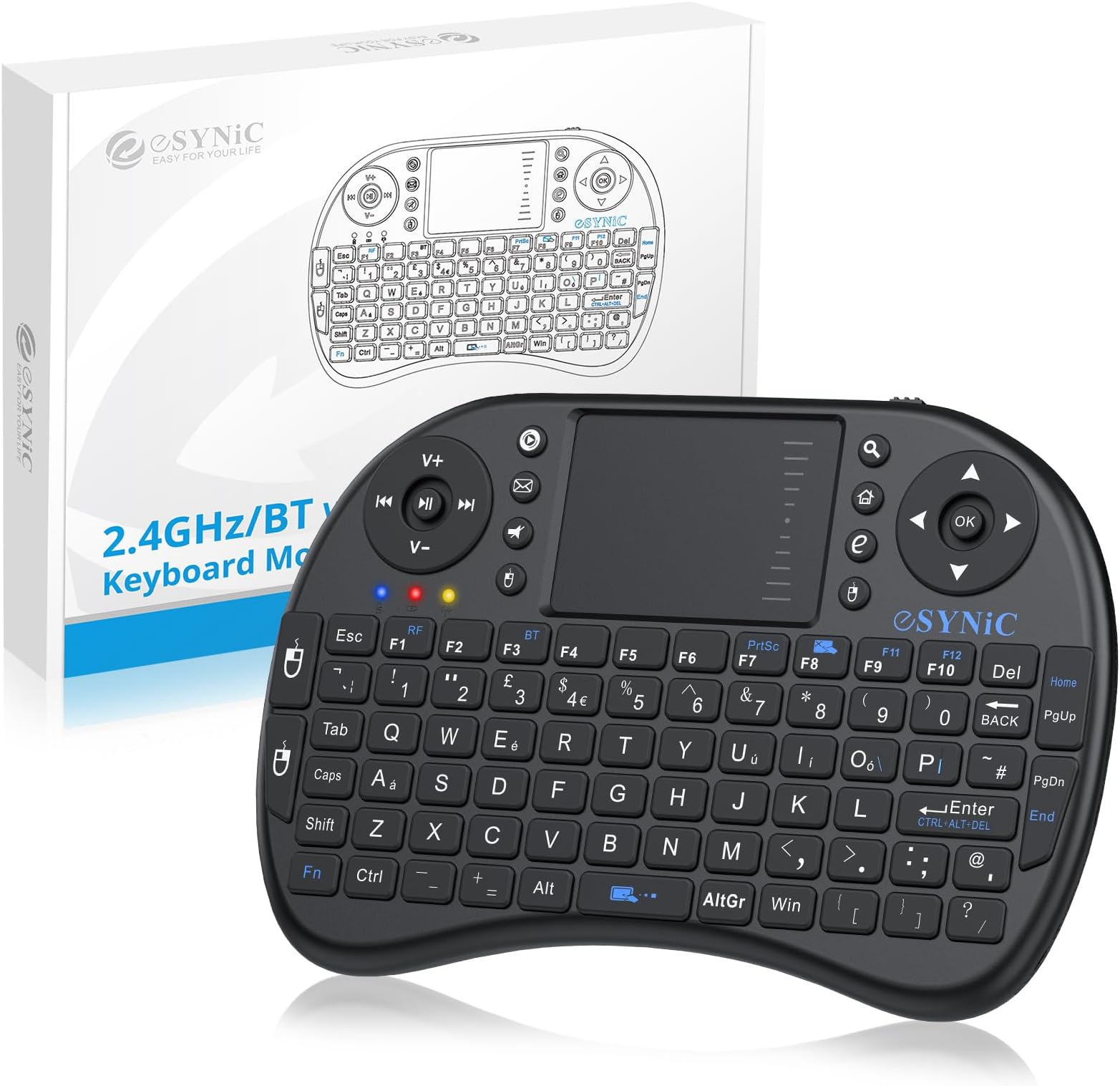
The eSynic Upgraded Bluetooth Mini Wireless Keyboard is a versatile 92-key QWERTY device featuring dual wireless modes (Bluetooth & 2.4GHz), an integrated touchpad, and multimedia controls. Designed for professionals and media enthusiasts alike, it offers broad compatibility with devices from PCs to gaming consoles, a rechargeable Li-ion battery with intelligent power management, and an ergonomic, portable design perfect for on-the-go productivity and entertainment.


| ASIN | B00DUUF250 |
| Antenna Location | Multimedia |
| Best Sellers Rank | 5,831 in Computers & Accessories ( See Top 100 in Computers & Accessories ) 150 in Keyboards (Computers & Accessories) |
| Box Contents | 1 x Mini 2.4GHz keyboard, 1 x Wireless receiver, 1 x Male to Female Cable, 1 x USB Cable, 1 x Manual |
| Brand | eSynic |
| Brand Name | eSynic |
| Button Quantity | 92 |
| Colour | Black |
| Compatible Devices | PC / Laptop / TV / Pad / Phone |
| Compatible Operating System Family | Windows |
| Compatible devices | PC / Laptop / TV / Pad / Phone |
| Connectivity Technology | Bluetooth, USB-A |
| Connectivity technology | Bluetooth, USB-A |
| Country of Origin | China |
| Customer Reviews | 4.2 out of 5 stars 7,281 Reviews |
| Enclosure Material | Plastic |
| Hand Orientation | Ambidextrous |
| Item Dimensions L x W x H | 17.8L x 10.2W x 2.5H centimetres |
| Item Weight | 110 Grams |
| Keyboard Description | Multimedia |
| Keyboard Layout | QWERTY |
| Keyboard description | Multimedia |
| Manufacturer | eSynic |
| Manufacturer Part Number | FMKRFL1-IV17 |
| Model Number | FMKRFL1-IV17 |
| Number of Keys | 92 |
| Power Source | Battery Powered |
| Product Features | Ergonomic, Lightweight, Portable, Rechargeable, Trackpad |
| Product Warranty | 12 Months |
| Recommended uses for product | Multimedia |
| Special feature | Ergonomic, Lightweight, Portable, Rechargeable, Trackpad |
| Style Name | Non-Backlit |
| UPC | 757901753558 |
A**Y
perfect size
A great small keyboard prefect for tv or phone
F**P
Does what I wanted it to do extremely well.
Pros -------- Shipping from this company was very, very fast! Very pleased! Great little device with good quality "clicky" rubber buttons and a solid feel. Very little latency from mouse pointer. Can scroll on the trackpad with 1 finger. A good size for my hands (which are maybe a little on the smaller side for a man) White backlight works well in a dark setting. Rechargeable li-ion battery. Simple plug and play design. I plugged this into a Windows 10 laptop and an Android box and both worked instantly without trouble. Compact form factor that's comfortable to use in hands without resting on anything. Cons -------- Middle Click: There's no middle click feature. The manual gives instructions for one but they don't appear to work for this specific device. (e.g. it says you middle click by tapping on the trackpad with 2 fingers, and right click by tapping with 3, but you actually right click with 2 fingers and 3 finger tapping does nothing, at least not in Windows 10.) There's no version number of the device so it's possible I have the wrong user-manual? Other Considerations ------------------------------- Back-light: There's only the one brightness level as far as I can tell -- it's either on or off -- so the back-light might be a little unimpressive for some people's tastes. I find it's perfect for me as I don't like super bright LEDs blinding me. Redundant Buttons: There are other versions of this type of device out there that either have "www." and ".com" buttons in place of the extra left-click and right-click buttons on the left side, or removed the buttons altogether and made the rest of the buttons larger. I think those versions have no back-lighting however which makes this device the better option, but I find the extra mouse buttons a bit redundant and the space could be better utilized. It's only a minor thing though and it's probably a good thing to have extra backups of the most used buttons of the device. Netflix App: It works for navigating Netflix on an Android device, but only "sorta kinda". A lot of this probably the fault of the Netflix app itself but the spacebar and pause buttons don't seem to pause videos as you'd expect, sometimes you can navigate using the buttons whereas other times you need to use the mouse, the scroll function doesn't work, stuff like that, so if that's what you're getting the device for, might be better to just get a wireless keyboard and mouse. Overall ------------- If you're looking for a remote device for your Windows laptop, that has a rechargeable battery and back-light at a reasonable price, you really can't do better than this at this time. There are other similar devices out there that perhaps make better use of the space, but with the back-light and ability to scroll on the track-pad with one finger, as well as the other pros mentioned, it's a great device with little competition.
M**R
Cheap & cheerful - does the job.
Bought this to control one of those Android TV boxes, & on the whole it works very well. I wanted to give this a good run for it's money before reviewing as I was a bit dubious after reading some of the negative reviews. I've been using it extensively now for over a week and I have no major complaints so far.The trackpad is a little slow on it's default setting for my liking, but you can toggle between two speeds by holding down the Fn key and hitting the space bar. Some reviewers said the back light on their units did not work, at first I thought I had the same problem as toggling the backlight (Fn + F6) didn't seem to do anything, but this turned out to be that the backlight doesn't show up at all in daylight / a well lit room. In darkness / semi darkness it shows up very well allowing you to clearly see all the key chars (though not the extended 'blue' functions). The rubber keys have a good travel to them, but the unit itself feels a little light weight and flimsy. I wonder how well the keyboard membranes and the on/off switch will stand the test of time, but for 14 quid I wouldn't be too bothered if I only got 6 months out of it, as it's going to cost next to nothing to replace. Battery life has been great - since it's day one charge up it's had extensive use very night for over a week and is still going strong (keeping the backlight off unless needed). Wireless range is good enough for me to be able to sit back on the couch - opposite end of the living room to the TV. Note - the 'manual' this comes worth has marginally less info on it than the average Chinese fortune cookie, so you might have to play around to work out what some of the keys actually do - but at this price point thats a minor quibble. This little thing has exceeded my expectations.
M**2
Perfect for web Surfing on your Smart TV
Perfect for web Surfing on your Smart TV With all the smart TVs now available and tis allowing you to Facebook, surf the web etc, you'll not be frustrated any longer using your TV remote to enter text on search engines or post to your facebook page or indeed write emails via your TV set PRO's VALUE FOR MONEY Yep it is for £12 delivered this is a cracking piece of kit and will speed up your time on your TV there are a few short cuts you will have to find maybe via the internet as the instructions are woefull IE for Right Click hold down the Mouse key bottom left hand side of the scroll/touch pad for a second and this enables the drop down menu BATTERY CHARGE, it lasts forever, well a long time anyway, the battery is removable USB storage. the USB stores in the battery compartment, so if you take it with you anywhere, the USB is safe and sound in the back of the keyboard EASE OF USE, pop in the small USB wireless adapter, switch on the keyboard and it connects instantly, if it does just retry and it will find the keyboard SMALL SIZE, It is small but easily useable, larger than a Mobile keypad so that shouldn't be an issue for anyone WIDE RANGE, The USB picks up the keyboard signals from a wide area no need to point the keyboard directly at the piece of equiptment you have the receiver plugged into, i can bounce the keyboard signal of the living room walls and it pick it up easily USB Dual use cable, cable has 2 termination end options, so you have the choice of mini usb ( to charge the keyboard ) or you can use the same charge cable as a mini extension for your usb port as it also terminated in a female USB socket CON's Totally useless info booklet, the writing is so small its unreadable, hence you'll need to google to find out a few keyboard short cuts such as Right Click as mentioned above The usb receiver is small make sure you put it in a port thats easily accessed for removal
M**N
Doesn't work with Samsung Smart TV & cheap battery grew fat
[Update August 2016 - ok, I've added a star on because I DID find a new battery for it and have been using it quite regularly (though not every day - sometimes only once a week) to control the computer I have hooked up to my TV, and it's done a job for me all this time. My only real nags now are that connectivity seems to drop very easily and I need to switch the dongle to another USB port and turn the keypad off and back on, and I've also found other keyboards which are much more suited to my needs... I decided I liked much bigger keys so I could see what I was doing! So, it's ok for the price but if you want one to use from your sofa then there are better though obviously more expensive options out there which I won't mention here because it's not fair to do so in this review.] [Update December 2014 - I took another star off for the cheap (and now fat and useless) battery which ship with these remotes. I can't get another battery like this in the country where I live so I guess I'll have to try another product. Despite that - if anyone orders on I'd recommend you order a GENUINE Nokia BL-4C battery to go with it - i.e. one made in Japan, not China] Let me start by saying that I really like this little keyboard! I really only gave it a low rating so people take note of a couple of things they should be aware of, and this is by no means the fault of the product or incorrect product description - rather, to counter a few things which other reviewers (real, or not?) have stated which might mislead people a bit. First off this keyboard certainly DOES NOT work with my Samsung UE32F5300 Smart TV, though it is not claimed to do so. I bought it not knowing, but now I know. The TV certainly picks the device up ok and asks you to set the keyboard language & layout when you plug the USB transmitter in, but I tried pressing all the keys and tried the TV in "TV" mode, in the Smart hub, and with the web browser open (to see if, at least, the touch pad worked there) but nothing did. The other thing - again NOT claimed in the product description above - is that there are slots and symbols inside the battery compartment for a couple of size AAA batteries. Mention is also made in the little leaflet which comes with the remote that you can use either the supplied rechargeable battery or AAA batteries BUT - there are just plastic blank ends instead of battery terminals in these slots, so AAA batteries will not work. Having said that the supplied battery is a standard Nokia type (type BL-4C) so I would recommend you buy a spare and a charger (for less than a tenner here on Amazon) when you buy this thing. As for doing what it does for the low price then this thing is a bargain and, despite my 1-star rating, I can recommend it for using at your laptop if you're busy eating and just want to read and scroll the news and so on, without constantly reaching for your mouse & keyboard. The keys have a firm click, are easy to press, and the touchpad is actually quite good once you get used to knowing which part scrolls the screen and which part moves the mouse. It also has left/right mouse buttons both on the left side of the remote and also either side of the touchpad, and you can also tap the touchpad to select links and so on. Another plus is that this is VERY suitable for people with a disability - especially those who can only use one hand. Other remotes I looked at had the touchpad over on the right, but my son can only use his left hand so they are no good for him, but this one is nearly perfect. It also means that he doesn't have to move his left hand/arm much to use his computer, as this is still quite a task for him to perform with his one "good" arm. I can also see this being great for people doing presentations from a computer to a wall screen. So, don't be put off by my three-star rating - just make sure you don't buy this solely for a Samsung Smart TV, or you might be a little disappointed.
A**Z
A great add-on for media boxes
This is a great little device which brings my Ilinkbrand MX3 (MXIII S) - Android Smart TV Box Media Player to life. I needed a device with good range and battery life, a built-in mouse/scroller and full keyboard to perform the functions which were missing on the MX3's remote. This has proved to be an excellent buy at a very reasonable price. I can also confirm that the range is absolutely perfect for our needs (we have a sizeable lounge with the TV and sofas at opposite ends of each other). It sets up easily and, overall, is very responsive. The size ensures it fits snugly in the hands without becoming tiring, and it's a fairly robust design. I do have some concerns about the on/off switch as it feels a little weak, but time will tell. All in all, if you're looking to bring your media boxes to life without cumbersome and space-taking keyboards and/or mice, this is a great addition that tucks neatly away below the TV. It's really great to waltz through menus and browsers so quickly now. Highly recommended.
J**J
A wireless keyboard that simply doesn't wireless...
It had one job to do, just one, and that was demonstrably too much for it... :-| It doesn't charge :-/ Which makes it absolutely useless as a wireless keyboard as if it's not connected to a power supply, it won't work, that's despite it being left overnight to charge, there was nothing, nix, nada, in the way of functionality -until it was plugged into a power source... TOTAL FAIL... I was forced to give it one star (despite its not even mapping keys correctly!!! -try finding pipe | the blue format key and P gives a "less than" symbol (the web-interface won't let me type it here); and that's as much use as a chocolate fireguard when you're trying to address a console, and hiding ~ away as they have, makes addressing the root directory difficult in linux), but that's not a recommendation, it's just Amazon being benevolent to the feels of those selling items that simply don't work (and attempting to obscure any customer's opinion that the item is absolutely worthless/useless) I'm now expecting an email from the seller asking I take this review down, but it's better other customers know about possible pitfalls *before* buying, your mileage may of course vary, but if your running linux (and need ~ to hand) or want a wireless keyboard that actually functions wirelessly, you will definitely want to be buying something else (if of course you don't want to be tethered to a power supply). FWIW: The manual is full of typos/errors (they've put a sticker over the specs to replace them as they were obviously wrong) and if it's not simply a machine translation from Chinese I'd be very surprised, it seems you can tell a lot about a product from it's manual. TLDR: A total and absolute failure (relating to functionality). Hope this helps
A**R
Wow, and so cheap too
I bought it to use with a Mobie I bought at the same time. Without it, the Mobie would be very hard to use. With the keyboard, I can move a cursor using the finger-pad, just like on a laptop. There is one button to click on the mouse cursor, and another to click on List entries that can (as an alternative to the mouse) be selected using the arrow buttons at top right. The Mobie remote allows you to go into "mouse mode" but only offers arrow buttons to move its cursor, which is very slow. I have the following Apps installed, and the keyboard makes usage very easy: YouTube, WebBrowser with Favourites, and Google Sign On, for which I could install a password on my Windows desktop and then use it on the Movie. The WebBrowser shows the Google Search page as its Home, so it is easy to add Favourites which you search for, having checked on the desktop that the query works. The keyboard contains a lithium battery that can be charged with a supplied cable, from a USB socket, and there is one still free on the Mobie. As with a radio mouse, you just plug a little receiver into a USB socket on the Mobie. I guess you could also use the keyboard with a laptop or tower, on the far side of the room, say connected to your TV, but I have not tried this.
R**I
Tastiera di base
Prezzo ottimo. Prodotto usato. Non funziona bene il tasto @ ma molto facile l'utilizzo se non si hanno altre aspettative. Acquistato per smart box android collegata ad una TV LG del 2007.
M**N
هو انسب حاجه بالسعر ده
خامته مش اد كده بس،بالنسبة للسعر تمام بس الزراير صغيره شويه أو شويتين
Q**O
más que adecuado
no hemos dejado de utilizarlo desde el primer día, la carga de la batería es más que apropiada y permite no tener que interrumpir su uso muy a menudo; práctico, sencillo y muy intuitivo...
F**A
Otro modelo, misma función.
Ordené el control remoto marca Esynic 2.4G, y me enviaron uno muy similar de la marca Rii, físicamente son muy parecidos si no que iguales, aparentemente tienen las mismas funciones, pero el otro modelo es un poco más económico y reportan fallos de perder la señal con distancias cortas en algunos equipos, lo cual espero no sea mi caso y además quiero aclarar con Amazon para ver un reembolso de la diferencia (actualizaré al tener una respuesta). Por el momento dejo 3 estrellas porque aparentemente son casi lo mismo los controles así que está bien, espero no arrepentirme y tener que bajar la calificación.
Trustpilot
2 weeks ago
2 months ago