Buy anything from 5,000+ international stores. One checkout price. No surprise fees. Join 2M+ shoppers on Desertcart.
Desertcart purchases this item on your behalf and handles shipping, customs, and support to Colombia.
🛫 Own the skies with precision and style — don’t just fly, dominate!
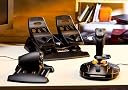
The Thrustmaster T16000M FCS Flight Pack is a professional-grade flight control system featuring a joystick, throttle, and rudder pedals. Equipped with advanced H.E.A.R.T magnetic sensors and S.M.A.R.T sliding rail technology, it delivers unparalleled precision and smoothness. Designed for both left and right-handed users, this ergonomic setup offers customizable controls and compatibility with advanced programming software, making it the ultimate tool for immersive and realistic PC flight simulation.


| ASIN | B01HZ2APKU |
| Best Sellers Rank | 3,871 in PC & Video Games ( See Top 100 in PC & Video Games ) 109 in PC Game Controllers |
| Brand | Thrustmaster |
| Brand Name | Thrustmaster |
| Button Quantity | 17 |
| Colour | Black |
| Compatible Devices | PC |
| Compatible devices | PC |
| Connectivity Technology | USB |
| Connectivity technology | USB |
| Controller Type | Joystick |
| Controller type | Joystick |
| Country Of Origin | China |
| Customer Reviews | 4.5 out of 5 stars 1,223 Reviews |
| External Testing Certification | Não aplicável |
| Global Trade Identification Number | 03362932914891 |
| Hardware Platform | Desktop, PC |
| Included Components | 1 x Instruction manual and Warranty information, 1 x T16000M FCS : 4-axis joystick with 16 buttons, 1 x TFRP 3 axis Rudder Pedals, 1 x TWCS throttle 5-axis with 14 buttons |
| Item Dimensions | 42.2 x 40.7 x 28.7 centimetres |
| Item Dimensions D x W x H | 42D x 40W x 28H centimetres |
| Item Type Name | Thrustmaster T16000M FCS Flight Pack - Joystick, Throttle and Rudder Pedals for PC |
| Item Weight | 5.51 Pounds |
| Manufacturer | Thrustmaster |
| Model Name | FCS T-16000M Flight PACK |
| Model name | FCS T-16000M Flight PACK |
| Package Quantity | 1 |
| Power Source | Corded Electric |
| Product Warranty | 2 year manufacturer |
| Special Features | Ergonomic, Rumble, ergonomic Rumble Ergonomic rumble |
| Unit Count | 1 count |
B**N
This is arguably the best product for any flight sim that I have ever had.
So I bought this since I wanted some rudder pedals, and then I liked the idea of a separate throttle from the joystick, and I needed the joystick, so I bought the whole shebang. The joystick has single-device capability, meaning you don't require either the extra throttle or the pedals to be able to get full functionality. It has typical X and Y axis, as well as rotation for rudder, and a slider for throttle. It has 12 buttons in total, 6 each side of the base, and 3 on the top of the column with the POV switch. When I initially bought this I was looking into the possibility of using it left handed when flying airbus aircraft, and when it came I immediately saw the thumbrest on the left side of it, implying it wasn't ambidextrous. Upon further inspection of the box, it also comes with left-handed versions, or if you want to, it also comes with another non-rest cover, meaning it can be used without any rest for your thumb. This is very nice with flight simmjng because I'm used to an 8-bit input from my Saitek F.L.Y.5, which got grubby and the pots became very dirty, preventing it from working. That joystick also had a difficult spring, which was difficult because you'd either move too Mich or too little - with no in-between, meaning when flying some aircraft, I'd be rolling down the runway at takeoff speed, gently pull back and all of a sudden I'm nosed up 15°, with the stall siren active. With this joystick there's none of that - fluid motion, so much so that you can see the slight inputs that it makes when you're just holding the joystick in place - its not massively noticeable, but its like the natural sort of input you'd expect from the real aircraft. As for the separate throttle, it has 3 axis, a rocker switch, 3 hat switches and 3 buttons, as well as a controller joystick by your index finger. I'd prefer that by your thumb, however its easy to avoid accidentally moving it using your index finger, since the throttle is pretty big, even for my hands, which are quite big. The throttle movement is very fluid, however it's not adjustable in terms of friction. The other axis include a rocker-styled axis, its like a guard on a sword in terms of placement, and could be used for wheel steering or rudder - depending on whatever usage you want, and the last axis is on the far left of the throttle itself, almost like a trim wheel, however it is very limited in motion, possibly 90°. 2 buttons are also in weird places, one is likely to be hit with your pinky, and the other is likely to be hit with either middle or ring finger. The third button is just below the 3 hat switches. Out of the hat switches, the top is programmed as an actual had switch, whilst the other 2 have independent control, meaning they're more like d-pads in terms of programming. The rudder pedals were a bit weird to begin with, since I used to use steering wheel pedals to control myself when on the ground. This caused a little bit of a problem since I'm not moving my foot forwards or backwards like on rudder pedals, so I either keep braking or turning the wrong way! Again, the axis itself is not adjustable in friction, however it is still very fluid just like the rest of the set. The brakes are set via individual axis meaning you have 2 axis for brakes and then the rudder axis itself. Not much to say other than its very nice now being able to brake using the proper motion! Out of the whole set, I have it running in Star Citizen, Elite Dangerous and FSX/P3D and it works wonderfully in all of them. I very much enjoy being able to finally do away with having to move my hand constantly between either throttle or joystick onto the keyboard to be able to do certain things. Overall the plastic is very premium, and the joystick set as a whole feels solid, and so far has been worth every penny. I only wish that my Saitek Cessna proflight yoke/throttle was up to this standard. In terms of gripes, my only improvements I could put forward to Thrustnaster is to move the joystick ob the throttle to where your thumb is, and either put more buttons where the joystick is currently, or place another rocker switch there. I would then do away with the dedicated hat-switch since the joystick will replace it, and keep the other d-pad hat-switches there. I would then add more buttons behind the throttle (like where the screen is on the X52 joystick) and remove many of the buttons below on the base of the joystick since they are less likely to be used. At the top of the joystick column, I miss the rotating wheel on my F.L.Y.5 joystick, since I had used it for elevator trim. I'm not sure I would add friction adjustments capabilities to the throttle; however I would consider it on the pedals. The only other niggle is that the pedals I'd have thought would be USB with the throttle plugging into the joystick, and joystick plugging in via USB. The joystick and throttle plug in via USB, and an adapter can be bought for the pedals for it to plug in via USB. The pedals plug into the throttle, which is a very odd choice. I haven't attempted tightening any screws on the pedals so it could just be a loose screw, however the pedals to rotate ever so slightly, enough for me to hear 2-3 bumps if you get comfy in your seat with your feet resting on them. Other than the fact that some things are in what I'd call less than ideal places, I have had no problems. There are some minor niggles, but its nothing that has caused me frustration.
B**T
Great for MSFS 2020
Bought as a Xmas present for my son for MSFS 2020 and found it has most of the settings mapped out of the box. All of the components are plastic, though very well made and put together. The accuracy and control in game is superb and very accurate and makes a huge difference to the playability of the game. Not tried with other flight sims or games though I’d imagine they’d all benefit. I had to adjust the friction for the throttle to loosen it off slightly. There is a screw that can be accessed from the bottom while the throttle is in the forward position to adjust it. The pedals I haven’t used much apart from landing for the brakes and they feel sturdy enough. Highly recommended if you are looking to get a setup for flying.
A**.
Arrived a day earlier than expected...
Arrived a day earlier than expected, but still had to wait about 7 days from ordering ( came from France to UK - kept in touch with seller who was extremely helpful - thank you ). Unboxed and connected joystick and throttle to a 4 USB 3rd gen 'gang', bought separately but advertised to go with this package on Amazon at the bottom of the seller's advert for an extra cost, the rudder pedal's RJ12 connector fits into the throttle body, which has it's own USB connector ( all 3rd gen ). Read the leaflets ( 1 for each controller - joystick - throttle - rudder / pedals ), went to Thrustmaster's website and downloaded manuals and drivers and calibration software easily - couldn't wait so took a Cessna 172P training aircraft for a little 'taxi' on the tarmac ( I'm really new to Flightgear 2021 ), and all was well except for the rudder / pedals - found another driver 'all-in' software pack on the Thrustmaster website and downloaded that too. So far all is well and looking forward to learning to fly ! ( The last time I looked the package was £20 cheaper - during the Covid pandemic prices went up - everyone sheltering from Covid wanted to learn to fly so prices went up as the bundle became scarce I believe - so should be a little cheaper now. If you get this bundle YouTube has plenty of videos reviewing the bundle - and I can't argue with anything I came across so far - Happy Days !! Overall, pleased with the experience and taking to the skies soon hopefully ! Simulator bought for this was Flightgear 2021 - 6 disk pack - World scenery - Over 50 aircrafts including a helicopter or two - Tutorial disk with vocal instructions - Many World airports. Patience is the key to learning to fly with Flightgear - A flight simulator many flight trainees use on PC which is more real World experience including air traffic controller vocals - more a starter to real flying than a game for shooting things so beware. Can be intensive, but, if you want to get very close to the real thing Flightgear's right up your alley for this bundle. Finally, Flightgear does use up quite a heavy amount of PC resources, so consider something more like a good flying game if all you want to use this bundle for is to just get into the skies and shoot down an enemy with this flight controller kit. Flightgear uses openGL settings and a graphics card similar to Nvidia GeForce 1050 Ti GTX which is what I have, and a CPU starting around 3300- 3600 MHz. Find out all you can before buying a flight sim to use with this kit. All in all pleased. 4 Stars for now simply because there is better out there but is so much more expensive. This a great 'middle of the road' piece of kit. ( This meets my budget, and first-time learning to fly experience with Flightgear 2021 ! ) Good luck ! UPDATE: Having tried to get the Thrusmaster T16000m fcs running with Flightgear, I've since had to get a Thrustmaster T.RJ12 USB ADAPTER for the pedal's T.RJ12 connector, which doesn't register in Flightgear if plugged into the throttle female T.RJ12 connector, and a USB 3.0 HUB to accommodate 3 USB 3.0 connectors, ( 1 for the joystick, and throttle and pedals ). You will also have to at some point learn .XML or HTML language for the odd programming and script writing to be able to change some settings ! Having said all of that...I wanted Flightgear for the helicopter tutorials and I'm going to stubbornly continue my quest ! p.s. If you prefer to get a Microsoft Flight Sim' be very well aware of what you will need, and whether the version you get for this Thrustmaster package has been discontinued. And if you think it's all hard work, I've seen some cracking flight simulator rigs that have taken over the lives and provide a lot of entertainment for some !! A labour of love ! Good luck !
R**D
Great for the most part
I haven't used it much, but for the purpose (flight simulator) works very well. The only problem I've had so far is with the Throttle slider, it's a bit stiff and I'm using a big mouse pad for my desk so it does move a bit when I'm trying to use it, and I have to reposition it from time to time.
D**H
Excellent FCS
Stll evaluating this system, but so far this is a brilliant Flightstick/Throttle/Pedal combination, but the learning curve for the programming software is fairly steep. This is a well engineered system, and is working perfectly on Win 10, provided the appropriate drivers are installed
A**C
Excellent
Really nice quality and good sensors that dont wear off over time. Been flying Il-2 Battle of Stalingrad and it didnt let down so far. A must for entry lvl flight sims.
M**B
Good HOTAS and pedal set
This is a good HOTAS and pedal set. It should be noted that Thrustmaster don't include the T.RJ12 USB adapter with this set so if you upgrade the throttle you can't easily use the pedals. The rudder pedals plug into the throttle. Apparently, the T.R12 adapter is included if the rudder pedals are bought separately, as the TFRP. Kinda feels like Thrustmaster are running a scam as the pedals in the Flight Pack can't be used without connecting it the the bundled throttle or by purchasing a £30 dongle. The pedals don't plug into the HOTAS Warthog so upgrading to a premium Thrustmaster product cost you still more. The stick is very good for the price point and bearing sets are available from the Bay to make the throttle silky smooth. One star has been deducted due to Thrustmasters corporate greed in not supplying the much needed T.RJ12 adapter
D**A
Amazing precision versus Hotas X and comparable to the Warthog
I bought this product as a Father’s Day present to myself to play DCS World. In particular F/A-18 and the super carrier DLC. It has the “real feel” element when combined with an Oculus Rift S headset. One thing to remember is that it takes practice to master any game but with this stick and a bit of practice you can quickly zone in to perfect even carrier landings. Massive accuracy/realism boost compared to my Hotas X.
Trustpilot
1 month ago
1 month ago