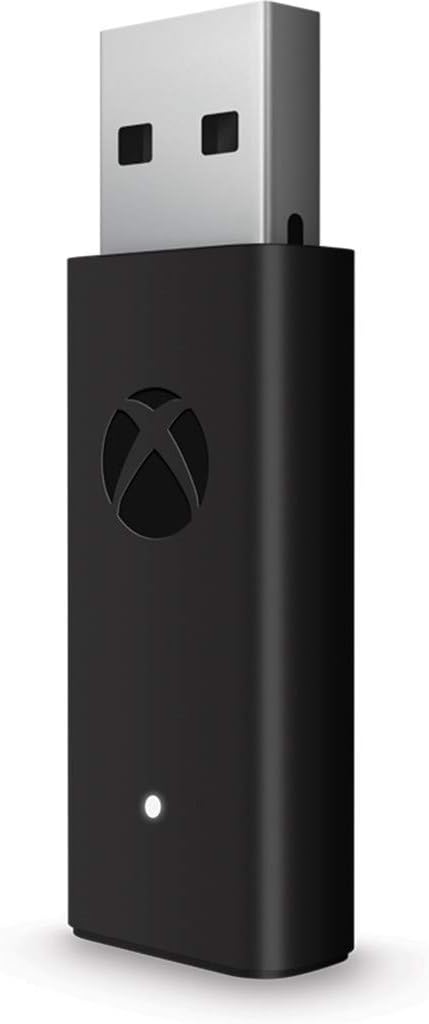
Xbox Wireless Adapter for Windows 10 (Xbox One)
Product ID: 47874222
💻Optimized for Windows 10
📶Seamless wireless connection
🔌Includes USB extension cable
Desertcart purchases this item on your behalf and handles shipping, customs, and support to Colombia.
🎮 Elevate your game—wireless freedom meets Windows 10 precision!
The Xbox Wireless Adapter for Windows 10 enables wireless connection of Xbox Wireless Controllers to Windows 10 PCs, laptops, and tablets. It includes a USB extension cable for flexible setup and supports seamless gameplay across PC titles and Xbox One game streaming, delivering advanced controller precision and comfort with official Microsoft support.
| ASIN | B00ZQW91DE |
| Best Sellers Rank | 15,541 in Computers & Accessories ( See Top 100 in Computers & Accessories ) 493 in Adapters |
| Customer reviews | 4.1 4.1 out of 5 stars (4,902) |
| Guaranteed software updates until | unknown |
| Is discontinued by manufacturer | No |
| Item model number | HK9-00003 |
| Product Dimensions | 14.6 x 14 x 4.4 cm; 0.41 g |
| Rated | Not PEGI rated |
| Release date | 20 Nov. 2015 |
M**3
Genuine Xbox Wireless Adapter
Excellent product, works perfectly and it IS a genuine Microsoft Wireless Adapter. Windows being Windows there are installation issues now that have nothing to do with the seller or the product. The drivers do not auto install on Windows 11 and 10 has had issues as well so here’s what you need to do… Go to Settings and onto the Windows Update page. Click on Optional Updates and there is the option to install the driver for the Xbox Wireless Adapter. (You may need to plug the Adapter in first and click check for updates before the driver appears in the optional updates list) After it’s installed, press and hold the button on the end of the Adapter and a little white light will flash. Hold the Pairing button on your Controller and you’re good to go. To turn off the controller just hold the Controller power button for 10s and it will turn off.
W**R
Couldn't be any happier !!
Well what can I say , I read mix reviews on this but I have had no problems . Plug and play simple as that . Re issues I read 1: can't turn controller off A: just hold main X button for about 5 seconds and it does , so saves battery life 2: won't connect when PC has been turned off A: I've had no problems just let PC boot up allow a minute for everything to load and then press X main button and walla instant connection . 3: won't work in USB 3.0 A: mine works no problem in mobo 3.0 port , so not sure if people are using hubs etc.. 4: range is poor A: I'm gaming on 60inch tv sat about 15 ft away and whilst my Logitech f710 kept dropping out and caused me to turn grey , this hasn't skipped a beat even from plus 20ft standing at kitchen door . 1 word fantastic !
G**D
Flawed - bought two and both lose connection.
My first one lasted a few months before it failed. Seems to be a high failure rate with this model. The device would randomly refuse to connect and when going into device manager the adapter would have a warning sign on it. You had to unplug it and plug it back in to fix it. Later my pad started losing connection but this was a prelude to the unit failing entirety and not an issue with a general weak connection. I bought a new one and am still having issues. Each time I want to use it I have to unplug it and plug it back in again. Exactly the same as I experienced on the first unit and that lots of other reviewers are reporting. It does it on two PC's and none of my other USB devices have an issue. This has been out a number of months and given that my new model has the same issue, they clearly haven't fixed the problem in later production batches. Sadly there is no alternative product. Stick with the old 360 pad/adapter until MS work out how to solve the problem. EDIT: Ok over a year later I purchased a third one! I thought maybe third time lucky...... Well as it happens I was lucky! This new one seems to be working just fine. Have they fixed a problem with the hardware or improved the drivers/support within Windows 10? I have no idea. All I know is that this one now connects solidly every time. No errors in device manager etc. My PC is identical to how it was the first time as I've only upgraded the GPU since then. Same motherboard/USB sockets and same joypad.
L**U
Works as expected.
Truthfully paying extra to be able to connect your XBox one Controller to a PC is not exactly something I can recommend to everyone, maybe if it was included in a Bundle? There is a Bluetooth option to connect it and it works, (mostly*) when connected via Bluetooth, not all games see the gamepad as an Xbox controller, rather as a generic one, with that comes several problems. one is that the buttons layout are scrambled around. the second is that on other several games the rumble was also not working. so far I discussed about the Gamepad Bluetooth features or lack of. The adapter is another story. the Controller and Adapter truthfully feel like they are made to be bought together if you plan on using it on a PC and don't want to use a USB cable or fiddle around with the Bluetooth. you just turn on your pad and the next second is connected and ready to play. Tested on WIN 7 and 10, [ Plug and Play ] no Drivers Needed! USB cable extender is a welcome accessory, the dongle it self is quite big and bulky but the Signal range is so strong that you can just hide the dongle somewhere and still have a strong signal. all in all, the adapter feels top quality and had no problems with it for the past 2 months
J**E
Tore it apart looking for the gold plate I paid for.
Another overpriced glorified Bluetooth dongle from a big tech company. Honestly, does its job and is reliable. So other than the price its 5 stars, controller syncs up every time instantly.
K**N
Good
It's great for connecting your Xbox pad to your pc if you're transitioning over. The product doesn't come in the original packaging because Microsoft no longer make these. The product is still brand new it just comes out of a pad and adapter set. Works perfectly and connects effortlessly. No input lag or delays and is really worth the money.
H**H
Easy set up.
Great little adapter for hooking up your XBOX controller with your PC. While this device does not come in retail packaging it is the genuine article and works as expected. So much better than my fist gen. adapter that is a brick by comparison. I plug this in to the hub on the back of my monitor which means the pairing button faces down, perfect for paring without being able to see it unlike my old adapter which had a small button on the side that I had to press with a thin blade due to it's inaccessibility. If you like to be up to date and your gadgets as small as you can get them, buy one!
D**S
Decent Product Shame No box and i never recieved the extension cable.
"Edit" The Product Is Great and Works. However their is no way that you can justify classing this as a new product when its just in a tiny little plastic wallet. Even had the little plastic pull tab to help take it out of the box. But my low ish rating is primarily due to not recieving the Extension Cable if they had any hope of justifying the NEW price of £40 they had to ensure that i had a good quality extension cable at the very least and to not recieve anything other than the Adapter itself in a little plastic bag just felt like a kick to the stomache. However after talking to the Seller this has since been rectified with a 50% refund to cover the costs of having to buy an extension cable seperately and for the inconvinience caused. As a side Note for anyone else Reading; These Adapters are no longer being Sold in box from Microsoft and can only be purchased through official means of a Controller+ Adapter bundle so therefore official Boxes no longer exist for the standalone product. I personally feel that is a Majorly Bad Decision on their Part.
F**.
Perfettettamente funzionante.
Prodotto nuovo perfetto. Essendo plug and play una volta collegato non ha bisogno di nessun driver o programma di gestione per poter funzionare. Utilizzato con controller Xbox Elite 2. Prezzo un po alto circa il doppio delle controparti/cloni cinesi che però danno problemi di instabilità.
V**R
Avoid
An absolute trash. After 2 weeks doesn't identify the controller anymore.
B**K
Excellent article
Excellent, a l’air de très bien fonctionner (je l’ai reçu hier). Sur windows, il n’y a absolument rien à installer, connecter votre manette ne prendra seulement que 30 secondes. Elle sera automatiquement reconnue toutes les prochaines fois même si vous eteignez votre pc ! Vous avez juste à brancher l’adaptateur à une prise usb de votre pc et appareiller votre manette avec celui-ci en appuyant (en même temps) et sur le bouton du dessus de l’adaptateur et sur le petit bouton que vous connaissez sur votre manette xbox ! • Rapide à connecter • Efficace (ne bug pas) • Un peu cher (souvent en promo à 29,99€) • Livraison un peu lente (~1 semaine ouvrée, le produit est quasi tout le temps en rupture de stock en France, vient d’Allemagne) Très pratique si vous n’avez pas du Bluetooth sur votre PC ou si vous ne voulez pas vous embetter ou abimer votre manette avec des câbles 👍🏻
U**R
Funktioniert super! (Auch unter Windows 7!)
Also zuerst einmal möchte ich hier etwas schreiben, was im Internet fast auf keiner Seite zu finden ist. Denn der Wireless Controller funktioniert auch an Betriebssystemen wie Windows 7! Überall steht zwar, dass es theoretisch funktionieren müsste, jedoch ist es auf keiner Seite richtig bestätigt. Zwar ist es richtig, dass man nicht sofort loslegen kann, wenn man den Stick an einem Windows 7-PC ansteckt, aber es gibt Tricks es über eine manuelle Treiberinstallation ans Laufen zu kriegen. So sollte es ohne Probleme funktionieren: 1. Öffnen sie: catalog.update.microsoft.com (es muss mit dem Internet Explorer geöffnet werden, sonst funktioniert es nicht!) 2. Suchen sie nach "Xbox Wireless", und fügen Sie "Microsoft - Generic-Controller - Xbox Wireless Adapter für Windows" (Beide) 1,8 MB und 1.7 MB hinzu! 3. Klicken sie auf den Korb am oberen Bildschirmrand in der Nähe der Suchleiste und klicken Sie auf "Download". 4. Dann entpacken sie den Ordner, der für ihr Betriebssystem benötigt wird (!x86 für 32Bit & x64 für 64Bit!) 5. Packen sie den Inhalt am Besten in einen separaten Ordner. 6. Dann gehen sie in den Geräte-Manager. (Windows-Explorer---->Computer---->Systemeigenschaften---->Geräte Manager) 7. Dort sollten Sie "xbox acc" finden, sobald der Wireless Adapter angesteckt wurde. Klicken sie dann mit der rechten Maustaste auf "xbox acc" und klicken sie dann auf "Treibersoftware aktualisieren"! Suchen Sie dann den Ordner in der sie den Treiber in Schritt 4&5 extrahiert haben und wählen sie ihn. 8. Nach der Aktualisierung des Treibers sollte der Adapter in Windows unter Netzwerkadapter als Xbox Wireless-Adapter erkannt werden. Ich hoffe, dass diese Anleitung hilfreich ist! Einen Großen Dank an den Verfasser auf der Seite: [...] Zum Adapter an sich: Verbindung ist gut.
R**O
imprescindible para el mando XBOX one
Perfecto, me funcionó en Windows 8.1 sin necesidad de instalar drivers. Funciona de maravilla. Tenia el mando de Xbox One con batería, y estaba jugando con el cable, ya que no funcionaba este adaptador más que con windows 10. Hice una pregunta mediante amazon, y me respondieron varias personas que ya funcionaba con windows 8.1, y así ha sido......Gracias a todos los que me respondieron...me ayudasteis a decidirme y no puedo estar más contento.
Trustpilot
3 weeks ago
2 weeks ago