Buy anything from 5,000+ international stores. One checkout price. No surprise fees. Join 2M+ shoppers on Desertcart.
Desertcart purchases this item on your behalf and handles shipping, customs, and support to Colombia.
๐ Silence meets power: The ultimate compact cooling upgrade
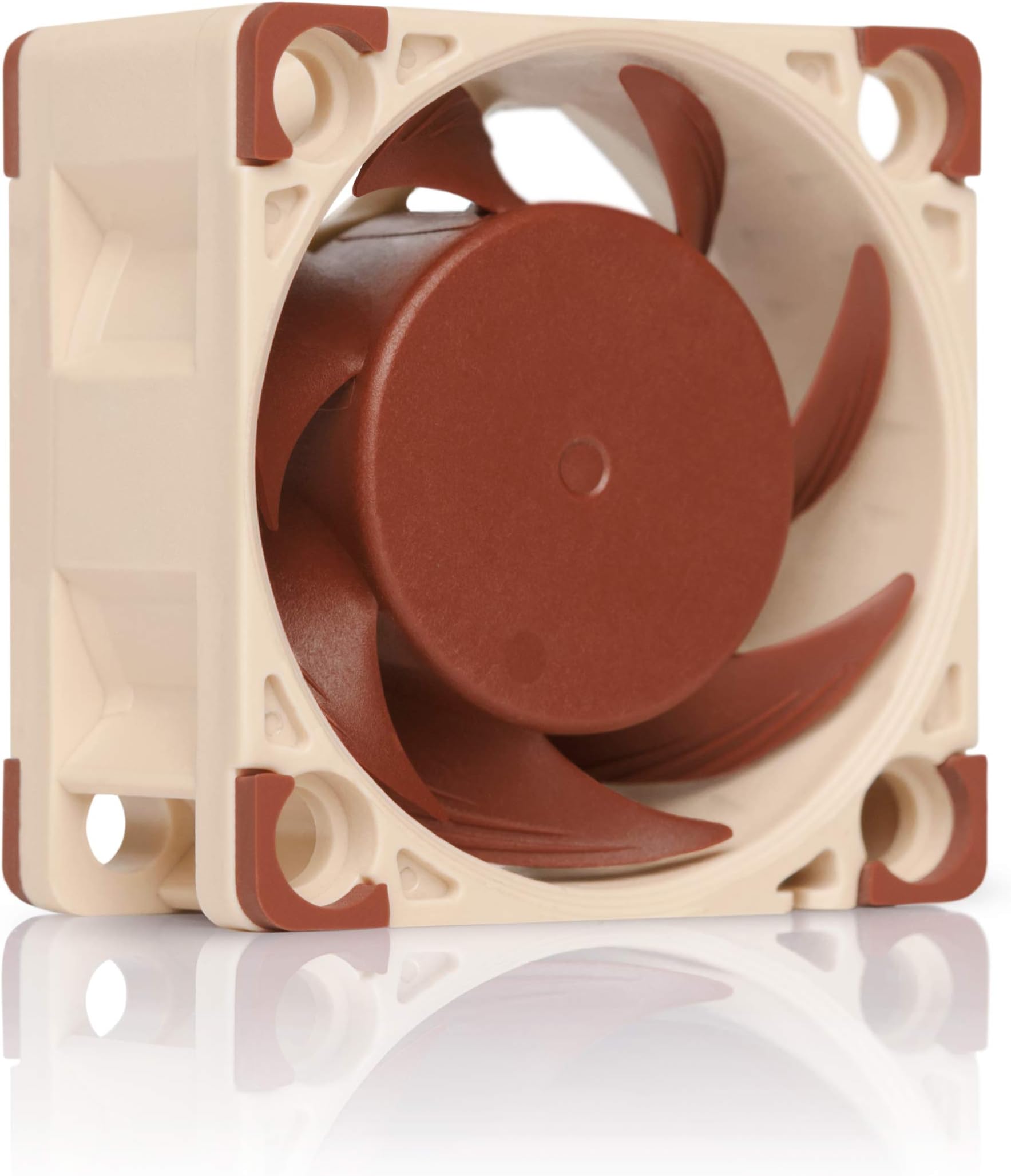
The Noctua NF-A4x20 FLX is a premium 40x40x20mm computer case fan engineered for high-performance cooling in tight spaces. Featuring a max speed of 5000 RPM, ultra-quiet operation at just 14.9 dB(A), and advanced aerodynamic technologies like Flow Acceleration Channels and SSO2 bearings, it delivers efficient airflow with minimal noise. The FLX version offers three speed settings via included Low-Noise Adaptors, plus anti-vibration mounts and an OmniJoin adaptor set for easy installation in network equipment, desktops, and specialized devices. Backed by a 6-year warranty, itโs the go-to choice for professionals demanding silent, reliable cooling.


| ASIN | B072JK9GX6 |
| Air Flow Capacity | 9.4 Cubic Meters Per Hour |
| Best Sellers Rank | #94 in Computer Case Fans |
| Brand | Noctua |
| Brand Name | Noctua |
| Compatible Devices | Desktop |
| Cooling Method | Air |
| Customer Reviews | 4.8 out of 5 stars 2,511 Reviews |
| Included Components | 1 |
| Item Dimensions L x W x H | 1.57"L x 1.57"W x 0.79"H |
| Manufacturer | Noctua |
| Material Type | Fibre-glass reinforced PBT |
| Maximum Rotational Speed | 5000 RPM |
| Model | NF-A4x20 FLX |
| Noise Level | 14.9 Decibels |
| Part Number | NF-A4x20 FLX |
| Power Connector Type | 3-Pin |
| Product Dimensions | 1.57"L x 1.57"W x 0.79"H |
| UPC | 841500110116 |
| Unit Count | 1.0 Count |
| Voltage | 12 Volts |
| Warranty Description | 6 year manufacturerโs warranty |
P**K
Perfect for network switch fan replacement projects - Noctua is an amazing company
I purchased an unmanaged 5 port, 10gbe / 100gbs network switch to put in my makeshift networking closet. Closet is about 6 feet from my work station. Switch works GREAT, but has a 40mm fan that is legit 40db loud on the tech sheet for it but more like 50db in real life which is like having a conversation with a person loud. To remedy the issue, I purchased this fan. The fan itself is of the high quality and acumen for brown color tones one would expect from Noctua, so I'm not even going to touch on that. What is the most amazing about this purchase is everything else it comes with the kit and how Noctua caters to the primary use case for their customers here. My OEM fan has a 2 pin connector to the PCB. Noctua includes a converter so you can splice the OEM 2 pin together with the converter that plugs into the 3 pin coming from the fan. In addition, Noctua provides 3 tool-less (mostly) connectors for the splice. When you crush them down it squirts some kind of non conductive oil into the connections to protect it from water and dust. Made by 3M, but nevertheless a WELL thought out solution to include for their customers. Running at 4000+ rpm is extremely unnecessary for this network switch & since silence is the name of the game for me a way to reduce RPM without implementing a PWM controller in my limited space configuration. Another whammy from Noctua for this problem. Two RPM cables are included that step down the rpm without the need for a separate controller. I used the ultra low noise cable. It reduce the noise some, but the fan itself made such a difference that alone should do the trick for most people. I've purchased a lot of PC components and networking hardware over the years. Not sure I've ever felt like a company thought this much about their customer for something that costs such a small amount of money. The time and frustration they saved me is immeasurable and priceless. Good job Noctua :-)
E**N
Fits the Icom IC-2730B
The IC-2730 is a great radio, but it has a fan that comes on as soon as you transmit in high power mode. Then it stays on for a minute or more even if you only keyed up for a second or so. And the fan is loud! In medium power mode, it takes 10 or 15 seconds for the fan to come on and then it stays on for a while. This Noctua fan fits the radio perfectly and is so quiet that it is hard to tell if it is running or not. That is no exaggeration. Installation is easy but requires that the connector from the old fan be spliced onto the wires of the new fan. The new fan comes with solderless connectors to do this, but they are too big, so I just cut the wires and spliced them, soldering the connections. Just ignore the yellow wire from the fan; it is not needed in this radio. Note that the fan blows into the radio, not out. This easy modification makes a great radio better.
L**N
A fan that lives up to Noctuaโs reputation
I recently upgraded the case for my computer. The new case had much quieter fans than my old one. Happy as a peacock, I set about using it, only to be disturbed by a high pitched whine that quickly got on my nerves. A little investigation and I discovered that the stock 40mm fan that helped cool a component on my motherboard was the culprit. So I went looking for a replacement. Enter the Noctua fan. I was familiar with Noctua from research Iโd done about CPU cooler fans a few years ago. Their reputation is very good. That inspired my purchase of this fan over other less expensive brands. I wasnโt disappointed. This fan is quiet. There is very little noise other than the sound of air moving through it. Even that is minimal. Obviously, that is exactly what I was looking for, so it fits the bill perfectly. I wanted a fan that wouldn't disturb the peace. This one is quiet as a mouse. Overview: The fan comes with a standard 3 pin connector that is common on many motherboards and electronics. It also has an assortment of additional items in the box. This includes a short extension cable, low noise adapters that reduce the speed of the fan and 4 omnijon clips , so you can easily remove the included 3 pin connector and connect a new one if needed. A set of case screws and anti-vibration mounts are also included in the box. The fan itself has silicon pads on the corners to help cut down on vibration. Unlike other reviewers, I had no issue with them falling off. I did not use any of the mounting options provided in the box as I simply used the mounting solution my mother board already provided. I suspect that the anti-vibration mounts would be one time use. Theyโre shaped like Christmas tree clips and would probably get shredded when removed. Another bonus is that it has a nicely presented set of instructions explaining how to use the adapters and silicon mounts. Bottom line: The packaging for this fan is crazy. It comes in a double book fold cardboard box with a molded plastic tray. I guess theyโre trying to give the impression of quality with the packaging, but it really seems like overkill for a product that cost only 14 dollars. Noctua wants its customers to feel like they got a quality product by providing one and packaging it like one. Well, it worked. This is a great little fan.
D**V
Good little fans.
I have bought lots of these over the years, and as is typical for Noctua you're getting a high quality product that is QUIET. I bought these fans to replace the ones on a network switch since I know Noctua is quieter, and while they did not work on the switch I intended them for because the switch is wired different, I used them in another one and they work perfectly. Yes some may say they don't flow as much as the industrial grade, super loud fans that come with them, but in a home environment that matters much less and I'd rather have peace and quiet thanks to Noctua. That being said, this is a small fan, small fans spin faster and are louder by nature, so I'd still recommend either using the included Low Noise Adapter Cable (labeled in the box), or implementing some sort of fan control. At 50% speed these are basically whisper quiet, and move some decent air. I also have the PWM versions of these which are easier to control for speed, but you get the idea. One small con is that the rubber dampener things that come with these are basically useless because they don't seem to stay in on the small fans. I've used them on the 120mm fans and they work fine but for these they don't really work as well and the fan slips off.
M**L
Not compatible with some rack mounted conputers
THIS IS A GREAT PRODUCT, but it is NOT going to help reduce the noise of rack mounted hardware. The thing about rack mounted computers and switches is they're intended to be extremely reliable and robust. This means the fan controllers are wired to monitor and maintain speed. This means: 1. The wire pinout is different than this product and this fan will not spin. 2. Using an adapter to the correct pinout still doesn't make the fan work. 3. The hardware fan controlller monitors fan speed and defeats the resistor dongles by increasing voltage to compensate, resulting in precisely the same RPM anyway. My Dell brand switch just sat there with a red light, refusing to boot. Granted, Dell uses propriety connectors for everything to force consumers to purchase only their products, but this is a fan with a standard connector. Plugging this fan into a PC and 3D printer works perfectly and the fan is VERY QUIET compared to other fans it's size.
S**E
Good 3D printer replacement fan even at 24V
I'm going to start off saying this is my first stand alone Noctua fan I've bought, mainly because I always needed 24V and in this size they don't make one. With that said I've read multiple posts around the interwebs where people have used these 12V fans in a 24V printer with no adverse problems. I decided for $15 it was worth a shot to try and see. In the past I've bought dozens of DC fans from 30mm to 120mm for various applications and most come in somewhat basic packaging. The Noctua very much surprised me as the packaging and presentation was very nice and presented well. I was even more surprised when I opened the package to see all the extras included like wire extensions, in-line speed reducers & anti-vibration mounts. The wires are heat shrinked with abrasion resistant sheathing everywhere else on the wire. Before cutting the wire I first tested it on a 12V DC power supply to check that it worked followed by 24V. It worked fine with both voltages, it might have been a little faster on 24V but it was hard to tell because it's rather quiet on both voltages. After removing some wire wrap I cut the wires to my desired length and crimped then soldered on my 2P JST connector (red & black wires) leaving the yellow wire unconnected and secured under the new heat shrink. I then installed on my printer where it's been in use almost constantly now for 18+ hours and still going strong. I'll continue using this as long as it works and if anything changes from the 24V use, like it dies, I'll update my review commentary. Update 04/28/2022: This fan is still going strong on 24V and easily has 1500hrs on it. I've since bought multiple more fans for other printers and projects all working just as well including in my Voron 2.4 ABBN with no heat creep even though the interwebs all claim the low static pressure will cause your hotend to melt like chocolate in the sun.
R**D
Used to replace fan on Cisco SG200-26P PoE Switch
Used as a replacement for the old and loud Delta EFB0412MD-R00 3-Pin fan that started to make rattling noise intermittently on my Cisco SG200-26P PoE Switch. I'm guessing the bearings on it were the cause and it gave me a reason to look for a replacement. After doing some research online and for my home use application, settled on this Noctua NF-A4x20 FLX fan and it worked after some modding and is noticeably quieter. I've read people using the comparable Noctua PWM fan as a replacement but that's a 4 pin fan as opposed to this 3 pin fan. Looking at the Noctua fan schematics, the additional wires on their fans are for the RPM speed signal as well as the PWM signal. These additional wires should NOT be connected to the Cisco switch as the third blue wire found on the Delta fan as well as the fan header is meant for the Locked Rotor Sensor wire that these Noctua fans don't have (wish they sold one so you didn't have to mod these). Be aware that the pin layout on the fan header of the Cisco motherboard is different than the pinout of the fan so it's not as simple as just plugging it in. I used the included adapter cable with the loose black and red wires along with the OmniJoin adaptors. I snipped the wires from the original Delta fan, connected the black (-) and red (+) wires and it was good to go. A word of caution here with the blue wire as if that's not connected, the switch will think the fan is dead and will throw a fan error. To simply get rid of this error, I just stripped the blue wire and connected it to a nearby ground screw. If you do this, there's no way of it knowing if the fan dies but it's not a big deal for my use. Worked for me after some modding and is quieter. Even if it doesn't push as much air as the original fan, the lower noise is a good compromise for my application. Using this switch to power my PoE cameras and so far so good.
J**A
Super case fan for efficient & quiet operation
These fans are super quiet and efficient. Extremely well made using quality components and at a very affordable price. Comes with a wide range of attachment options. Have bought two but will buy some more to replace all my existing computer related case fans.
A**L
Super silent
Super silent, buy it
A**R
Not loud at all. Wonderful.
I used this to replace the fan in my hub. Keeps things cool.
C**N
Quiet; must have for a USG pro in your home!
I have fitted these, blowing, into my Ubiquiti UniFi USG-Pro-4 and I can report the high pitch whine is now gone. Pretty handy when you don't have a rack out of the way of habitual areas! Only been installed an hour but so far so good, and I chose to use the noise suppression mounts, they aren't recommended for this application but I wanted to try it and the resonance from the metal cover is now much more subtle. Running these fans without a cover show they are actually virtually silent, but obviously, it's not recommended to run this device with the cover off (airflow etc)!
W**S
Nice cooler for sff aystem
Its nice for the small pc
R**S
Very quiet fan
Fan was so quiet I had to visually check to make sure it was spinning. It comes with both a low noise adapter and an ultra low noise adapter. I can't imagine needing them since it is barely audible at full speed. Certainly the quietest fan this size that I've ever encountered.
Trustpilot
3 weeks ago
2 weeks ago