


📚 Scan, translate, and conquer your day with the ultimate pocket powerhouse!
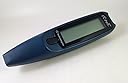
The C Pen 600C is a compact handheld scanner designed for professionals, students, and travelers. It features a memory capacity of 3,000 pages and an address book for 1,000 contacts. With 11 downloadable language dictionaries, it doubles as a translation tool. The device offers fast scanning at 15 cm/sec, supports both left and right-handed use, and transfers data via infrared or serial cable. Powered by 2 AAA batteries, it includes software for easy editing and management of scanned text. Though discontinued, it remains a versatile gadget for on-the-go text capture and translation.
| ASIN | B00005BC09 |
| Batteries | 2 AAA batteries required. (included) |
| Customer Reviews | 3.2 3.2 out of 5 stars (17) |
| Date First Available | April 14, 2001 |
| Is Discontinued By Manufacturer | Yes |
| Item Weight | 1.2 pounds |
| Item model number | 600C |
| Manufacturer | C Technologies |
| Package Dimensions | 9.1 x 7.9 x 2.5 inches |
A**B
I would not recommend it to anyone
this product is not worth the price that is advertised for it. it is very difficult to user, not user friendly at all. most of the time the scanner doesn't work properly. there is no customer service to call for assistance. I would not recommend it to anyone.
I**E
Scanner Dictionary and NoteTaker
Unfortunately no longer produced, this is a most useful gadget. Take notes while you read using the scanner, scan unknown words in foreign texts and have them translated, and all that without being hooked up to a computer. The next generation model of C-pen is no longer stand-alone, so here is an example of different people having different opinions of what progress is.
T**N
Three Stars
It was ok, battery goes out too fast.
"**"
C-pen Great- just wish it were cheaper
The C-pen is just what I needed. I love the bar code. It reads all major bar codes. You do need to download the software but, it is free. You can't be in too much of a rush when reading the bar codes because it sometimes does not read and you have to look at the pen to see if it has read the bar code or not. I have found the key is to keep the pen at the angle of the opening. If you very it too much it will not read correctly. I found that if you pass the pen too slowly it is not good either. I used the C-direct mode to enter specific text from a book. This program allowed me to enter text into places that I wanted and only the text I wanted. I usually scan in pages and modify them later. I found that I could "take notes" and eliminate much of the text that I usually have to delete later. A nice plus is having an option of left and right handed as an option and I am left handed and it helps read the words. If you have a bad read it could be you are using the wrong hand. The negatives are that it does not "learn" text and that when linking to my Palm, using the IR port, it would only read into the memo section. This means that you are limited in the size of the text. I use quick word and wish it would link to that program because it would allow unlimited text.
R**I
Can't get it to sync
I have not been able to connect the C-Pen to my computer(Compaq Presario). The Laptop doesn't have a com port so I had to use Keyspan but still the C-pen was unable to sync. I Email to the address on the brochure still nothing works. I took my Laptop to CompUSA and they couldn't get it to sync to the C-pen. After approx. $100.00 and many months later I still cannot use the product. I need it to work to help me with my school work. Rose
C**3
a great technological achievement
This is the most amazing tool I have ever seen. It reads with fantastic accuracy and is so easy to use. It comes with everything you possibly need: the computer software to edit and print your notes, and a cable to connect it to your computer. The dictionary that comes already installed on the pen is incredibly thourough, and I heard you can download other language dictionaries for almost any language from the website for free. I recomend this product for students of all ages, teachers, and anyone who needs to take notes. The only down side is it's battery consumption. I would highly recomend using rechargeable NiMH batteries on this toy. It's price is right here on Amazon, so why wait.
B**N
A mixed blessing
After working with this gadget on four business books, I concluded that the downside outweighed the upside. The upside: When it worked, the scanning mode that transferred text directly into a WORD-document saved a lot of time. The downside: (1) The text still needed editing since the C Pen misread letters and commas in every other sentence. (2) Most functions of the C Pen were very cumbersome for someone who is used to the convenience and user-friendliness of a PC or laptop. After an initial try at writing with the C Pen or copying my address book from a PDA to the C Pen, I gave up on these functions. (3) After about an hour of constant use, my C Pen tended to "hang up"; the scanning device in the tip of the pen simply continued to light up without scanning anything. (4) The C Pen needed a lot of power: After four books I had to replace the two AAA batteries in the pen. The bottom-line: A good product idea in search of a reliable and user-friendly technology.
L**E
Handy hints to save you from returning this gadget
I just unboxed this CPen about an hour and half ago, and I've come up with a few suggestions to save the rest of you from frustration. None of my suggestions are explicit in the owner's manual, but I've now mastered the pen by keeping a couple of the following hints in mind... First off, hold the pen at about a 75 degree angle from the scanned text. Originally, I assumed the pen would work best at a perfect 90 degree angle, but it doesn't. I suppose my suggestion is similar to that of others that have suggested setting the pen in left hand mode. I also found that if you do not hold the pen at the 75 degree angle, the light tends to go off right after you start scanning (which means you are no longer scanning). Next, depress the trigger at the beginning of the line, on the first letter to be scanned, as you quickly scan across the text. I originally thought that dragging the pen across the text more slowly would give the pen more of an opportunity to scan, but the opposite appears to be true. A quick drag across the line of text works best. Remember to keep the pen in contact with the paper and not above it... In the end, the pen requires a bit of practice, even with these suggestions, but I hope that these hints will speed the process along. I can already see how many ways this pen will help me in my everyday life, and I would surely recommend it.
Trustpilot
2 months ago
3 weeks ago