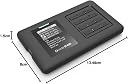
🚀 Unlock the future of portable bootable storage with ironclad security!
The IODD ST400 is a cutting-edge 2.5-inch USB-C enclosure that supports bootable virtual optical and hard drives with AES256-XTS encryption up to 76 digits. Designed for professionals demanding secure, fast, and versatile storage, it offers universal OS boot compatibility, write protection, and smart power-saving features—all engineered in Korea for premium quality.

| ASIN | B0B3HQMV5T |
| Best Sellers Rank | 109,430 in Computers & Accessories ( See Top 100 in Computers & Accessories ) 358 in External Hard Drives |
| Box Contents | USB Cable |
| Brand | IODD |
| Brand Name | IODD |
| Color | Black |
| Compatible Devices | Personal Computer |
| Connectivity technology | USB |
| Customer Reviews | 4.6 out of 5 stars 346 Reviews |
| Data Transfer Rate | 5 Gigabits Per Second |
| Digital Storage Capacity | 2000 GB |
| Digital storage capacity | 2000 GB |
| Enclosure Material | Plastic |
| Form Factor | 2.5-inch |
| Global Trade Identification Number | 08809419400232 |
| Hard Disk Description | Mechanical Hard Disk |
| Hard Disk Form Factor | 2.5 Inches |
| Hard Disk Interface | USB-C |
| Hard disk form factor | 2.5 Inches |
| Hard disk interface | USB-C |
| Hard-Drive Size | 2 TB |
| Hardware Connectivity | USB Type C |
| Hardware Platform | Windows |
| Installation Type | External Hard Drive |
| Item Weight | 0.15 Kilograms |
| Manufacturer | IODD |
| Manufacturer Part Number | ST-400 |
| Media Speed | 80-160 MB/s |
| Model Name | ST400 |
| Model Number | IODDST400 |
| Network Connectivity Technology | USB |
| Number of Items | 1 |
| Product Features | Portable |
| Special feature | Portable |
| Specific Uses For Product | General computer use |
B**E
You gotta get an IODD!
Almost any pro IT guy - and most vaguely geeky hobbyists - who's had a chance to play with one of my IODD drives, ends up buying one :D They're all good - the older 2.5" ones became a staple of my toolkit, previously resold in EU under Zalman branding, and they've just got better since - going from USB 2 to USB 3, adding a full keypad and screen for better UI, more compact options (the IODD mini) and then this, bringing the newer interface to 2.5", along with - praise be! - a USB C port! The build quality is pretty nice too, a step up from before - I really like the clicky button feel on the keypad and it feels nice and solid in general. This is now my primary workshop IODD with an IODD mini in the go-bag :) Yes, you can use Ventoy. But this is like ventoy in hardware :) It works - nearly everywhere, nearly every time. It identifies as the emulated device down to the BIOS level, works with fussy servers, and makes it pretty much impossible to pick the wrong drive or accidentally overwrite your USB key during an install. I use a range of USB thumb drive images for various purposes - some copied from actual keys I had floating around or loaned. And USB HDD images to keep a Windows2Go install handy at all times (and a Debian install as well!). And of course, a full library of ISOs, from proliant service packs to windows 10/11/server to truenas to proxmox to pfsense to firmware update discs for SSDs and diagnostic toolkit discs. Get one :) And this particular one is a good choice, if you don't need it to be tiny - check the IODD mini for that! Give it a nice big SSD and load it all up!
A**R
Fantastic Product
This has to the second best product I have used the 1st was my other iODD device which had broken from being used so much. This is such a great idea and much better I can use an SSD now not the M2 I had to but to upgrade my older model. It is really good value for money and the so easy to use and great performance. If you have a fast SSD then the speed is better but I think even a slower SSD would still be better than a load of USB drives
Q**R
A better design than the awkward to use old metal-cased step-wheel model.
Fitting my 1TB 2.5" SSD was easy, the button grid made it much easier to use, It's probably faster, and has a much neater USB-C connector, which also allows use with a USB-C to USB-C lead, e.g. useful for direct use with a mobile, to transfer stuff when a booted PC is not handy. My contained 1TB SSD was formatted as NTFS, NOT ExFAT(!), contains many isos, Linux and Windows installers, docs, an ODS partition planning spreadsheet, and most of the PortableApps apps. This is far superior to Ventoy on a USB stick, because unlike Ventoy, you have optional direct HD partition access, and 2.5" SSDs are far faster and more reliable the USB sticks, e.g. an 256GB intenso one I have seemed to be fine, but flaky sometime, but more iffy than I had thought, because it over-heated/throttled a lot during several minute mass-transfer, even hanging Linux, and stalling boot after hard-reset, and ExFAT corruption can't be reliably spotted/fixed on Linux! On Linux, never use ntfsfix for NTFS, it's worse than useless, instead use Windows chkdsk, or find and try the Paragon NTFS utilities.
A**N
Decent piece of kit
A Fab piece of kit, allowing the use of Iso files to be added as a virtual cd rom drive makes my life as a Technician a dream. Put my own 1TB SSD in it and the USB 3.0 has a decent transfer speed.
P**R
Great IT tool
Brilliant tool for IT pro use , domestic users will be lost
A**R
Amazing device!
So useful for mounting ISO files, secure and encrypted. Works well in items where even Ventoy does not work.
M**D
Great external drive case
Really nice unit.. Only issue is that you can't put larger drives in it (12mm plus) so you're limited to ssd's or 2tb hard drives.
M**R
Works great but feels cheap
I have owned all the Zalman\Iodd drives except the mini. this is definitely the best one for functions but also the cheapest build quality, has annoyingly loud click when you use the buttons but overall I am happy with it.
Z**N
Excellent
Excellent
H**M
Klockren disklåda för IT tekniker
Manualen är inget vidare men ge den en stund sen är den fantastisk. Varför släpa på en massa USB minnen när den här kan ersätta dem alla. Den dyker upp som en disk på datorn, som en CD/DVD/BR spelare och som upp till 3 USB/HD enheter, CD/DVD/BR pekar mot en ISO fil, på disken, USB/HD pekar mot viruella hårddiskar, de går att skrivskydda efter behov och avmontera och montera andra helt efter behov.
M**K
Amazing for Everyday Use
I use this every day for work. Easy to use and works well. Takes a bit to figure out which has an online Wiki. I use this for multi booting and imaging devices.
V**R
Peace of mind should you lose your drive.
This enclosure is great. It keeps your information secured until you provide the key and provides a great peace of mind for protecting your data in the event that you lose your device. The device comes with USB C which is a welcomed addition compared to some of their other product offerings. The enclosure is a good value if you are looking to have an added peace of mind if you ever lose your drive. While it won't prevent someone else from being able to use your drive, It will prevent them from being able to access what you lost. Drive powers up and is readily available for pin entry in less than 5 seconds from when the device is powered up. I do find that most computers will post and begin booting before you even have the change to unlock the drive and mount the ISO. Also, some computers interrupt USB power during a soft reset which can sometimes make it complicated to get your ISO to mount. There is a function that keeps the password cashed for two minutes which aims to alleviate this but I found that entering bios or pressing the pause print screen/scroll lock on the keyboard sometimes will pause the power on self test. This gives me time to enter my pin and mount my ISO. Or likewise, i'll enter the bios setup utility (mount my ISO) and immediately exit it without saving changes and my device will be ready to boot from. Something to keep in mind but all in all, a very useful enclosure and it does make safeguarding my files convenient.
P**U
Surprisingly good and useful
A bit cumbersome to configure. Scrambled input keys/numbers for passwords is annoying, but good for the purpose. The entire thing works well. You should read the online manual and guides, there are a few tricks that are helpful to know (how to save default ISO mount, shortcuts, etc). Nice to have for an IT enthusiast! For the ones not reading the description, IT COMES WITHOUT AN SSD IN IT, you have to procure and install that yourself! This is a feature, not a bug ! :)
Trustpilot
3 days ago
1 month ago