Buy anything from 5,000+ international stores. One checkout price. No surprise fees. Join 2M+ shoppers on Desertcart.
Desertcart purchases this item on your behalf and handles shipping, customs, and support to Colombia.
🤖 Elevate your clean game—because your home deserves next-level intelligence.
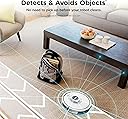
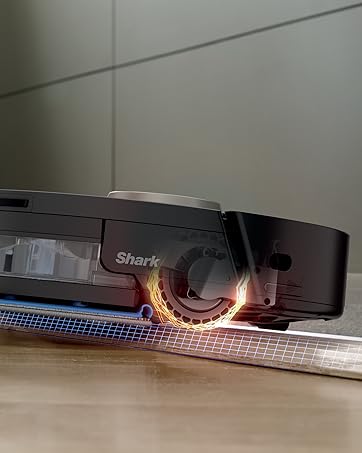
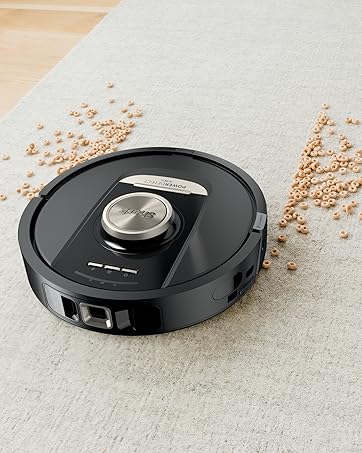
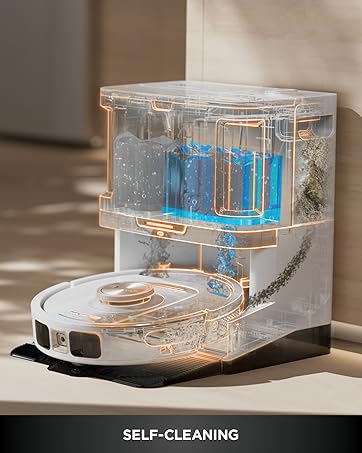
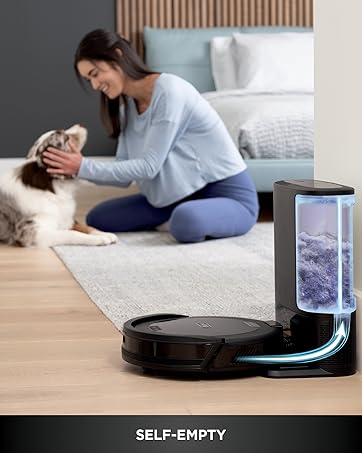
The Shark AI Ultra Voice Control Robot Vacuum AV2511AE combines powerful 1500Pa suction, advanced Matrix Clean multi-pass navigation, and 360° LiDAR home mapping to deliver a comprehensive clean on carpets and hard floors. Designed for pet owners, it features a self-cleaning brushroll and an XL bagless base that self-empties for up to 60 days, minimizing maintenance. Voice and app controls enable effortless scheduling and targeted cleaning, while recharge-and-resume ensures uninterrupted performance in large homes. This smart vacuum is a top-tier solution for busy professionals seeking a hands-free, deep-cleaning experience.


| ASIN | B09T4YZGQR |
| Batteries are Included | Yes |
| Battery Life | 120 minutes |
| Battery Type | Lithium Ion |
| Best Sellers Rank | #1,023 in Home & Kitchen ( See Top 100 in Home & Kitchen ) #1 in Robotic Vacuums |
| Brand | Shark |
| Brand Name | Shark |
| Capacity | 0.27 Gallons |
| Color | Silver & Black |
| Compatible Devices | Amazon Alexa, Google Assistant |
| Control Method | Voice |
| Controller Type | App Control |
| Customer Reviews | 3.9 out of 5 stars 8,537 Reviews |
| Filter Type | Cartridge |
| Form Factor | Robotic |
| Global Trade Identification Number | 10622356588314 |
| Included Components | Filter, Shark AI Robot, Side Brush, XL Self-Empty Base |
| Indoor Outdoor Usage | Indoor |
| Item Dimensions L x W x H | 8.43"L x 13.08"W x 13.9"H |
| Item Type Name | AI Robot Vacuum with XL Self-Empty Base, Bagless, 60-Day Capacity, LIDAR Navigation, Home Mapping, Silver & Black |
| Item Weight | 15.3 Pounds |
| Manufacturer | SharkNinja |
| Manufacturer Warranty Description | 1 year limited warranty. |
| Model Name | Shark AV2511AE |
| Model Number | AV2511AE |
| Number of Items | 1 |
| Number of Wheels | 2 |
| Other Special Features of the Product | Bagless, LiDAR Navigation, Lightweight, Obstacle Avoidance, Pet Hair Pick Up, Self-Emptying, Smart Mapping |
| Portable | No |
| Power Source | Battery Powered |
| Product Dimensions | 8.43"L x 13.08"W x 13.9"H |
| Recommended Uses For Product | Cleaning homes with pets, Carpets and hard floors, Large homes or homes requiring frequent cleaning |
| Special Feature | Bagless, LiDAR Navigation, Lightweight, Obstacle Avoidance, Pet Hair Pick Up, Self-Emptying, Smart Mapping Special Feature Bagless, LiDAR Navigation, Lightweight, Obstacle Avoidance, Pet Hair Pick Up, Self-Emptying, Smart Mapping See more |
| Style Name | Matrix Clean Auto Empty (60 Days) |
| Surface Recommendation | Carpet & Hard Floors |
| UPC | 622356588317 |
| Voltage | 120 Volts |
A**R
Overall very happy with this product.
My Usage and Overall Comments: ============================== Have had the Bot for 2-3 weeks now. Mostly used on 2nd floor (bedrooms/bathrooms/Loft area) which is 90% carpet. I mapped this floor only. Occasionally used on 1st floor, which is about 50% carpet. (Not mapped). Overall it seems to do a pretty good job, keeping in mind these Bot Vacs are not meant for DEEP cleaning carpets. Much quieter than my old Neato Botvac80! Cleans my 2nd floor on a single charge with BOOST cleaning, and recharging takes about 3 hours. Overall I feel it's a good Robot Vac, but wouldn't spend more than $300 for it. Floor Mapping Review: ============================== - My 2nd floor is about 1,000sq ft and it takes about 10-12 mins to map it. - It's not the greatest at mapping. It will sometimes take 2-3 "Explore" runs for it to get it right because it occasionally misses entire wall sections. - Adding/Changing/Removing Room Labels and No-Go Zones on the app is pretty easy. If you're older, it's easier to do it on a Tablet vs the phone. - I noticed that once it completes the entire cleaning run on the 2nd floor, it seems like it internally compares the results with the full map(??), and if it detects area's that it missed it will go back to them to clean them. When it does do that, it doesn't always clean them in the most efficient order, often running from one end of the house to the other to address these areas. I have also seen this behavior when tasked with cleaning a specific room. It's will sometimes bounce around in the room getting the spots it feels it missed. - There have been times where I've seen it do several clockwise/counter-clockwise spins in the same spot as if it's trying to decide where to go next. Sometimes these crazy spins can last 30-40 seconds. - So far no problems with it finding the Base Unit and Docking with it. - Mapping is only required if you need to specify No-Go Zones or want the ability to vac a specific room(s) so you CAN do like in my case, map the most commonly vacuumed floor (ie: 2nd floor) then manually initiate a cleaning for the 1st floor. (see more about mapping in my "CONS" section). Detailed Review: ============================== PROS: - It's fairly quiet. You can actually have a conversation standing next to it as it's cleaning. - Their SHARK CLEAN app is easy to use. Again, if you are older using it on a Tablet (larger screen0 will be a better experience. - The self-vacuuming / evacuation unit works well, typically removing 95% of the bot vac's contents. - So far have not had any issues with it getting stuck in a corner, going over room thresholds/transitions, etc. - Bump avoidance it pretty good as long as objects are high enough for the Lidar Sensor to see it. - No issues transitioning between carpet and hardwood/tile surfaces. - Although it may not take the most efficient paths on occasion, and sometimes re-cleans a section(s) 2-3 times during it's total run, it does appear to do a very through clean, cleaning all the places that it possibly can reach. - It does well respecting No-Go Zones. - Ledge detection works well also, but the fall-off is only detected after about 25% of the bot is hanging over the edge - depending on it's speed. It can be nerve wracking to watch near stairs!! - The Evacuate and Resume feature is nice to have. (After every 30 mins of cleaning, it will return to the Dock to empty its dust bin then return to clean where it left off. - The Do Not Disturb Schedule works well. - The No-Go Zones work well. - Although I have not had a need for it as of yet, I'm confident the Recharge and Resume feature will work fine. FYI: - Initial WiFi Setup: I did have an issue trying to pair the Bot with my phone. I think after I rebooted my phone it finally worked. - Annoying - if you remove the Bot's dust bin while it's ON, it will complain stating it's dust bin needs to be replaced. - The foam roll filter in the Docking station gets VERY dirty real fast and needs to be cleaned every 2-3 runs. It's easy to clean, just tap over a garbage can to get the bulk off, then slide off the foam roll from it's base and rinse in a sink. Let dry completely before returning to docking station. - The Evacuation system will engage EVERY TIME you return the Bot to the dock. So if you pull the Bot off just to check the roller, as soon as you re-dock it, the evacuation system will turn on. - The Evacuation system is as loud as a typical upright vacuum, so keep that in mind when deciding on a location for it!!! - I have not tried the SCHEDULED Cleaning at all. I personally prefer to manually initiate when/where I want it to clean. CONS: - I was not able to Register the Bot via the app - kept saying "Something went wrong". Had to do it online. - The app could use some improvements/updating, like showing the current location of the BOT and what it's cleaned so far as it's running, estimated time of completion, etc. - Deleting your map when you want to do a "Re-explore" (ie: Re-Map) can take a minute or two to complete. - "Matrix" cleaning can only be performed on one room at a time. So if you have 3 kids bedrooms you want to Matrix clean you have to select one, do the cleaning, then send it out again to do the Matrix cleaning on the 2nd bedroom, etc. You might be able to work around this by setting up 3 Scheduled cleanings(??), one for each room. - The Mapping system could be MUCH better. I can understand it not mapping a shoe on the floor, but missing an entire 10-FOOT WALL SECTION??? Would be nice to have Multi-Floor/Level mapping also. - I've run into an occasional issue where after doing a manual cleaning (via press of the CLEAN button) on the 1st floor (not mapped), then using the app to vac a specific room on the 2nd floor (mapped), it will clean the room, but then starts re-cleaning the last 3-foot section over-and-over until I manually stop it. Others also have reported odd issues jumping between "Mapped" cleaning and "non-Mapped" cleaning areas. The fix for me was to delete my map and have the bot do a re-explore to build it again (and hope it does it correctly on the 1st pass). If this issue continues, I'm toying with the idea of not doing any mapping at all and just letting the Bot figure it out as it goes regardless of the floor it's on. I'll loose the No-Go Zones and Specific Room Clean functions and it will likely take longer to run, but it might be worth it until the Mapping Logic is improved. CUSTOMER SUPPORT: ============================== I did reach out to them when I had the "re-cleaning the same 3-foot section" issue after bouncing between a Mapped and Un-Mapped floor. This was during Black Friday weekend, and I only waited 5-10 minutes to speak with someone. They were OK, some easier to understand than others. I was eventually connected with one of their Technical Support staff and had to re-explain the issue. He asked if I could run the cleaning session again (I was fine with that) and he wanted to video record the Bot in action, so he sent me a link for the video connection. I was unable to get that working (Android phone issue??). He asked me to re-explain the issue to him again, and we got into a brief disagreement about how the MATRIX CLEAN function worked - he claimed that was only for "Spot cleaning", which I told him was NOT true. He finally suggested I delete my floor map and re-run another mapping session then try to replicate the problem again. I was assigned a Ticket# to reference when I called them back with my findings. After re-doing the mapping, I haven't been able to replicate the problem yet, and I'm leaning towards assuming the Bot works best with Mapped areas only, and jumping between Mapped/Non-Mapped floors is not 100% supported (???)
R**H
Pretty easy to set up and operate.
I did a good bit of research before deciding on the Shark. We have a Shark upright and another dustbuster size Shark so we are very positive about their products. I chose a spot for the dock that doesn't really comply with the instructions but it hasn't affected the operation in the least. It is under a side table in a bedroom. Works very well from there. I used the app to map my apartment, which it did very well. I closed the doors to rooms i didn't want it to go - either because i just want them cleaned more thoroughly by our cleaning service or i thought it might get stuck on the rugs. It handles rugs pretty well, though. Minor complaint that others have mentioned: it doesn't take the same route each time. And it goes over the same areas more than once. The first time it ran, it got itself stuck under a low riser dresser so i now put a stool in front of the dresser to prevent that. I think the app is pretty slick and easy to use. You can set it to vacuum every day or any odd assortment of days. Ours runs twice a week to be sure the cat hair gets cleaned out. First run complaint: since it was vacuuming under beds, it was probably going places that had not been vacuumed in a long time. So that first time, it filled the bin with cat hair and just stopped in mid run. I had to take it back to the dock but even then it couldn't off load the hair. It was too full and compacted so i had to remove the bin from the robot and clean it by hand. That hasn't happened again though. Just be aware if you have any areas like that. The app lets you do the whole house, just one room, or a selected 5 ft square space. In the app, choosing Spot, it puts a square in the middle of the screen with the house map over laid. You choose the spot by moving the map under the square until it is over the area you want cleaned. It's not intuitive, but once you see it, you know how it works. I read many of the older reviews that mentioned a magnetic strip to keep it from going certain places like off a step. I was wondering where those strips were because mine did not come with any. I almost returned it before the first run because i do have a sunken room and was concerned about it going off the step but it ran right up to the edge, stopped, and then ran along the entire width without a problem. Pretty impressive. It will obviously have trouble negotiating table and chair legs so if you want those areas cleaned you will need to move the chairs. It would also be nice to know how to deal with the sunken area of our home. For now, i take it off the dock and carry it to that room before turning it on. It does the room completely and returns to the starting point where i again have to pick it up and return it to the dock. Then, i have to use the app or the button on top to tell it to return to the dock, which works ok. Im just concerned if this confuses the mapping of the rest of the house. I wish the instructions addressed this issue. UPDATE, Nov 13, 2025: I have been using the robovac for two years now and I still love it. I have discovered a few irritating features- 1. Make sure you don't have anything on the floor that could jam the machinery. My cleaning lady left a dryer sheet somewhere and it got sucked into the filter on the Shark. There is no warning and no other notification that the robot is no longer working. 2. The app keeps asking me to re-logon every time I need to start vacuuming. I have it set up to NOT do that but it seems to forget every so often. It's very inconsistent. The app just needs a little tweaking to be perfect, 3. If you have a separate room that isn't on the same level as the majority of your home, it isn't able to "map" the separate area. That would be a very-nice-to-have feature.
R**8
Simply Doesn't Work
Don't waste your money. I've had a robot vacuum for about 12 years at this point. Samsung, Multiple Neato, and now this Shark. This shark has the worst interface of them all. The robot is supposed to have a "charge and resume" feature, but 3 months now of turning features on/off, completely resetting the robot, relearning the house, deleting the app, and setting it up as a new robot. But the robot vacuums for 5-15 min, the goes back to its base and pats itself on the back with a "mission complete" report literally showing is only did 5% of the house. It's just garbage. Just Google Shark Robot not completing runs and see dozens of Reddit posts of everyone having this issue and others. Even if it is actually VACUUMED, which it doesn't when it does it is the worst of all robot vacuums I have owned. Customer Service from Shark 2/10: Update 1: Reached out to Shark to try and fit it and warranty the item if needed. At no point did a ask for a replacement, only did what was instructed to try and get it fixed. After I called, it took 30min walking through the most basic steps possible with a Level 1 rep. Then.... 45 min on hold waiting for a level 2 tech (not something I asked for). This rep made me completely reproduce everything that I had gone through with the level 1 tech. At no point was there any actual diagnostics done by me or by the rep remotely. It felt like they were intentionally making the repair/warranty process painful just so people give up. The level 2 conversation was another 45 min. So nearly 2 hours after first speaking to someone, they agree it is not working correctly. You would think this would trigger the warranty claim, but no. A level 3 rep would need to call me..... later in the week? Really, after 2 hours of video conference of you literally seeing the machine do all the errors, stops, and failures. Sharks need even more people to see it? They already record the calls, why cant someone just review it? Update2: Level 3 called me at 10:30am on a Thursday. Shocker, I was working and could not answer. Update 3: I call back with my ticket number and speak to a level 1 rep again. He wants me to describe the problem, I let him know I already have a ticket. I tell him the ticket number, he pulls it up and then wants to diagnose. I politely refuse and let him know I was calling the Level 3 tech back, and that is who I would like to speak with. The level 1 rep then speaks to someone, and comes back saying they are going to warrant the item and ship a portion of a new robot (yes portion, not a replacement robot). BUT.... I would have to pay a shipping/service fee. Which is a slap in the face. This unit has likely never worked correctly and has cost me multiple hours of my time this week alone, just to get to this point. There was no good reason this process should have taken +2 hours. They could have asked for a 2-minute video proof of it not working and a 2-minute form to accomplish literally everything we went over in multiple hours. I calmly explain why I would much rather have had my original robot work, I literally don't want a new one, I want mine to work, and it is Shark choosing to do a replacement, not me. So No, I would not pay any fee. He went away and came back saying they will "wave" the fee. I'll update once the pieces of the replacement robot come in. Update 4: Warranty finally sent a replacement. But based on what is written above, I wasn’t surprised it was the bare minimum. They sent a replacement core, but you have to move over brush, battery cover, battery, filter hosing, filter, and brush cover. And the replacement pod doesn’t match at all. Looks like absolute crap. And keep in mind. There tech support spent literally hours looking at this thing on video chat. Don’t but cause the warranty is useless.
M**S
So far so good! *30-day Update* (See below)
I'm no stranger to smart vacs - I have 4 robovacs, two of them self-emptying, mapping robots. My other self-emptying one is a Roomba i3+ (which by now is 3 or 4 year-old tech), so I naturally am comparing this Shark to that one. There's a lot to compare and report on, but I'll just quickly touch on some categories: - General cleaning power The Shark seems to be right up there with the Roomba. Suction power and brushing is very similar (even though the Shark has only one brush to the Roombas two), with the Shark having a minor edge in suction power. - Mapping The Shark seemed to map my house much faster than the Roomba. It apparently uses its lidar to do so, while the older Roomba had to physically travel over the floor area to include it in the map. The Shark map appears a bit more accurate than the Roomba's. - Cleaning style The Shark, like the Roomba, cleans in neat parallel rows, and they both do it well. But the Shark has the advantage of Matrix Cleaning, which covers the area twice - in two directions - and that's a great option. And I also like the spot cleaning option, as well as the ability to set keep-away zones with the Shark. - Flexibility Both machines allow the user to direct them to clean certain specified rooms via their apps, and both do it well. The Shark seems to go to rooms faster, while the Roomba has to think about it a lot before proceeding. Both apps are intuitive and work well. - Noise levels Sound levels are about the same to my ears, although they sound different. The Roomba has a sucking whine, while the Shark has a slightly rattling sound. ........................ Some negatives for the Shark: Maintenance - The Shark uses a bagless sytem, whereas my Roomba uses a tidy throwaway bag. While bagless may seem like an advantage, it requires you to clean the dust collection container instead of just pulling out the bag and tossing it. The bag also serves as a filter, meaning that the Shark has to have multiple internal filters (3 in fact), which have to be periodically cleaned or replaced. Object Avoidance -While it doesn't bang into walls and objects as much as some vacs, it can be too cautious and stop 3-4" from baseboards, leaving an uncleaned zone along walls. Looks like I'll have to pull out the old upright vac every so often and vacuum the perimeters. Profile - Its lidar module on top extends higher than on many vacs, making it tend to get stuck on low clearance furniture. It makes a very good effort to avoid these situations, though, so it's not a major issue. Dock - While it's a lower-profile dock than some vacs, it's also wider, so it takes up more wall area. Leaving the recommended amount of free space on either side is hard to do, so placement might be challenging. ............................ All in all, this Shark self-emptying smart vac is a great tool. At full price it might seem a little pricey, but it's on sale from time to time, and might be worth waiting for a good price. In today's smart vac world it's a solid contender, and it earns all 5 stars from me in spite of some minor shortcomings. ............................ *Update* - I've used the Shark for a month now, and I'm very happy with it. It seems to avoid getting stuck better than all my other vacs, and it has no trouble finding its dock and docking itself like some vacs. I can send it to rooms clear across the house and it just obediently goes there and does its job, then comes back. Matrix clean is awesome. Cleaning our carpet in one direction and then coming back in the other direction is genius. What it doesn't get going north-south it gets in the east-west direction. It doesn't seem to allow me to select more than one room at a time for matrix, but I can deal with that. I've been a Roomba fan for years, but this Shark is changing my mind!
C**.
Usually does a good job
We've had the Shark for about a month now, probably run it 10+ times, and when we tell it to clean it usually (probably 75% of the time) does a fine job. We are happy we got it and it does save us time. Pros 1. sweeps the house with little to no oversight. 2. Very quiet. Even when you are in the same room you can still easily have a conversation. I wouldn't run it when I was trying to sleep, but much quieter than our manual vacuum. 3. Setup was easy. Found the wifie with no problems 4. No connectivity issues. This is great and a pleasant surprise based on other wifi appliances we have owned. 5. Mapping was adequate, if a little awkward. You only have to do it once so I count it a win! 6. Handles the carpets well. No problem getting onto and off of them. It struggles with the ledge into our kitchen which is probably a full inch but it always triumphs! Also no problem with going over electrical cords. 7. Nice low profile so it can get under pretty much all our furniture. This is a big win. 8. Dust bin is quite adequate for our house. Occasionally it will empty in the base in the middle of a clean but it takes right back up. We empty the base after each cleaning Cons 1. Battery life is adequate but barely. Our upstairs is a little less than 1200 ft and it can do it on one battery charge if nothing goes wrong, but if there is a hickup then you're out of luck. 2. When it encounters an error it cannot restart from the point the error occurred. You have to restart from the beginning. 3. It sees our intake vent for our furnace as a cliff occasionally and will ask for assistance. This is the one error, however, which it recovers from gracefully and continues so it is really just a minor annoyance. 4. It seems to fail more often than I'd like. Either the rollers get clogged, or the dustbin on the unit gets clogged or something. One time it unplugged the base station during cleaning! As noted above if one of these errors occurs you have the fix the problem and start over, it won't take up where it left off. 5. Mapping is awkward. I would like to make our furnace intake vent a no-go zone, but am not ready to try that with the mapping. It is cool to see it trundling around doing it's job so earnestly. Table legs, kitchen ledges -- it perseveres until it gets the job done!
S**Y
Best Shark Robot Vacuum Yet!
As a household with a Shark vacuum on each floor of our house (basement, main floor, second floor), we panicked when our oldest, most powerful Shark robot vacuum died. It was the first generation who could empty themselves and was responsible for taking care of the most extensive square footage of our home (the main floor). As we tried to find parts to repair it, fur was getting out of hand in our household. Unable to take it any longer, we upgraded to the new AI vacuum with a larger dumping bin. Honestly, we are so glad we did since it has been truly night and day! The new Shark Matrix was very easy to set up out of the box. The bin was together, mostly just getting protective wrapping off the vacuum. From there, it was just waiting for it to charge. Getting it on the app was just scan and go, with the hardest part being deciding what to name our vacuum. After a good twelve-hour charge (we had it charging while we were working and taking care of dinner), we had to do its first sweep of the house, mostly just mapping its new territory. It had a very detailed map on the first try, something our old vacuum had never really accomplished. What was really impressive, however, was the vacuuming itself. The next day, we let it go on its first true expedition. Unlike our old one, we still have not seen an error, and it has taken care of itself, even with large tufts of dog fur (we have two double-coated Alaskan Malamutes in full shed). It just didn't care. It took care of everything, emptied itself, and had no clogs! It even had an even better map after working and sent us complete statistics of its work. We are so glad we got this vacuum and are pleased with how it has cleaned and handled large amounts of dog fur. If you have a double-coated dog and want to make life easier, get this vacuum!
B**M
Overly aggressive on furniture, ignores no-go zones, schedule cleaning very basic, good suction
I purchased this for a Black Friday deal and my unit is now getting close to 5 months old. I've used it almost daily since it arrived. I have a long-haired cat and my home floor area is 2500+ square feet, so it's on the larger side. I never intended for it to vacuum everything, so the base station is in the center living room which in theory should give it the best access to high traffic areas like the kitchen but not necessarily the bathrooms or extra bedroom/office. My entire home is tile so it doesn't need to worry about cleaning on carpets. I also have a 3 year old $100 Eufy unit that is "dumb" non-mapping type for comparison. Starting with pros: -Suction power is great. It cleans up a lot of dirt and especially cat hair well. -Self-emptying is loud but works well and doesn't need to be touched except once a month or so (to clean filters too) -It will detect when full, empty, then resume cleaning if it still has battery. Battery life also seems excellent Cons, and these are some major ones. -It is EXTREMELY aggressive. To the point where it has damaged some of my furniture. As it nears a table leg or similar, it will "bump" it to get close to clean, just like my Eufy. The difference is the Eufy bumps then immediately moves around the obstruction. The Shark bumps, then tries to see just how close it can get by ramping itself up the side of the table leg, especially if you have furniture where the legs curve or go outward at the bottom. The Shark thinks it is a mountain climber and tries to go right up the leg of the table, resulting in damage to the finish. Very frustrating - pictured. -Because of this aggressiveness, it also moves around rugs/mats anything that isn't nailed down, especially if it's higher pile. It seems to do ok on my entry rug but my kitchen has two of those squishier ergonomic pads in front of the sink and stove and after it runs, I find them pushed to a corner or out of place (but only sometimes). Even things with rubber bottoms get moved around - I only mention this because again, the Eufy does not have this problem. -It mapped my entire home, and I can define rooms like "Master" "Living" "Kitchen" etc but you cannot schedule those rooms. Ex. If I wanted to have the vacuum run every day, but each day clean a different room, you can't do that. You can manually tell it to go to a room, but if you schedule it to run it'll do the default entire-house clean. This is a problem because of how long it takes to clean an area - more on that in a moment. -In addition to that, you can define no-go zones in the app, which it completely ignores. It will run over your tables, pets, play rooms, and maybe even worse, go into rooms that aren't mapped at all and wreck up the place. After being frustrated with it ignoring no-go zones, I closed my office door and main bedroom doors, remapped the entire house, and set it up from scratch, and as an extra layer, I defined a no-go zone near those doors. If I leave the door open, even though the room isn't on the map, this vacuum will go into the room anyway, ignoring the map and the zones. So what's the point of floor mapping and no-go zones if it's just going to go wherever it wants? -Maybe I'm not an expert here but the way it cleans is also strange. If you have a long hallway, instead of going up and down the hallway in 4 or 5 trips long-ways (like you would with a normal vacuum), it goes laterally across the hall about 500 times. Because of this, and two hallways in my house, it estimates some absurd amount of time to clean my home, like 5 hours or something. I had to disable the recharge+resume feature because if I set it to start at 10am for example, the thing is still cleaning my house at 5 or 6pm when get back from work because it had to stop and recharge for an hour or so! -It is years newer than my Eufy but already has a problem with one of the side brushes used to pull dirt into the roller. The brushes on the shark are just a single blade, as opposed to me cheaper Eufy which has 3-bladed brushes. Because of this, it now leaves the dock and gives me an error code. Luckily the code lets me know which part has the problem, so I cleaned and partially disassembled the brushes to make sure there was nothing causing a problem, they spin freely by hand. The unit will spin them a few times but then I get an error and because the side brush has a code, it won't vacuum or do anything at all right now. Even with a broken brush, I still need to vacuum, but I can't override it, so now I'm chasing a warranty/repair claim while my old reliable Eufy takes over. Conclusion. Maybe I'm being unfair, and maybe my Eufy isn't working as well as I think, but when I empty both vacuums my non-mapping Eufy seems to have close to as much dirt as the Shark and doesn't have any of the above issues, just the limitation that it doesn't map. But this Shark, even though it maps, it doesn't make good use that mapping information. The self emptying function is cool even if the mapping is more of a joke than a feature, and perhaps with software/firmware updates, the mapping will improve - the actual hardware of the unit itself seems solid, it's just software issues holding it back.
A**E
Great product
The Shark Matrix Clean Auto Empty is easy to use right out of the box. Set up is straightforward and the app is easy to navigate. I have been using the vacuum for over a month now and I have dogs so I can attest to its ability to suction pet hair well. You do have to make sure you clean the roller about once a week and it will alert you for any roller issues or other problems. There’s is an internal filter that needs to be cleaned after each vacuum to prevent suction issues. I empty the tray after each vacuum but there’s really no need, it’s just my preference. The sensor does a good job. Overall, I’m very happy with it and I recommend it to all busy households with pets and small children.
N**.
SOLUCION A PELO DE PERRO
EXCELENTE PRODUCTO PARA EL HOGAR, MANTIENE LA CASA LIMPIA DE TODOS PELOS QUE TIRAN MIS PERROS HUSKY
C**C
Absolutely Outstanding!
I couldn't be happier with my Shark robot vacuum! From the moment I set it up, it has been a game-changer for keeping my home spotless. The setup was incredibly easy, and the app integration is seamless, allowing me to schedule cleanings even when I'm not at home. The suction power is phenomenal, effortlessly picking up dust, pet hair, and debris from both carpets and hardwood floors. I love how it navigates around furniture and obstacles with ease, ensuring that every corner of my home gets cleaned. The self-emptying base is a fantastic feature, saving me time and effort while keeping the vacuum running efficiently. One of my favorite aspects is the advanced mapping technology. It creates a detailed map of my home, so it knows exactly where to clean and avoids areas I don't want it to go. The battery life is impressive, easily handling my entire home on a single charge. The Shark is quiet, efficient, and incredibly effective. It has truly made my life easier, and I can't imagine going back to manual vacuuming. Highly recommend this product to anyone looking for a top-notch robot vacuum!
A**S
APP NO FUNCIONA EN MEXICO
Amazon no debería de vender algo que no tiene soporte en México. Por otro lado, creé una cuenta de USA pero la app no funciona porque no deja verificar el correo. El correo de verificación si llega pero cuando vuelves a la app dice que lo ha sido verificado. Es un problema muy común que si lo buscas en internet tiene muchos años sin poderse resolver.
A**S
Es enorme
Pensé que era aspirador y trapeador pero debí leer bien, el aparato es realmente muy grande por lo que por muchas áreas no podra pasar, lo que si hace es librar bien los cambios de nivel, pasa hasta por encima de cables de extensión sin problemas, las 4 estrellas es por lo grande que evita que pase a detalle por muchas zonas de la casa
M**J
Don't buy ... app fails
Aaaaah ... I'd love to love it, but it's just ok. The suction is not as strong/reliable as it ought to be. I am still trying to figure out if I can adjust the settings to relieve my complaints in that department. What I am sure is below par is the app: slow to open, no context help (you have to search the internet for the manual and then find the solution to the problem - I had to do that just to be able to open and empty the dustbin), instructions for mapping were not intuitive - I had to do 3 failed runs before I figured it out, cannot add rooms after the fact, so I will have to do it again. Shark support, though, is responsive and helpful. I appreciate that! Update December 2025: a couple of days before the warranty ran out, the app stopped working. "Can't fetch map", the app crashes. The usual fixes (uninstall, reinstall, different phone) didn't work. Since then I've spent hours on the phone with them to no avail. "Don't worry, we will fix this" .... I want to reach through the phone and .... Now I am trying my luck with Amazon, but nobody is taking any responsibility for selling this crap. DONT BUY and don't buy anything from Shark and Ninja ... that is my recommendation.
Trustpilot
1 month ago
2 weeks ago