🎥 Own your space, anytime, anywhere — the smart way to watch over what matters.
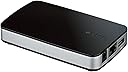
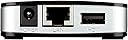
The D-Link DNR-202L is a compact, mydlink-enabled Network Video Recorder designed for up to four cameras, supporting simultaneous recording and playback. It offers flexible local storage via two USB ports for your own hard drives and remote access through free mobile and web apps. While setup requires some technical know-how, especially on Windows 10, it delivers affordable multi-camera surveillance with customizable bandwidth settings and secure local storage.


| Best Sellers Rank | #731 in Surveillance Video Recorders |
| Customer Reviews | 3.2 out of 5 stars 1,198 Reviews |
W**J
Inexpensive 4 camera recording system.
Purchased this on a lightning deal for $70. Already have 4 of the DCS-932L indoor cams hanging under eves successfully for the last year and also have 2 of the DCS-2330L's which are an outdoor camera. Before buying this I had all of my cameras sending on motion detection to and FTP server I set up on my laptop. Also have them sending a text with imaging to my Android phone. My cameras still do this but 4 of them also record continuously to the DNR-202L. Hooked this up to my router and hung a WD Elements 2TB USB 3.0 drive on it. Everything fired up as it was supposed to. Downloaded the setup wizard and ran it. It ask to format the drive which was already NTFS. I allowed it to reformat and it defaulted to FAT32 but you could skip this step if you have a new disk formatted to NTFS or FAT32. You can also reformat either NTFS of FAT32 later from the unit's web page settings. The setup wizard crashed under Windows 10 at the last step but I reran it and it was fine. It set this up in my MyDlink account but you really want to access the DNR-202L's web page directly from your network with it's IP address. Ex: http://192.168.2.55/dlink/live.html The nice thing about the DNR-202L is that it allows you to configure each camera's video feed without having to set up each camera from it's web page. I cut down the frame rate for less wifi bandwidth usage. It takes a little experimenting to learn all of the features of the interface but I was able to find my way around in about an hour. It seems that it will lose the real time displays of one or more cameras sometimes but it still seems to be recording. When that happens I close the web page and reopen it and usually I have all 4 feeds again. **** None of the D-Link cameras or the DNR-202L currently work with the Windows 10 Edge browser. You have to use the IE browser ***** **** Also I think there is an Android app out there that supports the DNR-202L but it may not be released in the USA as of this date *****
S**Y
READ THE WHOLE REVIEW. ESPECIALLY THE LAST EDIT.
First off let me get this out of the way. This Network Video Recorder or NVR, as D-Link prefers to put it, isn't as plug and play as they advertise. Will it work? Yes. Is it easy to setup? kind of, if you are technically inclined, your PC isn't on windows 10 and you have copy's of old browser download zips / Java installers on hand. See the real problem is that D-link inadvertently leaked their private key's for this unit in a driver file and some tech sites picked up on it and published it. Basically any version of Java after version 7 will SERIOUSLY HINDER your efforts to install and register the software for this unit on your PC. Which you have to do in order to register & use it with the My D-link apps on your android phone. Also if your PC runs windows 10, 8, 8.1 & possibly 7 the OS itself will block the executable as well as the HDD Viewer apps from installing let alone running without disabling the UAC system COMPLETELY. On windows 7 this is more of an annoyance than anything else but on windows 8 / 8.1 it gets a bit more complex to do & on windows 10 its a complete and utter Pain In The Ass to do. Essentially because of how windows 10 handles disabling UAC and how its tied into the hidden administrator account. Yup that's right windows 10 has a hidden administrator account & so do windows 7, 8 and 8.1. The process on windows 10 ( yes its different on the older versions of windows because screw you that's why... thanks Microsoft ) is as follows, for me to install or even access the NVR, which is important because when you add a camera... you have to... you guessed it.... access the NVR. Also sometimes ( perhaps monthly if your particularly unlucky ) the NVR will FORGET some or all of your cameras requiring them to be re-added. 1. Boot up Windows 2. Type UAC into the search the web & windows section on the toolbar and select the first response. 3. Drag the slider to the bottom or select NEVER NOTIFY & reset the PC 4. Boot up again 5. Now Open an elevated command prompt and enter net user administrator /active:yes. 6. Restart windows. 7. Finally you can install the software & follow the prompts or access the NVR if, like me, you've done this NUMEROUS TIMES by the way use IE11 not edge or chrome or Firefox to access the internet for My-DLink's website & you must have java installed & the antivirus / firewall disabled or better yet switched off entirely. 8. When you are done open another elevated command prompt and type in net user administrator /active:no 9. Restart windows 10.Type UAC into the search the web &windows section on the toolbar and select the first response. 11. Drag the slider to at least the third tier select ALWAYS NOTIFY & reset the PC AGAIN. 12. Re-enable the antivirus / firewall and be happy. For what its worth half of this is the security in Windows 10 itself, as well as the inherently unsecured nature of Java and the other half is D-Link themselves. Maybe they could fix this with a firmware update but I honestly think they cant which is why they HAVEN'T FOR THE PAST YEAR. Is the system bad for the price? Not really. Is it secure? No, it is hack-able because of the aforementioned private key leak. But for less than $300 for 4 camera WIRELESS recording with a bring your own USB HDD approach its not horrible. However do you need to be tech savvy ? Yes especially if you are using Windows 10. Also I had to actually research all of this with some help from D-Links forum and numerous other Google searches to figure this out. So if you get it for your aunt Mable and don't want to provide tech support DEFINITELY look elsewhere. However if you know your stuff you CAN do it yourself. As an aside this system will EAT wireless bandwidth if you have everything set up to record HD & Audio. However D-Link cameras can be set to record on motion or audio input and the system does provide for automatic overwrite of stored files. So it is plug and play to an extent. You should also check your states Audio / wiretap recording laws. For instance its ILLEGAL in Pennsylvania to record audio & in some cases Video anywhere where there is an expectation of privacy like through a window, in a bathroom / bedroom or in a shared entryway. Luckily D-Link cameras can mute the microphone through the settings. In closing I would definitely suggest you research this unit before deciding to buy it. EDIT. I decided to leave the above review intact without edits but I changed the review to 1 star the only addendum to the review is the title and the edit at the end. As of November 2016 I purchased an ASUSTOR NAS. The main reason I went with ASUSTOR was the fact that their NAS had 4 free camera licenses for their builtin surveillance station software. After purchasing this NAS and setting up static IP's using the mac addresses of the cameras in my router I have been able to make my d'link cameras just work. No monitoring of anything, no fixing and rebooting of anything & no messing with anything. If I couldn't make this any more clear to you I will now THIS NVR IS WORTHLESS THE SECURITY IS ATROCIOUS AT BEST AND UTTERLY HEINOUS AT WORST. I got the cameras running with the NAS within half an hour of completed setup of the NAS. I waited until last week ( 4/3/17 ) to update the firmware of the d'link NVR and try to use it with an external hard drive. The results are bleak at best. First the device still loses connections with the cameras even though the IP's are STATIC, meaning THEY CAN'T CHANGE. The system should know where to look since the cameras ARE ALWAYS IN THE SAME NETWORK LOCATION. Second its not any easier to set up the NVR despite firmware upgrades to my cameras and the NVR itself. The cameras are easier to set up but still use the same outdated insecure keys since that's an issue that cant be resolved without changing the MAC address that THEY CANT CHANGE. Once private keys are given out they cant be changed without changing the hardware.Why do you think there is different hardware versions of the NVR A0 to A1 etc. The best solution I have is update your firmware and hope for the best, provided d'link has released an update that is. I still have to use Internet explorer I still cant use Firefox or Edge I still have to fiddle with the security in windows 10 ( for the NVR at least ) Its flat out SHAMEFUL that an outside company can make the cameras work better with their storage solution than the company that DESIGNED them. I'm changing my review from 3 stars to 1 star. I gave d'link the better part of a year to smear lipstick all over the whole damned pig and they couldn't even get that right. The only reason the cameras are worth a damn is because a third party vendor has a better implantation of d'links own back end software. Think about that for a minute. Not very secure is it? The designers of this should be fired, the person that left the private keys UNENCRYPTED IN PLAINTEXT in the driver file should not only be fired but should be ASHAMED and if anyone got robbed because of this terrible NVR system the people involved in development, cryptography and d'link themselves should be held criminally responsible. The bottom line is stay away from this NVR. Its heinously, atrociously, terribly and unforgivably bad. If d'link were responsible for network security I WOULD DEVELOP MY OWN NETWORKING AND SECURITY SOLUTION that's how bad this is. P.S. I'll be replacing the cameras soon....
O**N
Installation was a Bear - Now it works Great
I'd have given it 4 stars, but the installation and support issues drove it down to 3 stars. Once up and running it works great. Challenges - DNR-202L Installation & Setup with Mac Yosemite O/S I recently purchased the DNR-202L with two DCS-934L cameras to upgrade my home security system. The installation of the cameras went pretty smoothly although they would not work with my 802.11ac/n/g/b WIFI network. No problems here as I was able to activate a secondary wifi for 802.11n/g with very little effort on my router. Additionally, I had to download the latest version of Java to enable viewing the cameras video from Safari. The challenges appeared when I started to install the DNR-202L. My Mac is the iMac with the Yosemite OS. The DNR-202L is HW version A and Firmware version 1.01. The problems started when I attempted to download the setup wizard. The D-Link support site for the DNR-202L points you to the wizard version 2.02 which after a little work I determined was for the newer firmware. When I ran the wizard it would fail and I'd get the error to eject the disk (Apple's way of aborting a failed app start up). After several attempts I followed the link used to download the wizard .dmg file to the D-Link FTP site. Once I ftp'd to the site as a guest I was able to find the wizard for the 1.01 version of firmware and downloaded it. I was able to run the wizard and get my DNR-202L up, registered with mydlink and running. But, it would not auto-detect the two cameras on the network. (Note: Not sure if anyone else with a Mac has experienced the setup wizard problems, but it's not related to the DNR-202L firmware at all. Appears to be a bug in the wizard.) After a little thinking I attempted to login to the DNR-202L via the IP address and was successful. I was able to add the cameras from the web interface with no issues. I downloaded the IOS MyDlink NDR app to my phone and voila it worked. I still can't view video using Safari (I think its version is 9.X), but that seems to be a known issue per the web. My explanation makes this sound pretty simple, but it took me several hours to complete. I would also point out that I have over 35 years experience in computing and networking. The average Joe or Sally buying these things from Best Buy, Amazon or some other place would not have been able to figure things out (in my opinion). On and it was Christmas, so the Technical Support center was closed (I attempted to called to let them know I was going on to the FTP site and got the "We are closed..." recording). Now I'm faced with a decision. I'm on an older version of firmware. As I stated above the wizard is for the newer 2.02 firmware. I have downloaded the .bin file (found it on the FTP server), but I don't think I want to go through the aggravation again. As usual, or as I have found, little support goes to the Apple related Mac software and that's probably why the wizard hasn't been fixed. I also find it frustrating that when running the 1.01 wizard it does not prompt you to download the latest firmware like the camera wizard did when installing them.
P**R
Home Wireless Camera Security System that works with and APP or Computer anywhere in the world
D-Link Camera Video Recorder mydlink-Enabled (DNR-202L) I decided to upgrade my home security to wifi cameras with a network recorder and found this system. I decided on this camera for my indoor solution the DCS-934L and the DCS-2330L for my outdoor solutions. The recorder I chose is the DNR-202L which requires and external USB drive which I chose a WD Passport Ultra 2T drive with USB 3.0. So when I opened the boxes I first connected each camera one at a time directly with a network cable and did the firmware upgrades on all the cameras. The Recorder needed to be updated as well before I configured the system. There is two ways to perform this process one from MyDLink website or doing it manually by logging onto the cameras assigned IP and going to firmware upgrade. MyDLink website works easier but a littler slower. Suggest you use MyDlink website. Once you have confirmed you have the camera's firmware all upgraded including the recorder you are ready to decide the location on your wifi system you want to place the camera's if you have more than one router you are fine I have 3 and it works great. The cameras can be linked to the recorder but that comes later. My suggestion is to download the app MyDlink to you Smart Phone if you have one and once you have all your cameras placed check them out with the phone app. Ok now it is time to configure the recorder. A couple of thing by default the recorder is set to record 24/7 all the time. I changed mine to only record when it sees motion. So each camera will need to have it settings changed to only record on Motion. I used Internet Explorer Desktop app on my Windows 10 (On your desktop in the Ask me anything window type "Internet Explorer" You will need to download Java for windows 10 first). Do not try to use the Microsoft Edge it does not work. You can also do this on the MyDlink website in the advanced settings. The problem with windows 10 is it open Microsoft Edge on my computer but it will show you the IP which you need to keep track of. If you use a Chrome or Internet Explorer with the JAVA added you will be able to just login to the camera though its IP. In Chrome you will need to Allow Chrome to go to the unsecured website before you can get to the settings. I found Internet Explorer easier to use. Once you are logged into the camera you can go to Settings and change the camera to record on motion. You will also need to change the sensitivity of the camera from 90 to 50% and select the grid where you want to sense movement. I used a checker pattern and did not select all the grids. Don’t forget the save Now that we have the cameras setup we need to get to the recorder. The best way is to use Internet Explorer going to the IP of the recorder and setup your schedule. I set all my cameras to record 24/7 once you set one camera there is a way to set all cameras the same during this process. Finally you will also need to set your time zone and do not forget day light saving it that applies to you area. Ok if this all sounds like a lot of work well it takes about 1 hour if you do your prep work and call the best Tech Support like I did. The D-Link tech support agent for home security system I talked with was Randy ID AR004611. We decided to use TeamView and worked on it together. This was a great experience. 877-453-5465 I have had a few other security systems and this is the best system I have used with all the bells and whistles. The best part is this system works 24/7 and I can access it with my app or on any computer anywhere in the world.
J**.
A bit finicky to configure, but it works
I purchased a pair of D-Link DCS-932Ls along with a D-Link DIR-605L Wireless N router , D-Link DNR-202L Network Video Recorder and a Seagate 1TB external drive in order to build a (relatively) simple and (comparatively) inexpensive home surveillance "nanny cam" system that allowed remote viewing, continuous recording and motion detection without having to purchase a subscription or eat up tons of bandwidth uploading the video to someone else's cloud service. (My review of the cameras is very similar to this one, but goes into more detail about their operation, if you're considering a similar setup.) If you're looking to set up a system like mine, it'll probably take a moderate level of technical know-how and a not-insignificant investment of time getting everything configured. I didn't find the D-Link community forums until after I got everything set up, but a few of the threads there might have saved me some grief. Features verified to work: - Recording and playback of Audio\Video at 640x480 "medium quality" MJPEG at 12-15fps. (My cameras do not support HD video or h.264 encoding, so I haven't tested that.) It looks like with continuous recording of two cameras, I'll get around 8 days before it starts overwriting the oldest video on my 1TB drive. I could increase this by lowering the resolution or framerate (or getting a larger HDD), but a week's backlog is more than sufficient for my purposes. - Remote live view and playback of recorded video through the Android app and direct IP interface (though the IP interface can be a little tricky to set up to work correctly from outside your network), with fast-forward, pause and slo-mo - Receipt and logging of Motion detection events (which must be set up first on the cameras, and then enabled in the 202L) which highlight video segments in the playback selection window - Plug-and-play recording to an external HDD (which actually surprised me when it just started up once the HDD was plugged in, since I was expecting to have to turn on the continuous recording) - Saving video segments to AVI, though I'm having an issue with the audio stream of exported AVIs being played at half-speed. Not sure if this is a codec issue or a device issue. I've managed to alter the exported AVI files to correct the issue, but I'm hoping to find out why it's happening in the first place Available Features I Haven't Tried: - Any cameras other than the pair of DCS-932Ls that I've got (though only certain D-Link cameras are supported) - iPhone app. - E-mail alerts on motion detection, disconnection. - Recording schedules, or recording on motion\disconnection (I'm using it to record continuously, though with motion detection active on one camera which puts highlights in the playback selection window) - User Accounts - you can set up sub accounts that do not have access to camera settings, but can still see the Live View (I think) Complaints\Issues: - Java security weirdness. If you view the Live View or Playback through the NVR's direct IP interface (as opposed to the Android\iPhone app), recent Java security changes require you to add an exception for the NVR's IP address to the Site List in the Java Security settings. - Sometimes during playback the status information pane (which shows time, speed, etc) will seize up. Since there's an on-screen-display for each camera, it's a minor annoyance - Has a LOUD error beep when it's not connected. This might be a plus or a minus, depending on your situation. Thankfully, there's an option to turn it off. - Setup can be a bit daunting. There are automatic configuration options, but to get things working the way I wanted required some poking about. (See 03/20/2014 update at the end of this review.) Some of this could probably be chalked up to the router configuration more than the 202L, but to me it's a package deal. This is somewhat exacerbated by the fact that... - Documentation isn't fantastic. It's not awful, but there are certainly some gaps explaining esoteric settings. You have to find the documentation first, though. - It wasn't obvious (to me anyway) that you can click-drag to select a segment of video to view in the Playback selection window. I found that out accidentally. - Using the Save as AVI to export a video segment works, but produces an AVI where the audio stream is played at half-speed, out of sync with the video stream. I've managed to edit the AVI files to correct them, but it'd be nice to find out why they're being exported incorrectly in the first place(if it's a codec issue on my computer, or a device issue with the DNR-202L) Heads Up: (Things that aren't really complaints, but could be easily overlooked.) - It has no built-in storage. You need to purchase a separate external USB hard drive. - It's not wireless. It needs to be physically plugged into a router. - It's tiny. From the picture, I assumed it would be the size of a router. It's a little bigger than an Altoids tin. - It only supports D-Link "cloud" cameras. - It will record 4 cameras at a time, but the interface suggests it can connect to 8 total. (I suspect you just pick 4 of the 8 to record, if you happen to have that many cameras.) Why This Particular Setup: - DCS-932L - The cameras offered Audio and nightvision at a decent quality much less expensively than other alternatives I've seen, as well as remote live viewing without the use of a subscription service - DIR-605L - I'd read you need to dedicate a router to your cameras to avoid bogging down other services on your network (e.g.: Netflix). In the end, I'm actually using it as a switch plus wireless access point (with LAN port to Lan port connection to the "parent" router and DHCP disabled on the 605L) so that the NVR and camera traffic is sequestered to the 605L, but the NVR and cameras are still on the same subnet as the rest of my computers, facilitating access. - DNR-202L - Local recording of (and remote access to) continuous Audio and Video without the use of a subscription service - Seagate 1TB portable external drive - the DNR-202L does not have its own storage, and requires an external USB hard drive. 1TB provides about 8 days of continuously-recorded 12-15fps "medium quality" MJPEG audio\video from two DCS-932Ls. The Other Alternatives I Considered: - Logitech Alert Indoor Master - My runner-up selection. Uses networking-over-power by communicating through special power adapters to avoid tying up your home network , has HD cameras with 130 degree fov, is probably easy to configure, and allows remote live viewing. Does not require a subscription for recording video, but my understanding is that local video recording is done by designating a home computer to do so using Logitech's included software or a 3rd party solution, although the camera's built-in microSD cards hold a certain amount of video until it's ready to be downloaded. This was roughly the same price as my setup, but only came with one camera, and additional cameras are nearly twice the price. There is some subscription service offered by Logitech, but I didn't see that it offered any meaningful benefits over the free service. - Netgear VueZone - Cameras are truly wireless, being battery operated, but they don't record audio. Requires a subscription or 3rd party software (on a home PC) for continuous recording and playback. The full-featured 110 degree fov camera with nightvision is twice as expensive as the 932L. - DropCam Pro - HD video, 130 degree fov, two-way audio, reviews seems to suggest it's easy to use. Requires a subscription or 3rd party software (on a home PC) for continuous recording and playback. One camera is three times the price of a single DCS-932L. - Foscam - No subscriptions, comparatively inexpensive, pan-tilt with two-way audio, but again - need to dedicate a PC with Foscam or 3rd-party sofware to recording and playback. - Lorex Wireless (and similar) - A true "surveillance system" with a dedicated DVR-type unit. Most require physical installation of BNC cables from the cameras to the DVR unit, although I did see a Lorex system with two wireless cameras at a big-box retailer for about the price I paid for my setup. The reviews were poor, so I dropped it from consideration. Two things that keep coming up in this review: - Subscriptions. It's a matter of principle for me, so it's a personal preference thing. I prefer to buy products rather than services. I get what I paid for and then I'm done putting money into it. A cloud recording service would necessitate using Internet bandwidth for streaming the camera feeds, where my setup allows me to sequester the camera traffic onto its own router unless I'm actively viewing the live stream. Plus, I'm not at the mercy of a company who may discontinue the service before I'm done using it. I am using D-Link's mydlink cloud...thingy to direct web requests for live viewing to the cameras, but it's free, and it's not essential. - Use of a home PC for recording\playback purposes. I don't like the idea of using up CPU cycles, bandwidth, and storage space on my main computer for recording, plus I don't have to worry about the recording service starting back up automatically if there's a brief outage. With the NVR, you can access the recorded video for playback from any of the computers in the house (or remotely), and I've unhooked the power to the cameras and the NVR more than once to move them and had recording start back up very quickly without any intervention on my part. There you have it! I've had the system running for about a week now, so if I experience any issues with reliability down the road, I'll update my review. Update 02/28/2014: The system has been running for about a month (admittedly the short month of February) without interruption. With the two DCS-932Ls recording continuously on medium quality 640x480 MJPEG with audio, I'm getting around 8.5 days backlog on my 1TB drive. I've experimented with using some inexpensive (like, $6) smartphone add-on wide-angle lenses to increase the field of view with some success and will probably be semi-permanently attaching those to my cameras in the near future. If you're considering it, I'd recommend a clip-style version of the 0.67x wide angle lens. The more common magnetic version of the lens interferes with the IR filter of the DCS-932L unless the magnet is removed (which isn't trivial). Update 03/20/2014: I've read several reviews where people report having trouble with the setup Wizard. I configured my cameras and the DNR-202L through the direct IP interface before ever running the Wizard, and even then I only ran it to register the unit with mydlink.com. It requires a certain degree of technical know-how, but it seems like the Wizard has a spotty track record. Also, the forums at forums.dlink.com might provide some user-to-user assistance if you're having difficulty getting things set up.
G**N
Plug and Pray
The DNR-202L is a great concept but the device unfortunately is not well engineered. I am technically minded when it comes to IT issues and have extensive experience in network architecture . Let me tell you a little about my configuration. I have a Windows 10 desktop and laptop with the latest Java, Windows updates, IE and Firefox browsers installed. I have two DCS-932L and two DCS-5009L cameras attached to the DNR. I am using a NETGEAR R8000 for my router where the DNR is located. After going through updating firmware on all cameras and the DNR and running the setup for the DNR I was not able to see live or playback video using Firefox or IE (Chrome is not supported). The only thing that worked at all was the android app on my phone however this doesn’t give you the full advertised capability of the DNR-202L. I gave up trying to access the DNR using the MyDlink app and tried connecting via the DNR’s UPnP port listed in my router. This gave my some spotty capability. Sometimes I could see the cameras through the DNR on Firefox using my desktop computer and sometimes I was able to get it to playback video using IE on my laptop. I could never get live video and playback on the same computer or browser. I finally broke down and made the dreaded call to DLINK Customer Service. I found the DLINK representatives to be hit or miss. The first person I talked to told me that the MyDlink app never works with the DNR-202L but they are working on it. Really??? His technical knowledge about the DNR-202L itself was very limited as I was put on hold after every question. After about 15 minutes he stated that someone would call me back at some future date and time although he could not tell me what date and time that was. Not believing this to be an acceptable answer I tried again and this time I got Dave (ticket number C684458). Dave was very knowledgeable and he thoroughly trouble shot my configuration by remotely signing onto my computer. After a lengthy time period where he retried everything that I already tried he came to the conclusion that the DNR-202L was defective and he authorized a return and replacement. The DLINK return process is much more convoluted than Amazon so I returned it to Amazon instead. Upon receiving the new DNR I experienced the exact same problem I did with the old one. So now I was back to square one. I decided to try one more thing and that was to use Port Forwarding instead of UPnP. I briefly discussed this with Dave but we both agreed that this really shouldn’t do anything but I figured what the heck I’m pretty much out of options. Once I did that I was actually able to remotely access the live video and playback using Firefox on my desktop computer however IE still wouldn’t work. On the laptop I was able to see the live video on Firefox but not access playback. Using IE on the laptop I couldn’t see live video but I could access playback. Well at least I could do both on my laptop but I have to use 2 browsers to do it. Conclusion: The fact that the MyDlink app will NOT work with the DNR-202L is unacceptable and the fact that DLINK apparently is aware of this as told to me by the first DLINK technician I talked to is inexcusable. If you are not technically minded and know your way around your router enough to know what UPnP is and how to enable port forwarding for a device, I would not recommend you purchase this yet. Once DLINK fixes the issues that many customers seem to be having and turn this device into a true plug and play (as opposed the current plug and pray) I will gladly give this a five star rating. Till that day arrives, this is really a one star device that I will grudgingly give two because I was finally able to get functionality out of it.
A**R
You need to be Tech Savvy
Bought this to work with my 3 Dlink cameras. I could not get it to install properly. I sent two e-mails to support and received no reply. I finally called and after two hours on the phone with tech support, it finally installed. It worked for about an hour before acting up. It put two of my cameras on standby (no help in support FAQ) and is very slow to load at their website. After using the "Connect" button my computer slows down, the only way to get my speed back was to restart my computer. It does record my video to a HDD, but I have to confirm this by connecting the HDD direct to my computer (the only reason it got 3 stars instead of one). I'm still working on the problem with the view site on the Dlink. Supposedly there is a way to have the recorder do continual overwrite, but I haven't found it yet. UPDATE: Thanks to the DLink reponse, I was able to find the way to do the overwrite. However, I did have to call again because the DNR would not show my video, at MyDLInk site I could view each camera individually and the DNR did show the cameras, but had them all on standby. Spent another 2 hours getting this fixed and now everything works as it should. If it continues to do so this is well worth the trouble and pain. I would like to comment on the two support techs who helped me over two days. They were both very patient, helpful, professional and knowledgeable about the program. KUDOS to them. However, DLink needs to add a whole bunch more written info to their products when shipping, this is a complicated product to set up correctly. I would love to update this to 4 stars mainly because of the quality of the product and the wonderful tech support. But it's just too complicated for the non-techie. Also, my computer slows down after using DLink and stays that way unless I restart it. UPDATE. UPDATE: I was able to speed my system back up by adding a router to my modem/router. However,I have spent hours trying to get this system to work. To include six hours on the phone with Tech Support, they will get it working and then within two days the whole system doesn't work. I sent three e-mails and have never received any answers. Gave up.
K**N
Great recorder, Great customer service with D-Link
While I had a bit of problem with the connect process and getting it to recognize my camera tech support agent AR004654 was wonderful. She was very knowledgeable and professional and very, very patient with me. We finally worked through all the glitches and everything works great. I especially love the ability to see all three of my camera views at one time. Update: case # C6742517: (this update is nearly a year after my previous problem). Was having problems accessing my recorder. agent AR004276 was wonderful. As I indicated in my review before this agent was also extremely knowledgeable and professional and very, very patient. It took quite sometime to get everything working correctly again, I appreciated her help so much. I have to add, that every time I have had to call for customer support the agents I have worked with have all been wonderful. This company has exception customer service. Update: case # C6742517 Once again D-Link customer service to the rescue. Was prompted to download an updated version of JAVA so I did, and then my recorder would not work again. Obviously I did not do something right, but customer service was able to promptly assist me and get everything up and running very quickly. Thanks to agent AR004216 for her excellent help. Update 9/29/2015 Case # C6746330. After installing a new D-Link router, I had to re-install all my camera's etc, and had some problems with one camera. Agent AR004216, Jasimine, was very helpful. We actually had problems with the recorder and she was able to make the corrections so everything finally worked perfectly. Thank you for your assistance and patience with me. Your customer service was excellent. I have seen in some reviews people questioning if these reviews that mention the agents are real. Let me say, they are absolutely real. I have used customer service with D-Link several times and every time the agents have been extremely polite, and knowledgeable, and have always had me up and running in no time. The problems I have experienced have nothing to do with the equipment as much with user error on my part. I have asked for the persons badge number so I can indicate who specifically assisted me so they can be acknowledged internally.
P**N
Great recorder captures good video
Good product works great
S**.
Great product! Records up to 4 cameras … and you can monitor all 4 on your iPad or iPhone.
I have 2 of these devices. They are tiny but pack a punch. Best of all there are no monthly charges. One monitors our 4 front outdoor wireless D-Link cameras and one monitors our 4 back yard outdoor wireless D-Link cameras. These DNRs plug into your router and then I have 2 cheap 2TB USB drives, one plugged into each of these units. This saved buying 8 SD cards (1 for for each camera) and it allows monitoring 4 at a time on my iPhone or iPad. I can access all recordings from one place without having to connect to the SD cards in 8 different cameras. They record 24/7 all 8 cameras for about 4 weeks and then it records over the older files. I do not use motion detection so that everything is always captured. Why have security cameras that don’t record everything? You configure them by connecting to their IP address and then scanning for the cameras and selecting which camera you want in each of the 4 positions. The cameras easily connect to your wi-if using their WPS button. D-Link has great documentation online. On the My D-link View app, you can monitor 4 cameras at a time, or tap on 1 of them and get full screen view with audio. You can even select to record what you are monitoring right to your device. Also within the App when looking at 1 of the cameras, you can open the folder allowing you to view a previous date and time it recorded for that camera. I flip between the front and back 4 cameras as needed. They are rock solid, and I have been using them for years. From anywhere in the world I can see, hear and record 24/7 all around my home without any monthly fees.
J**R
Five Stars
Does the recording perfectly onto the external hard disk attached without any issues.
J**E
Buena opción para grabar con las cámaras de D-Link
Muy buen equipo para grabar con las cámaras de la misma marca, es económico, pequeño y fácil de instalarse. Lo malo es la aplicación del iPhone que es muy lenta para visualizar las grabaciones y se bloquea frecuentemente. Si se visualiza con una PC se puede ver con mejor calidad y rapidez las grabaciones.
B**N
Obsolete stock no longer supported.
Piece of rubbish.
Trustpilot
2 months ago
2 weeks ago