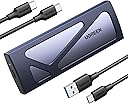
Desertcart purchases this item on your behalf and handles shipping, customs, and support to Colombia.
🚀 Unlock lightning-fast storage on the go—because your data deserves the VIP treatment.
The UGREEN SSD Enclosure is a premium tool-free USB-C external M.2 NVMe adapter delivering up to 10Gbps transfer speeds via USB 3.2 Gen2. Compatible with M and B&M key SSDs from 2230 to 2280 sizes and supporting up to 8TB capacity, it features an aluminum shell with silicone thermal pad for heat dissipation and advanced RTL9210 chip for data protection. Backward compatible with USB 3.1/3.0 and cross-platform friendly (Windows, Mac, Linux, Android, iOS), this compact, portable enclosure is perfect for professionals demanding fast, reliable external storage without the fuss.


| Asin | B09T97Z7DM |
| Best Sellers Rank | #2 in Enclosures |
| Brand | UGREEN |
| Built In Media | External Silicone Case, Silicone Thermal Pad, Tool-free NVMe M.2 SSD Enclosure, USB C to USB C Cable & USB C to USB A Cable, User Manual |
| Color | Grey |
| Compatible Devices | Computer, Laptop, Samsung/WD/Toshiba/Crucial/Seagate/Sandisk, Smartphone, Tablet |
| Connectivity Technology | USB |
| Customer Reviews | 4.4 4.4 out of 5 stars (16,703) 4.4 out of 5 stars |
| Data Transfer Rate | 10000 megabits_per_second |
| Enclosure Material | Aluminum |
| Global Trade Identification Number | 06957303895410 |
| Hard Disk Form Factor | 2280 inches |
| Hardware Interface | USB 3.2 Gen 2 |
| Hardware Platform | PC |
| Item Dimensions L X W X H | 4.92"L x 1.61"W x 0.55"H |
| Item Weight | 139 g |
| Manufacturer | Ugreen Group Limited |
| Memory Storage Capacity | 8 TB |
| Mfr Part Number | 90541 |
| Model Number | Grey |
| Number Of Items | 1 |
| Number Of Packs | 1 |
| Supported Devices Quantity | 1 |
| Unit Count | 1 Count |
| Warranty Description | 1 Year Warranty |
User
Great nvme enclosure!
Great tool-free enclosure, very easy to use!This UGREEN NVMe enclosure is excellent. It’s completely tool-free, making it incredibly quick and easy to install or swap out SSDs. The build quality feels solid, transfer speeds are fast, and the included silicone sleeve offers nice extra protection. Highly recommended!
User
Simple, Highly Affordable SSD Card Reader
Was more difficult removing the SSD card from the motherboard than setting up the card in this external reader. Worked smoothly on both Mac and Windows computers. Adapter included for older USB ports. No driver or software required. Simply put, does the job simply and easily and the price is a joke — lovely.
User
Reliable, GREAT PRICE for 17$
UGREEN is the greatest. We buy these all the time at work because they're just so reliable and are good at dissipating heat from the NVME drives, they even come with thermal putty and some high quality cables with adapters attached. Transfer rates are fast, not the fastest I've ever seen but definitely good enough, you can even load games on it pretty fast.
User
Unstable connection to the drive?
Installed a brand new NVME, dropped connection while transferring data, plugged into a new computer, it would intermittently recognize the drive or drop to "unable to initialize disk" via included USB-A and USB-C cables. Removed the drive from the enclosure and installed directly into the computer and it worked without issue, so suspect the issue is with the enclosure-Edit, removed and reseated, seems a little more stable without the thermal pad and cover, will review and update
User
good
solid build, good temperature, indeed supports TRIM as advertised. the grey rubber thing on the product pic thing is optional, you can choose to not put it on. Transfers heat to the outer shell well. thermal pad is nice and big. tight fit.
User
This UGREEN SSD Enclosure Worked Excellent To Clone My Win11 C Drive
This UGREEN SSD Enclosure worked excellent to clone and switch out my Win11 C Drive. Simple and fast. Thanks. DMWorrel
User
very portable
Great little encloser for M.2 driveSolid, easy installation and a soft boot around it for added cushionno issues with use, plug and playPerfect for repurposing an older drive to use as a portable one
User
Solid build, poor design
My problem with this is design. NVMe drives DO get warm or even hot. Inside a PC case a drive would either be completely exposed to air or it would have a heat sink on top of it with a thermal pad in between. There is enough pressure from the heat sink pushing down on the thermal pad for there to be a solid link between materials so heat can pass from the drive, through the thermal pad and then to the heat sink. This enclosure has an inside unit which slides into the external case you see in the image. On top of that it's beveled so over the area where the drive sits, it's higher than on the sides. So, inside unit slides into external casing. Cool right? No, HOT.This unit comes with a thermal pad you put onto the drive, but a thermal pad is supposed to make a solid connection with a drive AND a heat sink, which in this case would be the external casing. But since for one the inside unit has to slide into the external case, AND it's beveled AND the highest point is above the drive, that thermal pad isn't going to make a good bond between the drive and the external case, so instead of pulling heat AWAY from the drive, that thermal pad actually TRAPS HEAT on the drive because air doesn't wick heat away from those thermal pads fast enough.So this is a very poor design. I would say if you buy this, toss the thermal pad aside because it's not going to accomplish anything except for maybe heating up the drive faster. Now, the one good thing is since this is running through a USB port and the max speed is 10Gbps, which is about 1.2GB/s, that's not very fast for a modern NVMe drive so it won't heat up so much, compared to a drive that plugs into an NVMe port on a PC that can run MUCH faster than that depending on the drive and the type of NVMe port (PCIe gen3, 4 or 5) where the best drives can now run about 10GB/s. So, this helps to keep the drive cooler, simply because the data transfer speed is relatively slow, maxing out at about 1.2GB/s best case scenario and most likely only a few hundred MB/s.I've worked with another enclosure where the thermal pad made good connection between the drive and the external case, and the case got very warm. This case doesn't so once again that's probably heat trapped next to the drive. So, I removed the thermal pad so at least more air can move around the drive.Another point about using enclosures, they create problems for the operating system in how to deal with them. For instance a typical USB drive, when under a file browser you can tell the system to eject the drive. You can't do that with these drives, so Windows is recognizing these are permanent fixed drives, not a portable drive. Maybe you can change a setting in Windows. But when you use these between different operating systems, you HAVE to eject the drive using the operating system or it can start to corrupt the file system, or at least make the operating system think there's a problem with the drive. So in Windows you go to status area on the toolbar and go to the icon for "safely remove hardware....." and select this to eject it. But, I can have problems doing this from time to time and if I just pull it and then stick into another system, I get problems. The other thing is using Linux with these enclosures. Once again maybe there's a setting I haven't figured out, but these give me lots of problems with Linux which is very frustrating. Even with a fixed drive, when you are under a file explorer in Linux, you can tell the operating system to either eject or unmount a drive, but with these I don't get either option. I have to go under disk tools to unmount it. But there are times I have problems unmounting and it will LOCK UP my system or lock up USB ports which is VERY frustrating because now I have to reboot a system.Last point, you can't think about these like a typical USB drive. You need about double the capacity for a drive that you stick into these enclosures that you plan to use. So, if you want to use 500GB, you need to stick in a 1TB drive, and this is because you are continually writing to it, and storage on an NVMe drive or any solid state fixed drive has layers of storage for bits. You can write data to an NVMe drive and later the drive will move that data around on the disk to an upper, but slower level to get data onto. If you don't have a lot of extra space on the drive, it will slow down dramatically as the drive is not only taking in the data you're trying to write to it, but it's also trying to move data to those upper layers. A typical USB flash drive doesn't have the problem so you can continually write to it until it's full, no problem.So, I don't have good experiences with using enclosures and the operating system doesn't matter.
User
جميلة
اشتريتها انهارده ، ما شاء الله جميلة ، من احسن المنتجات ال جاتلي صراحة سواء تغليف أو خامة وجاية بوصلتين يو اس بي وتايب سي ، روعة
User
Excelente Producto
Cómo siempre, UGREEN es sinónimo de Calidad, Todo super bien, La ocupa en una MAC MINI M4 y todo super bien.... El envío todo bien.
User
Performances au top et montage sans outils : Le boîtier NVMe idéal !
J'ai acheté ce boîtier UGREEN pour recycler un SSD NVMe et en faire un disque externe ultra-rapide. Voici mon retour d'expérience :Les points forts :- Vitesse USB 3.2 Gen 2 : Les débits sont excellents. On atteint bien les 10 Gbps théoriques avec un SSD compatible. C'est parfait pour transférer de gros fichiers vidéo ou des jeux en quelques secondes.- Montage "Tool-free" : C'est un vrai bonheur. Pas besoin de tournevis, le système de fixation par clip est ingénieux et très solide.- Dissipation thermique : La coque en aluminium n'est pas là que pour le look, elle évacue très bien la chaleur. Même lors de gros transferts, le SSD reste à une température raisonnable grâce au pad thermique inclus.- Qualité de fabrication : C'est du UGREEN, donc c'est sobre, élégant et robuste. Les finitions sont impeccables.Le petit bémol :- Le câble fourni est un peu court (environ 25-30 cm). C'est bien pour un ordinateur portable, mais un peu juste si votre tour PC est posée au sol.Verdict : Un boîtier performant, fiable et très facile à installer. Un incontournable pour ceux qui veulent du stockage externe haute performance.
User
Versatile and Efficient SSD Enclosure for All Your Storage Needs
I recently purchased the UGREEN M.2 NVMe SSD Enclosure Adapter, and it has been an excellent addition to my tech setup. This enclosure is perfect for anyone looking to convert their internal SSD into a high-speed external drive.Pros:High-Speed Performance: With support for 10Gbps USB C 3.2 Gen2, this enclosure offers impressive transfer speeds, making it ideal for tasks that require fast data access and transfer.Tool-Free Installation: The tool-free design makes it incredibly easy to install your SSD. Simply slide the SSD into the enclosure, and you're ready to go. This feature is especially convenient for those who frequently swap out drives.Wide Compatibility: The enclosure supports both M and B&M keys and various SSD sizes (2230, 2242, 2260, 2280), ensuring compatibility with a wide range of SSDs.Durable Design: Made from high-quality materials, the enclosure is sturdy and built to last. The sleek grey finish adds a touch of elegance to your tech accessories.Thunderbolt 3 Compatible: The enclosure is compatible with Thunderbolt 3, providing even greater versatility and performance for users with Thunderbolt-enabled devices.Cons:Price: It is slightly more expensive than some basic enclosures, but the added features and performance justify the investment.Plastic Components: While the overall build quality is good, some users might prefer an all-metal construction for added durability.Overall, the UGREEN M.2 NVMe SSD Enclosure Adapter is an excellent investment for anyone looking to enhance their storage solutions. Its combination of high-speed performance, tool-free installation, and wide compatibility makes it a standout product in its category.
User
ÓTIMA QUALIDADE TÉCNICA E VISUAL !!! - RECOMENDO MUITO !
Produto com excelente qualidade !!A UGREEN vem se destacando cada vez mais por oferecer produtos com um acabamento de ótima qualidade e com tecnologia superior.O gabinete SSD foi uma aquisição que valeu cada centavo investido.DICA: ao inserir o SSD é necessário formatá-lo (fazer a partição) para começar a utiliza-lo como um pen-drive, mas o processo é muito simples.Recomendo.
Trustpilot
3 weeks ago
2 months ago