

Buy anything from 5,000+ international stores. One checkout price. No surprise fees. Join 2M+ shoppers on Desertcart.
Desertcart purchases this item on your behalf and handles shipping, customs, and support to Colombia.
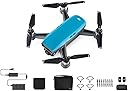
✨ Elevate your creativity with the DJI Spark — small drone, big impact! 🚁
The DJI Spark Fly More Combo in Sky Blue is a compact, intelligent mini drone featuring 1080p HD video capture stabilized by a 2-axis mechanical gimbal. It offers intuitive hand gesture controls, FaceAware quick launch, and multiple intelligent flight modes for cinematic aerial content. With a top speed over 50 km/h and up to 15 minutes of flight time per battery, the Fly More Combo bundle extends your flying sessions with extra batteries, a charging hub, and essential accessories—perfect for millennial pros seeking effortless creativity and social media-ready footage on the go.


| ASIN | B072FPRDSL |
| Age Range (Description) | Adult |
| Age Range Description | Adult |
| Are batteries included? | Yes |
| Battery Cell Composition | Lithium Ion |
| Best Sellers Rank | #514,098 in Toys & Games ( See Top 100 in Toys & Games ) #2,223 in Hobby RC Quadcopters & Multirotors |
| Brand | DJI |
| Brand Name | DJI |
| Color | Sky Blue |
| Connectivity Technology | Wi-Fi technology |
| Control Type | control |
| Customer Reviews | 4.4 out of 5 stars 1,258 Reviews |
| Global Trade Identification Number | 06958265149405 |
| Included Components | Aircraft body, Battery charging hub, Charger, Manual, Micro USB Cable, Propeller Guard, Remote Control, Shoulder Bag, Storage Box, extra Intelligent Battery, extra Propellers |
| Includes Rechargeable Battery | Yes |
| Includes Remote? | No |
| Item Weight | 1.5 Pounds |
| Manufacturer | DJI Europe B.V. |
| Material | Plastic |
| Media Type | Digital8 |
| Model Name | Spark |
| Model Number | CP.PT.000902 |
| Optical Sensor Technology | CMOS |
| Part Number | CP.PT.000902 |
| Remote Control Technology | Wi-Fi |
| Skill Level | All |
| Smart Home Compatibility | Not Smart Home Compatible |
| Special Feature | Intelligent flight modes, high-performance camera, mechanical gimbal stabilization, flight safety features Special Feature Intelligent flight modes, high-performance camera, mechanical gimbal stabilization, flight safety features See more |
| Special Features | Intelligent flight modes, high-performance camera, mechanical gimbal stabilization, flight safety features |
| Supported Image Format | JPEG, MP4, MOV |
| UPC | 190021295513 |
| Unit Count | 1.0 Count |
| Video Capture Format | HD |
| Video Capture Resolution | 1080p |
| Video Output Resolution | 1080 pixels |
| Warranty Description | Standard Warranty |
| Wireless Communication Technology | Wi-Fi |
S**D
I love this little bugger.
I fly Inspires, Phantoms and recently a Mavik 2 Pro at work, but I always thought it would be nice to have my own machine. Wasn't willing to cough up a thousand dollars and up for one. "Ah, I probably wouldn't use it much anyway." Sound familiar? When I saw the spark I thought it would be worth a shot even though it probably wasn't "as good" as the big ones so I got myself one for Christmas. I am very happy I did. I am thrilled by the fact that a $450 (fly more bundle at Amazon's holiday price) had a lot of the same features as the big boys. It may not shoot in 4k or have a three axis camera gimbal or have the same flight time, but I don't need it to. I just wanted to have a drone for fun, and fun it is!!! So far, I have flown this sUAS 81,029 feet (a little over 15 miles) and have never had any issues with it, I would fly more but the temps have been arctic up here. The app did crash once on me while linked to the controller by wifi and when I restarted the app my phone would not reconnect to the controller. The spark was over a thousand feet out and while I had line of sight, that's a pretty tiny thing to be able to tell where it's facing at that kind of range. With no telemetry at all available I just pushed return to home on the controller and it came straight back and landed itself. Phew. Yesterday the temp hit 41 so I played hookie and went flying. I got in 7 flights with my 4 batteries, recharging with the 3 bay DJI charger hooked to a Bioenno BPP120 power pack. I used an OTG cable (has prevented any more disconnects between my phone and the controller) a landing pad, folding signal boosters on the controller antennas and a Nanuk 915 hard case. It was a great day to fly. Over a frozen lake, I easily flew to a horizontal distance of 6,754 feet at an altitude of 35 feet. Never had any signal breakup. A clear day over a frozen lake with perfect line of sight is certainly ideal conditions, but I do believe that the signal boosters helped. I have never gotten that far out with no signal loss without them. There is a lot of heated debate about whether or not these signal boosters work, but for $9, what do you have to lose. I think they help. By the way, if you fly in the cold like I have been doing, keep the spare batteries in your coat until you are ready to use them or better yet, I have a pair of heated Milwaukee Tools gloves. These make great Spark battery warmers. Here are my suggestions for what you should get for a complete drone package: Spark fly more combo. (Yellow of course, who could want any other color?) 2 extra batteries (for a total of 4). Nanuk 915 hard case (Yellow of course, who could want any other color?) Landing pad (you can see mine in the photo, there are tons of them on the market). Camera gimbal protector (I got the FS Labs one) Landing gear (FS labs again. Haven't used them yet because I use a landing pad). Folding parabolic range extenders (I got the Amazon's Choice marked ones.) Micro USB to Lightning OTG cable. (I got one from RCstyle and like it. Some say it extends range, don't know how it could do that but it provides a rock solid connection to the controller). Micro USB to female USB so you can use an Android phone with the controller. Get the DJI refresh insurance for $60 bucks or so. They will replace up to two wrecked Sparks for a year for, I think, about $60 per occurrence. If you are new to flying or like to push your luck, you will probably need this. A couple of over the top items if you really get into it: Bioenno BPP120 power pack to recharge in the field. I've heard the Smatree one is good too, but not as versatile. A phone/tablet holder by MavMount (Mavmount 3.0) This is more pricey than most because it is extremely well made professional hardware made in the US. It's worth it!!! There you have it. I really like this little drone. It has surprising range and capabilities, is surprisingly tough and is a ton of fun. Its the toy that didn't exist when we were kids, indulge yourself now! Happy flying.
D**0
easy to fly drone with surprising camera/video capability
I’ve had the DJI Spark for a month now, and I’m impressed. I give it 5 stars. The build quality, stability in flying, and portability are all impressive. So far it’s exactly what I wanted. If I encounter a fatal flaw, I’ll update with a reduced rating…. I won’t list pros and cons. From my point of view, I’ve always been fascinated with remote-control flight toys. Over the years, I”m not sure how many $25 or $35 or even $70 remote control helicopter or airplane gadgets I bought. For a $500 drone, this is just what I’ve always wanted. It’s a quality, stabilized, easy to fly drone with surprising camera/video capability. They hit my price point. ⁃ This thing is crazy small. Packed up in the shoulder bag for the combo kit, with remote and spare battery, it looks smaller than a lunch bag for work. ⁃ It’s well made. Has a nice feel and heft, quality rotor motors and LED signal lights, and doesn’t feel like a toy. The shoulder bag in the combo kit is surprisingly well made, as is the battery charger. The drone body itself is the size of an iPhone Plus in footprint. ⁃ I’ve never flown a real drone before. So far I’ve not lost control of this yet, and pretty quickly felt ok using the joysticks to send it up to 290 feet, or swoop it around in sports mode in an open field. ⁃ It hovers precisely stable, adjusting for wind. I quickly felt confident of how it just parks itself in the air if I let go of the controls. The phone screen shows you lots of detail and exactly what the drone camera sees. You can move the camera gimbal up and down. ⁃ The instruction manual is pretty good too. It seems sparse but when you read it again, it has a lot of detailed info concisely stated. The Spark is packed in a foam box with printed manuals, but they are tiny. I downloaded and printed the current user manual in full size, and also saved that PDF in my iPhone iBook app. ⁃ If you want just a toy, read reviews of this or check YouTube instruction videos and the DJI forum for users. I think yeah, if you mostly want a selfie drone with hand gestures, this can do that. But it is designed for a lot more capability. It has "quick shot” programmed modes, and lots of control using joysticks and options on the phone screen. ⁃ Dive down into the app, and you can set options for gimbal sensitivity, speed or distance limits, many photo/video options. In that app you can see a history of each flight, a google-like GPS map of where the drone flew, with a playback of the onscreen messages from the flight. Other settings let you dive down and calibrate the internal compass or IMU. Or see the temperature of the battery cells. They’ve shoved a lot of the technology of their bigger photo drones into this “toy” that is a full-featured drone. ⁃ Get the combo with the remote controller. Your smartphone by law has limited wifi transmit power. With the remote control you get good quality joysticks and can watch the drone in the sky as you fly up to several hundred feet high and 3/4 mile away. It has smart modes to bring it back and land if you lose contact, or if the battery gets low. I haven’t tried those yet. One battery can fly for about 15 min. ⁃ It uses GPS and has map knowledge. Be prepared for lots of on-screen warnings. It enforces no-fly zones, such as all of Washington DC. Presumably some “yellow” warning areas can be unlocked via the app for 3 days. I haven’t tried that yet. This thing looks like a toy so most passersby are amazed. DJI forums have many posts about drone fliers being kicked out of parks or marinas or public places. ⁃ The cached video the DJI app saves on the smartphone is fun, but the true HD quality video files and pics are on the micro-SD memory card in the drone. You’ll need to read the manual to learn how to get the real HD footage. Friends are amazed when I show them the HD video from this “toy” which has an active optical 2-axis gimbal. Purists will want the better optics/gimbal of the Mavic or the Phantom. But this tiny drone is one I’ll actually shove in my backpack on a trip. ⁃ Did I say do research and read the manual and online videos? :-) DJI releases firmware updates to the Spark, installed via computer or the phone app, The first couple updates fixed a lot of complaints about gesture control not working right, I've also found the quick shot modes are quirky. “Helix” goes way too far out and doesn’t spiral. “Dronie” stays oddly low and goes too far away. “Circle” and “Rocket” work well. Read up about how the precision landing for return home can work. But nevertheless, using the remote control and playing with the options, so far it hasn’t done anything crazy. The pause button basically parks it in air and so far it has been easy to bring it back and land gently. Basically it's everything you'd want in a $1000 drone for half the price. Treat it like it is a $1000 drone since you can crash it if you don't know what you're doing, ⁃ If it randomly falls out of the sky, I’ll update the post! DJI forums reported that happened to some Sparks.
M**M
Good Quad - Comparisons and suggestions included from long time DJI Prosumer.,,
** Full disclosure - no one has given me any equipment or freebies to do this review. All equipment I own and purchased myself. ** DJI did a nice job on this smaller quad. Flies well with Controller and not bad with the phone alone - though not as well with the controller. A couple of things you should be aware of and frustrated me when I got it: 1) Controller wifi password is DIFFERENT and on the back of the CONTROLLER - not to be confused with the wifi password on the drone (under battery) which is different. 2) The drone has to be switched between phone only and controller modes with the power button. 3) As usual manuals really aren't very clear. I ended up watching a few youtube videos to get me going right & quick. 4) Just assume there is a new release of the software/firmware when you open the box. Go ahead and connect everything together and apply it. 5) Assume your going to need to practice ( a while) to get the hand gesture features to work. Its not trivial, but once you get it down they work about 80% of the time. Good enough for a quick selfie. Quality of photos is very good and on par with my Iphone 6s or better. Video is great too - prefer 4k but will live until DJI does a firmware upgrade on these to 4k. Love that they put Sport Mode as a switch! That is a blast and works surprisingly well (Phantom 1 days in equivalent of "sport mode" was just plain scary.. DJI has made this extremely useful now. ) Compared to Dobby and S4 Quads - hands down no question DJI is 200% better and more stable. BETTER PRODUCT, BETTER COMPONENTS ETC..I tried both of the others out and they just don't fly well and they require constant tuning while flying. DJI - no such issues. Lastly - but a good one - THANKS DJI for the BAG (fly more package) not only is it designed to fit the Spark but it ALSO fits the Mavic! Seriously a great detail and one I will personally use a lot. I don't take both at the same time so the bag is a great feature FUTURE ITEMS: 1) 4k video firmware - should be easy to do and won't compete with Mavic. 2) Still think DJI should have a LOUD audible ping every 10 seconds if it is powered on for over 10 mins but not connected to controller or phone. This would be a HUGE HIT for those who have lost a drone and are attempting to find it. No hardware needed, just use the speaker - crank it to full and ping noise every 10 seconds until the battery dies or something connects. You could also do a disable of this feature too. Probably get a month of pings! More than long enough to find your lost toy... I've got (or had and lost..) every consumer quad DJI has built. Phantoms 1-4 (pro) Vision, Mavic and now the Spark. Why would I own the Spark? Its really about use cases; I wanted something small (tiny) with a great camera that I can take photos/videos while traveling. Mavic is close - but it is big unfolded and it garners a lot of attention where as the Spark is pretty discrete. I can take that out and fly it and not get a bunch of attention. The Mavic I use for distance - especially out on the ice (lake freezes over) or out in the field. Phantom 4 doesn't get much air time these days though arguably a better camera than the Mavic. I use the 4 for when I want pro quality shots. Similar story w/ my 2 with a Gimbal and Gopro. I still have my Phantom 1 which I use as a trainer for my kids and as well for my friends who want to try a DJI out before they buy. I've tried just about every quad manufacturer and returned them all.. DJI is just a better quad maker. They leverage their Professional equipment (Remember DJI's been a pro Quad company MANY years before ever selling a consumer drone.) and put it into their consumer lines - just can't beat that.
T**N
Not fail safe, but generally cool.
TLDR: Do NOT fly under bridges. Look, it's really cool. It's a ton of fun to fly, people in the park are always interested in how it works, it's got lots of really neat features, the video quality is pretty good, and generally it works really well. All of that said, I had my drone for three weeks before I lost it. Today, I decided it would be cool to do a low-altitude water-skimming shot under a bridge. Everything was looking great until the drone got halfway through the bridge when the signal cut out completely. After a few seconds of signal loss, the drone is supposed to automatically return to the home point (the place where it took off from), but before it tries to navigate back to that point, it ascends to a specified height in order to clear obstacles. This does not work well when it is under a bridge. I watched in horror as my drone tried to save itself from being lost by flying up and crashing into the ceiling of the bridge, losing total control, and dropping helplessly into the river below. The splash that it made into the water was cringe inducing. The feeling you get when $400 crashes into the water never to be recovered is very painful. The moral of this story is that you have to be pretty careful about how and where you fly your drone. My guess is that the metal in the construction of the bridge caused the signal to get messed up, which ultimately caused the drone to meet its untimely demise. You need to constantly be thinking about what will happen if everything fails. How will the drone try to return home? Will it encounter problems along the way? Do you *really* need to fly under the bridge? Is the resulting shot worth the risk of losing the drone? Luckily there were no kayakers in the area at the time so no one got hurt, but it could have easily been very a painful injury for someone. Learn from me and my mistakes. Don't fly your drone under or through things unless you COMPLETELY disable the RTH on signal loss feature. I consider this a fault of my own and not the drone's, which is why I am still giving it a 4 star review. It's generally a cool device and a lot of fun to play with. I already bought a new one to replace the one that I lost this morning. Good luck and be safe out there.
J**E
Great first drone to own and test with, also a great field scout for pros
I can't say enough good stuff about this drone. As someone who has operated a few other drones, this one packs in a TON of great features in a very small and easy-to-use package. After about 100hrs of flight time on this, I feel much more comfortable using larger, more expensive drones, not to mention more confident in knowing what I want when searching for a professional drone to purchase. The first great function of this drone is it's size. Not only is it much easier to transport than even the Mavic Air, but it's much less noticeable when flying. Because it's so small, people tend to take it much less seriously and worry about it less when it's flying around. Larger drones tend to bring a lot of attention with them, as well as the occasional angry passerby who wants to tell you off. Also, a smaller drone means a quieter drone. Second, I quickly found both personal and professional applications for this drone. While I'm not a licensed commercial operator, I would bring this drone along for professionals to use as a scout. We would figure out our shots beforehand, then have much more battery life with the larger drones to use when we really needed them. We could also get an idea for base settings, making setup quicker for our larger cinema drones. This made our flight time that much more valuable, allowing us to get more coverage since we didn't need to scout our shots with the big drone and use up the life of its batteries. Finally, for personal applications this drone shines. The 1080p downsampled from a 4k sensor looks great, even with the digital stabilization applied. Also, I find the auto settings on this thing to be VERY forgiving. Not only does the image look great straight out of the camera without the application of expensive ND filters or lots of editing, but it takes up so much less space than it's 4k counterparts. A 32Gb card can last MUCH longer than the possible flight time of this drone, so I've been hitting record before I even take off and capturing every moment of my flights without ever coming close to filling up its storage. I would definitely recommend this drone to first-timers trying to learn, enthusiasts who want an easy drone for small video projects, and pros looking for a good little scout drone. Can't wait to give the Tello and Mavic Air a try, as I've already flown the Mavic Pro, and have a colleague who owns a Mavic 2 Zoom. Would love to see an upgraded version in this form factor, like a Spark with the camera capabilities of the Mavic 2 Zoom, or even just a smaller version of the Mavic Air!
B**N
Let down by a terrible app with tons of bugs and by poor wifi signal strength.
When it works its pretty good, but it doesn't work often. I bought this in anticipation of using it to capture some of my little sisters wedding which was outdoors. So a few days before I started to try everything out. I experienced a few glitches but overall it seemed to work. Then come wedding day and it pretty much just failed me outright. First the app would not recognize that I was connected to the wifi of the controller. I tried over and over to get it to work, restarting the controller, my phone (Google Pixel 2) and the app. Nothing worked, the app just wouldn't let me go. So I reset the wifi connections and tried connecting my phone directly to the quad. That worked, and I squeaked in 5 minutes of footage before the battery was done (wasted tons of time playing with trying to get it connected). I switched out the battery, the wifi reconnected but then the app once again failed to allow me to fly, prompting me over and over to connect to a wifi signal I was already connected to. So in the end I missed all the important parts of the wedding and this thing is going back. So despite the few pros listed below none of them mean anything if your required to use an app that is junk... Here are the pros: Fit and finish are excellent Feels like a premium product The tech it packs is quite amazing Love the small size Here are the Cons: Wifi signal is terrible, it will drop and/or get so bad the picture freezes often App randomly crashes, good thing altitude hold works because your stuck scrambling to restart the app When the app does work you are bombarded with pop up warnings constantly, very annoying You are forced to look at ads for other DJI products almost every time you launch the app Many times even though your connected to the wifi of the remote or even the quad itself, the app doesn't think you are and you cant fly Overall this was a very frustrating device, because on paper its awesome, in their marketing its awesome, in reality it feels like a beta product. I paid a premium price for this device because I didn't want to have to tinker with things to get them to work, and that just wasn't the case. The fact that its so expensive and potentially an amazing device makes even more frustrating that the core piece of the puzzle sucks so badly.
P**C
Amazing drone! I am only buying DJI from now on.
I bought a cheaper drone first thinking it would "do the job" all I thought I needed was an "ok" drone and "ok" camera for my needs. Within the first 10 minutes of flight I realized I needed something better. I saw reviews for the DJI Spark everywhere, they were great for the most part, I saw some footage of its camera and I was impressed, I decided to buy it and see for myself. First impression? Amazing quality, DJI really takes it to the next level, from packing to the smallest details, it comes in a small box, inside there's a hard case for the spark and a shoulder bag that fits everything in the fly more combo and then some. The drone looks, feels, and even smells like top notch quality, after flying a cheaper drone, flying this thing was like driving a corolla and then a new mercedes benz, smoother, more quiet, the controls are so crisp and responsive, the app and operation are perfect. The stabilized camera is amazing, the gimball really works great and even though it is only 1080p and 12MP the video and pictures are really good! Things to consider? Buy the fly more combo, don't even think about it, you will need the extra battery, the remore controller and why not some extra propellers too. It is a no brainer, in fact, I bought an extra battery (for a total of 3) and an extra set of propellers just in case, then, after using the drone I realized there are more accessories that are kind of a must have such as the gimball/camera protector for transportation, the usb cable for better phone/controller connection, landing gear (small legs so the drone is not so close to the ground) and maybe some lenses to improve your video and picture quality. Anyway, the drone performs amazingly all around. If you don't need a 4k drone, this thing is the best you can buy for the money, it is such a pleasure to fly and an amazing piece of equipment to own. Batteries charge in under 1 hour on their charging dock, flight time is 13 minutes consistently, about 14 when I keep it low and mostly hovering, takes 1 minute to get flying, my previous drone took about 5-10 minutes to setup. Enjoy! ____________________ Update: I have been flying over the beaches and ocean in Cozumel Mexico, yesterday I flew with very strong winds and the Spark performed great! It never drifted away, it responded and handled like any other time. I am impressed!
V**.
Basic Spark Overview
First and foremost, since I have bought this product, the listing has changed to include an "18G" sd card, which is neither pictured, nor something I have ever seen before. It goes from 16 to 32 from what I've ever seen in my life. FISHY... Now, onto the actual product review. This little drone is an absolute joy. I have a Hubsan 501s that I purchased from Amazon as well 2 years back to learn how to fly a drone before jumping into the more expensive range. I mention this so I can make a comparison and accentuate how great the spark is. My 501s is the second I bought, because at 70ft a gust of wind blew it away and I never saw it again. No drone is 100% safe from flyaways, but this of course was a massive letdown when I contacted the company's facebook reps and got left on "read." While the 501 also uses GPS, it is nowhere near as stable as the spark's. The spark can hang where you leave it extremely well, even up to a certain point when the wind is intense. I'd almost trust it to take a picture more steadily than an actual person holding a camera; it's that solid. The bundle I bought included the spark, 2 batteries, the battery charge hub and cables which allows for 3 batteries to be charged at once, a shoulder bag, a styrofoam case for the spark, prop guards, and a set of extra props. If you buy all these things separately, you will spend way more than if you buy a fly more combo. I recommend purchasing a third battery, maybe even a fourth. I believe the drone can be operated solely with the remote, but you won't be able to see what the camera sees, of course. The expected setup for your drone is to have either a phone or a tablet hooked up to it either via wifi or an otg cable (get the cable, seriously it's about 7 bucks and makes it so much easier) but you can fly it with a phone only as well. Again, the optimal setup is controller + phone. Wifi has a more limited range so visibility of the camera on screen might get a drop much more quickly than a cable connection from the remote to the phone will. The wifi setup is a little odd, but completely useable. For me with a cable, the startup procedure goes: turn on the remote, turn on the spark, wait a few seconds, then plug the controller cable into the phone. It'll open the dji go app (required for use with a phone or controller+phone setup) and it's typically smooth sailing from there. If it doesn't immediately work, unplugging and replugging usually gets it to work. It's important to remember the conditions of operation, that is, the weather when flying your device. A cloudy day might cause interference. I personally flew my spark up on a day where fog was absolutely intense, I'm talking you can't see past 3 or 4 cars in front of you, and it got up to 100ft before the signal lost stability. At that point my heart started to race because it wasn't responding, and I thought, "there goes $500 bucks" but then suddenly the voice on the phone says, "landing" and I just watched with my jaw on the floor as the spark brought itself down. At about 20ft I was able to take control of the craft and land it manually, but it was fantastic that almost as quickly as I lost control, it sent the drone into a landing. Lesson learned, don't fly without clear skies, or mostly clear skies. Battery life depends on how hard you push the drone. I typically get from 12-15 mins from a battery. There is a sport mode on the drone which is meant more for fast flying in order to get you to the spot you want to shoot video or pictures of, not for taking pictures or videos although you can still do it in sport mode. Charging is done either with the hub or directly with a usb cable connected to the drone, but that method is much slower. SOMETHING TO REMEMBER: I forget the reason why, but these batteries need a short cooldown period before you charge them. I tried to charge immediately after use and got a red light on the hub, which is an error message. I thought it was a defect, but it is not. Give the batteries 5-10 mins to cool off then you can charge them. The camera itself is very nice in my opinion. Though it is limited to 1080p and 30fps, I'm only ever really watching the footage on a phone, so it's more than fine for me. It isn't meant for big cinematic videos, but you can still get great shots. The gimbal is only 2 axis, not 3, so that is something to keep in mind as well. This is DJI's beginner drone, and it shows, but that is in no way a negative for the spark. It lacks the camera features, the battery life, and in some people's opinion, the portability of one of its bigger siblings like the pro which can fold up. However, for the price and what you do get straight out of the box, you're way better off getting this in order to learn to fly a drone than getting one of the cheaper alternatives that you might have more difficulty controlling due to inferior GPS or quality of the build. I spent over $500 on my 2 hubsans, and after using the spark, the one I have left is permanently grounded. It feels loose and less maneuverable, and I don't see a reason to go back to it. I could have spent that money on a spark from the beginning and gotten a better experience out of it, so think carefully about choosing to go with something cheaper. The drone does include gesture controls and some preset flight modes, but I have not used these yet so I won't comment on them. I prefer to have full control of the drone and can do anything these modes can do manually, so I don't see myself using them later on either. All in all, it's a great product. There's a learning curve at the start, but there's hundreds of tutorial videos on youtube to help with that. Good luck and fly safe!
E**O
Comprei pelo Meliuz.
Chegou em perfeito estado, antes do prazo... Lindo produto. Melhor do que eu esperava. Porém a descrição dizia que viria homologado, mas o distribuidor avisou que era um erro nessa descrição, eu tive a opção de não querer mais o produto. Optei em ficar pelo custo benefício. E ainda comprei pelo Meliuz.
C**N
Muy buen Dron con las característcas necesarias
Muy bueno para las personas que buscan un dron amigable y de facil uso, cuenta con un sistema de estabilización adecuado aun cuando hay fuertes corrientes de aire, no se nota en los videos. Hasta el momento no he tenido ningún tipo de problema a pesar de perder la conexión durante el vuelo y al usar el modo esport la batería baja un poco el rendimiento es decir que no dura los 15 minutos pero se debe a las corrientes de aire que hay en la zona en donde vivo. En cuanto a la maxima altura con las que he hecho pruebas son de 500 mts. todo perfecto y la distancia maxima lineal es de 1 km sin perder conexión entre el dron y el mando, pero si hay perdida de conexión entre la camara y el movil. Falta hacer pruebas con cable OTG.
D**N
It's amazing what you can get for under $1000 with drones ...
It's amazing what you can get for under $1000 with drones these days. At $629 ( for the basic done ) or $1000 for the fly more combo ( Which has 1 x Remote Controller, 1 x Propeller Guard set, 4 pairs x Quick Release Propellers, 2 x Intelligent Flight Battery, 1 x Battery Charging Hub, 1 x Shoulder Bag ) it is amazing Value. This thing is also so small, about half the size of the mavic. You can get about 50Km/h in sport mode, which is very fast, and the battery is *upto* 16 minutes flight time. In Australia make you get the CASA 'Can i fly here' app ( available on web as well for pre-planning ) as it is very important to drone properly ) eg only fly upto 120m ( which doesn't sound like much, but when you get up there with your drone it is very high ) and restricted areas ( within 5km of airports etc ) This has a 2 axis gimble ( Mavic has 3 axis ) which performs great. Video are stable and look amazing. The video resolution is Full HD ( 1080p ) ( Mavic is capable of 4K ) which for most people looking to get this drone will be more than adequate Definitely recommend the RC Controller, without it ( and just using your phone ) you can only 100m, while with the remote it extends that out to 2km ( though you still need to be able to have line of sight as per the casa guidelines ) Extra batteries are also well worth it, to extend your flying time Maybe the only thing that would be better with the charging hub would be for it to charge all the batteries at the same. Unfortunately it only charges one at a time, which is a bit annoying. You can get charging hubs that charge all batteries at the same time ( much quicker charging ) for about $50 off ebay/amazon etc. Well worth it if you have more than 2 batteries. Definitely as great drone and well worth the money.
S**Z
Best price point for professional level entry to drone piloting and photography
If you are complaining about "choppy video", the best solution is to use a fast android tab or smartphone. Anything less than 2Ghz and below android 7 is too slow for seamless streaming. The other thing that will enhance your video experience with the spark is to install a micro SD on the aircraft itself. I know all this from experimenting with older versions of tablets and smartphones, even using a direct cable to the controller but nothing makes an ultimate improvement other than a fast smartphone or tab (I am using a Sony Xperia XZ Premium and the difference between it and a Galaxy tab 2 is amazing). There's really nothing else that I can add to all the 5-Star reviews for Spark, Ease of control through an awesome app gets a 5-star. Stability even in windy conditions of about 20mph (which I tested mine at), is incredible, especially when you use the "Tripod mode" for super smooth and stable shots. Attached video is a short clip of a much larger (10 minutes) shot of my rooftop which I wanted to inspect for a long time but was scared of climbing a ladder. Spark's camera gimbal is only 2-axis but its perfectly fine and does as good a job as a 3-axis gimbal stabilizing a much larger camera, particularly when you put the drone in "Tripod" mode (did I mention Tripod mode already?). Highly recommended if you are done with your entry level drone and ready to step up, but don't want to spend thousands on a fancy professional drone. With its awesome price point, Spark will surprise you ever step of the way.
N**G
Great small drone
Takes good quality video and photos. Easy to fly and control. Easy to carry. Priced a bit high. Evrything you need to fly a drone. Camera is very good. Supporting app is there for you to enjoy the fun
Trustpilot
1 month ago
3 weeks ago