🖨️ Elevate your home office with vibrant prints and wireless ease — don’t get left behind!
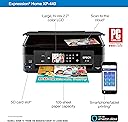
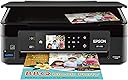
The Epson Expression Home XP-440 is a compact all-in-one wireless color printer designed for home use. Featuring a sharp 2.7-inch color LCD, it supports high-resolution borderless photo printing up to 5760x1440 dpi and offers easy mobile printing from iOS and Android devices via Wi-Fi Direct. With individual DURABrite Ultra ink cartridges, it ensures cost-effective ink replacement. Additional perks include built-in memory card slots, duplex printing, and smart scan-to-cloud functionality, making it a versatile and stylish choice for the modern professional’s home office.


| ASIN | B06W9K5FD2 |
| Additional Printer Functions | All In One |
| B&W Pages per Minute | 10 ppm |
| Best Sellers Rank | #529,016 in Office Products ( See Top 100 in Office Products ) #3,761 in Computer Printers |
| Brand | Epson |
| Built-In Media | 4 DURABrite Ultra Ink cartridges (1x Black ink cartridge and 3x color ink cartridges: 1x Cyan, 1x Magenta, 1x Yellow), CD-ROM with drivers, Expression Home XP-440 Small-in-One printer, instruction booklets, power cord |
| Color | Black |
| Color Depth | 24 bpp |
| Color Pages per Minute | 4.5 ppm |
| Compatible Devices | Laptops, PC, Smartphones |
| Connectivity Technology | Wi-Fi |
| Control Method | App |
| Controller Type | Amazon Alexa, Android, Vera, iOS |
| Customer Reviews | 3.8 out of 5 stars 2,177 Reviews |
| Display Type | LCD |
| Dual-sided printing | Yes |
| Duplex | Yes |
| Global Trade Identification Number | 00010343929753 |
| Hardware Interface | USB |
| Ink Color | Cyan, Magenta, Yellow, Black |
| Item Dimensions D x W x H | 15.4"D x 20.8"W x 11"H |
| Item Type Name | Epson Expression Home XP-440 Wireless Color Photo Printer with Scanner and Copier |
| Item Weight | 9.5 Pounds |
| Manufacturer | Epson |
| Maximum Copy Resolution Black and White | 600 |
| Maximum Copy Resolution Color | 300 dpi |
| Maximum Copy Speed Black and White | 10 ppm |
| Maximum Media Size | 8.5 x 14 inch |
| Maximum Print Resolution Black and White | 5760x1440 |
| Maximum Sheet Capacity | 100 |
| Maximum print Resolution Color | 9600 |
| Model Name | XP-440 |
| Model Number | XP-440 |
| Model Series | Expression |
| Other Special Features of the Product | Wireless |
| Output sheet capacity | 100 |
| Paper Size | 3.5" x 5", 4" x 6", 5" x 7", 8" x 10", Letter, Legal, A4, B5, A5, A6, half letter, executive, user definable (3.5" – 44" in length) |
| Print media | Paper (plain) |
| Printer Connectivity Type | Wi-Fi |
| Printer Output Type | Color |
| Printer Type | Inkjet |
| Printing Technology | Inkjet |
| Resolution | 9600 |
| Scanner Type | Photo |
| Special Feature | Wireless |
| Specific Uses For Product | Home |
| Total Usb Ports | 1 |
| UPC | 010343929753 |
| Unit Count | 1.0 Count |
| Warranty Description | 1-year limited warranty in the U.S. and Canada |
| Warranty Type | Limited Warranty |
| Wattage | 12 watts |
S**R
Great value, great quality
After having a fight with my work printer for a few hours. I gave up and ordered this one. My main reason for purchasing this model was due to the amount of ink I had on hand that the old printer used. I looked for a new printer that took the same ink. When I saw the price on this one I was sold, I needed this printer. The printer works just fine. I use 4inkjet cartridges in it so I will get my money out of this printer even if it only lasts a few years. I do run a lighter weight paper through it currently because that's what I have on hand and it will every now and then put a wrinkle in the paper when it pulls it through to print. I'm not sure why it does that but for what I print that has no impact. The stuff I print is packing slips, invoices, and prints. This is a great economy printer for your everyday needs. I would recommend this to anyone who has everyday printing.
D**R
Excellent little printer!
No the printer is not useful in a busy office, however in my home it serves 3+ people who manage to create letters and graphic designs. These printers cost little in of themselves. The largest portion of their cost is in individual cartridges of ink. By using the 288XL version you an save by clicking on B & W for most jobs. I have previously owned two other Epson printers. Mine died after 2 years of indiscriminate printing. It copies, scans, and prints. If you hav e Alexa you can also have a standing order for replacement inks. I do not refill the ink cartridges as some do. Neither do I clean the print head regularly. This process also consumes ink. The printer is easy to set up and use. I'm older than many around me and set it up by myself. That being said I also am a retired office employee for a major corporation. I am picky about getting a very good printed page every time, the first time for each document.
J**.
Unreliable: terrible printing and terrible print outs
UPDATE 11/18/2019 I have changed my 5 star rating to a 1 star. i would rate it zero stars if possible. WARNING: Do not buy this printer unless you like inconsistent printouts, are forecasting at spending $300 a year on ink cartridge replacements, and love trouble shooting connectivity issues with your devices and are not guaranteed the printer will recognize your computer. I'm lowering my rating as my experience in using this printer has continually gotten worst. Here are the problems I have been troubleshooting for the past couple of months. (I've only owned this device for 5 months) 1. print quality of standard text documents (no pictures included) is horrible. The printer will only print every other line, at best, and most lines are low quality ink distribution. Some lines are dark and others are faded and some lines aren't even on the paper. I've gone through all the maintenance steps on the device but to no avail, it doesn't get any better. 2. The ink cartridges empty out very very quickly. The cartridges are small and I knew they wouldn't last as long as my prior printer's cartridges. But these...HOLY COW!!! In the short 5 months i have owned this printer, I have replaced the ink cartridges 3 times. It's $45 to replace all 4 of them. I get it...the ink is where they make their money. But having to replace ink cartridges this frequent and at this cost is ludicrous. This is has proven to be a bad investment over a short period of time. 3. The printer is picky on which device it allows to print to it. I have 2 pc's that it refuses to print from. All other devices, work fine...for the most part. Cell phone printing is still working fine. But it is annoying that i cannot print from the main pc in the house that the kids use for homework. i have uninstalled and reinstalled the drivers 4-6 times already and it still is sporadic on allowing these 2 specific pc's print. 4. no consistency in printing output. I get print outs that are just plain white pages, no text. Sometimes the last page will print last and require me to reshuffle the print out to get the pages in order. Some pages print upside down and some wont print at all in a print job wherein some of the pages did print out. i'm so confused on what this printer is thinking as we dont touch any of the settings. I'm really stumped on this printer. i have clearly seen that in ink alone, i will be on track to spend multiple hundreds of dollars in a 12 moth time frame. This is not a wise investment compared to some of the All-In-Ones that HP makes. This printer is being placed in the garbage can tonight and i am going back to the familiar and reliable HP printers i had in the past. Ignore my comments below. I had only used the device for about a week and all was well...for that week. ****************************************************************************************************************************** Sometimes smaller products sacrifice capability. But really what I needed was something small and capable of printing. Scanning is a bonus but not a necessity for my needs. I just want printing capabilities, from any device, and to do it wirelessly. What a great little device. It meets all of my expectations perfectly.
H**D
Simple to set-up, basic printer for home use.
Inexpensive all-in-one printer for basic needs. Don't over think what a $50 printer/scanner/copier is supposed to be. This was easy to set up via Wi-Fi and being able to wirelessly print from your iPhone is an added bonus. Everything works well and it is compact, as well was lightweight. Some other reviews have stated "the ink cartridges cost more than the printer" and that is true unless you upgrade to either Epson's Eco-tank printers or you buy a professional quality level. If the ink cartridge price bothers you, then order a brand new printer every time a cartridge runs out. I just needed a basic Epson for routine work and being able to scan/copy. When it comes to doing photo work, I buy a professional level in wide-format.
M**O
3 to 1 or 1 to 1 Whatever You Need
It works great once you get the hang of it. USB cable the computer next to the 3 in 1. You may need to reinstall the software, but once you get it running the wireless feature works from any location in the house for printing. The setup may be too difficult for some. If you can get this on sale it is definitely worth a look. Only install what software you need so apps run quicker. The wireless is a great feature to eliminate unnecessary printers in the household and have the advantage to be able to print from any device when needed. Have not tried the scanning or copying features since the printer was the primary objective. The wireless printing does work well and is fairly quick. The ink is expensive but should decrease as time goes on.
D**S
Super Print Work Horse For Home Or Small Office Needs
I needed to add a Wireless printer to one end of my office so I started searching for something that caught my eye. I didn't know specifically what I needed, only that I knew I wanted a wireless ink-jet printer. I have always been a fan of HP Printers but for some reason, I wanted a change in the regular options. The Epson XP-440 caught my eye because it was available in black. USE: I use the Epson XP-440 to print highly detailed and very colorful product labels on high-gloss adhesive sheets. Print quality is as follows: High-Gloss labels/photo paper - Great Quality Printing - Takes time to print Matte paper - Color - Great Print Quality Matte paper - Black - Great Print Quality Document Printing - Super Fast - Great Quality
T**Y
Meh. Cheap, easy, but ink doesn't last long at all
Cheap, easy to set up. It was a bit unreliable in the beginning, losing connection sometimes or having the print jobs error out. Then at some stage it started printing things weirdly (missing random lines of text), then started working again all by itself. It's a $50 printer though, so expectations should not be high. I agree with the reviewer that you're almost better buying another printer than buying the ink (as the ink comes with the printer). I'm going to do that once - that way I have a spare printer, and spare color cartridges. Then I'll just buy individual black ink cartridges. I will say that it ran out RIDICULOUSLY quickly. I saw one reviewer said it lasted 100 pages - mind didn't last 50, and I was just printing shipping labels and delivery notes, so nothing that uses much ink (like photos).
A**P
Printer Works, Installation Instructions Are VERY Poor
I'm an accomplished programmer and network guy. My Epson XP-640 recently ceased to print legibly. I would have purchased another 640, but it is no longer offered so I chose the XP-440. It arrived on time and in fine shape. The unboxing and power up were simple, well documented and quick. The Epson software set up was frustrating, dangerous and despite numerous false starts ultimately failed. Part of the software installation requires that the Windows 10 Firewall be disabled. REALLY? This is down right dangerous in some situations. I've written software installations that work for all of the Windows versions from 95 to Windows 10 and never had to drop or modify a firewall. In several iterations of the XP-440 installation process I ended up dropping the firewall, rebooting my router, dropping my VPN and finally rebooting my PC. Nothing worked. The Epson software continually reported that it could not install the software. :( Eventually I asked Windows 10 to install the printer. That worked like a charm. The process took a good 70 seconds or so and did not require that I drop a firewall, reboot the router or reboot the PC. :) Printer is now working fine. It seems to be considerably lower quality than the XP-640 it replaced, but it is workable.
Trustpilot
1 month ago
5 days ago