Desertcart purchases this item on your behalf and handles shipping, customs, and support to Colombia.
🚀 Upgrade your virtual presence with the Anker PowerConf C200 — where clarity meets confidence.
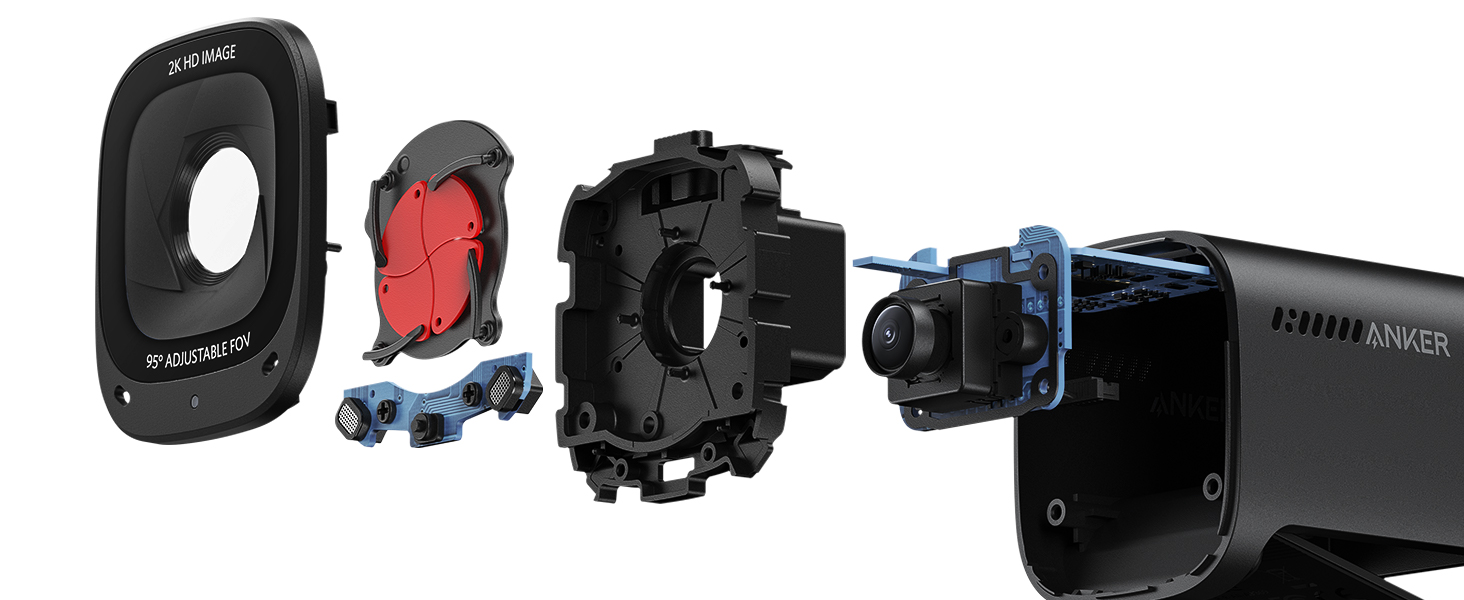
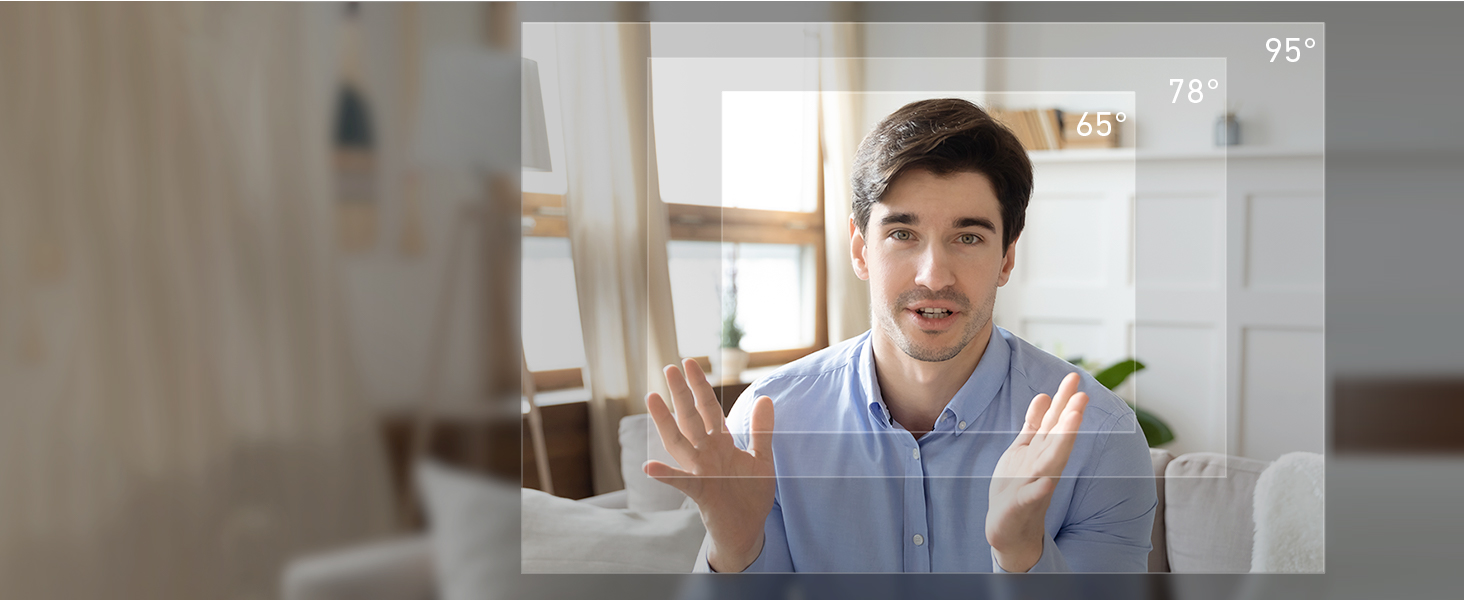
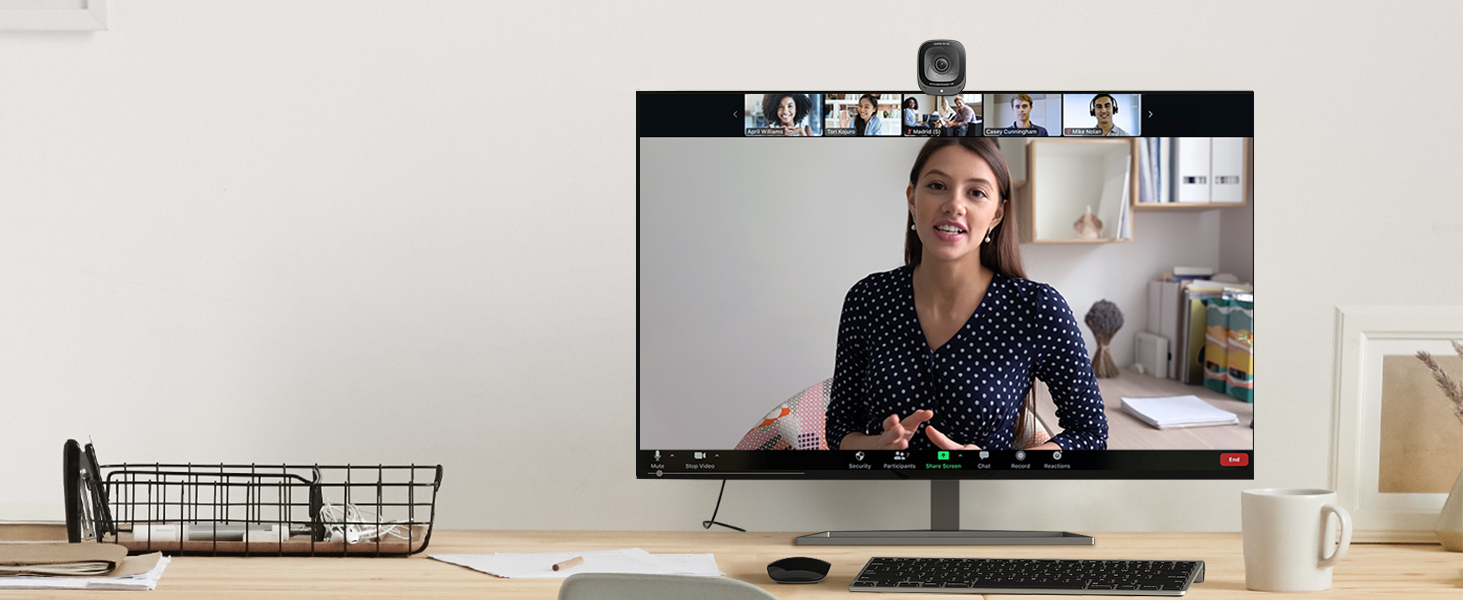
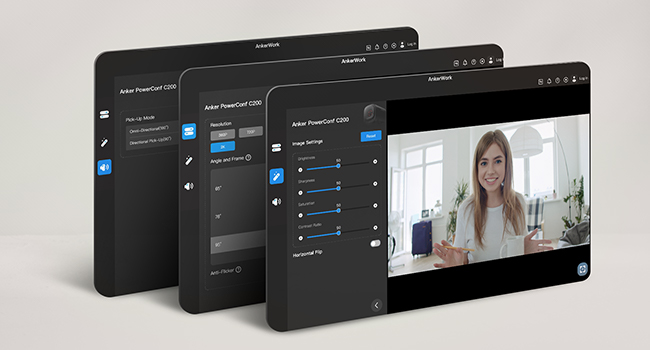
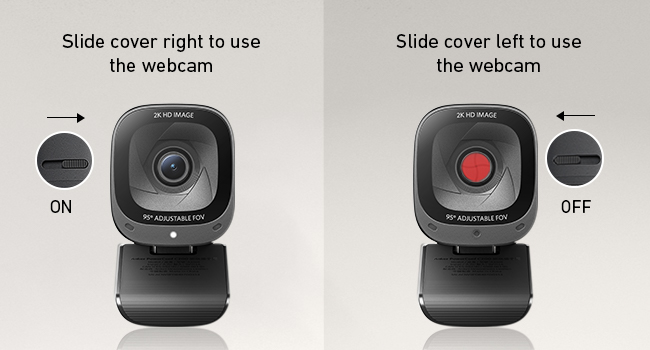
The Anker PowerConf C200 is a compact, USB-C webcam delivering stunning 2K video resolution with advanced low-light correction and AI noise-cancelling dual microphones. Compatible with Windows and macOS, it offers adjustable viewing angles (65°/78°/95°) and a built-in privacy shutter for secure, professional-grade video conferencing and streaming.


| ASIN | B09MFMTMPD |
| Antenna Location | video conferencing, computer camera applications |
| Best Sellers Rank | #6 in Webcams |
| Brand | Anker |
| Built-In Media | Anker PowerConf C200, USB-C Cable |
| Camcorder Type | Webcam |
| Color | Black |
| Compatible Devices | Laptop |
| Connectivity Technology | USB |
| Customer Reviews | 4.4 out of 5 stars 9,327 Reviews |
| Display Resolution Maximum | 2K |
| Effective Still Resolution | 2 mp |
| Effective Video Resolution | 1440 pixels |
| Exposure Control Type | Automatic |
| File Format | JPEG |
| Flash Memory Bus Interface Type | SD |
| Flash Memory Type | Micro SD |
| Focus Type | Auto Focus |
| Form Factor | Compact |
| Image Aspect Ratio | 16:9 |
| Item Dimensions D x W x H | 1.97"D x 1.57"W x 2.17"H |
| Item Weight | 7.04 ounces |
| Lens Type | Zoom |
| Manufacturer | Anker |
| Maximum Aperture | 2 f_stop |
| Maximum Focal Length | 30 millimeters |
| Minimum Aperture | 1 f_stop |
| Minimum Focal Length | 15 millimeters |
| Model Name | A3369 |
| Model Number | A3369 |
| Number of Speakers | 1 |
| Operating System | Windows 7 or later, macOS 10.11 or later |
| Photo Sensor Technology | CMOS |
| Screen Size | 2.7 inches |
| Sensor Type | CMOS |
| Shooting Modes | Automatic, Easy |
| Special Feature | Low Light |
| Style Name | 2K Webcam |
| Supported Audio Format | MP3 |
| Supported Image Format | JPEG |
| UPC | 194644088194 |
| Unit Count | 1 Count |
| Video Capture Format | MP4 |
| Video Capture Resolution | 2K |
| Video Resolution | 2K |
| Viewing Angle | 95 degrees |
| Warranty Description | 18 months warranty |
| Water Resistance Level | Not Water Resistant |
| White Balance Settings | Auto |
| Zoom | Adjustable Zoom |
C**Y
After a few months, I'm still glad I bought this one.
I'm not a "techie" person, so I needed something simple to install, yet that would provide a clear and professional image to my clients when I do virtual meetings. I was replacing a camera that had stopped being reliable (sometimes worked, sometimes didn't), and I was dreading having to do through a setup or install process with a new one. Fortunately, the install process was a piece of cake! In fact, the install was MUCH simpler than tinkering around trying to get my old camera to work! What a relief! I've had it for a few months now, and it was a good choice for me. It was SO worth a little extra money to get this camera in terms of quality and ease of use. One small detail I really like is that the lens cover for privacy is INSIDE the camera. That is a nice design touch. It's orange, so you can easily tell whether the lens cover is on or off, but it doesn't attract and hold dust the way the little ridges on an external privacy cap does. At first, I thought the lens cover looked "thin" and I was waiting for the day when it would jam and ruin the image from the camera. That hasn't happened -- however, I might recommend that anyone with small children keep the camera and the kids away from one another. I can see a kid really enjoying making the orange appear and disappear with the slider -- until it breaks. The lens cover should be fine with adult use, but it's not a toy for children. The picture is clean and crisp. So far (knock on wood) the camera has been reliable and there have been no headaches. I've used it with Teams and Zoom without issues. I can recommend this one without hesitation.
E**D
Great Camera, Great Quality for the Price!
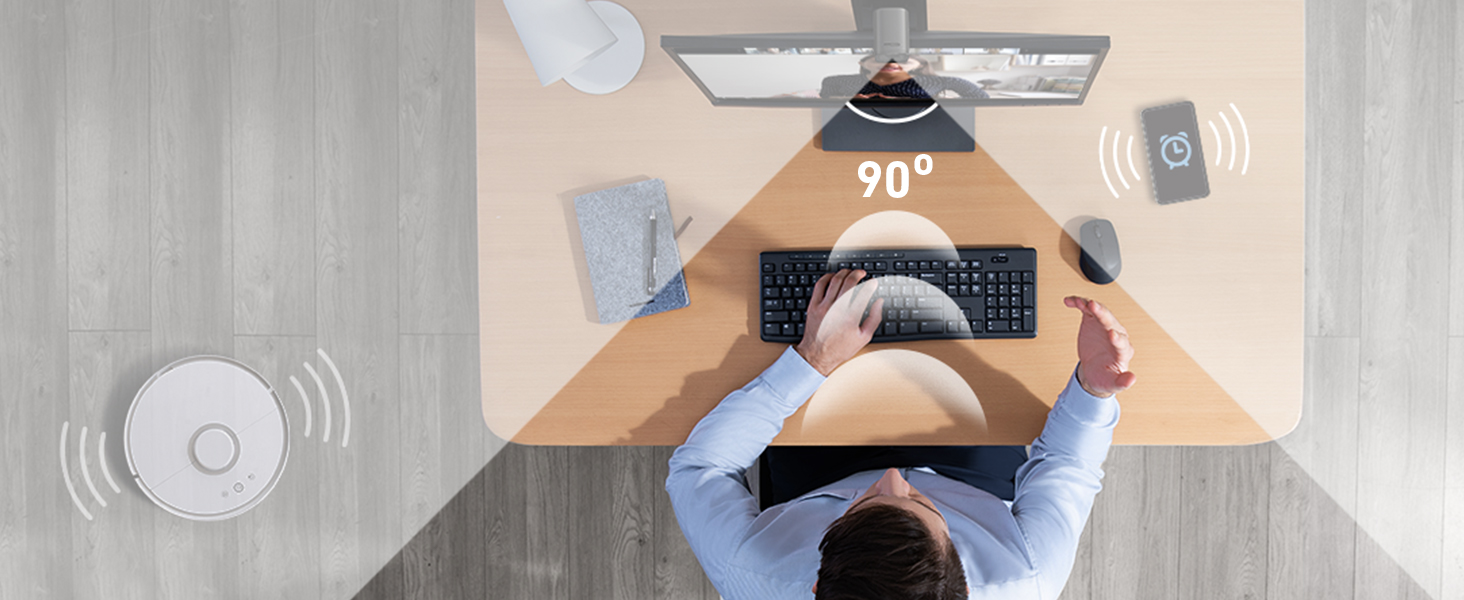
With my old webcam, I was having trouble during work video call because of low light, which caused bad quality video during my calls. I was looking for a camera that could adjust for low light while still maintaining a great video feed. The Anker PowerConfC200 fills that gap. For the price point, most cameras only offer 1080p resolution. For low light, this causes those cameras to become pixelated and have poor quality. The only way to fix that is to 1) spend more money on a higher quality camera that compensates. Or 2) purchase a small clip light fort he webcam to provide additional light. I didn't want option 2 because I didn't want that artificial light staring me in the face. Option 1 didn't need to happen either because the Anker is a 2K resolution camera that will automatically adjust to lower light, and still provide a great picture. My only slightly negative feedback is I wish the camera software was a bit better. Granted for the price, you aren't going to have a ton of controls. The other issue is the software doesn't allow me to login into my account and just refreshes the login page. This is minor in comparison to the camera's quality. It's small, lightweight, easy to adjust and doesn't block a big portion of your screen like other cameras that I've had. It also features a manual privacy shutter, which some models at this price do not have. It also allows you to adjust the field of angle, or allow you to manually adjust the zoom using the software. The microphone also offers a 360 degree field of pick-up, or 90 degree to keep the pickup more focused. Overall, I'm very happy with this purchase and would recommend it for people in similar situations.
T**R
Works well, good audio, narrow focus is good for one-on-one meetings
Pros: - good imagery - good audio - works out of the box under Ubuntu - has multiple fields-of-view widths (reported, but I haven't tested) - has a slide switch that covers the camera lens - easy set-up - just plugs in to USB 2 port, so easy connectivity Cons - slightly expensive - slide switch that disables the camera *does not* disable the microphone.
I**R
Surprisingly clean image for the price — solid everyday webcam
I bought this webcam for a mix of use cases: work meetings, online classes, occasional streaming, and letting my son use it for online chess tournaments. It’s not a single-purpose setup, and that’s actually where this camera shines. Setup was completely plug-and-play. I didn’t have to install or configure anything to get a good image. I’ve mounted it both on a tripod and directly on top of a monitor. The tripod mount worked as expected, but the monitor mount was a pleasant surprise — very stable and secure. I remove the camera after each use since it’s shared, but if this were staying on a monitor full-time, it would easily be a set-and-forget situation. Lighting in my space is mixed (standard room lighting plus Nanoleaf LED panels), and the camera handled it well without any tweaking. I haven’t needed to adjust settings beyond enabling or disabling the microphone. The image is clean and looks especially good for this price point. I did notice some difficulty when trying to use a green screen, but that’s likely more about my lighting or OBS setup than the camera itself. Autofocus has been solid — it stays locked and doesn’t hunt or distract during calls. I can’t really comment on the built-in microphone because I immediately disabled it and use dedicated RØDE audio gear instead. Likewise, if there’s optional Anker software, I didn’t feel the need to use it. Compared to other webcams I’ve used, this is definitely better than basic Logitech models. I haven’t used an Elgato webcam, but for most people this falls squarely into the “good enough, stop shopping” category. Who should NOT buy this: Anyone expecting 4K resolution or professional-level camera results. This is not a replacement for a real camera setup. I have limited need for a webcam, and this fits my needs perfectly. Bottom line: For the price, the image quality is surprisingly good, setup is painless, and the mounting is more solid than expected. Easy 4 stars.
G**W
Fantastic Webcam
I was setting up for some work interviews, and I wanted a webcam to use for my desktop. After searching for a bit - and looking for something with a low-cost price range - I came across the Anker PowerConf C200. This camera is great. It was extremely easy to setup and has its own app that you can download to adjust settings to your liking. Setup was very simple...plug it in and you're ready to go. The camera has a privacy shutter built in, the microphone is clear and does a good job of pickup, and it does extremely well with various lighting situations. Low light...no problem. The colors are very nice, stable images and even has various zoom levels you can choose from when you're on-cam. Overall, a perfect addition for any computer for video conferencing, and I'd even consider it for small and general video recordings.
M**D
This is more than basic
Camera was about as close to “plug and play” as you can get. Downloaded basic controls for some minor adjustments. Color, lighting and picture quality is excellent. As other reviewers mentioned I would like camera to have more close up options and sometimes the camera takes a moment to focus. For a webcam at this price point these are not deal breaker issues. For Zoom meetings I am more than satisfied. I still use a stand alone microphone so I cannot give any opinions on the built in microphone. The camera sits securely to my monitor and the color coded privacy shield is brilliant. This is more than basic but if you need more professional set up you need to look elsewhere and spend more.
E**.
Solid webcam, nice features, works well.
I got this Anker C200 webcam to replace my Logitech C270 webcam. I started having multiple crashes during Zoom meetings and read that it could be due to Logitech drivers. I've only used this Anker webcam for a couple of Zoom meetings, so far no crashes, I hope this solves the problem. I like the solid build quality of this Anker webcam, I like the indicator light that shows when the camera is in use, I like the built-in privacy shutter that not only physically covers the lens, but is also a switch that turns off the camera sensor, the webcam still shows up as a connected USB device, just no video signal. I like that there are multiple settings options for resolution, view angle and microphone modes in addition to the normal color / brightness settings. There are settings for 360P, 720P, 1080P and 2K resolution, angle of view for 65 degree, 78 degree and 95 degree. A selection for the microphone between omni-directional and directional pick-up. The microphone on my Logitech is not very good and produces a very low / weak audio signal, people in my Zoom meetings tell me the audio on the Anker is loud, clear and good quality. I have it set to directional pick-up, have not tried the omni-directional as I know that will just pick up sounds from the room. The camera has an auto focus which is nice, what I don't like is the what I call "focus hunting". Not as bad as other cameras and more of a pet peeve of mine, but it might be nice to have a setting between normal auto focus and a less aggressive auto focus that "hunts" for focus less. The picture quality is good, better than most webcams I've seen, but you can still see the compression / processing artifacts in the picture even at 2K. This might be helpful with bandwidth when streaming at 2K and for the price, it's really good picture quality. The Anker seems to have much better overall light and low-light quality. My Logitech camera would make me look washed-out here and there even after making settings adjustments. The Anker has a much more natural look without the washed-out forehead. Color Balance control seems to be better with the Anker. I can give my webcam image a nice warm light look which stays set. The Logitech and the Auto White Balance setting of the Anker pick up on the LED lighting in my room and set the camera to a blue-ish / daylight setting. The Logitech was hard to set differently and wouldn't always hold my settings, so two thumbs-up there for Anker. I'm very pleased with this Anker webcam. At about double the price for the Logitech C270, for me, it offers more than double the results. It has more settings and options than what Logitech offers. The Anker software is clean, intuitive and functions well. If you're tired of struggling with those cheaper, low quality, works just "OK" cameras and want something that looks and sounds nice, the Anker C200 2K webcam is certainly worth getting.
T**F
Fine For Non-Professional Use - Poor auto-focus, cheap USB-C cable
The camera appears to be of decent quality with a sturdy build that has performed adequately over the past couple months of heavy use. It is easy to setup and using the AnkerWork application provides more versatility. However, the camera seems to have a lot of difficulty with its auto-focus. With normal lighting and even without a cluttered background, it often takes a bit of time to focus on the only person in the frame. Any movement seems to throw it off, and it has to try to focus again. The provided USB-C cable also appears to be of low quality as I began to have consistent disconnect issues after a month of use. I thought maybe it was a camera issue initially, but changing out the cable solved the problem. For its price point, it's a fine camera for non-professional use.
D**N
Bardzo prosty w obsłudze, bardzo dobra jakość
Bardzo łatwy w użyciu, a jakość obrazu jest bardzo dobra. Wideo jest ostre, a ustawienia łatwe do zrozumienia. Podłącz i graj.
J**O
Amazing image quality and build for its price!
I just got this today, but I am blown by the quality of this webcam. Upon opening the box, I was expecting some cheap plastic based item. Still plastic alright, but the finish, the thickness of the usb cable that came with it, how it was packed, the care of producing a quality brochure...it is better than the rest in its price class, or even compared to something more expensive. The image quality is just as amazing. And the autofocusing really works, as well as in the selection of the field of view. I am thinking of getting another one, as I type this review. I just plugged it into my Mac running OS Monterey, and then I'm ready for my online zoom session. We'll see how it performs in the next few months. But as of now, I am so pleased with this product that I would like to share this through a review here in Amazon.
M**O
Ottima webcam 2K con audio davvero notevole
L’AnkerWork PowerConf C200 è una webcam USB davvero valida per uso su laptop e computer, sia per lavoro che per lezioni o riunioni online. Il grandangolo copre bene l’area davanti al tavolo e la definizione 2K restituisce un’immagine chiara, ben contrastata e con colori naturali, anche in condizioni di luce non perfette. Il lato audio è un punto di forza: i microfoni integrati catturano la voce in modo pulito e preciso, riducendo il rumore di fondo e rendendo la comunicazione molto più piacevole. Nel complesso è una soluzione completa, facile da collegare e pronta all’uso, ideale per chi cerca una webcam di qualità superiore alla media per smart working o videoconferenze.
J**O
No conocía la marca, pero me ha sorprendido muy gratamente
Desde el inicio de la pandemia, el uso de una webcam en mi caso está siendo imprescindible para la realización de videoconferencia , ya que la cámara del portátil es bastante mala. Hasta la fecha estaba utilizando una webcam Logitech, pero desde la última actualización de Windows 11, por lo que sea, al enchufar la webcam Logitech el sonido se apaga automáticamente (es algo reportado por otros usuarios, y sin solución de momento). Así que me he visto obligado a comprar otra cámara, y por supuesto, no iba a a ser Logitech porque no quería seguir teniendo el mismo problema. He de reconocer que no conocía la marca Anker pero me aventuré a comprarla por las opiniones positivas, y estoy muy contento con el resultado. Lo que más me ha gustado: ✅ La calidad de la cámara es muy buena. La grabación y retransmisión es excelente. ✅ Fácilmente configurable (resolución, ángulo de grabación, exposición, etc.). Sencillo y práctico. ✅ Diseño bonito y compacto. ✅ El soporte funciona muy bien. En este punto, tengo que decir que el soporte de la Logitech parecía más estable, pero este también aguanta perfectamente. ✅ Se puede cerrar la mirilla cuando no estás utilizando la cámara. Está bien como medida de seguridad por temas de privacidad. Así que el resultado está siendo excelente, y la relación calidad/precio, también considero que es muy buena. Muy satisfecho con la compra y es un producto que recomendaría sin duda. 👍 Espero que mi opinión te haya resultado útil 👍
A**R
كاميرا ممتازة جدا
أنا شتريت هذه الكاميرا وبصراحة أبهرتني بجودتها الرائعة جودة التصنيع وجودة التصوير والميكروفون يعتمد عليهم جدا الكاميرا مفيدة جدا ومناسبة لتصوير الفيديوهات والبثوث المباشرة عبر كل المنصاب المتاحة يوجد برنامج يتم تنزيله من أنكر تستطيع من خلاله ضبط الألوان والفيديو والصوت وكل الإعدادات كما تريد الكاميرا بتضبط اللون الأبيض جدا وبتحس انها بتنقي الصورة بشكل رائع كمان الكاميرا يوجد فيها زر في الأعلى يتم سحبه لإغلاق الكاميرا والحفاظ على الخصوصية الكاميرا ممكن تثبيتها على شاشة الحاسوب أو على حامل سلك الكاميرا كافٍ جدا لجعل الكاميرا في المكان المناسب لها أنا اشتريت هذه الكاميرا من البائع shafeea هو بصراحة بائع ممتاز جدا ومحترم بشكل يجعلني أقول الدنيا لسا بخير والحمد لله البائع كان مغلف المنتج بشكل ممتاز جدا وقوي ويحافظ على الكاميرا من أي خبطات أو أي خدوش في علبتها الخارجية أنا بحثت عن المنتج في أماكن كثير قبل الشراء فلقيت المنتج هنا عند البائع shafeea أرخص من أي مكان بفارق كبير المنتج أصلي ومفيد لأي صانع محتوى يريد نقل محتواه لمستوى جديد من الإبداع أنا أنصح بها جدا جدا جدا شكرا البائع المحترم شكرا أمازون
Trustpilot
1 week ago
2 weeks ago