✈️ Elevate your flight sim game with cockpit-grade precision!
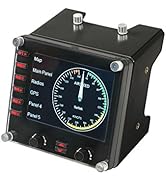
The Logitech G Pro Flight Instrument Panel features a vivid 3.5-inch LCD that integrates seamlessly with major flight simulators, offering 15 customizable instrument displays. Designed for professional-grade simulation, it delivers real-time flight data with reliable USB connectivity and durable build quality, making it an essential upgrade for serious virtual pilots.


| ASIN | B01LYE4J1C |
| Additional Features | Motion Sensor |
| Best Sellers Rank | #27,294 in Video Games ( See Top 100 in Video Games ) #75 in PC Game Flight Controls |
| Brand | Logitech G |
| Brand Name | Logitech G |
| Button Quantity | 6 |
| Color | Black |
| Compatible Devices | Windows 7, Windows 8.1, Windows 10, Windows 11 |
| Connectivity Technology | USB |
| Controller Type | Joystick |
| Customer Reviews | 4.0 out of 5 stars 498 Reviews |
| External Testing Certification | Não aplicável |
| Global Trade Identification Number | 10097855127928 |
| Hardware Platform | PC |
| Included Components | Mounting Bracket, Pro Flight Instrument Panel, QSG, Screws |
| Item Dimensions | 5.71 x 4.65 x 3.94 inches |
| Item Type Name | Logitech G Pro Flight Instrument Panel (945-000027) |
| Item Weight | 14.11 Ounces |
| Manufacturer | Logitech, Inc |
| Manufacturer Part Number | 945-000027 |
| Model Name | Pro Flight |
| Model Number | 945-000027 |
| Package Quantity | 1 |
| Power Source | Information Not Available |
| UPC | 097855127921 |
| Warranty Description | 90- Days |
P**T
Great if you know what you're doing.
Like the rest of the Logitech/Saitek panels, the build quality is rock solid. Be aware that this is an addon for simulator software; it will not work as a game controller straight out of the box with manufacturer's drivers on a standard gaming setup. Took me several days to locate an archived Saitek driver package that even made Windows 11 recognize that it was plugged in. Once you find a 3rd party support program to sit between the device driver and your simulator software (for example SPAD Next, other solutions are available), the ease of use goes from "nope" to "awesome".
V**R
A must have for flight sims!
I had no idea how good this display was going to be but it has rapidly turned into my favorite tool for FS2020. The good stuff: 1. The display has many quality gauges to choose from as well as a super useful multi-gauge page which means one physical display is probably going to meet the needs of most players. 2. Installation is cake; go to Logitech to find the sim you play and its driver, then do the auto-install. 3. Great update rates, no visible lag. 4. No trouble leaving it plugged into Thunderbolt 4 hubs during power cycles. It wakes up properly and starts communicating with no need to plug-pull reset. If only my HOTAS could be that way... The bad stuff: 1. Kinda spendy if you want a full setup. I'd like six displays but at the current price I can get a sim glass cockpit started for the same money. 2. Logitech does not seem to prioritize this product or any of their flight sim related products. Wouldn't be at all surprised if Logitech stopped making flight sim stuff altogether.
D**N
These work well but only if the right steps are done
I gave this a 4 star rating because there is only so much you can do with these and they are not the real thing like another company sells, but these are less cost. Do not use the Saitek drivers, hopefully they will not be available in the future. They do with with SpadNext if you sim works with it. I use fipguages for more guage choices. The next thing you need a USB 2 hub, does not have to be powered. It is best if you do not plug it in a usb 3 port but it does work. Only put 3 or 4 per hub. If you do a windows restart they may not all come back. When a windows shutdown and power off, mind always come back. I found on amazon a cable that has 3 USB 2 cables that all put into the computer with a single port. They were like $5 so they can be found. I run 6 and getting 3 more since they are stable now, but this was a learning curve for me trying to get them to work.
A**C
Drivers not updated since 2020 - poor support from Logitech.
Save your time if you are on Windows 11 or FS 2024. Logitech has not updated the driver's since 2020 as of this writing, and if you want to try to make this work, you need to go to a third party software solution that adds to the cost of adding an instrument to your sim. When the price dropped on this instrument display, I snapped it up, but didn't realize that Logitech hasn't supported it despite claiming Win11 support. I suspect there will be a lot of returns after Xmas due to not supporting modern platforms. It also requires a USB 2 interface; many new computers just offer USB 3, showing how this hardware has not kept up with the times.
J**3
Very useful
Never knew how much I needed this until I got it. It fits perfectly with the Boeing TCA Yoke
E**O
Maybe but if you need something more affordable in price
I’ve owned these for several years, and while they do work, I strongly recommend avoiding the stock drivers and software. The default interface feels very outdated and limits what the hardware can really do. To get the most out of them, I recommend using SPAD.neXt, which unlocks significantly more functionality. Pair that with gauges from fipgauges.com, such as the PFD and HSI if you’re using them for flight simulation and you can configure them to replicate instruments like the Garmin G5 or many other gauges. In my opinion, this is the only way to truly maximize their potential. On the positive side, the build quality is solid. The buttons could be improved, but they’re acceptable. They’re also fairly straightforward to use if you stick with the stock firmware. However, the biggest downside is performance. These units are noticeably slow when displaying real-time data. There’s a slight but consistent delay, and I often find myself relying on my main cockpit display for smoother, more accurate readings. While the lag isn’t a complete dealbreaker, there are situations in flight simulation where immediate, precise feedback is important, and these fall short. Would I buy them again? No. Instead, I would choose the RealSimGear G5. It uses an HDMI connection, eliminates the delay issues entirely, and offers far more flexibility without requiring additional third-party software purchases.
T**R
Really like these instruments
I use the instrument with MSFS 2020 and Spad.Next. Spad gives you choices of which instrument you wish to display and includes free and for-purchase options. It shows well over a dozen choices. I use this exclusively for airpseed indicator, very much more convenient than having to search around in the sim cockpit for the gauge when you're trying to maneuver or land. It's a bit pricey - but it works well, has bright display, decent choices of instruments.
C**Z
Espectacular
Super funciona perfecto
M**A
Ótima qualidade e resolução
Excelente visor, tamanho e fácil configuração. Deixa a experiência muito real.
N**N
Genial para un fan de simulación de vuelo
Al principio que ví este accesorio se me hizo caro y que nunca compraría.. Sin embargo tuve la curiosidad de usar uno de estos, lo compre en promoción y al montarlo me cambio completamente la experiencia de mi simulador de vuelo, me encantó y ya estoy juntando para adquirir los próximos para hacer la experiencia más real al simulador de vuelo.. Si eres fan de la simulación de vuelo, es un must que no te debes perder
D**.
Not just for flight simulator.
You can never have too many FIPs. And if you use SPAD.neXt instead of the Logitech/Saitek software that comes with it you can use it for racing gauges as well.
Y**S
Good product
Excellent product, works very well
L**E
Perfect, work when you plug it, for MSFS 2020
Plug and play, it’s work when you plug it, at the first time, For MSFS 2020
Trustpilot
1 month ago
2 months ago