Desertcart purchases this item on your behalf and handles shipping, customs, and support to Colombia.
🎯 Elevate your game with the ultimate wireless adapter—connect, customize, conquer!
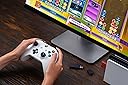
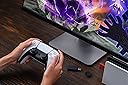
The 8BitDo Wireless USB Adapter 2 is a versatile, compact device that enables wireless connectivity for a wide range of controllers including Xbox Series X|S, Xbox One Bluetooth, PS5, Switch Pro, and more. Compatible with Switch, Switch 2 (with firmware update), Windows, macOS, Steam Deck, and Raspberry Pi, it supports 6-axis motion and vibration feedback. Advanced customization options allow button remapping, sensitivity adjustments, and macro creation, making it a must-have for serious gamers seeking seamless multi-platform play.


| ASIN | B09M8CVMYF |
| Best Sellers Rank | #499 in Video Games ( See Top 100 in Video Games ) #5 in Nintendo Switch Cables & Adapters #26 in Mac Games & Accessories #108 in PlayStation 5 Consoles, Games & Accessories |
| Brand | 8Bitdo |
| Built-In Media | 8Bitdo Wireless USB Adapter 2 for Switch |
| Color | Black |
| Compatible Devices | Gaming Console |
| Connector Type | Micro USB |
| Current Rating | 1 Amps |
| Customer Reviews | 4.4 4.4 out of 5 stars (6,192) |
| Finish | Matte |
| Input Voltage | 20 Volts |
| Item Dimensions | 3.54 x 2.17 x 0.98 inches |
| Manufacturer | 8bitdo |
| Mfr Part Number | 8BitDo USB Wireless Adapter 2 |
| Model Number | 8BitDo USB Wireless Adapter 2 |
| Number of Items | 1 |
| Number of Ports | 1 |
| Package Quantity | 1 |
| Power Plug Type | No Plug |
| Smart Home Compatibility | Not Smart Home Compatible |
| Specific Uses For Product | Video Game Console |
| Unit Count | 1.0 Count |
| Warranty Description | 1 Year |
B**B
Great product! Works great for connecting wiiu pro controllers to my pc!
I have two wii u pro controllers left from my console days. Plugged one of these dongles into my living room pc and pushed the pairing buttons the dongle and the controller, they instantly paired and stayed connected for hours with zero issues until I turned the controller off. Great product. If you don't know, you will need one these for each controller you want to connect. I'll be buying more of these.
A**M
One firmware update later and it works great
Be sure to grab the firmware updater from 8bitdo's website and follow the instructions. Once I did that and plugged it in to the front of the switch dock it works flawlessly. Connects to my Xbox core series s/x whatever naming scheme controller with no issues. Barely any latency so I cant deny that I suck at Smash anymore.
C**K
Went with this over Nintendo Switch Pro Controller 2
I was deciding between the Nintendo Switch Pro Controller 2 and this adapter. I ended up trying out the adapter to connect my Nintendo Switch 2 to a Scuf Gaming PS5 controller (4 paddles on the back). I first updated the firmware on the adapter and then plugged it into the Switch 2 dock. My controller connected immediately and I was able to start using it - including the paddles. This $15 adapter has exceeded my expectations - there is 0 lag, great compatibility, and it's hard to beat that price - especially when compared to the Pro Controller. The only downside is that it doesn't power on the Switch 2, but it's not a deal breaker for me since i keep the controller next to the dock anyways.
S**N
Elite Series 2 on Switch 2
Works great. Lets me use Elite Series 2 controller + back buttons on my Switch 2. Set the paddle bindings on a computer via Xbox Accessories, then plug the dongle in to the Switch 2 and pair the controller. Make sure to enable wired controllers in Switch options.
N**M
Worked out of the box connecting XB1 and PS5 to Switch, some issues.
My Switch Pro controller analogs are both shot now, and I figured 20 bucks for a bluetooth adapter to use other controllers on hand was worth trying, compared to the price of replacing the official controller. So far I've used this to connect my Xbox One controller (for the older Xbox, not the current one) and a PS5 controller to my Nintendo Switch. I did not update the 8BitDo2's drivers or change anything on the adapter's settings, and the controllers themselves were both up to date on firmware. So far I've only had connection issues with the Xbox One controller, which I suspect was due to the old AA batteries being low, but the controller worked great for the first 20 or so hours, with the exception of one mid-salmon run match where the controller got stuck and had me running in circles until I was booted. Most buttons on the XB1 were mapped one to one with the Switch, the only buttons I didnt seem to have access to was screenshot and recording. The rumble worked but was a bit too strong for my liking. Then I swapped to using my PS5 controller, and have been keeping the controller's power topped off. Ive had no disconnect issues with the PS5 controller while games were running and the console was powered on. The PS5 controller seems to emulate all buttons as well as motion controls, while using the touchpad button to take screenshots and record clips. Both controllers occasionally have to be reconnected when the console has been off for a while, which is fairly easy to do. I'm not sure why this is, the adapter seems to retain connected devices after being unplugged. Some days I wake up, press the PS or Xbox button to connect them to the adapter, and then press it again and the console wakes up, other days I have to walk over to the docked console and press the power button, and then reconnect the controllers. So far both controllers were very responsive pressing buttons and responding to analog sticks, I have not been able to perceive any delay/latency compared to using the Switch Pro controller. I typically sit between 4 to 12 feet away from the console when I play. Both controllers seemed to have a mildly annoying dead zone on the LR2 triggers though, but it usually doesn't affect anything unless I need to press those triggers rapidly. Either I never noticed this dead zone when using the controllers on their respective consoles, or the *BitDo2 is set to wait until a certain analog distance is pulled before emulating the digital signal to the Switch. Out of the box, this may be annoying depending on what hardware you have to tweak it with, since it requires a compatible smartphone or PC.
J**O
Good product bad user experience.
This thing works great. Only issue I had was having to update it to work on my switch. Holy moly did that take long. The issue was finding what link to download the fight update option. That took like 2-3hrs. There are no clear videos or write ups that give help.
N**S
Totally Useless, Does Not Work on Windows 11 with Xbox Elite Series 2
I bought this to use with my Xbox Elite Series 2 Controller on my PC, running Windows 11. Previously I had purchased another, cheaper USB dongle to pair this controller to, and it honestly worked great. I bought this 8bitdo dongle when that cheaper dongle bent, as I thought it would be nice to have an upgraded dongle that was not bent. This one had good reviews, so I really looked forward to having a more reliable dongle for my controller when gaming on my PC. Unfortunately, this product is completely useless for my use case, as it simply does not work at all. I am able to pair my controller to the dongle, but the dongle simply does not transmit any controller button inputs to my PC. I have tried updating the firmware to no avail, and I have tried using 8bitdo's software to troubleshoot my issue, but said software is completely unhelpful, and does not seem to do anything at all. I have scoured the internet for troubleshooting tips - most of which come from third party sites, as 8bitdo's website seems to have major issues and mostly doesn't seem to even work - but nothing I have tried has made this 8bitdo dongle function as it is advertised. I have since returned to using my old, cheap, bent USB dongle, which still works great, despite requiring absolutely no drivers or software or firmware updates. This 8bitdo dongle seems to require a lot of software and firmware updates, along with major troubleshooting, and still does not have a guarantee of working. I am incredibly disappointed with this product, and moreover I am disappointed with myself for not returning it within the return window, as this thing is just totally useless. I cannot recommend this product at all, if you intend to use it on a Windows 11 PC with an Xbox Elite Series 2 controller.
R**Y
Recommended Wireless Adapter
I have only used this adapter for a few hours, but so far it is performing exactly as expected! This allows you to connect a wide array of controllers to your PC or console with close to if not zero latency. I wanted a solution to use my Xbox Elite controller wirelessly , but the Bluetooth connection is a joke with the input lag. This adapter solves that problem, and since I have other controllers I can use those too as a bonus!
A**S
Great little device.
It's worked great! Obviously I tested a Switch 2 Pro controller and it did not work but wanted to test. Works with my Xbox Controller on PC and my Switch Pro 1 controller on PC. I tested it on PS5 and it didnt seem to work. Tried connected a PS5 controller to Switch, it didnt work. So make sure you fully read the description of this item before purchasing as it seems to only work with controllers stated. That being said, it's been a dream to use my xbox controller wirelessly since my computer has such garbage bluetooth. I got it for way cheaper than the price of 26CAD (it's current price at time of this review) I think I paid under $20 so wait for a sale if you want.
C**O
Funcionou perfeitamente
O melhor que tem!!!
凜**舞
Dualsense無線接続できました。
無線接続できました!むしろ有線接続できなかった… Dualsense(PS5コン)とSwitch2です。他の方のレビューの通り、ファームウェアアップデートをして、Switch2本体につないでクリエイトボタンとPSボタン長押ししても機能せず… しかしAIと何度も対話していたらできたので共有します。 Switchのコントローラー検索画面を開き、アダプターのボタンを長押しします。 普通の不規則な点滅ではなく、高速&一定の点滅になるまで何度か長押しします。(←ここが成功要因でした) その上で無線でクリエイトボタン&PSボタン長押しでSwitch2がコントローラーを認識してくれます! 当方FPSなど触りたかったので遅延や接続が不安定であれば追記しにきます。ご参考まで。
K**R
Works out of the box
Works exactly as intended with an xbox series s/x controller after paring. The 8BitDo Windows app is neccessary for it to work and map custom buttons.
T**L
ماتشغل مع كل الكنترولرز
للأسف القطعة ماتشتغل مع كل الكنترولرز حتى لما سويت آبديت لها, انا استخدم كنترول البلايستيشن 4 و3 على البي سي
Trustpilot
1 month ago
2 months ago