


Desertcart purchases this item on your behalf and handles shipping, customs, and support to Colombia.
🚀 Elevate Your Display Game with Unmatched Clarity & Stability
The Cable Matters Unidirectional USB C to DisplayPort 1.4 Cable (6ft) delivers ultra-high-definition video output up to 8K@60Hz or 4K@240Hz, tailored for Thunderbolt 4/5 and USB-C DP Alt Mode laptops. Featuring locking DisplayPort latches for secure connections and MST support for multi-monitor setups, it’s the professional’s choice for flawless, high-performance video and audio transmission.
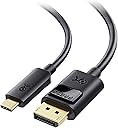


| Asin | B01J6DT070 |
| Best Sellers Rank | #7 in Thunderbolt Cables |
| Brand Name | Cable Matters |
| Cable Type | USB |
| Color | Black |
| Compatible Devices | Laptop |
| Compatible Phone Models | Iphone |
| Connectivity Technology | USB |
| Connector Gender | Male-to-Male |
| Connector Type | Usb Type C, Displayport |
| Customer Package Type | FFP |
| Customer Reviews | 4.6 4.6 out of 5 stars (4,678) 4.6 out of 5 stars |
| Data Transfer Rate | 1.5 gigabits_per_second |
| Ethernet Cable Category | Cat 5 |
| Frequency | 60 hertz |
| Global Trade Identification Number | 00682017352923 |
| Indoor Outdoor Usage | Indoor, Outdoor |
| Item Length | 6 feet |
| Item Shape | Round |
| Item Weight | 1.6 ounces |
| Manufacturer | Cable Matters |
| Model | 201036-BLK-1.8m |
| Model Name | USB-C to DisplayPort Cable |
| Number Of Items | 1 |
| Number Of Pins | 44 |
| Other Special Features Of The Product | Data Transfer, High Speed |
| Outer Material | Rubber or Plastic |
| Part Number | 201036-BLK-1.8m |
| Recommended Uses For Product | Connecting computers to monitors or projectors, high-resolution video output, audio output, daisy-chaining multiple monitors |
| Specification Met | Industry Standards |
| Unit Count | 6 Feet |
| Upc | 682017352923 |
| Wattage | 20 watts |
User
Exactly What I Needed for My Monitor Setup
I picked this to connect my USB-C device to my monitor, and it has been working really well. The 6-foot length is perfect for my setup and gives me enough room without having a bunch of extra cable everywhere. The picture looks clear and smooth, and I haven’t had any problems with flickering or the connection dropping. The cable also feels sturdy and well made. Just make sure you need a USB-C to DisplayPort connection specifically since it is unidirectional.
User
Works with displayport KVM, 4K@120Hz
This works great with the Mac Mini M4. I have two of these attached to my rear TB ports. They connect to a dual display displayport KVM. They work perfectly at 4k@120Hz.
User
Works Flawlessly with My ASUS HD Monitor
First of all, this cable works very well. I was having problems with my external monitor on my AMD powered laptop. The monitor wasn't working sometimes after the laptop woke from sleep. I would have to unplug the USB cable, which was a USB-C to HDMI and various other USB ports, to get the monitor to wake. This new USB-C to DisplayPort cable works everytime now. Also, the monitor is rock steady all the time. I works flawlessly now.
User
MacBook to Samsung G9 answer
Worked perfectly and as described - if you are trying to connect a M4 MacBook to a Samsung G9 - this is your answer
User
Good but have some caviats.
It worked with the Samsung G80SD and the MacBook Pro M1 Pro. I tried another cable before this, and I didn't get a signal at all. Sadly, it didn't work on my Windows Laptop at all, so I haven't tried 4k 240hz as advertised. Also, it didn't work with adaptive refresh rate, so I had to disable game mode to get a reliable image output.Since the other brand didn't work at all and this worked at least for my main use case, I am giving it 4 stars.
User
Excellent compatibility with MacBook air M1
After trying several different USB-C to DisplayPort cables, this is the one I decided to keep.My setup is a MacBook Air M1 connected to an MSI PRO MP273 monitor via DisplayPort. One of my main goals was to enable Variable Refresh Rate (VRR) / Adaptive Sync on the external monitor, and this cable successfully did that.At first, macOS only showed fixed refresh rates (50Hz and 60Hz). After enabling FreeSync in the MSI monitor's OSD menu, macOS immediately detected Variable Refresh Rate support, and the VRR option appeared in Display Settings. The connection has been stable and reliable.I tested multiple USB-C to DisplayPort cables before settling on this one. Some cables were significantly more expensive, including newer DisplayPort 2.1 models, but compatibility was inconsistent. This Cable Matters DisplayPort 1.4 cable provided the best balance of price, stability, and compatibility for my setup.The cable feels well made, the connectors fit securely, and I have not experienced signal dropouts, flickering, random disconnects, or display wake-up issues. Video quality is excellent and text remains sharp and clear for everyday office work, web browsing, and media consumption.For anyone using an Apple Silicon Mac (especially an M1 MacBook Air) with an MSI monitor that supports FreeSync/Adaptive Sync, this cable is worth considering. If you're troubleshooting VRR support, make sure FreeSync is enabled in the monitor menu, as that was the key setting that allowed macOS to recognize Variable Refresh Rate on my system.Overall, this cable delivered exactly what I needed at a reasonable price, and it has been the most reliable option among the several cables I tested.
User
Reliable QHD 165Hz Output—2-Way Testing Not Feasible
I’ve been using the Cable Matters USB-C to DisplayPort 1.4 Cable with my 16-inch M4 Pro MacBook Pro and Samsung LC34G55T ultra-wide monitor, and here’s my experience:System Setup:My MacBook Pro has the following configuration:Apple M4 Pro chip with 14-core CPU, 20-core GPU, and 16-core Neural Engine.24GB unified memory and 1TB SSD storage.Three Thunderbolt 5 (USB-C) ports, HDMI port, SDXC card slot, MagSafe 3 port, and Liquid Retina XDR display.My monitor is a Samsung LC34G55T ultra-wide, with a resolution of 3440 x 1440 and refresh rate of 165Hz, which I used for this review.Performance:The cable works as advertised. It successfully achieved the full 3440 x 1440 @ 165Hz refresh rate on my Samsung monitor, something HDMI couldn’t handle. It provides reliable video output via DisplayPort Alt Mode from my MacBook Pro’s Thunderbolt 5 ports.2-Way Operation:I cannot confirm the cable’s 2-way operation, as I don’t own a USB-C input monitor to test it. I use the cable solely for my Samsung LC34G55T monitor, and it has performed exactly as expected.Final Thoughts:This cable does exactly what it promises. It provides reliable and consistent video output for high-refresh-rate monitors. It’s a solid choice, and I recommend it to anyone whose needs are similar.
User
Great cable! It does what it promise!
I orderded two UGREEN cable before ordering this. They both just didn't work to connect my monitor DELL to my Yoga I9 2025. This cable worked perfectly. 5 stars.
User
Ravi
Service client particulièrement réactif et produit d’une qualité exemplaire. Une recommandation sans réserve.
User
funciona perfectamente, incluso con Samsung Odyssey G7 27
Funciona perfectamente.. antes tenia conectado el portátil a la pantalla por hdmi.. y no me dejaba seleccionar más de 144hz.. pero ahora que lo tengo por el usb-c al displayport.. me seleccionado automáticamente los 240hz y funciona como debe.Hay comentarios en otros cables que dicen que no funcionan con el odyssey g7, no se si es por el cable, pero si que encontré que cambiando la configuración del monitor en:sistema -> modo pc/av -> displayport1 -> AV (originalmente estaba en PC), funciona.Por si le sirve a alguien de ayuda.
User
Funciona perfeitamente
Cabo funciona perfeitamente.
User
كل شي تمام
ممتاز شغال معي 👍
User
Fragile Product
Within two months of purchase, the display cable stops working. This is not the quality product I expected it to be
Trustpilot
1 day ago
3 days ago