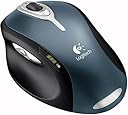
๐ Elevate Your Productivity with Every Click!
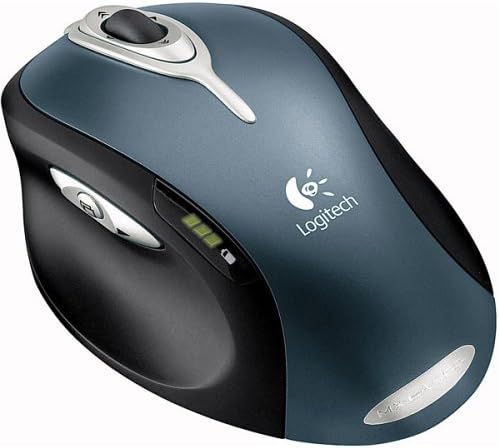
The Logitech MX1000 Laser Cordless Mouse combines cutting-edge laser technology with ergonomic design, offering unparalleled precision and comfort for professionals. With an impressive battery life and customizable features, this mouse is engineered to enhance your productivity and streamline your workflow.
| ASIN | B0002UM0JW |
| Additional Features | Wireless |
| Antenna Location | Office |
| Are Batteries Included | Yes |
| Are Batteries Required | Yes |
| Best Sellers Rank | #8,726 in Computer Mice |
| Brand | Logitech |
| Button Quantity | 4 |
| Color | Black, Grey |
| Compatible Devices | Personal Computer |
| Connectivity Technology | PS/2, Radio Frequency , USB, Wireless |
| Customer Reviews | 4.1 out of 5 stars 312 Reviews |
| Embellishment Feature | LED |
| Enclosure Material | Wood |
| Global Trade Identification Number | 00097855023933 |
| Hand Orientation | Right |
| Hardware Platform | PC |
| Item Weight | 2 Pounds |
| Manufacturer | Logitech Inc |
| Mfr Part Number | 931175-0403 |
| Minimum Required Operating System Version | Windows 98 |
| Model Number | 931175-0403 |
| Mouse Maximum Sensitivity | 32000 Dots per Inch |
| Movement Detection | Laser |
| Movement Detection Technology | Laser |
| Number of Batteries | 2 AA batteries required. (included) |
| Number of Buttons | 4 |
| Operating System | Windows 98 |
| Power Source | Battery Powered |
| Range | 30.0 feet |
| Special Feature | Wireless |
| Style Name | Modern |
| UPC | 097855023933 |
| Unit Count | 1.0 Count |
G**T
Logitech makes a Quality Mouse debut, wow.
I'm going to have to admit something, though I'd easily whore myself to every category of Logitech product, I despise their mice, every Logitech mouse I've tried I've found uncomfortable. This is mostly due to their small, teardrop shape, my large hand, and a lack of some comfort features I found on Microsoft mice. The MX1000 changed everything, I waited a while to order it, considering I had no money and there were quite a few reported lemons, mine came in and worked flawlessly from the start. The ergonomic features of this mouse shame any other small "Grooves" in most mice, the only bad thing is you lefties are just that, left out, it's for Right handed mousers only. While I admit that my pinky finger can touch the mouse pad, I attribute this to my larger hand, which is a comfortable fit for the MX1000 and lets me use those fast-scroll buttons easier than most. I have not witnessed any of the various glitches mentioned by people, nor the possible deviation if the mouse is moved quickly, and straightly, in one direction, there is something I have encountered though. This mouse, when lifted high enough off it's surface and placed back down, will have a less-than-a-second lag, this isn't relevant to most, but Gamers who lift their mice higher off the pad for repositioning during game play might find reason to reject this otherwise fine mouse. I've used it extensively in games, as I am an avid PC Gamer, and play a wide assortment of the latest, and the greatest (to which no age applies to) and it's worked flawlessly as a mouse. Though on the other hand, the buttons don't work very well with a lot of games, why you ask? Well there is a sneaking evil in this mouse, as there is in all products; they call it a "Fatal Flaw" which might displease a lot of people. SetPoint, is the software, or lack thereof, it is the largest downfall of the MX1000, it has a total lack of customization, and the forward/back buttons must be changed to work with the widely used open-source browser Firefox. SetPoint is not a gamer friendly piece of software, nor does it give you much to work with, unlike the iTouch software there is absolutely no customization to be had. I repeat, no customization, there are only pre-set options for what each button does, and these can be interchanged, so don't expect something along the lines of the Razor Diamondback. Laser sensitivity cannot be meddled with either, but the lack of that setting is made up for by cursor speed, scroll speed, and even Smart Move features. This mouse is obviously an innovative product for its Laser engine; the corded version should be wildly popular with gamers as there shouldn't be anything to compete with its precision and power. Hopefully it will be better at handling repositioning in a seamless motion once it's corded. The time between recharges is a bit off too, and some worry about the integrated battery solution, though it is true for 10 minutes or so the mouse will be good for the entire day. The times between recharges range from a week for the more intense users (myself included) all the way up to 21 days for the on and off average person. The battery indicator is a lovely feature for all us feedback junkies, and gives me a constant indicator as to how much juice is left. The Tilt Wheel is an interesting feature; my personal opinion is it needs to scroll just a little bit faster on maximum settings, as it is just a little bit too slow for me. The fast scroll buttons are very useful and I'd like to see them used on other mice, if placed better for the majority of people who might not have big enough hands and long enough fingers to really reach them comfortably. The Application Switch is nice if you don't feel like Alt Tabbing, and not having the hold the two buttons to keep the selection on-screen is more than welcome, though I still don't find myself using it much. I look forward to the MX3100 Desktop Duo, featuring the spiritual successor to the amazing Logitech Elite Keyboard; the MX3100 will feature the successor, the MX300, and the MX1000 Laser Mouse, making them Logitech's new flagship duo, and this mouse is more than worthy of taking part in that duo. Features 4/5 Customization 2/5 Ergonomics 5/5 Battery Life 5/5 (None much better) Overall 5/5 (This is not an average)
C**M
Wonderful with a few minor caveats
I received my MX1000 this morning and after playing with it for 6 solid hours, I decided I had to write a review. Installation was fairly simple, but I ran into one little snag. I suggest you download the newest software from Logitech before installing the mouse. 1) Turn of the computer. 2) Remove the old mouse. 3) Plug the MX1000 base station into the computer. 4) Plug the AC adapter into the base station, then into a power socket (preferably a UPS). 5) Turn on the mouse (there's a tiny switch on the bottom of the mouse) and drop it into the base station to check the battery level. Mine came just barely fully charged! 6) Turn on the computer. The new mouse will be detected and you will be asked for drivers (I installed on windows XP SP2). Instead of letting windows use the installation disc (which came at version 2.14b), I cancelled the driver search and used the newest drivers (version 2.31.546 dated 5/5/2005) from Logitech. A reboot was required after installation. Also, the mouse was unusable after first staring the computer, during installation of the drivers and after the reboot. I hit the silver reset button on the base station, a help balloon popped up from the system tray telling me to hit the reset button on the bottom of the mouse. Bingo! The mouse works! I have a sneaking suspicion that if I'd just reset the mouse after first starting the computer, I could have used it during installation. Oh well. Customizing the buttons is simple, however, there are somewhat less options available than I am used to with MouseWare, such as minimize all. If there were a way to assign windows key commands to buttons, it'd be perfect. The grip of the mouse is incredibly comfortable! The arch of the mouse and thumb groove is literally the perfect size for my medium sized hands. Unlike many have complained, the back and forward buttons DO work in Firefox! The issue was likely addressed in the newest version of the drivers. Also, I reassigned the left/right scroll buttons on the wheel to Control+Shift+Tab for the left and Control+Tab for the right. Easy tab switching in firefox! The scroll wheel is a bit loose, with less pronounced clicks. I don't know if that's good or bad yet, but it seems fine. When clicking down on the scroll wheel, you have to take a bit of care not to hit the left/right scroll actions, though I quickly became used to it. The forward/back/application thumb buttons feel slightly lose, but the clicks are good and solid. The cruise up button is just a little bit of a long reach for the index finger, though it is much more prominent and easy to hit than the little button on the MX500/700/900. The cruise down button is very easy to reach. The left mouse button has a stronger spring and bit longer travel to click than the MX500/700/900. The same goes to a lesser extent for the right button, but that's a good thing as I was accidentally right clicking on my old MX500 quite often. Some have reported the MX1000 to un-level and wobbly on a hard surface, and that may be true for some, but the unit I received is rock solid. As far as skipping/stuttering/jumping behavior is concerned, I haven't seen any. Which is amazing considering I placed the base station directly in front of my wireless router which is on top of my steel tower case which is about 6 inches from my monitor! I figured there'd be SOME kind of interference, but I've noticed none whatsoever! The mouse tracks beautifully on my bare desk surface (highly polished imitation wood grain). The weight of the mouse takes a bit of getting used to if you are used to a light corded mouse, such as I am. My previous mouse was a Logitech MX500. After playing a few hours of CS2, I found my accuracy has noticeably improved because the weight of the MX1000 is damping the natural twitchiness of my "gaming hand". However, I expect that effect to lessen somewhat after I'm completely trained to the mouse. Overall, I'd give the MX1000 4.5 stars if I could, but since I cannot, I believe it is more deserving of 5 stars than it is of 4. Happy mousing!
D**.
One of the best mice ever made.
The MX1000 is one of the best gaming mice ever made, and it is a shame that it has been out of production for so long. The laser precision was way ahead of its time and continues to be impressive. The built-in rechargeable battery lasts for years without losing integrity. The 3-part rocker with central button thumb buttons are extremely handy for games. The rockers fore and aft of the scroll wheel are also very handy and well located for even further button options, though these tend to get a bit sticky after a few years, it is possible to clean around the edges to restore function. The MX1000 however is not suited for very small hands, as I've seen this is the most common complaint about it. It is a large and heavy mouse, but for those of us with larger hands this is perfect and aids greatly in the comfort of prolonged use. Smaller mice tend to make my hand cramp after using for hours at a time, but this mouse fits so comfortably, I never have any problems. My original MX1000 lasted 8 years of heavy gaming use before the click-actuator under the right click started to fail. When I say heavy gaming use I mean extreme marathon sessions and heavy use daily (I am a computer game addict and not ashamed of admitting it.) After such a long time when my right-click started to fail, I decided to try to find another MX1000 to replace my favorite mouse. The fact that a brand-new-still-factory-sealed MX1000 can cost $250 or more is a testament to how in demand this classic mouse still is. I have yet to find another mouse on the current market that is as well built as this one, in many respects. I am very tempted to locate yet another MX1000 to hold in reserve to replace my 2nd one, before they all disappear. Here's to another 8 or 9 years of excellent gaming mouse goodness!
L**N
Great idea, bad implementation
I am a gamer so I'm very particular about the mice I use. Logitech is a great mouse maker and I'm a happy owner of an MX700. The MX700 was the first mouse that was created that was actually workable in games (including FPS). So, I was excited about a new cordless that used a laser. Anything that improves tracking accuracy is great for gamers. This is where things go downhill. I bought the MX1000, spent about 5 minutes getting it set up (after fully charging it first) and went to town. On the plus side, the tracking is truely excellent. No question about it. There's nothing out there that's as good and I've tried almost every mouse made. The battery life appears to be also very good. This thing is extremely efficient about controlling its power useage. Ergonomically, it is also very nice. Unfortunately, it has two major problems: 1) the right mouse button is too stiff and even caused me hand strain in a game where you have to use the right mouse button a lot. This may be specific to my particular sample, but it's something to watch for since if there's one like that, there's probably more. 2) the mouse wobbles. It's like a weeble...it wobbles but it never falls down. I'm not kidding. I even tried shifting the weight in my hand to compensate but it still wobbled. I tried it on 3 completely surfaces and got the same result each time. This is simply unacceptable and completely invalidates its use for gaming. I wouldn't even use it for productivity apps...it's that annoying. Honestly, I can't see how this mouse made it out of the prototype stage with the wobble problem. Using it for 10 seconds would make this apparent. Sadly, my dream mouse must wait until Logitech comes out with it's next iteration (whenever that is). Until then I'll stick with my trusty MX700. I would have given this mouse 1 star but the excellent tracking buys it 2 stars.
O**R
Nice piece of hardware
The Logitech MX1000 Laser Cordless Mouse comes in a handsome packaging with a faux hologram pattern hinting at the laser technology employed by this mouse's optical engine. The package includes an AC power adapter for the charging base, the mouse, and the base station itself. Logitech includes a PS2 adapter which is a nice touch for those who might not have a spare USB port. Also included are the mouse software disk and a quick start guide printed in English, French, and Spanish. Setup was no problem on my machine running Windows XP. The operating system recognizes the mouse almost instantly, and software installation is straightforward. Installing the Logitech drivers and software allows you to adjust mouse speed, report rate, and to assign custom commands to the buttons on the mouse. Surprisingly, there is no way to set mouse orientation. This is a bit of an oversight in my opinion. You see, the mouse is designed to an ergonomic specification, and the way it fits in your hand will not be the same for everyone. Some, like me, will find that mouse accuracy is somewhat sacrificed because you cannot tailor the mouse orientation to your particular taste. This is not a major shortcoming however, and I am sure I will be able to adjust in time. Or perhaps Logitech will update its driver soon to include an orientation adjustment. There is no mouse lag that I can detect. I have used the device to play fast-action multiplayer online games such as Call of Duty, Quake, Unreal Tournament, Microsoft Flight Simulator, and Soldier of Fortune. The mouse itself has a nice battery meter which always stays lit. It consists of 3 green lights which eventually fade to one red light indicating a low charge. I have tried leaving the mouse out of the charging cradle for a week at a time, and have had no battery issues. Typically I charge the mouse on the weekends only, and I find this to be sufficient for my needs. The mouse itself has an on/off switch which I do use to power the mouse off at night. Presumably this helps conserve battery power. I have heard some people indicate that the mouse will go into "power save" mode when left idle for some time. I have no documentation from Logitech to support or disprove that statement, but I must say that battery life is nothing short of phenomenal. I bought this mouse as my first venture into the cordless input device market. There tend to be a lot of peripherals on my desk what with the PDA charger cradle etc. I must say that I am completely satisfied with my purchase. I successfully reduced the clutter on my desk, and I have found that the mouse transmitter does not interfere with my work buddies in adjoining cubicles who also have wireless mice. This product receives 4 stars because the price is a little high... $49.99 would be a better value rather than the $59.99 I paid. Also, I had a minor complaint about not being able to set the mouse orientation, so it just missed the 5 star rating.
J**G
Questionable for Mac Users/CAD
I've had this mouse for three months or so, and am greatly disappointed. I have spoken to Logitech Support, and received little help. The mouse worked well for a couple of months, with only minor tracking problems. The mouse tends to track erratically, as I'm sure people have posted. Also, my mouse had the tendency to intermittantly scroll, without warning. After attempting every troubleshooting option the Logitech website offered (and some of my own), I called their support by phone. When I contacted Logitech's Support, I was informed that the Logitech Control Center software was not optimized for the latest Mac OS. Their answer was not to use the Logitech software, which makes the mouse useless for me. The software allows the mouse to track faster, customize the buttons, et cetera. These are features that are required when using a mouse with a CAD program. Without those features, the mouse is less than advertised. Essentially, Logitech never throughly tested their Mac drivers. The mouse is Mac compatible, but the software isn't compatible. For the price, the software is half (or more) of the lure.
G**E
A Great Mouse - for most people!
I have been using a Logitech MX700 mouse for a few years now (since the day they were first sold) and I love it. I now love my MX1000 even more!! Up front: If you are an EXTREME gamer or relying on this for many hours of professional photo editing - other specialized mice may better suit your needs. Wired opticals usually work best for intense games and very small, light mice are best for hours of fine photo editing. (The MX1000 is the same weight as the MX700 but 6oz is a lot of mass to push around all day pixel-by-pixel editing photos even thought the MX1000 has bigger slide pads on the base and moves more easily than the MX700.) And by the way, mice are easy to change. I have on occasion put on a $10 1oz mouse just for a day to do 10 hours of photo restoration. As for the MX1000 in general: Great feel, super responsive, good placement of features (for a right-hander). IF you are coming from a mouse like the MX700 then this feels "turbocharged". You will LOVE IT! 21 day battery, no annoying red light, SMOOTH buttons, multiple scroll buttons, etc. I waited 3 weeks after they came out to buy mine afer hearing a lot of mixed press on this mouse but finally just took the plunge. Very glad that I did. I spend a lot of time on the computer and this is making my life a lot easier. I feel like a child that just got a new toy for Christmas. Few pieces of computer hardware make me feel that way.
D**Y
Overrated
Hi. I've owned a Microsoft Wireless IntelliMouse Explorer 2.0 for the past 6 months or so. I like the mouse very much, especially its ergonomics and enery efficiency. The only thing that drives me insane about it is the smoothness of the scroll wheel (you don't feel the notches as the you scroll the wheel, which makes it a pain to scroll power-point presentations and pdf files). I got the Logitech mouse because a lot of people praised its enhanced precision and "old-school" scroll wheel. Personally I was not able to notice any improvement in the accuracy, and while the feel is "old-school" like, its construction is somewhat flimsy. In terms of egonomics, I think that the mice is a total disaster. I have fairly large hands, and it is very uncomfortable for me to grip the mouse. Once I do grip the mouse, it is virtually impossible for me to use the scroll wheel w/o letting go of the mouse, because it is positioned somewhat close towards the center of the mouse. In terms of side buttons, it does not matter how you grip the mouse, you will be able to comfortably use only 2 out 3 buttons at a time. I would HIGHLY recommend going to the BestBuy or CompUSA store first and playing around with MS and Logitech mice first, before purchasing this mouse. ------------------------------------------------- Update: Let me start by saying that it takes about 2 days to get used to this mouse after using any MS mouse. Once you get used to it though, the mouse simply ROCKS and undisputaply deserves 5 stars (Sorry Logitech. Amazon does not allow you to edit the review score). My only complaint about it is the "switch applications" button that is located between back/forward buttons. I tried using it a few times, and found it to be rather cumbersome and useless. I guess Logitech's research group decided that since Alps and Synaptics implemented their own "application switcher," Logitech has to do it as well.
Trustpilot
1 week ago
2 weeks ago