🚀 Work, Stream, Connect — All Day, Every Day!
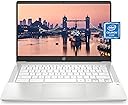
The HP Chromebook 14 (14a-na0021nr) is a sleek, lightweight laptop featuring a 14-inch HD anti-glare display, powered by an Intel Celeron N4000 processor with 4 GB RAM and 32 GB eMMC storage. Designed for remote work and entertainment, it offers up to 13.5 hours of battery life, seamless connectivity via Wi-Fi 5 and Bluetooth 5.0, and a wide vision HD webcam with dual microphones. Running Chrome OS, it combines efficiency, portability, and eco-friendly ENERGY STAR certification for the modern professional on the go.


| ASIN | B08YKGZF7P |
| Average Battery Life (in hours) | 12 Hours |
| Batteries | 1 Lithium Metal batteries required. (included) |
| Best Sellers Rank | #725 in Computers & Accessories ( See Top 100 in Computers & Accessories ) #72 in Traditional Laptop Computers |
| Brand | HP |
| Card Description | Integrated |
| Chipset Brand | Intel |
| Color | Ceramic White |
| Computer Memory Type | DDR4 SDRAM |
| Customer Reviews | 4.3 4.3 out of 5 stars (4,061) |
| Date First Available | March 26, 2021 |
| Flash Memory Size | 4 |
| Graphics Card Ram Size | 4 GB |
| Graphics Coprocessor | Intel UHD Graphics 600 |
| Hard Drive | 32 GB SSD |
| Hard Drive Interface | Solid State |
| Hardware Platform | Chromebook |
| Item Dimensions LxWxH | 12.82 x 8.6 x 0.7 inches |
| Item Weight | 3.24 pounds |
| Item model number | 14a-na0021nr |
| Max Screen Resolution | 1366x768 Pixels |
| Memory Speed | 2400 MHz |
| Number of Processors | 2 |
| Operating System | Chrome OS |
| Optical Drive Type | No Optical Drive |
| Power Source | Battery Powered |
| Processor | 1.1 GHz celeron_n4000 |
| Processor Brand | Intel |
| Product Dimensions | 12.82 x 8.6 x 0.7 inches |
| RAM | 4 GB DDR4 |
| Screen Resolution | 1366 x 768 pixels |
| Series | 14a-na0021nr |
| Standing screen display size | 14 Inches |
| Voltage | 24 Volts |
| Wireless Type | 802.11a/b/g/n/ac, Bluetooth |
B**Y
A Workhorse of a Laptop -- Upgraded Memory Pleases Even an Accountant!
I'm very pleased with my purchase decision. I am a semi-retired accountant, working from home as a Fractional Controller. I have preferred Chromebooks for many years. When searching for a new Chromebook a year ago, I settled on this HP mainly because of the expanded memory. It contains 8GB memory capacity, which is double the amount of less-expensive Chromebooks being sold on Amazon. It also has a 10-key number pad to the right of the keyboard, which is important to an accountant. After one year of heavy usage, I am very pleased with this Chromebook. Even when running the memory-intensive QuickBooks Online Advanced edition, the Chromebook performs remarkably. It is lightweight, has a larger screen, and the battery lasts several hours--even under the intense workload of QuickBooks Online. When under an intense workload (working with QuickBooks, driving a secondary portable monitor, recharging the headset, and running an intensive secondary application (usually Google Sheets), the battery lasts for at least 3 hours. After a morning working on the patio, or when the RV is using StarLink, I'll be ready for a lunch-break after 3 hours, and the battery recharges quickly so I'm ready to pound keys again after an hour and a half. This laptop has been dropped, has stayed in the hot automobile, and has been heavily used 8-10 hours per day, and is still functioning like new (although the case does have some scratches and assorted battle scars). Chromebooks are impervious to viruses affecting the expensive laptops (Microsoft and, sometimes, even Apple). The only thing I truly miss is the ability to add a SIM-card (or E-SIM, preferably), and maybe the fact that this chromebook offers only two Type-C connections, one Type-A connection, plus a standard mini-headphone jack, as well as an SD card slot. I have never used the SD card slot, nor the 1/8" headphone jack, but the other connections operate well. I charge with the Type-C on the left side of the keyboard; the one on the right side is hit-and-miss--sometimes it will charge the laptop, other times not so much. The auxiliary monitor goes into the Type-C on the right side of the keyboard, and my bluetooth headset uses the Type-A on the right side of the keyboard to maintain its charge when docked. (The headset is bluetooth, so could connect to its own charger, but it's much easier to plug it into the laptop to charge.) I find no issues with lagging from the laptop side of the equation. Of course, the WIFI connection will sometimes (rarely) lag, and the QuickBooks application itself will sometimes lag, but I have come to believe these lags are not originating with the laptop itself. The screen is bright, the sound is good. When I'm not wearing my headset and receive a call on Google Voice, I can use the internal microphone and speakers, which provide excellent quality--although the headset's microphone dampens background noise much better than does the laptop's internal microphone. I would recommend this particular Chromebook, with its upgraded memory capacity, to anyone using exclusively web-based software and needing a work-horse of a laptop computer. After a year of pounding the keys on this HP laptop, I would purchase again, with no hesitation.
C**R
Great for everything most people need!
A great basic computer and the Google Docs/Gemini mix is a real winner!
O**Z
Its okaay but good for the price.
I've had the computer for a couple weeks, and so far it works for what I need it for school. The plus to the computer is that I'm able to download the work and programs that college needs. Watch movies smoothly. The downsides are that the computer doesn't go as far and It cant run too many tabs without it freezing up, like 7-10 tabs. It starts slowing down but goes away when removing the tabs. The sound is nice.The screen quality is okay.The price was great for this computer, in my opinion.I got it at a reduced price too.
M**R
Travel size
Packaged great looks nice,feels great and works well
G**R
Great affordable little laptop
I got this for my daughter to prepare her for getting one from school. I wanted to teach her how to use it, take care of it, etc ahead of time. She really enjoys the computer, she treats it well but its also just holding up very nicely, even with a 9 year olds usage habits. A great option for a computer that can surf the net, use google docs, play online web games etc, but at a price point that you dont need to "worry" about it all the time or be afraid its going to break.
J**D
HP Chromebook 14
This is my first ever laptop/computer so I’m excited to finally own one. So my review is going to be based around just being able to get it set up, the fact that it works and came to me in perfect condition. Setting it up was as easy as it could get for someone who has only had a iPhone. Wi-Fi connected with no issues. I’m really only using it for streaming YouTube videos and Tubi.☺️ it so far seems like it will be perfect for my needs and to help me get used to owning a computer/laptop. I have a lot to learn and get used to.
T**S
Didn't work out of the box
I ordered the laptop in October, so there was no supply issue, and gave it to my granddaughter for Christmas. The laptop has a Chrome OS is missing or damaged Notification, product does not work so far. I will revise the review after customer service. 1 star for delivery of a device that doesn't work. *Amazon replaced the unit. Thank you Amazon customer support!
A**S
I expected more but got what I payed for.
I've gotten laptops that were around this price but way more functional than this. I feel like I have an android tablet with keyboards. There needs to be a lot of updates to make this laptop usable. The first thing the stood out to me is the space, I understand that you can put an SD card but why? Shouldn't every functional laptop come with enough space? I've seen phones with more space than this chromebook. Secondly, like I said before it feels like a tablet with a keyboard because you can only download "apps" from the Google play store. Why apps? This just seems so cheesy to me because it gives me mobile phone vibes. It turns me off from wanting to use it. Thirdly, you can't download game files directly from the web for steam, origin etc. You have to allow use of this third-party Linux (beta) files, do some coding crap, and transfer to files over to Linux. And when you do this, you're only left with about 5GB - 7GB of space on the entire chromebook, which makes no sense because now your steam has no purpose because you're unable to download the games due to low storage space. Lastly, you have to use the mobile versions of Microsoft Word, excel, PowerPoint etc. You know the things just about every laptop brand should allow you to get. Long story short, if you are getting this for you kids, cool. They can download apps, play games and watch YouTube. However, if you are an adult and you're using this for more purposes other than research for college. It's pretty useless. I honestly want to return it but I got whatbI payed for. I will honestly not recommend this to anyone else. My review may be harsh but I don't want anyone to experience the disappointment I've felt while purchasing my very first laptop.
Trustpilot
4 days ago
2 weeks ago