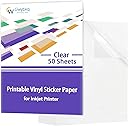




Transparent Printable Vinyl Sticker Paper
Product ID: 295630128
Details
- BrandGwybkq
- ColorTransparent
- Item Weight0.77 kg
- Paper FinishGlossy
- Sheet Size8.5-x-11-inch
📏2.5mil thick durable vinyl
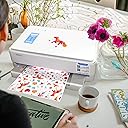
🖨️Inkjet printer optimized
🛡️Scratch & tear resistant
✨ Stick with brilliance — make your mark crystal clear! 🖨️
Gwybkq Clear Printable Vinyl Sticker Paper offers 50 sheets of premium 2.5mil thick transparent vinyl designed for inkjet printers. Featuring a glossy finish that dries quickly and resists scratches and tears, these stickers deliver vivid colors and clean, residue-free removal. Perfect for professional-quality labels and creative projects that demand durability and clarity.
| ASIN | B08SJZPVTY |
| Best Sellers Rank | #272,252 in Office Products ( See Top 100 in Office Products ) #697 in Inkjet Printer Paper |
| Brand | Gwybkq |
| Brand Name | Gwybkq |
| Color | Transparent |
| Customer Reviews | 4.3 out of 5 stars 1,561 Reviews |
| Item Dimensions L x W | 11"L x 8.5"W |
| Item Weight | 0.77 kg |
| Manufacturer | Gwybkq |
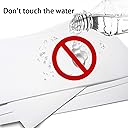
| Material Features | Non-waterproof |
| Paper Finish | Glossy |
| Paper Size | 8.5-x-11-inch |
| Paper Weight | 20 |
| Sheet Count | 50 |
| Sheet Size | 8.5-x-11-inch |
| UPC | 779776984370 |
| Unit Count | 50 Count |
K**N
Use the 'Matte Photo Paper' setting for best results
I've purchased these clear sticker sheets multiple times. I use Canon inkjet printers, and the results are always great. The stickers are clear and the print quality is sharp and vibrant. I always give the ink a couple of minutes to dry completely after printing, and I've never had any issues with smearing or smudging. The adhesion is great and stick securely to various surfaces. When I print I use “Matte photo paper” at best quality, in some cases it may even turn out better with “printer paper” at best quality.
K**J
Arrived so quickly and works perfectly.
Arrived so quickly and works perfectly. I print stickers for my Journaling and this is the perfect paper. It does not smudge and is easy to lift the sticker from the backing.
S**N
Happy with sticker paper
Nice sticker paper. Didn't smudge or smear when I printed stickers off, able to use as soon as printed.
J**O
Went from ARGGGH to Okay... I can live with this
Long story short: Used Glossy paper as setting, Max DPI, best quality on HP OFFICEJET Pro 6978. This did not work. smeared atrociously even after a day of drying with a light swipe across it. Tried matte settings which resulted in a little less smearing. Finally, reread the instructions and it says use PHOTO, BEST QUALITY, MAX DPI. This time i made sure not to get my fingerprints on the sheet of vinyl touching just the very edges to avoid finger oils getting on the sheet, used photo, best quality w max DPI. LET DRY FOR 15 MINUTES. Ran through my Silhouette Portrait 3 and it came out great making teensy little bullet journal stickers. HOWEVER, the oils on your fingers will make the coloring start to rub off if you keep rubbing at it, but used in my bullet journal as a sticker it does not smear. I am not sure about waterproof. If you are going to sell this as a decal with a lot of handling you will want to put a protective coating over it. But for use as a sticker that I generally am not touching once placed, they don't smear and work fine so I am satisfied. Attached is a sticker made to .3 inches in size, so teeny.
T**R
Prints with ease.
Awesome for printing stickers.
K**H
Ink doesn't dry and smears images easily
Tried on multiple settings. Even at the recommended "select 'matte' + 'best' at media and quality settings." Tried glossy, plain paper, matte, high quality, low quality. None of the settings changed the outcome. The ink tends to "bead" on the paper, and when it finally prints "normal," it takes forever to completely dry (like hours...) and smears really easily. Then again it's a plain sheet of plastic with no apparent coating to make it hold ink, so anything liquid is just going to bead on top. Also, no where does it describe whether pigment or dye based inkjets work best. There's a huge difference and if using dye based, any type of liquid that gets on it is going to completely remove the ink, since dye ink is water soluble. So saying this is suitable for inkjet is false and silly unless it's suitable for both types of ink.
R**T
Work well with inkjet printer and the gloss is great
I wasn't sure how glossy these would be after printing, but I must say, the results seem quite professional. The vinyl is a nice thickness - not thin like tape or label maker labels, but not so thick that they are easily snagged when adhered to something flat. I haven't really tested the water resistance yet, but I don't plan to use this in areas where they will get exposed to significant moisture. I see the matte and white versions are considered water proof. The clear gloss stickers are considered water resistant.
C**A
While it works, it is a little misleading and here's why
For starters, to all those in the comments saying "It's for sublimation printers", please stop. This is clearly advertised IN THE TITLE to be for Inkjet printers, so people that are buying these are correct in their assumptions, but it is slightly misleading. Overall, it took me a few tries and tweaks on my settings to get this to print correctly. You HAVE to print at high settings and set from standard to glossy paper. This is basically standard for all printers and should save you a lot of trouble with sticker paper. That being said, these stickers are VERY thick. They are not to be intended for decoration purposes in my opinion and are solely utilitarian (so glasswear and the car decals). If you are trying to buy these and expect thin, flexile material, look elsewhere. If you like rigid stickers, then these might be for you. Now, all that said and done, while I was able to print my images and they look fantastic.....against white back paper. Once you peel it off, the ink itself is also transparent, even with high settings and such. So If you are planning on using these for stickers that are supposed to go against anything but white backed surfaces, be prepared to be disappointed. Again, they look amazing against the paper backing it comes printed on but once removed it looks awful and very dark. It's basically line work that you see and that's it. Hopefully someone found this helpful!
Trustpilot
1 week ago
5 days ago