

🚀 Elevate Your Office Game with Brother's DCP-L5500DN!
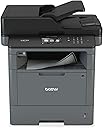
The Brother DCP-L5500DN is a high-performance monochrome laser multifunction printer designed for busy work environments. With a print speed of up to 42 pages per minute, advanced scanning capabilities, and flexible network connectivity, it ensures efficiency and productivity. The printer also features innovative security measures and is Amazon Dash Replenishment ready, making it a smart choice for modern offices.


| ASIN | B01BHSLIN6 |
| Additional Printer Functions | Copy |
| B&W Pages per Minute | 42 pages_per_minute |
| Best Sellers Rank | #440,837 in Office Products ( See Top 100 in Office Products ) #610 in Laser Computer Printers |
| Brand | Brother |
| Built-In Media | Toner Cartridges |
| Color | Black |
| Color Depth | 1 bpp |
| Color Pages per Minute | 1 pages_per_minute |
| Compatible Cartridge | Arthur Imaging compatible Brother DCP-L5500DN Toner Cartridges |
| Compatible Devices | Smartphones |
| Connectivity Technology | Ethernet, USB |
| Control Method | Touch |
| Controller Type | Amazon Alexa, Vera |
| Customer Reviews | 4.1 out of 5 stars 223 Reviews |
| Display Type | LCD |
| Duplex | |
| Global Trade Identification Number | 00012502641889 |
| Hardware Interface | Ethernet, USB |
| Initial Page Print Time | 1-2 seconds |
| Ink Color | Black |
| Item Dimensions D x W x H | 16.8"D x 17.1"W x 19.1"H |
| Item Type Name | Laser Multifunction Printer |
| Item Weight | 21 pounds |
| Manufacturer | Brother |
| Maximum Copies Per Run | 42 |
| Maximum Copy Resolution Black and White | 1200 dpi |
| Maximum Copy Resolution Color | 1200 x 1200 dpi |
| Maximum Copy Speed Black and White | 42 pages_per_minute |
| Maximum Media Size | 8.5 x 14 inch |
| Maximum Print Resolution Black and White | 1200 dpi |
| Maximum Sheet Capacity | 300 |
| Maximum print Resolution Color | 1200 x 1200 dpi |
| Model Name | DCP L5500DN |
| Model Number | DCPL5500DN |
| Model Series | L5500DN |
| Number of Ethernet Ports | 1 |
| Number of Trays | 2 |
| Other Special Features of the Product | 3.7" Color Touchscreen display, 40-page Auto-Document Feeder, Print from Scan to Cloud Services, USB Host to print from scan to your USB flash memory card |
| Paper Size | 5.80 x 8.30, 8.27 x 13, 8.50 x 14, 8.50 x 11, 8.30 x 11.70, 10.50 x 7.25, 4.10 x 5.80, 3 x 5, 8.50 x 14 inches |
| Print media | Card stock, Envelopes, Labels, Paper (plain) |
| Printer Connectivity Type | Ethernet, USB |
| Printer Output Type | Monochrome |
| Printer Type | Laser |
| Printing Technology | Laser |
| Resolution | 1200 x 1200 |
| Scanner Type | Sheetfed |
| Series Number | 5500 |
| Special Feature | 3.7" Color Touchscreen display, 40-page Auto-Document Feeder, Print from Scan to Cloud Services, USB Host to print from scan to your USB flash memory card Special Feature 3.7" Color Touchscreen display, 40-page Auto-Document Feeder, Print from Scan to Cloud Services, USB Host to print from scan to your USB flash memory card See more |
| Specific Uses For Product | small business |
| Total Usb Ports | 1 |
| UPC | 012502641889 |
| Unit Count | 1 Count |
| Warranty Description | 1 year |
| Warranty Type | Full Warranty |
B**N
Another impressive Laser MFC device from Brother!
I've had quite a few Brother printers over the years. I've been very happy with each and every one, this L5500DN is no exception. Even extracting the printer from the box is a very pleasant process. This particular machine has been enclosed in a plastic bag; I simply had to pull up on the bag and the printer came right out. These devices can get quite heavy, but, using the bag made the task much easier. Setup was a snap. I plugged in the power cord, clicked in the Ethernet cable, powered it up and it was ready to go. It grabbed an IP address and even the software for my Mac was a breeze. It discovered the printer immediately and in about a minute (for me, I have a fast Internet connection) the printer driver had been installed and is ready to go. I'm very excited about the 40+ PPM throughput of the printer. You will notice a difference if you have an older/smaller machine. The next thing that was a BIG plus for me was that it will do two-sided to two-sided via the platen. No putting the paper back in to get the 2nd side printed. (Yes, it'd be great if this would function using the ADF), but, even using the platen, it's so much easier. I really like the idea of the 850 toner's. Up to 8000 pages per toner, compared to the 3000 for the TN-660's. Nice improvement. I was not thrilled about having to buy another different toner, until I discovered the difference in capacity. This is very helpful. I wish the extended paper (optional) drawer wasn't so expensive, or, I would purchase it. My wife is a teacher and she makes a lot of copies. This printer is going to be a blessing for her. Overall, this is a solid built machine and one I hope will function great for the foreseeable future. Thanks Brother!! You did great!
A**R
Reliable and Good Quality
I have used Brother Laser all in ones for years for our business. They seem to be the most reliable printers and easy to use especially for the price. Toner is also reasonable and seems to last longer than other brands.
C**L
A Very Fine Printer
I am so pleased with this printer. It is a replacement for my previous brother which I had for years and used it continually until it literally went "kaplunk/" Very smooth, very fast, touch screen controls. Excellent quality output with very little effort. Highly recommended for home or small business.
W**2
Lousy product in my opinion - AVOID
I bought it for copying, but I expected it to function as a wireless printer. The connection was tenuous at best. Unable to connect to my wireless network at work. I had my very capable IT professional attempt a wired connection as well. It would drop off the network spontaneously, making it useless to my front office staff. The touch screen was cumbersome to use. Saving a shortcut to copy pages was less than satisfactory as it will only save a function and assign a number to that shortcut. You have to remember the number of the shortcut or keep a cheat sheet. This is not helpful. My first attempt at using the copier top feeder resulted in total destruction of the original. This device is no good for anything in my opinion. It's going back to Amazon.
J**H
Very pleased with quality
I am very pleased with the quality of my Brother printer. It runs as expected, printing, scanning, and copying many pages, and is easy to use.
J**D
First Class printer that will not disappoint.
Super fast printing. Good scanner. Every part is solid. I just wouldn't buy the toner from Brother. There's lot of places for 70% less and their ink works great.
F**R
Two key factors make this purchase a success for me
Although I've only had this printer for two days and usually wait for more experience before reviewing, there are two important items that I really appreciate. My environment is several computers and two printers connected using wired Ethernet. 1 Setup, using the bundled software CD on my primary computer was easy, and worked perfectly on the first try. Conversely, the printer I'm replacing required obtaining its IP address from its control panel and manually entering it into the settings on each computer before they would recognize it. This was an annoyingly clumsy process. The Brother DCP L5500dn had no trouble being seen on my LAN. The remaining computers all recognized this printer through the Add Device dialog, without even using the CD. 2. My Chromebook recognized the printer immediately. The previous printer never worked with the Chromebook despite months of trying every approach I could find in my research. As with the networking, this worked immediately on the Brother with no issues. So far, regular printing and copying function very well. I won't be able to properly assess scanning until I've done more of it but the first few attempts were successful. Update 2-7-2023 - My first disappointment. The starter toner cartridge is supposed to be good for 2,000 pages. The printer stopped working with a replace toner message when the counter showed 527 pages. I replaced it with a Brother 850 cartridge that is supposed to provide 5,000 pages. It will be interesting to see how many I actually will get. I've reduced my rating from five start to four but am still very happy with everything else about this printer.
A**Y
Easy Install and Works great
This printer works like a charm. Easy to set up and prints good quality at a good pace. I've had it installed for a week now and I'm more than happy with it's performance.
M**Z
Rifado
Esta refida
J**M
Impresora brother
Todo muy bien excelente impresora
C**N
ocupa 10.5 amperes
usa muchísima electricidad. requiere una conexión que aguante 10.5 amperes!
Trustpilot
3 weeks ago
1 week ago