Buy anything from 5,000+ international stores. One checkout price. No surprise fees. Join 2M+ shoppers on Desertcart.
Desertcart purchases this item on your behalf and handles shipping, customs, and support to Colombia.
🚀 Triple your screen, triple your productivity!
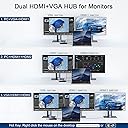
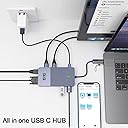
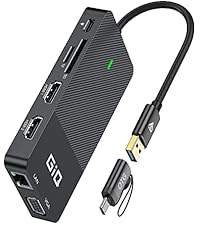
The GIQ USB C Docking Station is a compact, high-performance hub designed for professionals seeking to maximize productivity. Featuring dual HDMI and VGA outputs for triple display setups, three USB 3.0 ports with 5Gbps transfer speeds, and a gigabit Ethernet port, it ensures seamless connectivity and fast data flow. Compatible with MacBook M1/M2/M3 and major Windows and Chrome OS devices, this sleek grey dock is perfect for multitasking at home, office, or on the go.


| ASIN | B08R9WZKFN |
| Best Sellers Rank | #5,092 in Electronics ( See Top 100 in Electronics ) #78 in Laptop Docking Stations |
| Brand | Giq |
| Color | Gray |
| Compatible Devices | MacBook Pro M1 ,Macbook pro air mini M1, Dell XPS 13/15, Lenovo Yoga, Huawei Matebook, ASUS ZenBook ,Samsung Galaxy S9/S9+. Works on Mac OS X 10.6 or higher; Windows XP, 7 or higher; Ubuntu ;Chrome OS;Android system. Compatible Devices MacBook Pro M1 ,Macbook pro air mini M1, Dell XPS 13/15, Lenovo Yoga, Huawei Matebook, ASUS ZenBook ,Samsung Galaxy S9/S9+. Works on Mac OS X 10.6 or higher; Windows XP, 7 or higher; Ubuntu ;Chrome OS;Android system. See more |
| Customer Reviews | 4.4 out of 5 stars 2,306 Reviews |
| Global Trade Identification Number | 00779880308628 |
| Hardware Interface | 3.5mm Audio, Ethernet, HDMI , USB 3.0, USB Type C |
| Item Dimensions L x W x H | 2"L x 2"W x 0.59"H |
| Item Weight | 3.6 Ounces |
| Manufacturer | Shenzhen Hongtian Electronics Co.,Ltd |
| Mfr Part Number | D3908 |
| Minimum Required Operating System Version | Windows 7 |
| Model Number | D3908-giq |
| Number of Ports | 10 |
| Product Dimensions | 2"L x 2"W x 0.59"H |
| Total Number of HDMI Ports | 2 |
| Total USB Ports | 3 |
| Total Usb Ports | 3 |
| Warranty Description | 1 |
M**R
Works Great Even On Older Laptops
I have a relatively new Acer Aspire5 and a four year old HP x360 laptop. I originally bought a different mini-dock that said no additional drivers were needed, and it would not work on either of my machines. This unit works perfectly on both, with all features available from either USB3-A or C ports. I am currently running it with two additional HDMI monitors at 1920x1080 resolution without an external power supply, and the dock's USB3 ports are also working fine at true SuperSpeed. The installation of the necessary DisplayLink driver was painless, and no application needs to be started on the laptop before you connect the mini-dock. Connecting and disconnecting the laptop works as simply as it did before The documentation supplied is very limited and typical poor Chinese translation, but you can get a lot more information by just taking the time to wade through the many pages of questions/answers on this site. Here are a couple of things I gleaned from there that are not at all clear in the documentation: 1. The dock has a USB-C port, but it cannot be used for anything at all except power IN to the dock from an external power source, and that power in is not passed back out to your computer. It is ONLY used to power the dock if you need to attach too many hard drives or other power-hungry devices. You will still need to attach your normal laptop power supply to keep your computer charged. This is a slight negative since it is both confusing, AND you loose all access to a USB-C port if you need to run this mini-dock from a laptop that has only a single USB-C output. The good news is that the mini-docks works perfectly from a USB3-A port, so you can leave your laptop's single USB-C port available for other devices. 2. If you are connecting multiple monitors, the output resolution to all of them will be limited to 1920x1080, and you might also need that external power supply I mentioned above.
D**D
Serves its Purpose but Interferes with Wifi (UPDATED)
UPDATE: Original 3-star review is below ... I initially had an issue with this docking station interfering with my wifi. However, since posting the review I did more research and from what I can tell older Surface Pro laptops have an issue with USB 3.0 devices causing the wifi interference (of course there's no fix that I can find as of yet). I've updated my review to 5-stars because the problem is on my hardware's end AND because GIQ customer support reached out a couple times to offer troubleshooting tips and a full refund if I was not satisfied. I purchased this for use in my home office - the setup is Surface Pro with dual monitors, USB keyboard, and webcam. This GIQ docking station was plug and play, and I was up and running instantly. The only issue I had was with my wifi ... with everything connected through my Surface Pro my wifi drops to unusable levels. I'm not a tech genius so there may be a fix I'm not aware of - I initially thought it was a Windows 11 issue so spent a couple days working through those solutions, and even moved a mesh network point next to my Surface Pro. I figured it out only when I took my Surface Pro to a different place in the house and the wifi was back to normal, so I tested it in the home office and can confirm the wifi interference is coming from the GIQ docking station. I tried disabling various devices etc. and nothing worked ... I gave in and connected a cable from my mesh point to the GIQ docking station and was back up to blazing wifi speeds. If I didn't have the wired connection available though this docking station would be useless for me ... again there may be a solution I don't know of, but a plug and play device shouldn't require a tech genius to get it working.
J**E
Compact, Powerful, & Versatile Docking Station!
This USB-C hub is a must-have for expanding connectivity! It effortlessly connects my MacBook or Asus Laptop to an HDMI display in crisp 1080p while offering 3 USB 3.0 ports for peripherals, a Gigabit Ethernet port for fast wired internet, and SD/microSD slots (though not simultaneous). The slim, travel-friendly design is perfect for work or travel. I found that the USB-C port is for docking station power only (doesn’t charge laptops). SuperSpeed transfers (5Gbps) and multi-device support make it a powerhouse. Works flawlessly with Mac, Windows, and ChromeOS. Highly recommend!
W**3
Nice video unit for the office
My new tower only had two HDMI outputs and I was pretty used to my 3-monitor setup. This is working out quite well, seems to draw enough power from my PC. Before I had 2 DVI with DVI->DisplayPort adapters and one HDMI.. now I have one DVI with DVI->HDMI in the computer itself and two HDMI cables going into this. I had thought I might need to use the VGA port, but ended up I didn't need to. I kept getting wonky colors when I did try it; however I suspect that's just the name of the game with those old cables. It did work (and colors were fine when jiggled) so know it is an option where needed. I'm docking one store just because I think it's a bit overpriced for what it is.. I'd give it 4.5 if I could!
T**M
Do not use VGA and HDMI input at the same time. Other combinations work great! My review explains.
Purchased this docking station because my work laptop only offers one HDMI and two USB inputs, which hugely limits extending to multiple monitors. When I received this docking station, I did as directed and installed the specified driver before connecting this device to my laptop. One of my monitors is VGA and the other is HDMI. When I first connected the VGA, the device recognized it and my laptop automatically extended the display to it; however, when I added the second monitor via the HDMI input on the docking station... it was not included on the display settings monitor list (in the Windows Setting and also in the Driver App Settings). Then I thought to try my VGA adapter that converts to USB-Type C. The HDMI cable was communicating just fine. When I adapted the VGA to the USB-Type C, and plugged it into the docking station, it all works perfectly. Other than the VGA minor hiccup, this device functions perfectly! Very happy with this purchase. The device's driver is vital to its success, but the device's program is not necessary at all (it directs you to the Microsoft store for PCs). The device's program appears to be a literal replication of the Windows Settings layout, and the links it contains to "adjust" the display settings simply sends you back to the Windows Display settings. Hah! Anyhow. Hope my details help someone else wondering.
D**N
The USB docking station is one of the best investment
I used both a Macbook Air and a Lenovo, both powered by USB-C and this is one of the best investments I made. The USB-C power through allows me to expand the port, as both the Macbook and Lenovo have only one to two USB-C ports and this device allows the expansions plus the power supply for both computers. The SD and micro SD card readers are a bonus, but I use the HDMI more often than I thought I would, via connecting to larger screens at conventions and hotel rooms when I travel. I have not used the VGA but I'm sure it would come in handy if I need to connect to an old fashion monitor/terminal. Overall, this is the one tool that has many functions, very versatile and useful. Great form and function.
A**T
Docking station doesn't work... do not buy.
Product does not work as advertised, the software needed also is not updated and does not download also not able to connect monitors and support was not supportive. Do not buy. Here is my communication. My issue Hello, I am having issues connecting the docking station model D3908 to my 2017 IMac. I am attempting to connect 2 additional monitors. However I can only get the iMac plus one additional monitor to work. Please advise on connecting the 3rd monitor. Response Hello, our docking station has 3 video output ports: 2 HDMI ports and 1 VGA port, but during use, the display mode is AAAA+AABB+AABC (if you connect both the VGA and HDMI1 ports at the same time, the 2 monitors will be limited to displaying the same screen). . When connecting dual or triple monitors, the maximum resolution of each monitor will be limited to 1920 x 1080@60Hz.
N**I
USB Docking Station GIQ USB C Hub: Unleash Your Connectivity Potential with Style and Performance!
The USB Docking Station GIQ USB C hub is an exceptional product that truly impresses. It boasts a remarkable array of features and functionalities, making it an invaluable addition to your MacBook Pro or Thunderbolt 3 devices. With its triple display support, you can enjoy immersive visuals and seamlessly connect to multiple screens. The high-speed data transfer capabilities of the USB 3.0 ports ensure swift and efficient file transfers, while the SD and micro SD card slots provide convenient access to your memory cards. The sleek and compact design adds a touch of elegance to your setup, making it perfect for any environment, be it at home, work, or during your travels. Moreover, the commitment to customer satisfaction is commendable, with 24-hour service available to address any concerns or issues that may arise. Overall, the USB Docking Station GIQ USB C hub is an impressive and highly reliable solution that enhances your productivity and connectivity.
D**Q
bonne solution pour ajouté internet LAND
Installer sur mon portable
M**A
Adattatore comodo e funzionale
Ho acquistato questo adattatore per rendere un pochino più agevole il passaggio cavi sulla mia postazione da smart working. Una volta ricevuto l'oggetto, la prima cosa che ho notato è stato il packaging e l'aspetto esteriore dell'oggetto: la scatola è molto gradevole e anche il design e i materiali sono pregevoli anche se avrei preferito un cavetto più lungo. Le dimensioni non sono eccessive e il quantitativo di porte è più che adeguato. All'interno della scatola è presente un cavo USB, di cui però non ho avuto necessità in quanto questo adattatore riceve tutta l'energia necessaria dalla porta USB, che può essere di tipo A oppure di tipo C attraverso l'adattatore contenuto nella confezione. Prima di collegarlo ho scaricato i driver necessari alla gestione multimonitor dal sito della Synaptics, dato che recentemente ha acquisito la tecnologia DisplayLink. Sul microsoft store è presente anche un app per la gestione audio / video dei monitor ma si riesce a fare tutto anche solo col pannello di controllo di windows. E' da precisare che per poter utilizzare la modalità estesa dei monitor è necessario che entrambi siano collegati tramite HDMI. Altra nota da ricordare è che solo la porta 1 dell'HDMI permette anche il passaggio audio. Non so come si comporti a più alte risoluzioni ma attualmente gestisce due monitor in fullHD senza particolari problemi, sfarfallii o instabilità della connessione. Pertanto mi sento di consigliare l'oggetto.
P**U
parfait
conforme et fonctionne parfaitement sur les écrans 1, 2 et 3
B**R
Sturdy and good quality
Works well and feels solid, the only thing is that it gets quite hot being plugged in all the time, tho that seems like a common thing for usb c hubs.
A**Z
Gran calidad de acabados y técnicamente superior
La presentación del producto supera mis espectactivasx esperaba la típica caja marrón, pero no, es una caja con un cierto diseño y con una textura "premium". Además, la impresión sobre la caja también está hecha con letras plateadas holográficas. Un 10 en este sentido. El producto denota calidad, aluminio bien rematado, de nuevo con textura en una de sus superficies, peso correcto, no parece que se vaya a romper con facilidad. Los conectores no tienen holgura, y todo encaja a las mil maravillas. Técnicamente correcto, da lo que ofrece. No hay problemas de falsos contactos, ni de desconexiones intermitentes. Tengo conectado al portátil 2 monitores de 24" FHD, un SSD externo, un combo de ratón-teclado y el cable de red Gigabit. Todo funcionando perfecto. He probado el lector de MicroSD y también funciona perfectamente. Velocidades de lectura y escritura acorde con el USB 3.0. Una grata sorpresa de producto. Puntos a mejorar: Para mí uno muy importante es que la entrada USB-C sirviera no sólo para cargar el Dock Station, sino también el portátil, así me ahorraría el USB-C del cargador, ya que mi portátil carga vía USB, pero el Dock Station no dispone de Power Delivery. Por otro lado, el precio, es cierto que éste es más compacto y que se nota la calidad, pero 90€ no está al alcance de todos los bolsillos, y no quiero decir que sea caro, porque no lo es para lo que ofrece.
Trustpilot
1 month ago
3 days ago