๐จ๏ธ Print smarter, faster, and sharper โ donโt get left behind!
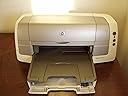
The HP DeskJet 6122 is a versatile color inkjet printer delivering up to 4800 x 1200 dpi photo-quality prints and fast black draft speeds of 20 ppm. Featuring automatic duplex printing and a high-volume duty cycle of 5,000 pages per month, it supports USB, parallel, and optional network connections for PC and Mac compatibility. Ideal for professionals seeking reliable, efficient printing with smart paper sensing and expandable paper capacity.
| ASIN | B00006L4XF |
| B&W Pages per Minute | 0.9 pages_per_minute |
| Brand | HP |
| Color | Color |
| Color Pages per Minute | 0.9 pages_per_minute |
| Compatible Devices | PC |
| Connectivity Technology | USB |
| Control Method | App |
| Controller Type | iOS |
| Customer Reviews | 3.6 out of 5 stars 25 Reviews |
| Duplex | Yes |
| Global Trade Identification Number | 00808736375757 |
| Hardware Interface | USB |
| Ink Color | Multi-color |
| Item Weight | 16.3 pounds |
| Manufacturer | Hewlett Packard |
| Maximum Copy Speed Black and White | 20 pages_per_minute |
| Maximum Media Size | 8.5 x 14 inch |
| Model Name | 6122 |
| Model Number | C8954A#ABA |
| Model Series | DeskJet |
| Number of Trays | 1 |
| Other Special Features of the Product | Auto Document Feeder, Auto-Duplex |
| Print media | Glossy photo paper |
| Printer Connectivity Type | USB |
| Printer Output Type | Color |
| Printer Type | Inkjet |
| Printing Technology | Inkjet |
| Resolution | 4800 x 1200 |
| Scanner Type | Photo |
| Special Feature | Auto Document Feeder , Auto-Duplex |
| UPC | 808736375757 |
G**S
Excellent Choice For 45/78 Cartridge Users
I used an inexpensive HP PhotoSmart printer for 2 years. The print quality was good, but the feed mechanism drove me crazy with frequent paper misfeeds (using HP paper!!!). The support software also contantly gave warnings about a lost connection to the printer (actually to the built-in memory stick reader). There were so many buttons on the housing that I had to study them carefully with a flashlight whenever the printer needed service. It turns out that I had purchased the wrong printer for my needs. The Photosmart was a fancy toy for digital photo enthusiasts. What I needed was a small business-grade printer. During that period, I built up an investiment in 45/78 cartridges. There is a local service here in North Seattle which refills the cartridges for about $15. They do a good job. I finally decided to purchase a new printer. The HP 6122 offers three things that I really, really needed: 1. Reliability. 2. Simplicity. 3. Uses the same 45/78 cartridges. The 6122 cost a lot more than the Photosmart, and it has fewer "cool features." The trick is that the 6122 has everything I actually need---and it works reliably. As a bonus, the 6122 gives me double-sided printing. When I use this feature with draft quality printing and inexpensive paper, I have a very cost-effective printer. For resumes and important correspondence, I turn up the print quality, switch to single-sided printing and use paper with rag content. The result is equal to that of a laser printer. There are only three buttons on the housing, and they are easy to see and understand. This printer is not a toy. It prints. That is all it does, and it does that very well. The HP Preview is included. This is an awesome utility that saves me gallons of ink and tons of paper each year. HP should win a Nobel award or something for that little utility. THe 6122 is ideal for professionals/small offices needing a simple printer that is very reliable---without spending a forturne. It is well-built, solid and compact. I am very pleased with the HP 6122.
J**L
Solid Printer. Not an Ink-Hog
Solid printer that doesn't run out of ink every two weeks. Color printing is nothing fancy, but if you do mostly black and white printing it works good and lasts long time. Two things: it's a little loud during printing if that is a problem for you. Also, DO NOT try to feed in extra paper when the printer is active. Wait for everything to stop before loading more paper. If you "confuse" it, you will experience a very painful reset process and waste a lot of paper. Other than that, it is very well behaved. I've used a couple of them for over 4 years and never had one jam. Best thing you can do is keep it stocked so it doesn't run out of paper and it will run efficiently and with a pretty long time between cartridge changes. Cheers,
J**P
great product wish it was new
this is a great copier it does what i need it to do prints both sides like it says it will has a little problem with its mechanics and black ink do to ware on machine but still does a good job as needed as long as you use a little care I wish HPstill made new ones.
A**R
Four Stars
Works great.
C**E
Hewlett Packard now on my permanent "do not buy" list
My experience with HP products has been pretty dismal. My hopes for better results with a fancier model were dashed when my HP 6122 stopped communicating with my Mac. The local computer repair shop charges $70 for a diagnostic look, applicable to the repair. Unfortunately for me, the defective USB connector in the printer cannot be obtained. I guess it was worth $70 to finally learn that HP printers are break-down, non-repairable crap. As I've had two previous HP printers to die on me, it's three strikes and you're out, Hewlett Packard. I will not be pouring any more money down the HP sinkhole.
B**R
Disappointed
The printer worked fine but the outside was very yellow, apparently from sun exposure. Looks bad among my nice office equipment!
S**G
Four Stars
Very goood~
M**S
For WEBTV PLUS USERS!
I was printing in 1/2 an hour! Dont forget to order a cable -doesnt come with, about 30.00, just spend it, it'll save aggravation. I ordered mine also thru Amazon. NOTE: There are no instructions for WEBTV PLUS hookup, but thru your msn printer help pages, just a few steps, it'll take u 5 minutes. Also the box comes in the original package, UPS GROUND, so you'll probably want to be there to get it. 1 more thing, there are no pictures in the reference guide, but if you look in the MAC & WINDOW flyer that it comes with you'll know where to put things, for those of us that aren't printer savvy. THANKS AMAZON!
Trustpilot
3 weeks ago
3 days ago