Buy anything from 5,000+ international stores. One checkout price. No surprise fees. Join 2M+ shoppers on Desertcart.
Desertcart purchases this item on your behalf and handles shipping, customs, and support to Colombia.
📸 Digitize your memories, dominate your nostalgia!
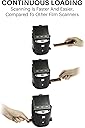
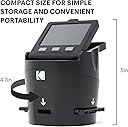
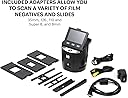
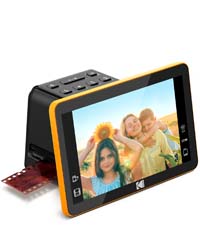
The KODAK SCANZA Digital Film Slide Scanner is a powerful 14/22MP device designed to convert a wide range of vintage film formats into high-quality JPEG digital files. Featuring a bright 3.5-inch adjustable TFT LCD for easy viewing and editing, it comes equipped with multiple adapters for 35mm, 126, 110, Super 8, and 8mm films. Its user-friendly interface and one-touch operation streamline the digitization process, while included cables and a cleaning brush ensure a complete, ready-to-use package compatible with both Mac and PC.


| ASIN | B00O2BU8PK |
| Best Sellers Rank | #45,366 in Computers ( See Top 100 in Computers ) #21 in Slide & Negative Scanners |
| Brand | KODAK |
| Color Depth | 24 bpp |
| Connection Type | USB |
| Connectivity technology | USB |
| Customer Reviews | 4.1 out of 5 stars 11,328 Reviews |
| Global Trade Identification Number | 00840102192780 |
| Item Dimensions D x W x H | 11.9D x 11.9W x 12.7H centimeters |
| Item Weight | 1 Pounds |
| Light Source Type | LED |
| Manufacturer | KODAK |
| Media Type | Slide Film, Negatives |
| Minimum System Requirements | Windows XP, Vista, 7, 8, 10 and Mac OS X 10.7 and above |
| Model Name | SCANZA |
| Model name | SCANZA |
| Optical Sensor Technology | [CMOS, NA] |
| Product dimensions | 11.9D x 11.9W x 12.7H centimeters |
| Resolution | 3200 |
| Scanner Type | Film |
| Scanner type | Film |
| Standard Sheet Capacity | 35 |
| UPC | 840102192780 |
| Unit Count | 1.0 Count |
| Wattage | 250 watts |
M**I
Highly satisfied with suggestion of 6x6 format
An adapter should be included for 6x6 format. Otherwise, I am very satisfied!
M**N
Nice product
superb service and device too very nice
H**S
Je oude foto`s en dia's kun je goed digitaal maken. Bewerken met foto programma`s
Je oude dia's kun je digitaal maken en bewerken met je programma bv. Luminair of Photoshop of Inpixo
C**E
Scanned functioned as advertised.
Easy to use. However, The color of the slides is slightly washed out no matter how much I tried to adjust the color.
G**.
Facile da usare per convertire foto, veloce e risultato soddisfacente
Ho comprato il Kodak Scanza per convertire delle vecchie diapositive in formato più moderno. È facile da usare, all'interno della scatola sono presenti tutti gli inserti per convertire vecchi formati (compreso il Super8). Una volta presa la mano il processo è semplice, mettendo anche una diapositiva una dietro l'altra e premendo il tasto per catturare l'immagine su schermo. Il risultato è soddisfacente e di qualità buona. IMPORTANTE: Per salvare le fotografie convertite, è obbligatorio utilizzare una microSD. L'entrata USB presente, infatti serve soltanto per collegare il Kodak alla corrente e non può essere utilizzata per mettere una penna USB o simili.
D**.
Decent, pretty much what I expected.
• I had read many reviews before buying so I had a fair idea of what to expect. • As noted elsewhere, the Scanza is not a scanner. It makes a digital image of the slide. • Note that I've used it only with 35 mm slides. • It took a few seconds to figure out how to assemble the power adapter. There are outlet configurations for what I assume are various international outlets. • Other than that set up was very simple. Set it up, plug it in, and start using. • You do need an SD card. 32GB is more than enough for me. • The USB cable connects to power, or to a computer to upload pictures. When connected to a computer you cannot scan new images. You can also transfer images via the SD card. • Other reviews say the process crops the slides. I don’t see much, if any, cropping. • Quality is not great. There are colour adjustments and brightness controls, but I found it easier to tweak in the pictures Photoshop elements. With that I get adequate results. I’m making pictures to share with family, not for an art show. • I love the quick push-slides-through process. • I had a flatbed scanner with a slide adapter but it stopped working with a Windows upgrade. I like that this is independent of Windows. • To connect to a TV or monitor, it seems to work best to connect, then then power on the Scanza. • As noted in other reviews, I see no benefit to using the 22 MP format as opposed to the 14. • If you delete all the slides on the SD card, the numbering does start again at one. If you leave one image with the highest number so far, then the next scan would be that number +1.
M**Z
Great unit, great price
I bought this unit not expecting much, but was pleasantly very surprised with the way slides scanned and looked on my 55" television. For slides with good exposure, contrast, dye color retention, and focus the results were great and exceeded my expectations. It should be noted that slides may degrade over time and have severe color shifts if not stored correctly. I had many slides with a blue/cyan cast that were not stored correctly, and many that were outright destroyed by wet basement storage. But if your slides are good you should get very pleasing results. If your slides are in metal frames from a previous projector be sure to check for rust deposits. If deposits are visible scrape clean with a utility knife and blow off slides with a squeeze bulb puffer. I fed a few slides with rust deposits into scanner and scans became very dirty. I found unit was very easy to clean but I DID NOT use the little scrub brush supplied, I was worried hard rust particles might scratch the scanner lens. So I decided to try my squeeze bulb air puffer in the slide slot; one or two quick puffs and all dust and debris were gone! People also complained slides are a bit tricky to load, which is true. I found my slides had bowing from being stored in the metal projector frames, and that if I manually bent them straighter they fed MUCH better. All I have done so far is to scan slides, but scanner is worth every penny to me. Scans are captured very quickly, and all I had to do was use default settings, a breeze to use. I think the editing scanner settings might help some in getting better scans, but I think you can do much better with computer software after capture. I purchased my Scanza from DBROTH and it arrived quickly, but unit was packed very poorly, loose, rattling around in a bigger box with no padding. I was lucky, unit was not damaged, but I would not buy from this source again. See sample scans
Trustpilot
3 days ago
3 weeks ago