Desertcart purchases this item on your behalf and handles shipping, customs, and support to Colombia.
🎮 Elevate your cockpit—tune in, stand out, and never miss a frequency!
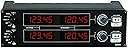
The Logitech G Pro Flight Radio Panel is a professional-grade USB controller designed for flight simulation enthusiasts. Featuring twin concentric dials for precise frequency adjustments, real-time LED displays synced with popular simulators like Microsoft Flight Simulator X, X-Plane, and Prepar3D, it eliminates the need for on-screen radio controls. Its plug-and-play USB connectivity and robust build make it an essential upgrade for any serious home cockpit setup.
| Additional Features | Real-time flight controls |
| Asin | B01M1BNQAF |
| Best Sellers Rank | #8,721 in Videogames (See Top 100 in Videogames) #37 in PC Flight Controls |
| Brand Name | Logitech G |
| Button Quantity | 10 |
| Color | Black |
| Compatible Devices | Microsoft Flight Simulator 2004, Microsoft Flight Simulator X, PC, Prepar3D 2.2+, X-Plane 10, X-Plane 11 |
| Connectivity Technology | USB |
| Controller Type | Panel |
| Customer Reviews | 4.6 4.6 out of 5 stars (803) 4.6 out of 5 stars |
| External Testing Certification | ANATEL |
| Global Trade Identification Number | 00097855127945 |
| Hardware Platform | Desktop |
| Included Components | Mounting Bracket, Pro Flight Radio Panel, QSG, Screws |
| Item Dimensions | 28.2 x 5.5 x 8.4 centimeters |
| Item Type Name | Logitech G Pro Flight Radio Panel (945-000029) |
| Item Weight | 14.78 Ounces |
| Manufacturer | Logitech, Inc |
| Manufacturer Part Number | 945-000029 |
| Model Name | Pro Flight |
| Model Number | 945-000029 |
| Package Quantity | 1 |
| Power Source | Wireless |
| Upc | 097855127945 |
User
Melhor escolha
A configuração é muito simples e torna tudo mais real
User
Great Radio Panel!
I bought two of these for my flight simulator setup. They work great! Very sturdy. Nice big displays. Lots of radio tuning options with these radio panels. They mounted easily to my Honeycomb Alpha and Bravo units. One one of the radio panels I did discover one of the LEDs burned out after not even a month. I contacted Logitech support via email. In a very timely manner they sent me a replacement radio panel, a brand new one, very quickly. It's working perfectly. Their tech support did a great job in my situation. I highly recommend these panels for any serious flight simmer.
User
Funciona a la perfección y jalo a la primera en XPlane 11
Muy útil para manejar los radios me gusto mucho
User
Positive Feedback
Good job! Keep up the great work!
User
Works with MSFS 2020
Good build quality, works straight out the box, just install the Logitech driver before plugging it in (unless you have installed it previously for other multi panels you may own). The display doesn't show the third digit after the decimal which for some frequencies is a bit annoying, but there is good haptic/tactile feedback when turning the wheel, so it's not that hard to get to 122.755 even though it's only showing you 122.75.Keep in mind that some aircraft need you to turn on the "master avionics" switches when starting "cold and dark" so use a key binding for this if your panel doesn't seem to work.
Trustpilot
1 month ago
5 days ago