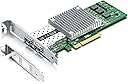
🚀 Elevate your network game with 10GbE power and effortless scalability!
The 57810S-10G-2S-X8 is a high-performance Broadcom BCM57810S-based 10Gb Ethernet network card featuring dual SFP+ ports and PCIe v2.0 x8 interface. It supports CAT6a/7 cabling up to 100 meters and is compatible with major operating systems including Windows Server and Linux. Designed for professionals seeking reliable, scalable, and plug-and-play 10GbE connectivity, it enables bonding for up to 20Gbps throughput, making it ideal for demanding data center and enterprise environments.


| ASIN | B06X9T683K |
| Are Batteries Included | No |
| Best Sellers Rank | #58,751 in Computers ( See Top 100 in Computers ) #143 in Network Cards |
| Brand | H!Fiber.com |
| Color | For BCM57810S(2xSFP+) |
| Customer Reviews | 4.5 4.5 out of 5 stars (210) |
| Date First Available | 14 March 2017 |
| Item Weight | 210 g |
| Item model number | BCM-57810-2S-1pc |
| Manufacturer | H!Fiber.com |
| Operating System | Linux 5.7, Windows Server 2008 |
| Product Dimensions | 22.35 x 15.24 x 2.54 cm; 210 g |
P**E
I must say, that thise netcard are pretty good and are just working right out of the box. CachyOS (Arch Linux) found the card right away, no driver install needed. I got two of them, and have bought a pair of DAC Cables and have made direct connection between my PC. All I needed was to setup local ip adresse and up and running in no time. I used 10.0.0.1 for port 1, 10.0.0.2 for port 2, Gateway 10.0.0.10 and DNS 10.0.0.10, on the other card, I used 10.0.0.3 and 10.0.0.4 and again 10.0.0.10 for DNS and Gateway. If you want, you can either use bridge or bond to combine both ports on one of the netcard, so you instead of 10GbE get 20GbE out of the cards! Use arch wiki for how to or even just ask ChatGPT. Just remember, if you want to bind two ports to become 1, that this shall ONLY be done for 1 of the cards. I really recommend this under rated cards. Buy them and enjoy the fun with either 10GbE or 20GbE networking the EASY WAY.
M**G
Regardless of which combination of PCI-e slots and settings I used, I wasn't able to get this above 3gbps even using fibre cables and transceivers. Returned it and gave up.
M**A
La carte est de bonne qualité, aucun driver à installer, elle est reconnue immédiatement par le système. Performances au rendez-vous, je constate une nette amélioration des transferts en 10GbE, sans surchauffe ni instabilité. C'est une excellente alternative, bien moins onéreuse que la carte officielle Synology, tout en offrant des fonctionnalités identiques. Je recommande vivement pour ceux qui cherchent à upgrader leur NAS sans se ruiner. Livraison rapide et bien emballée. Très satisfait de mon achat.
I**N
My use case is a personal development network with two high end desktop workstations, one with AMD Ryzen 9 and the other with Intel i7. Both are running Ubuntu Linux 22.04.2 PRO and I am using a Mikrotik CRS306-4S-1N switch. Both Desktop systems have this board and cable into the switch with 6COM 6C-SFP-10G-T SFP+ 10G RJ45 Adapters and CAT8 cabling. As soon as everything was plugged in the systems came right up and everything was fast and sweet. Don't forget to plug in the backhaul cable from the switch to your in-house network feed otherwise no DHCP and the 10G connections don't com up. Highly recommended. This is plug and play and the most practical sense. Installation time was about an hour and that include putting boards in two machines, running cables, attaching adapters and installing switch. "Settings/Network/Ethernet/Wired/enp11s0f0 showed connected at 10000 Mb/s immediately.
A**H
Works as expected and Very happy
Trustpilot
1 month ago
2 weeks ago