❄️ Compact Cooling Meets Big Performance — Your Mini-ITX Masterpiece Awaits!
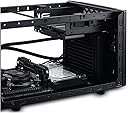
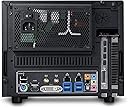
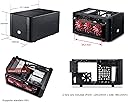
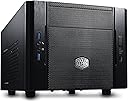
The Cooler Master RC-130-KKN1 Elite 130 is a sleek Mini-ITX tower case designed for professionals craving high performance in a compact footprint. Featuring a mesh front panel for superior airflow, support for 120mm water cooling radiators, and compatibility with full-size ATX power supplies and long GPUs, it balances power and portability. With dual USB 3.0 ports and a steel alloy build, it’s the ultimate budget-friendly choice for efficient, stylish small-form-factor PC builds.
| ASIN | B00DJ6A88G |
| Antenna Location | Indoor/Outdoor |
| Best Sellers Rank | #5,190 in Computer Cases |
| Brand | Cooler Master |
| Case Type | Full Tower |
| Color | Black |
| Compatible Devices | CPU |
| Cooling Method | Air |
| Customer Reviews | 4.5 out of 5 stars 974 Reviews |
| Enclosure Material | Steel Alloy |
| Fan Size | 12 centimeters |
| Global Trade Identification Number | 00884102024221, 04719512045176 |
| Hard Disk Form Factor | 2.5 inches |
| Internal Bays Quantity | 3 |
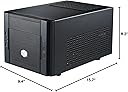
| Item Dimensions D x W x H | 15.7"D x 9.4"W x 8.2"H |
| Manufacturer | Cooler Master USA, Inc. |
| Material | Steel Alloy |
| Mfr Part Number | RC-130-KKN1 |
| Model Name | RC-130-KKN1 |
| Model Number | RC-130-KKN1 |
| Motherboard Compatability | Mini ITX |
| Number of Fans | 1 |
| Number of Items | 1 |
| Other Special Features of the Product | 120mm Radiator Support in Front |
| Power Supply Mounting Type | Bottom Mount |
| Recommended Uses For Product | Indoor/Outdoor |
| Supported Motherboard | Mini ITX |
| Total Expansion Slots Quantity | 2 |
| Total USB 2.0 Ports | 1 |
| Total USB 3.0 Ports | 2 |
| Total Usb Ports | 3 |
| UPC | 031112550909 884102024542 884102024221 803982775139 |
| Unit Count | 1 Count |
R**D
Monstrous Mini ITX Case for even high end builds
Before I get started, I should note I run a pretty high end custom watercooled system inside this Elite 130, so I guess I'll list what I'm packing in this mini monster: Conventional Parts CPU - Intel I5 3570k Motherboard - MSI Z77IA-E53 Graphics Card - MSI Twinfrozer Radeon 7950 (7970 Reference PCB) Power Supply - Silverstone Strider 550 Watt Hard Drive - Western Digital Cavalier Green 1TB SSD - Samsung 840 Pro 128GB Unconventional Parts Radiators - 2x Alphacool NexXxoS XT45 Single 120mm Pumps - 2x Swiftech MCP35X Resevoir - Koolance RP-401X2 CPU Block - Koolance CPU-380I Graphics Card Block - Heatkiller GPU-X³ 79X0 Fans - 3x Scythe Gentle Typhoon AP-45 2150RPM (GT's are best fans out there, no joke. Also the AP-45's are a little tough to find now but AP-15's are just as great and abundant.) With that outta the way... Coming off of the Elite 120, I had very high expectations for this case, and it did not disappoint. Again, coming off the Elite 120, doing a side by side comparison between the 2 cases I found them to be the exact same dimensions even though the product numbers say different. From the numbers, the elite 130 should almost be 1 inch shorter in length which its not. The only difference in size may be the front panel by a couple of millimeters. Speaking of the front panel, it has been changed to a full mesh front which is thee biggest change from the Elite 120, and what a huge improvement it is. My GT's are breathing much more comfortably and are moving monstrous amount of air now thanks to the full mesh front. Also from doing measurements, it looks like that front panels between the 120 and 130 are NOT interchangeable. Some people say that this case is a little to big to be a Mini ITX case, and why this may hold some truth, going any smaller of a case would keep one from installing full length graphics cards. That said, there so much room to work with in this case that u can fit everything one would want into it. And yes, I was able to fit all the stuff listed in this case. And that's 2x 45mm radiators with 3x 25mm fans fitted to them. However the side drive bracket did have to come out for the HDD to fit in its place. HOWEVER, (and this is a big however, notice the caps), the side drive bracket does fit with a watercooling setup and has enough room left on either side to mount an SSD, so if your rocking just SSD's or have external drives, this bracket still maintains functionality in watercooled setups. When selecting the radiators it should be noted that you should pay attention to radiator thickness and graphics card length when the rad inlets are on the graphics card side as they may intersect. The airflow of the case is fantastic when coupled with a Power supply with fan down, which creates a wind tunnel effect where the front fans pull air straight in and the psu pulls in out back. If your going the aircooling route, it should be noted that u have a 65mm clearance for a heatsink. The stock heatsinks that comes with most processors will fit. The Cooler Master GeminII M4 - CPU Cooler with 4 Direct Contact Heat Pipes (RR-GMM4-16PK-R2) is a great choice for an aftermarket cooler, and as far as I've seen in pictures, will fit even with a graphics card installed. So in conclusion, this case has a ton of different options to which you could build it, whether it be a light and small office computer, a quiet and appealing HTPC, or a full bore, no holds bar, cancer curing, old people punching, etc etc, monstrous gaming Lan Box. I will say however that if your going with multiple drives (3+), I would still recommend the Elite 120 for its optimize drive cage, and if your looking to go any smaller, say bye to that graphics card you have sitting in your wish list. I also uploaded some pics of my build to amazon so u can get an idea of what this little monster can do, as well as a couple measurement for reference.
W**Y
Great case, even for a gaming setup
I go to school across the country from where I live and needed to move my current hardware in a mid sized case into a smaller case. (See my review of the Corsair 300R here on Amazon, great mid tower case). After doing hundreds of hours of research and passing up a great deal on the Bitfenix prodigy, I decided to get this case for a few reasons: 1. Front panel USB3 (x2) 2. Amazing options for many drives of different kinds (I currently have 2 SSD and 2 HDD in mine) 3. Full size ATX power supply form factor 4. Full size graphics card room 5. Truly small compared to the Prodigy 6. Simple, yet strong, look. Doesn't look like a plastic toy like many other Cooler Master products. (in my opinion, of course) Initial impressions: Out of the box, the case looks great. The paint is even, the inside is black, the cables are black, the grating on the top and front look very professional and stylish. The documents that come with the case are in many different languages, but are very easy to understand using the pictures. The front panel is not a massive pain to remove like many other cases I have owned. One thing that I love about this case is that it has many places to tie cables. When building, I took the time to really think through zip-tying cable groups to keep the clutter to a minimum. The case also came with a bag of various screws, quick detach mounts for SSD and HDDs, a bag of SSD screws, and two black SATA cables (one with an angled connector and one without). I'm sure I'm missing something here, so do a little bit of research or throw me a question to find out if this case has what you need. The build: - Motherboard: Gigabyte H77N-WIFI (so far so good, I'll write a review eventually) - Corsair H60 water cooler (great so far, fits very well in this smaller case) - SSD x2 - HDD x2 - Gigabyte GTX 670 Windforce (large and heavy, 11.2" long, 5" tall, 1.5" wide) - Seasonic 560KM PSU As you can see, this is a lot of things to power. I found it moderately easy to keep cables neat and organized, but it took a bit of head scratching and zip-tying to keep the spaghetti to a minimum. There are cable-tying points along both of the bottoms on each side of the case, so keeping the front-panel cables tied and out of the way was very simple. The hardest part was probably just making enough room to jam the PSU over all of the SATA cables, water pump lines, etc. when I finished installing everything. Don't be demoralized if you have to take a few pieces out in order to slot something in, everything will fit and it will fit well. Pros: - Full size gaming PC in a mini-itx sized case - Room for massive amounts of storage media (slightly less if you need to use the 5.25" slot) - Very easy to take apart to fit your hands inside - Quick detach for storage media - Very quiet stock fans that move plenty of air (each comes with a 4-pin power extension for direct PSU power) - Great price - Sturdy, trustworthy structure Cons: - Takes extra time to think through compared to larger cases Thanks for reading
A**Y
For your mobile power-rig.
The Cooler Master 130 is a nice little case, I believe it's one of the smallest m-itx cases you can get that still fits a full sized psu, and gpu. If you are building some kind of mobile power-gaming rig, then I recommend the 130. There is a good amount of room for cable management, I still recommend a semi/fully modular psu though. I have a semi-modular psu and still had to get creative with the cables. The amount of space for the gpu is awesome too, you don't have to worry about if your card will fit. There are some options for mounting your hard drives as well, you can work 2 SSDs, and 2 HDDs if you wanted to. The main reason I got this case is for mobility, especially if you are flying. It is just the right size to fit in a carry-on, that way you don't have to ship anything or worry about it in a check-on. The 130 M-ITX isn't my main mini case though, I only got it so I can carry it on a plane. I have a Thermaltake Core V1 as my home rig. Comparing it to the Thermaltake, I don't like how claustrophobic everything in inside the 130. The PSU sits right above the mobo, so I hope didn't forget to plug anything in your mobo or you'll have to unscrew the psu out, or only the gpu if you're lucky. You will be limited to the type of aftermarkget cpu cooler you might get. There is not a lot of vertical clearance at all. I don't really like the airflow on it either, however I am basing this with only the fans the case comes with. My GPU under load is ~77. With the Thermaltake V1, underload is 66-70c, which is awesome. I also don't like that the psu sits above the mobo. The V1 sits under the mobo and has awesome cable management. Although I like that the psu can be flipped either way, and can be placed right at the top to bring fresh air in on the 130. I miss the clear side too, I like to look inside my case and rework some cables if I see something. Overall, 130 is great mini-itx case, great for mobility, also a great price.
E**C
Excellent value and fits a lot of components
NOTE: some of the photos these reviews don't seem to be for the CM Elite 130, but another similar model. Check PCPartPicker, YouTube, reddit, or other sites to see photos of example builds! I only have photos without cable management, so I'm shy to share. Mini-ITX cases tend to be pretty expensive, so the CM Elite 130 is great value. I've had it for over a month now and I'm very happy! Installing parts was straightforward. Make sure you do a test build outside your case and make a plan for cable management ahead of time. YouTube has a lot of videos on installing in this case. My main main concerns when porting my parts from a mid-tower to a mini-ITX were: 1. having good airflow to keep the components cool 2. having space for a Bluray/CD drive 3. having space for my old, 2015 video card, which is about 11" long 4. having space for an additional SSD drive, which I plan to purchase when I have more money :) Regarding my concerns: 1. I decided to use a liquid cooler to keep the case quiet and better cooling efficiency.. I replaced the front panel 120mm fan with the radiator fan for the MasterLiquid120L. I kept the case fan to give my components additional airflow. I pointed my power supply fan towards the motherboard to act as an exhaust. It's been over a month now, and the case has been pretty quiet and cool. 2. Most videos you find on YouTube do not involve a Bluray/CD drive, but I have need for one. This fit easily. and will instead use the bay to install an HDD or two SSDs. I have need for the drive, so I added it. 3. Video card fit just fine. If I buy a new graphics card, I'll probably get a shorter one and see if it makes sense to squeeze in another case fan. 4. I removed the hard drive mount on the side of the case because I had no need for it. Removing it also made installation easier. I might add it back when I buy an additional SSD. ## Other notes ## The Cooler Master Elite 130 supports ATX power supplies, but I wanted a smaller, SFX power supply so I would have more airflow. You can easily use SFX power supplies on this case by buying a SFX to ATX Power Supply Adapter for ~$10. ## Build ## This build's value is close to $1000 because of the motherboard and CPU. [CPU] Intel i7-9700K 8-Core 3.6 GHz LGA 1151 [Motherboard] Gigabyte Z390 AORUS PRO WIFI [RAM] G.Skill 16GB (2 x 8 GB) 3000 MHz DDR4 [CPU Cooler] Cooler Master MasterLiquid Lite ML 120L, 120mm RGB [Video Card/GPU] MSI GeForce GTX 970 4 GB Video Card [PSU] PSU Corsair SF600, Modular, 80+ Gold [Optical Drive] Asus DVD/Bluray Drive [Storage] 3.5"" HDD and 2.5" Solid State Drive [Accessories] Silverstone SFX to ATX Power Supply Adapter, additional Corsair Power Cable for SATA connection
C**E
A Great Small-Form-Factor Case
Let me start off by saying this is a great case for the money. For $50 you get a great small-form-factor case which will easily fit into smaller nooks and crannies of your home theater setup. I've seen it as low as $35 with mail-in rebate, so it can purchased very cheaply. Specs: It comes with two fans a front intake 120mm fan and an 80mm exhaust. The case's dimensions are as follows (W x H x D) 9.4 x 8.2 x 15.7 inch. The whole thing is slightly bigger than a normal sized show box, which is impressive, as it fits a full size power supply and supports uber-long video cards like the AMD 7990. I really like that the video card in this chassis points the GPU fan to directly exhaust out of the case. The GPU exhaust is great because it directly shoots out hot air from the video card straight out of the case. The case comes with two USB 3.0 ports, a USB 2.0 port and front audio and mic inputs. It's pretty amazing that it offers all these I/O Panel ports at such a low price point. CoolerMaster has brought consumers a ton of value by doing this! Motherboard Support: This case only supports Mini-ITX boards, so you'll need to make sure you order a smaller motherboard for it before you decide to use it in your next computer build. Advice: If you are thinking of purchasing this case do yourself a favor and buy a modular power supply. Honestly, you will thank me later. I used an old normal non-modular power supply I had laying around and I had one heck of a time doing cable management in this thing. It is possible to do a build with a non-modular PSU, but if you're new to building PCs seriously get a modular one for this case it will make your life a whole lot easier when putting together your rig. Anyways, if you have the budget to purchase a small case this is a great option for you! It only supports Mini-ITX boards, but it has a great I/O panel and a size that will fit in almost any home theater setup or desktop space. At $50 I still think it is a steal and should be looked at as the best budget SFF case on the market!
A**Z
Good case but for a good gaming I would not recommend.
I bought this case to build an ITX gaming pc. While this case can be used as a gaming pc there are a few things you might want to know before choosing this case. 1. The case has no dust filters. 2. The LED light on my case did not work, could have been defective. 3. The case stand off feet are hard plastic and not rubber so the case slides all over the place like a damn hockey puck. Try hitting the power or reset button and the case will slide. 4. This case will fit most video cards with a length of 13.5 inches. However, depending on your video card you may have a card like I do that is much taller than the normal video card such as the EVGA 700 series Classified cards. Now these cards can fit but where you will probably run into problems when trying to fit it in is the height at the end of the card wont clear the 5.25 drive bay mount. It literally barely just doesn't fit by like 1/8 of an inch. I had to pull my drive bay tray out to get my card to fit. 5. Next is cooling. This case under normal use will do fine and generally wont over heat but if you plan to put in a beefy graphics card and run ultra settings on some of the latest games this case will start to over heat very quickly. Fortunately for me I always monitor my system temps with various programs and I noticed that my system was running hotter than I felt comfortable with. This was primarily due to my graphics card. Now some graphics cards will pull air into the card and vent the hot air out the rear vent of the card but the higher end cards while in a vertical position will vent the hot air out the top of the card from the heat sinks. This is good and bad, its good because the hot air goes straight up but with this case the bad thing is there no ventilation out the top of the case especially where the video card is located. So what I did as another modification was I pulled the outer case shell off the system and drill holes along the video card path, added a filter, and placed the shell back on the case. Now when I ran my system the hot air built up from the video card had a place to escape. This did improve temperatures but I still wasn't where I wanted to be. At this point I went back to the drawing board and started researching mini ITX cases again but unfortunately none of them were built to my liking with the proper ventilation and cooling I was looking for and that would fit my video card. That is until I found out about the Cooler Master HAF Stacker 915F. When doing my research I was searching for mini ITX cases and for some reason none of my search results ever showed me the 915F. If it had I would have ordered that case from the start. Anyways after I reviewed the 915F I ordered it. Pros: 1. It has a ton of ventilation (all sides) compared to the Elite 130. 2. System Temps are running 10°C lower than the Elite 130. 3. Good room for expansion for adding multiple case fans. 4. Comes with good quality dust filters. 5. Rubberized feet so it wont slide. 6. With the proper modification you could actually added a double 120mm radiator cpu cooler to the top vent with a push pull config. Cons: 1. No Reset switch (I had to order one off ebay) 2. Price is a bit high $70 3. Not the best cable management but can be done. 4. About 6 inches longer than the Elite 130. 5. The PSU extension cable can not be used for high end PSU's. You will need to order a Right Angle power cord with the proper 15 Amp, 125 Volt accommodations. Why? because the front panel on the 915F wont fit with a normal power cord for the psu. This is the power cord I ordered: Monoprice 10ft 14AWG Right Angle Power Cord Cable w/ 3 Conductor PC Power Connector Socket (C13/5-15P). The replacement power cord is only necessary if you are running a high powered PSU like 700 watts or higher. Other thoughts: I had to make three modifications to the 915F. First I drilled out more ventilation holes for my video card as the front fan was not getting proper ventilation and added a custom filter. Second, I added a 140mm case fan on the inside top panel to exhaust all the hot air out the top of the case. Third I ordered a LED reset switch off ebay and mounted it on the drive bay. I am very pleased with this case even tho it is a bit longer than what I originally wanted but I think the compromise works out ok for my needs. Some of you may wonder why I've been so concerned about cooling with my build, the are two reasons. 1. The cooler your system runs helps expand the life of your hardware. 2. I needed good cooling to overclock my video card with out having to resort to water cooling. If you are considering a mini-ITX case for high end (ultra settings) gaming (not enthusiast SLI or CrossFire gaming), the 915F case will work perfect for the size. If you are looking for a case to do basic computer tasks or light gaming the Elite 130 will work just fine. SYSTEM: CPU: Intel i7-4770K @ stock FAN: Corsair H80i MOBO: ASUS Impact VI Mini ITX RAM: Corsair Vengeance Pro Series 16GB 2x8GB DDR 1600mhz VCARD: EVGA GeForce GTX 780 Ti Classified K|NGP|N Edition PSU: Corsair HX1050 1050-watt SSD: Corsair Force GT 180GB HDD: WD VelociRaptor 10,000rpm 300GB CASE: Cooler Master HAF Stacker 915F UPS: CyberPower CP1500PFCLCD PFC Sinewave UPS 1500VA 900W
A**Y
Great mini-ITX case with 5.25 inch bay and full sized video card slot.
I literally own 3 of these now -- they're perfect for any/all mini-ITX motherboards that I've came across. Everytime I build a new PC, I buy one since I can't find a design I like better (not with a 5.25 inch bay, anyway), and have just naturally aquired them over the last 3-4 years. There's other cases like this online and on Amazon, but this is the only one (I think) that I've come across that still has the 5.25 inch bay for full-sized optical/DVD/BD drives. Sure, you could always hook up USB optical drives, but they're usually a little more expensive, and I just hate doing that when I could have it practically out-of-sight. The only drawback, that I see, is the space inside the case, which can be made better by using modular power supplies, or power supplies that don't have lots of cables or cables that are bulky. I found a power supply from an old Dell XPS 400 tower (I believe that was the model) that fits better than my two modular power supplies, strangely enough (the cables for my modular power supplies are much more bulky, even if there are fewer). Has front fan filters, even though I don't think they advertise it, also (You can see them when you look close enough through the mesh bezel in front of the front 120mm fan). There's no hard drive bay, but the case includes special rubber washers you screw into the bottom of 2.5 and 3.5 inch drives, which you then slide into holes on the side and bottom of the case. It's not the most time efficient process since you need to screw 4 screws in each drive and attach the washers, but it's also very space and cooling efficient, so it might be better than having a designated drive bay anyway. I actually just leave the drives in there loose since the cables are stiff enough on most power supplies to keep them away from everything else (I have plastic SSD drives which are light so don't move much). I really can't stress enough that finding a power supply with the least amount of cabling and/or the least bulky cabling will payoff so much in the end, in terms of working inside the machine, etc., and you'll easily see why if you ever buy this. Just take my word for this. I don't know if there's a way to locate a power supply that excels in this area, but if there is, use it to find one with some really flexible and conservative cabling. You will be thankful later. This is the biggest complaint I have, but is also nobody's fault.
A**H
and it was easy and painless
This was the second time I've built into an Elite 130, and it was easy and painless. The case is very small however, so I would definitely recommend at least going with a semi-modular power supply. There was ample room for a Gigabyte G1 Gaming GTX 960, which made installation a breeze. As far as quality of the case goes, the front feels a little cheap and scratch-prone, but beyond that, the rest of the case feels very high quality. There are no side panels on the case, the top, left, and right siding all slide off as one unit, which can be a little awkward, but it does fasten very securely onto the frame. If you are planning on making a higher end build, I would definitely recommend a water cooler for this case, as temps can get relatively high with a stock cooler. A small 120mm water cooler would work, I know that a Corsair H80i worked flawlessly. Temps with just the stock cooler were high, but never to the extent that I feared damage to the processor, or felt like I had a small space heater next to me. If I had to go ahead and list the pros and cons, they would be as follows: Cons: - Awkward access to internals based on there being one large removeable panel - The included 80mm fan does nothing to cool the internals, and was better off just removed - The front of the case did feel cheap and scratch-prone Pros: + A great case for the price + Enough room for cable management with a semi-modular power supply + Enough room for full length GPUs + Very compact and space efficient Overall, I would definitely recommend the case.
P**9
Super boitier
Vraiment un super boitier pour construire un mini PC bureautique et multimédia avec SSD, HDD et graveur. Il y a de la place pour tout loger sans que tout soit trop confiné. Du coup, le ventilateur de façade aère bien les éléments et la carte mère, et l'ensemble ne chauffe pas et fonctionne dans un quasi silence. Quasi parce que le ventilateur de façade est un trois pins, donc régulation de la vitesse en DC. J'aurais préféré un 4 pins pour une régulation PWM qui aurait permis de mieux ajuster sa vitesse de rotation et rendre ainsi l'ensemble plus silencieux. A, noter deux USB 3.0 et un USB 2.0 en façade, c'est royal ! La qualité du boitier est excellente pour le prix (pas de bord coupant) et le look final est plutôt sympa.
A**I
Grande Amazon. Prodotto perfetto.
Spedizione Amazon perfetta, come sempre. Case mini-itx perfetto per avere un sistema gaming high-end molto compatto. Io ho dentro un i7 4790k dissipato a liquido con un Corsair Hydro H80i v2, una Strix 980ti, 2 ssd, 2 banchi di ram ad alto profilo e ci sta tutto alla grande anche se gli spazi sono proprio misurati per cui va fatta molta attenzione a pianificare bene il tutto prima del montaggio. Nonostante sia così piccolo i flussi d' aria suono buoni ed io sto dentro un range di temperature accettabilissimo per tutti i componenti. Il filtro anti polvere anteriore fa il suo dovere ed il tutto è molto semplice da smontare, rimontare ecc. Un consiglio, anche se si può utilizzare un qualsiasi alimentatore standard andate su uno che sia massimo 150x140x86mm altrimenti vi troverete malissimo per la profondità dentro il case, io per questo ho preso un Cooler Master v750 completamente modulare. Nn ho trovato difetti costruttivi ne mi posso lamentare del funzionamento delle porte usb o dei tasti di accensione e reset. Unico neo: anche se il case è indicato come compatibile con un AIO a liquido con ventola da 120mm fate tantissima attenzione alle dimensioni del radiatore che andrete a montare e soprattutto al diametro dei tubi di scambio del liquido, perché si è vero che il Corsair che ho preso io ci sta benissimo una volta montato ma per montarlo ho sudato 14 camicie.
W**G
Cool looking, functional and overall awesome case!
This is the case I chose for my very first PC build and overall it was a dream to build in. It comes with all the small issues that Mini ITX cases have such as not loads of space inside in terms of working in the case, but this is easily worked around. It has amazing space for cable management including cable tie anchor points and grooves to hide cables. The case, for mini ITX, has a suprising amount of space for extra hard drives or SSDs. In my build I have 2 hard drives and 1 SSDs with room still for another couple of SSDs if need be. The case has loads of vents for fans including amazing ventilation for the PSU and GPU as well as two case fans already installed. Definitely recommend.
M**.
COOL product
Excellent case for thermal profile and for a midrange GPU. Will not fit much more than a GTX1660 OC however, such is the mini-ITX world.
C**G
A Compact Case
Nice with ODD support.
Trustpilot
1 month ago
2 weeks ago