

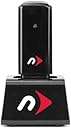
NewerTech MaxPower USB Wireless Adapter For Apple Macintosh & PC
Product ID: 24345581
Details
- BrandOWC
- Hardware InterfaceUSB
- Data Link ProtocolUSB
- Data Transfer Rate300 Megabits
- Item Weight0.35 Pounds
- UPC811643012257
NewerTech MAXPower 802.11n/g/b Wireless Network USB Adapter for Mac and PC. The easiest way to add 2.412GHz~2.484GHz Wireless Connectivity to ANY computer! 2 Year NewerTech Limited Warranty. Review: How to revive your White intel iMac for just $22. - In 2006-2007 the iMac Intel (White) was a best-seller and is still a great workhorse for many applications. All of the White iMac models named "Intel Core Duo" and "Intel Core 2 Duo" were equipped with Wireless 802.11 a/b/g, which makes them obsolete on today's networks: Model Identifier's: iMac4,1 - iMac4,2 - iMac5,1 - iMac5,2 - iMac6,1 do not support Wireless 802.11-N* I was ready to toss my wife's White iMac because it could not hold onto a signal from our Linksys E2500 Wireless-N Router** I tried several other usb Wireless-N devices, and none of them worked on the iMac. As soon as I plugged in the NewerTech MaxPower USB Wireless Adapter, it did a self-setup which took about 60 seconds, and the old white iMac picked up a very strong and stable wifi signal. It has been trouble-free since and now works as well as the new iPad with wireless. * Apple iMac Desktop with 17" Display MA590LL/A (2.0 GHz Intel Core 2 Duo, 1 GB RAM, 160 GB Hard Drive, SuperDrive) *To check the model identifier on your iMac, choose "about this mac" under the apple icon at the top left of your monitor. A small window will pop up, with an option that says "More Info". Choose this option and you will see if your iMac Model Identifier No. matches one of those listed above. In the same window, you can also choose "Airport" under the "Network" menu and you will see directly if your iMac supports 802.11 a/b/g or 802.11 a/b/g/n. *See the "customer image" posted next to the product at the top of this page for a visual guide on how to identify your iMac model # and if built-in wireless supports the obsolete 802.11 a/b/g or the current 802.11 a/b/g/n. **This is a fine wireless router at a great price ($50) for an area of about 1800 sq. feet: Factory Refurbished Cisco Linksys E2500 Advanced Simultaneous Dual-Band Wireless-N Router Review: One Star - TERRIBLE TERRIBLE TERRIBLE. Don't bother.
| ASIN | B00CRMDD08 |
| Brand | NewerTech |
| Compatible Operating System Family | MacOS |
| Customer Reviews | 3.7 out of 5 stars 19 Reviews |
| Data Link Protocol | USB |
| Data Transfer Rate | 300 Megabits Per Second |
| External Testing Certification | FCC, CE |
| Hardware Interface | USB |
| Item Weight | 0.35 Pounds |
| Manufacturer | Newer Technology |
| Mfr Part Number | NWTMXP3802NU2C |
| Model Number | NWTMXP3802NU2C |
| UPC | 811643012257 |
L**S
How to revive your White intel iMac for just $22.
In 2006-2007 the iMac Intel (White) was a best-seller and is still a great workhorse for many applications. All of the White iMac models named "Intel Core Duo" and "Intel Core 2 Duo" were equipped with Wireless 802.11 a/b/g, which makes them obsolete on today's networks: Model Identifier's: iMac4,1 - iMac4,2 - iMac5,1 - iMac5,2 - iMac6,1 do not support Wireless 802.11-N* I was ready to toss my wife's White iMac because it could not hold onto a signal from our Linksys E2500 Wireless-N Router** I tried several other usb Wireless-N devices, and none of them worked on the iMac. As soon as I plugged in the NewerTech MaxPower USB Wireless Adapter, it did a self-setup which took about 60 seconds, and the old white iMac picked up a very strong and stable wifi signal. It has been trouble-free since and now works as well as the new iPad with wireless. * Apple iMac Desktop with 17" Display MA590LL/A (2.0 GHz Intel Core 2 Duo, 1 GB RAM, 160 GB Hard Drive, SuperDrive) *To check the model identifier on your iMac, choose "about this mac" under the apple icon at the top left of your monitor. A small window will pop up, with an option that says "More Info". Choose this option and you will see if your iMac Model Identifier No. matches one of those listed above. In the same window, you can also choose "Airport" under the "Network" menu and you will see directly if your iMac supports 802.11 a/b/g or 802.11 a/b/g/n. *See the "customer image" posted next to the product at the top of this page for a visual guide on how to identify your iMac model # and if built-in wireless supports the obsolete 802.11 a/b/g or the current 802.11 a/b/g/n. **This is a fine wireless router at a great price ($50) for an area of about 1800 sq. feet: Factory Refurbished Cisco Linksys E2500 Advanced Simultaneous Dual-Band Wireless-N Router
A**E
One Star
TERRIBLE TERRIBLE TERRIBLE. Don't bother.
M**K
Read the fine print, is your computer N-enabled
Disappointed in the fine print that said it would not work without N-enabled computers. Still siting there waiting for another try.
T**.
Only works with certain versions of OSX, read all specifications to be certain of compatibility before you buy this product!!!
Has the same name and looks just like the older B/G model (other than the removable base) but this model with N capability will not work on OSX 4.x.x as no drivers are offered for this adapter to install on that older version of OSX and the driver for the older B/G version of this adapter which IS available for version 4.x.x of OSX does not work with this B/G/N version adapter. That said, I ended up using this on both a Windows XP and Windows 10 PC instead and it does that job just fine...
B**O
Gave wifi to my G5 Power Mac OS 10.5
Brought some wifi life to an old G5 Power Mac. Doesnt quite have the signal strength I would have liked, but pretty good for a dongle. If you have an old mac that needs wifi/your wifi card went out, this is definitely the way to go. Apple wifi cards are way overpriced, unless you can find a deal and are willing to install the hardware, which can be tough if you havent messed with stuff like that before. I'm a certified Apple Tech and I still didnt want to mess with it. The install process for the dongle wasnt too bad, really weird software guid thing you have to use, but cant expect too much using OS 10.5
K**.
works fine. Not too complicated to install on G5 Powermac
So far, works fine. Not too complicated to install on G5 Powermac. It picks up a weak signal and seems to hold on to it well. I notice the 1-star ratings are thin on technical or function issues and fat on "I didn't check this out properly to determine if it's compatible with my system/hardware." The adaptor cable gives you greater flexibility for placement in seeking a better signal. At the price, this is an excellent and functional gadget to have handy and does not deserve the negative knocks given to it by less attentive shoppers. I'm glad I saw past their comments and purchased this device on the strength of the more considered reviews. I was going to give it 4-stars, just because I've only been using it a short while, but on reflection in consideration of price and functionality I'm giving it 5.
C**N
No drivers for Mavericks OSX
I bought this device last November without knowing there were no drivers for Mavericks OS X. I contacted the company, and the rep told me they were working on updating the drivers. Five months laters, still no drivers, so I'm not sure whether they are actually working on it. So its currently a nice decoration on my sofa end table. Disappointing purchase.
B**G
it's the perfect solution & reasonably priced
I have an older Mac G5 & didn't buy the installed wireless option. New office space is in a room with no telephone jacks, so I needed a wireless adapter. Would be 5-Star, but 2 things are an issue for me: Takes about 20 extra seconds to re-link. Links up, then un-links, the re-links. Odd. But even more frustrating is if you power off, or the computer shuts down ... you have to re-enter the password & it's long. If this is OK, it's the perfect solution & reasonably priced.
Trustpilot
2 weeks ago
5 days ago