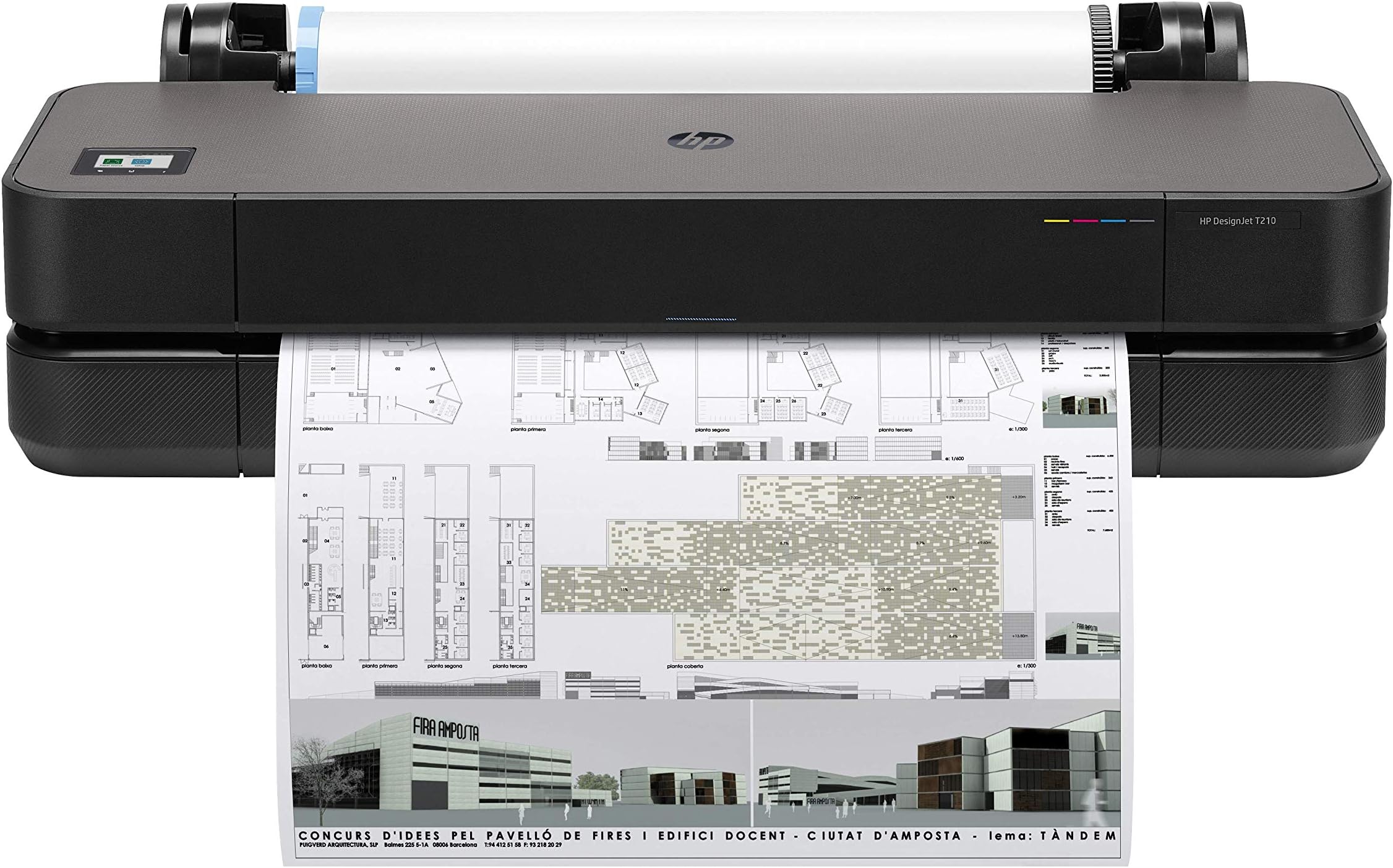
🚀 Elevate your prints, empower your projects — the HP DesignJet T210 means business.
The HP DesignJet T210 is a compact, high-precision 24-inch large format plotter designed for architects, engineers, and creative pros. It delivers fast, accurate prints with 2400x1200 dpi resolution, supports roll and sheet media, and offers versatile connectivity including Wi-Fi and Gigabit Ethernet. With eco-friendly features and intuitive remote management via the HP Smart app, it streamlines large-format printing while saving space and reducing operational costs.
| ASIN | B08F6T1CJ7 |
| Additional Printer Functions | Print Only |
| B&W Pages per Minute | 1 ppm |
| Best Sellers Rank | #215,753 in Office Products ( See Top 100 in Office Products ) #24 in Wide Format & Plotter Printers |
| Brand | HP DesignJet |
| Built-In Media | HP DesignJet T210 24-inch printer, printhead, introductory ink cartridges, spindle, quick reference guide, setup poster, power cord. |
| Color | Black |
| Color Depth | 24 bpp |
| Color Pages per Minute | 1 ppm |
| Compatible Cartridge | HP 712 Original Ink cartridges and HP 713 Printhead |
| Compatible Devices | Laptops, PC, Smartphones, Tablets, Windows, macOS, Android, iOS |
| Connectivity Technology | Ethernet, USB, Wi-Fi |
| Control Method | App, Remote, Touch |
| Controller Type | Android |
| Customer Reviews | 4.2 out of 5 stars 690 Reviews |
| Display Type | LCD |
| Dual-sided printing | No |
| Duplex | false |
| EU Spare Part Availability Duration | 1 Years |
| Hardware Interface | Ethernet, USB 2.0 |
| Initial Page Print Time | 45 seconds |
| Ink Color | Black, Cyan, Magenta, Yellow |
| Item Dimensions D x W x H | 11"D x 40"W x 17"H |
| Item Type Name | Plotter Printer |
| Item Weight | 21.5 Kilograms |
| Manufacturer | HP DesignJet |
| Maximum Copies Per Run | Yes |
| Maximum Copy Resolution Black and White | 2400 x 1200 dpi |
| Maximum Copy Resolution Color | 2400 x 1200 dpi |
| Maximum Copy Speed Black and White | 1.3 ppm |
| Maximum Media Size | 24-inch wide media rolls |
| Maximum Print Resolution Black and White | 2400 x 1200 Dots Per Inch |
| Maximum Sheet Capacity | 200 |
| Maximum print Resolution Color | 2400 x 1200 Dots Per Inch |
| Model Name | DesignJet T210 |
| Model Number | 8AG32A |
| Model Series | T200 |
| Number of Ethernet Ports | 1 |
| Number of Licenses | 1 |
| Number of Trays | 3 |
| Other Special Features of the Product | Auto-Duplex |
| Output sheet capacity | 200 |
| Paper Size | 13 x 19 inches |
| Power Consumption | 35 Watts |
| Print media | Banner paper, Glossy photo paper, High-resolution paper, Paper (plain) |
| Printer Connectivity Type | Ethernet, USB, Wi-Fi |
| Printer Output Type | Color |
| Printer Type | Thermal Inkjet |
| Printing Technology | Thermal Inkjet |
| Processor Count | 1 |
| Resolution | 2400 x 1200 dots_per_inch |
| Scanner Type | Sheetfed |
| Series Number | 194850019708 |
| Special Feature | Auto-Duplex |
| Specific Uses For Product | Office |
| Total USB 2.0 Ports | 1 |
| Total Usb Ports | 1 |
| UPC | 194850019708 |
| Unit Count | 1.0 Count |
| Warranty Description | One-year limited hardware warranty included. Friendly large format printing experts are only a phone call away to help with product setup and support questions. |
| Warranty Type | limited warranty |
| Wattage | 35 watts |
M**3
Fantastic prints, easy to use
I bought this as my printing needs were getting expensive. In our business, companies have turned to giving digital posters to print at your own leisure rather than shipping out promotional posters. Also, we commissioned prints quite regularly. Last year our local business printer left, leaving us with big box store printers only and my costs doubled. The price of this will pay for itself in about 6 months just from saving on printing. At first, I thought setup was going to be a problem. I use Mac products primarily and the firmware and software were fraught with errors. When I did get it to load by overriding the download, it didn't want to print anyway. Of course, I immediately just attempted to print from my own design software and had absolutely no issues. It does print at a default of draft upon first print which resulted in single passthrough lines about every one inch creating lines in the print and washed out colors. Once set to "FINE", the prints were actually pretty accurate and vibrant, as expected. I tested on cheap regular paper 20lb roll, as this was what I had. I also had a request to print some 11x17 flyers which had photos in it (also sized up from their 8.5x11 doc per request). (This was a test print. I noticed the flyer image is off center and needs to be corrected. Designer's error, not printer.) My 11x17 paper is 60lb stock. I was absolutely impressed that the pictures were distinguishable and all the faces were recognizable. Don't get me wrong. This is not a high res photo printer and it isn't intended to be. The color gamut isn't as well replicated, nor is the resolution as a photo printer and you won't get edge to edge printing. It's as if you are printing from a decent home inkjet. I don't do a lot of photo printing, only product posters intending to be temporary, so my quality isn't as demanding as some industries. Digital images created for the desired size look the best. All-in-all, I'm having a blast with this and look forward to many years with it. If anything changes my mind, I'll post an update.
E**S
Very Impressed
This is an amazing printer. Like most HP products, the print quality is flawless. I've ALWAYS hated the way HP screws their customers over for toner and ink, not to mention the inflated price of the printer itself, but I still use HP exclusively because of their quality of work. This is my first wide-fornat printer, and so far it's been a great experience. As with most printers, this one came with "starter" ink cartridges, which have actually lasted longer than I expected. I've printed 15 24"x12" signs, and i still have plenty of ink. Set up with the computer (laptop) took about 5 minutes---worked the first time. Very intuitive. It's paper handling (loading the paper, knowing exactly where to cut the paper, not wasting paper) was perfect. The self cutting, motorized blade works every time. My only issue so far is the paper rolls. Finding a 24" wide roll of bright orange paper, with the correct diameter and plugs at each end has been a headache. You cannot simply place a roll of paper on the loader and print. The rolls MUST connect to the motorized feeders (it has to be able to pull/adjust/feed the paper as it sees necessary...it automatically adjusts the skew of the paper, making sure the print is perfectly squared). I suggest for other users/purchasers of this printer, if you find a roll of paper with the right plugs in the ends, keep the plugs when it's done....they are like gold. I've actually sacrificed the last 20 feet of one roll that fits, and I manually roll new paper onto that roll. I'm sure there's a supplier with the right paper and end caps, I just haven't found them. Printer is pretty heavy. Should be installed in one location permanently. The additional HP Paper Feeder (pics attached, for regular paper, 8.5x11, etc) installs and uninstalls with ease. Very convenient. Allows you to use the printer for basically any size from 24" wide down to 8.5" wide. Printer is also wireless (have not tried yet). So far, happy with the purchase. Cannot comment on support (I did purchase HPs extended service contract---for something like this, it's a no-brainer for me).
N**I
Do not second guess yourselves. Just buy it.
I absolutely love this printer. I used it all day just with the app on my phone. I used to have to drive 15 miles to office max and print my larger images out for 18 bucks a pop and I've been doing this for year. Even though its a pricy purchase, i know in the long run I'll be saving so much money. It prints accurately and fast. The quality all depends on the quality of the image. My images, even the ones that were a bit more pixalated printed out beautifully. It's an easy set up. Just follow the directions on the screen and make sure your phone is charged. I'm not sure why others had issues with it because it works great. I literally printed out 8 huge portraits with perfect results. The negative comments made me a bit hesitant BUT I did spend weeks researching plotter machines. It's my first big purchase in a very long time only because I read too much into the negative comments but I'm so very glad I got this for myself.
J**K
HP Turns your money into Garbage
I had high hopes for the HP DesignJet T210 given its size and the reputation of HP, but unfortunately, it falls short in several critical areas. First, while the printer itself has a sleek design and could fit well in any workspace, the operational costs and reliability issues overshadow its initial appeal. The ink cartridges, even the XL ones, deplete quickly and necessitate replacements that can cost upwards of $200 monthly depending on your print volume. This recurrent expense makes it less economical in the long run, suggesting that it might be more cost-effective to consider other printers with lower operational costs. The reliability of the printer is another significant concern. It often requires the use of HP-specific hardware, which I found to be bloated and buggy. These additional tools not only slow down the printer but also tend to impact the performance of connected devices, which can be a major inconvenience. Moreover, the accompanying software behaves more like a hindrance than a help, often resembling the intrusiveness of a computer virus. This has been a major source of frustration. In conclusion, despite the potential benefits of its large format and brand name, the HP DesignJet T210's high running costs and poor reliability make it difficult to recommend. Potential buyers might want to consider alternative options that offer better value and dependability for their investment. In my experience, this printer has not lived up to the expectations set by its price or HP's promises.
E**G
Loving it so far
I'm the type of customer who does a ton of research on many different platforms before making a decision. I broke my household printer and took this opportunity to do a major upgrade. Based on my needs, I was looking for a printer that can print large sized prints as close to image color as possible for a small amount of money. Let's be clear, $700 is not small! I purchased this during Prime Day and got an amazing deal on Amazon Resale. For that reason alone, it deserves 5 stars! I am an event decorator and find myself needing prints for backdrops, props, and welcome signs. There are limitations when printing at a big box store, or I have to spend a lot more at local print shops, which is why I was interested in this upgrade. Once it arrived, I set it up, did some test prints, and quickly figured out what I like and don't like. Some of this I read and didn't know how I would feel until I tested it out. Pros: **Print up to 24 inches wide... the reason for the splurge **Touchscreen is bright, responsive, and super easy to navigate **The printer will show you how to do anything thru video on the screen... no need to research **The easiest printer to set up... took under 5 min ** Cons: **If not using a roll, it's a single sheet only... you have to manually feed the sheet, and if inserted incorrectly, the printer will unload the paper for you to start over, very time-consuming **Cannot feed in card stock... even the cheapest printer can print on card stock **Ink skipping when using monochromatic/black ink... have to upgrade print quality to high, which uses more ink **The ink cartridge has a sensor of some kind, so aftermarket ink may not be an option, but I'll try it and see Deal or not, this printer is actually pretty decent. I created 2 prints this past weekend for clients, and the convenience of creating and printing in my own home is spectacular! I do have to make some sacrifices, but that's to be expected when dealing with an entry-level printer. Some of the cons have some easy work around. For example, I can print it on a roll as much as possible. When needing a thicker print, I can use adhesive paper and add it to my board afterwards. Putting everything in perspective, this is a strong 4 out of 5 stars and I would definitely recommend it!
A**Y
outstanding machine
I bought this mainly to print large hiking maps for myself. This printer is amazing in how easy it makes everything. The starter cartridges are very generous.... I've printed over 40 24" x 36" maps thus far and just got a notice that the yellow is low and may need replacing soon. It takes a little getting used to all the new printing properties i now have to sort through but its a lot of fun. It can print draft and normal quality arch d size pages surprisingly quickly. From arrival to printing my first page was probably 30 minutes and most of that was unboxing and installing software. Ink is very inexpensive for this machine. You will notice the drastic difference in paper types and how well they hold ink. I have the best results with #36 coated bond for inkjet printers. plain #20 cheap paper works fine too, but if you print in high quality, it may not hold the ink very well. Awesome printer. Love it! wish i could give it 6 stars... The shipping box is VERY large and the printer is pretty large itself and also very heavy. Much more than i thought it would be.
M**3
Wonderful printer for large jobs!
Love it! Bought to do canvas prints..works beautifully! Not overly expensive, seems to have great ink capacity. Had to turn off automatic cutter for canvas material as it WILL NOT cut canvas , but everything else PERFECT! Used at Christmas to make nephews a extra large continuous coloring sheet.
J**S
Margins / Borders Too Wide - Solved
Prints fine. I kept getting a 3-4" border I just couldn't get rid of - adjust margins, tried different programs (PS, Acrobat, etc.) - nothing would get rid of that stupid border. I'm printing from a 24" roll. I finally looked at paper size in print settings. I had it set to D size, 22" x 34", so I would always get whatever the minimum margin/border the printer would allow (around 1/2" on the long sides), so with 24" wide paper I kept getting 1" (2 x 1/2") plus the 2" difference between the 24" roll and the D size's 22". Adjusting the paper size in print settings to Super D, 24" x 36" fixed it, for me at least.
H**N
Works great
Works great easy to set up
S**G
Very Pleased so far
Last plotter was a different brand and I was super disappointed, this HP has been a dream compared. Print quality, print speed overall value for money is excellent in my opinion. Good for smallish office, if in a high production office with more people plotting, get something bigger and heavier. If you have the room, the stands always come in handy.
G**.
Não comprem!
Serei breve. A impressão não é das melhores (nem das piores). O maior problema dela é a tinta. Você vai pagar 4k numa impressora para fazer poucas impressões e já ter que comprar outro cartucho. Se sua tinta colorida acabar você se lascou, pois nem impressão em preto e branco ela fará. Quer reabastecer a tinta, esquece, tem que comprar cartucho novo custando 200 cada um. Quer fazer uma impressão precisa e perfeita, o preto não fica bom, a imagem pode vir meio borrada e pra piorar o app da impressora é ruim e não permite você imprimir imagens de vetores, ou seja, vai precisar ser em pixel, aparentemente tem resolução máxima e não é das melhores. Tem outros modelos com tubo de tinta recarregável, esses compensam mais. Essa impressora aqui é perca de dinheiro.
S**T
Je suis très satisfaite.
J’ai acheté cette imprimante pour mes patrons de couture au format PDF. Je peux maintenant les avoir sur une seule grande page, plutôt que sur 35 feuilles A4 à assembler. Je détermine la longueur, ce que j’apprécie particulièrement. La qualité et la rapidité d’impression sont tout à fait correct pour moi. Facile à installer et connecter, environ 15 min. Et elle était prête a l’utilisation. Pour le moment, je recommande a 100%.
Q**+
GARBAGE
garbage. scam
Trustpilot
1 month ago
3 days ago