Buy anything from 5,000+ international stores. One checkout price. No surprise fees. Join 2M+ shoppers on Desertcart.
Desertcart purchases this item on your behalf and handles shipping, customs, and support to Colombia.
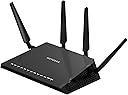
🚀 Own the fastest lane in your digital life with Nighthawk X4S!
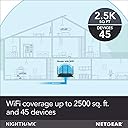
The NETGEAR Nighthawk X4S (R7800) is a high-performance AC2600 dual-band WiFi router designed for demanding home and office environments. It delivers ultra-fast wireless speeds up to 2600 Mbps, covers up to 2500 sq ft, and supports up to 45 devices simultaneously. Equipped with a 1.7GHz dual-core processor, 4 Gigabit Ethernet ports, USB 3.0, and eSATA connectivity, it offers versatile wired and wireless options. Advanced features like MU-MIMO, Beamforming, and Dynamic QoS ensure optimized, stable, and secure network performance for streaming, gaming, and smart home integration.


| ASIN | B0192911RA |
| Antenna Location | Gaming, Home |
| Antenna Type | Fixed |
| Best Sellers Rank | #37,986 in Computers & Accessories ( See Top 100 in Computers & Accessories ) #972 in Computer Routers |
| Brand | NETGEAR |
| Built-In Media | Ethernet cable, Nighthawk X4S AC2600 Smart WiFi Router (R7800)^Ethernet cable^Quick start guide^ Power adapter, localized to country of sale, Power adapter, localized to country of sale, Quick start guide |
| Color | Black |
| Compatible Devices | Phone, Mac, PC, Wireless Devices, Media Streaming Devices, Laptops, Computers, Tablets |
| Connectivity Protocol | ethernet, wi-fi |
| Connectivity Range | 2500 Square Feet |
| Connectivity Technology | Ethernet, Wi-Fi |
| Control Method | Voice |
| Controller Type | Voice Control |
| Coverage | 2500 square feet |
| Customer Reviews | 4.4 out of 5 stars 7,377 Reviews |
| Data Transfer Rate | 1733 Megabits Per Second |
| Frequency | 5 GHz |
| Frequency Band Class | Dual-Band |
| Global Trade Identification Number | 00606449109542, 10606449109549 |
| Has Internet Connectivity | Yes |
| Is Modem Compatible | No |
| Item Dimensions L x W x H | 11.22"L x 7.26"W x 1.97"H |
| Item Weight | 3.5 Pounds |
| LAN Port Bandwidth | 1000 Mbps |
| Manufacturer | NETGEAR |
| Maximum Upstream Data Transfer Rate | 1733 Megabits Per Second |
| Mfr Part Number | R7800-100NAS |
| Model Name | R7800-100NAS |
| Model Number | R7800-100NAS |
| Number of Antennas | 4 |
| Number of Ports | 4 |
| Operating System | Microsoft Windows 7, 8, 10, Vista, XP, 2000, Mac OS, UNIX, or Linux |
| Other Special Features of the Product | Guest Mode |
| Router Network Type | hybrid |
| Security Protocol | WPA-PSK, WPA2-PSK |
| Smart Home Compatibility | Smart Home Compatible |
| Special Feature | Guest Mode |
| UPC | 606449109542 |
| Unit Count | 1.0 Count |
| Voltage | 120240 Volts |
| Warranty Description | 1 Year Warranty |
| Wi-Fi Generation | Wi-Fi 5 |
| Wireless Communication Standard | 802.11ac |
| Wireless Compability | 802.11ac |
M**L
Excellent Router! (upgraded to R7800 from R7000)
I just upgraded to the R7800 from an R7000. I was pretty pleased with the R7000 range and performance, but was having issues with a Dropcam Pro (which is used as a baby monitor) constantly timing out. I have about 20 devices that, depending on the time of day, are competing for bandwidth on a fairly consistent ~115-125Mbps(down)/10Mbps(up) connection (only about 8 devices are wireless, the remaining devices are hardwired and pass through a Netgear ProSAFE GSS116E). Dropcam average bandwidth is only supposed to be between 200kb/s(0.2Mbs) average, 500kb/s(0.5Mbs) max. There was no reason I could find for the Dropcam to be stuttering so frequently, when all of my other devices operated at expected speeds. I had even moved the router's location so that it was only about 10 feet away from the Dropcam, with only a single interior (drywall only) wall separating the two (tested signal strength was excellent at the Dropcam). The R7000 was not placed anywhere near anything that could interfere with the signal (additionally, my WiFi signal was excellent in all parts of my home). I tried connecting with the 2.4Ghz band as well as 5Ghz. I was utilizing QOS on the most current firmware and had given the Dropcam the highest priority (by the device's MAC address), but was still having issues constantly. I figured I'd try the R7800 and see if the QOS handling was any better. Although I couldn't find any clear explanation between the "Advanced" QOS on the R7000 vs the "Dynamic" QOS on the R7800, it seems that the Dynamic QOS seems to have made all the difference in the world for me (or perhaps something else in the R7800), as the upgrade solved all of my Dropcam stuttering issues immediately. I've only been running it for about a week so far, but have had no disconnects, or buffering/stuttering with the R7800 so far. I've even tried taxing things by simultaneously streaming the Dropcam feed on multiple devices (1 iPad, 3 iPhones, a MacBook, a PC desktop running the feed in both Firefox and Chrome, at the same time), while playing multiplayer Halo 5 on an Xbox One, and streaming 1080p Netflix on a PS3. No lag in my gaming, 1080p Netflix, and no stuttering on any of the simultaneously running Dropcam feeds. In short, it works for me. So I'm happy. Just to be clear, the R7000 gave me excellent signal strength throughout my home and worked fine for me when gaming or streaming Netflix, but anything with the Dropcam was constantly buffering. The R7800 seems to resolve whatever specific issues I was having with the Dropcam. Also, I think it's worth mentioning that the GUI for the 7800 is similar, yet very much improved over the R7000. Little things like being able to manually assign names/labels for each device on your network and even choose an appropriate icon (game console, switch, TV, PC, iPhone, etc.) for quick and easy viewing of all connected devices is awesome. I no longer need to determine each device on my network based solely off of the MAC address. Thanks Netgear! The R7800 is definitely the best router I've ever owned. No issues. Zero complaints.
J**G
Excellent Router
It's been awhile since I have had to buy a router, and so I was a little surprised at how large they have become, and how the manufacturers have reverted back to external antennas. After lots of on-line research, I ended up with this router. I live in a 3 floor dwelling (with the cable modem located on the top floor) and needed something that could reach to all levels. I have 10 devices including phones, printers, and TVs connected and after having this in place for about 3 weeks have not had a burp from any of them. That in itself is a real endorsement. Prior to purchasing, I downloaded the manual (300 pages), but if you have installed routers before it's very easy to get going. The Netgear on-line management utility is easy to navigate (again, this is from the perspective of a veteran), and I really like the phone app that allows changes and router reboots. You can also get a graphic of every device connected so if there are any surprises, it is easy to lock them out. One feature I was looking forward to using was device priority. Again, this was easy to set up and in my case I made sure that TVs would get priority over phones and printers. Again, this is working flawlessly, and since installing the router I have not had one instance of the infamous Netflix rotating wheel where things freeze while the router tries to recover. Now, the unit itself has one of the smaller footprints of the routers I was considering, and I am pleased with the top mounted indicator light array that provides instant feedback of the status of the various networks, internet connectivity, and hardwired devices. Initially, I thought that adjusting the antennas might be a chore, but placing them all in a vertical position was all that was required. Downloading a network monitor from your app store to your phone is a good idea. With these little apps you can look at ping times, and upload/download speeds from anywhere in the house. This allows you to look at suspected dead zones and in most cases will help you to eliminate the router as a source of your problem. I have absolutely nothing negative to say about this router, and as always, Amazon has come through on their promised delivery date.
5**E
Best router ever
I couldn't be happier with Netgear X4S router. Before writing this review I've been using it (testing) daily to operate my Amazon Fire TV streaming 4-8 hours of HD a night via 5GHz WiFi, iPad Pro, iPhone 6+ and 6s, Dell XPS 15 9560 and XPS 15 M530, Ooma phone, Apple TV 4, Roku 3, and Belkin WiFi Switches. Oh, and a 2017 Ford Fusion car (it connects to the internet over WiFi probably so spies can hack into and crash my car one day). This router has been running non-stop for 2 months and has not missed a beat. Totally stable, very reliable. WiFi streaming is flawless, and speed tests to the internet have topped out at 136Mb/s over 5GHz AC WiFi verified on my 9.7 ipad pro and Dell XPS 15 9560. When I received it, I immediately updated the firmware, as there was a major security problem with the firmware it shipped with. This was easy, and uneventful. The new firmware appears to be bug free. I'm also using many of it's advanced features such as NAS using a flash drive. All my devices (including iOS) can see the router's network drive, and read and write fast without issues. I also use the VPN capability, and managed to get it working on my cell phone and iPad. This great for being able to see the content on your NAS drive, or talk to any computer or printer on your home network. You can even set it up to surf the internet from your home's internet connection from any location on the internet. Very useful for services like Playstation Vue when you're on the road and want to watch local channels. I even used it to get around corporate firewalls. A very nice feature that is also stable, and works as advertised. You do have to be fairly technical to make it work.. I can tell you from previous experience, getting a reliable router is very difficult, and many routers have bugs and stability issues. So far, no problems here. Netgear, you're engineers deserve a party and a raise. Keep up the good work.
R**R
Never got setup to work properly.
UPDATE #2: It appears that this review is attached to BOTH the R7800 and the R7000 models. My original review (bottom) was for the R7800, which I had problems with, and did not get to work. The TOP review is for the R7000, which I replaced the R7800 with, and is working great. I've set up two R7000 models now, and both work great! UPDATE: I received an email from Netgear support, offering to help get the router going, but have already replaced it with another Netgear model R7000, which is working great. Changing review to 3 stars just because they reached out to me proactively. (R7000 review): This unit seemed to come with newer software, and an app called "Netgear Up". I was having my son set this one up, for educational puposes, and he installed the app on his Android phone, and set it up very easily. It immediately told him that the unit was doing a "software update" (which is what the R7800 below may have been doing, but no message)... The unit was up and running in 15 minutes or less. We did have to use a browser to connect back into it and change the IP address and other settings, because I was replacing another router, and it configured itself in such a way that I didn't want to leave it. The R7000 works great now, very fast! (R7800 review): Unit hung up during first setup run, right after I entered a new password and security questions. I was not able to get to that screen again. I tried wired, wireless, factory reset the unit 4 or 5 times, but it never would run the setup genie properly again, would just hang for 5-10 minutes. After 2 1/2 hours of trying to get it working, I gave up and put back my old router and ordered another model, hoping that one works OK. Note: This R7800 is not my first Netgear nighthawk (just first of this model), and I've done hundreds of various router setups over 30 years, so it's not like it's my first one. :)
D**Y
Great at first. Problems at 3 months. Dead at 6 months.
The NETGEAR Nighthawk X4S - AC2600 (R7800) router was great at first. Very fast, great signal strength on both 2.4 a 5 GHz, and user-friendly interface. After 3 months, the router started to drop connection. It was only once a day initially, but became so frequent over the next month that it was happening every 10 to 15 minutes. I upgraded to the latest firmware and it seemed to take care of the problem, as no more drops occurred during the next two months. However, this morning I was online and all the sudden my laptop was no longer connected to the internet. I looked at the router and noticed that the only LED light on was for eSATA, but I've never had anything plugged into the eSata port. I tried restarting the router but again only the eSATA light turned on. I tried to connect to the router via network cable and the port LED did turn on, but I could not connect to the router configuration settings to reset it. As a last resort, I pushed and held the Reset pin on the back of the router for 15 - 20 seconds but absolutely nothing happened. I tried several more times by pushing in the Reset pin for different durations (from 5 seconds to over 30 seconds) but the router would never reset. So, 6 months after purchasing this router for over $200 the thing is dead. I called Netgear and spoke with Cherry, who was surprisingly kind and quick to help begin the process of replacing the router under warranty. We'll see how that turns out, but for right now, I've gone back to my 8 year old trusty and reliable Netgear WNDR-3700 router. Glad I didn't throw it out when I replaced it with the Nighthawk X4S - AC2600. I'll update this review after I receive a replacement of my defective router. * * * UPDATE * * * Netgear replaced my original router with a new one after it stopped working in March 2017. After a few months, I started having a few issues with the router dropping 5Ghz signal, requiring a reboot to fix. This got annoying after a few days so I upgraded the firmware to DD-WRT, and I had no problems. But after about 5 months, the router completely stopped broadcasting any signal at all. At first I thought the router was dead but decided to reinstall the Netgear firmware they had just released. Unfortunately, I lost power while beginning to install the new firmware and soft-bricked the router. After a few hours of trial and error, I was eventually able to unbrick the router and install the Netgear firmware. Since then, I’ve had no problems at all - going on a year now. So to sum up, even being an older router by today’s standards, this is a fast and pretty reliable router now that Netgear fixed the firmware problems that plagued this and similar models initially. Overall, I’m happy with the purchase!
D**B
Atrocious Customer Support
This is for the NetGear Nighthawk X4S (R7800) Here's what I really like about this router. - Easy to set up and despite it's features, it's very noob friendly - Mobile apps that help you tweak and trouble shoot - Firmware upgrades are easy and painless. - Excellent throughput on all bands and channels. - Excellent wireless range and signal strength on all bands. Now onto the bad things, of which there is really only one. Here's what happened. I've purchased two of these routers. One for me, one for the girlfriend. The 5Ghz band on my router has ceased to function. At first it was transmitting a very weak and unstable signal. Now it's just gone. I now have a very expensive 2.4Ghz wireless router. And to be perfectly fair, the wired and 2.4Ghz bands/channels are still going like gangbusters. But I bought this for the 5Ghz, not the 2.4 - NetGear customer service and support is one of worst I have ever encountered. If your product is less than 90 days old, they will be more than happy to assist you. If your product is more then 90 days old then they expect you to PAY THEM to "trouble shoot" your item. In my case, they wanted 49.99 for "Advanced" tech support to come to a conclusion that I already knew about. The router needed to be replaced. I get that we (the customer) need to jump through their hoops to verify that the product is actually defective. But why should I have to pay you to replace your faulty product? We went through the entire process and guess what... The router needed to be replaced. Was told that I would get a follow up email with instructions on what I needed to do next to complete the RMA 24 hours later, email never arrived. They cant even be bothered to do that much. Apparently if I want to RMA this device, Im expected to jump through even more hoops. NetGear, my time is more valuable than that. I'll simply wash my hand of this and move on. TL:DR NetGear Customer Service and Support is a joke. If your breaks, don't bother with CS, simply buy something else.
R**N
flashed ddwrt but...
i got this for the sole reason to flash ddwrt to it and stuff, but i flashed back to stock after an hour or so bc of well idk a thing about ddwrt and i didnt want to flash it back bc i wanted that built in adblock feature but the nighhawks firmware is pretty good in my opinion so i flashed back. had an issue with it not logging in at first but i got it. anyhow it has GREAT coverage in my larger 5 bedroom home. i used to run two t3200 routers from windstream one as a main and the other in the living room away from the laundry room across the house where the initial router homes at, wired the 2nd to the first changed a few things on the second to achieve my goal..anyhow this router ELIMINATED my issue with poor coverage i didn relaise at the time of purchase that it was only a router and not modem combined so i hoped to give that junk back to windstream but now i cant....anyways the security, GUI(interface), signal range ect are all AMAZING in my eyes from what i did have. i could had went 40 dollars more on a wifi 6 router but my home devices NOTHING has wifi 6 our note 8s nope...not going down the list but yeah as well as my speeds are no faster then they were at 80mbs on wind-streams dsl network for my area thats almost double the speeds of my neighbors and is triple the speeds from where i was living less then 3 minutes from my home now... anyhow this is a great router! one of the best for a reason! kknow several others who have one of these but they opened theres up and done some modding to them....but anyhow for the price it was at during my purchase its a no brainer! After a week or so of use I can say my speeds havent increased and the parental controls are GARBAGE for this router just like the firmware for the t3200 from windstream is. But I can set the 2ghz band to use a lower speed limiting it to 25 mbs and that's what I connect the kids too and any visitor too. But as far as blocking access to an iphone??? It will NOT block access to iPhones for whatever reason! I have to manually revoke all protocols for the i.p. given to the device I wish to block. So ima going to study ddwrt in the meantime and use it like I intended too. As for my 5ghz band its 80mbs all day wired or wireless dont matter. Signal strength is strong real strong honestly. My note 8 on 5ghz band, my msi b450i gaming plus ac built computer also on 5ghz band about 3 rooms away from the router also has a strong connection. I do recommend this. But if u have wifi 6 devices in your area theres something in this price range that will do wifi 6. So watch for that!
C**E
2 smart TV's, D-Link NAS and a EPSON printer - ...
So. Calif. resident using Time Warner as my ISP. Was purchasing 50Mb plan, and RARELY saw 40. With each room wired, I have 3 XBOXES, 6 desktops, 2 smart TV's, D-Link NAS and a EPSON printer - ALL WIRED. In additionI've got 4 iPhones, 2 iPads, 2 laptops, DirecTV, Firestick and probably a couple other items needing WiFi attention. I purchased a SURFboard 6183 cable modem and RETURNED my Time Warner (TW) cable modem, which they were charging me a extra $10 a month for. I tried hooking up modem a month or so ago and could not. Called TW with no resolution. I had other priorities so could not pursue it at that time. I hooked up modem again last week and called TW to activate. (They NEED new MAC address). It connected right away with NO issues. I wonder if first support person entered in wrong address. Anyway - It was EASY along with $10/savings. Modem will pay for itself in about 7 1/2 months. When I took modem back, they had a promotion going on and for $5 EXTRA, I could get 200 Mb speed. I figured why not try it. I purchased my NETGEAR Nighthawk X4S - AC2600 the same week I returned my modem. It was SPENDY, however, I was replacing my 12 year old router. Soetimes I thought a piegon would be faster. When I purchased the AC2600, I also purchased the TP-LINK 8-Port Gigabit Ethernet Desktop Switch (TL-SG1008D). Most all my rooms in my 2200 sq. ft. house is wired. (Old school, I know). I hooked up the AC2600 and I kid you not, it seemed like it was 1 step ahead of me on every step. It had already "shook hands" with my NEW modem and I was connected! To my surprise, I kept my static IP and and just started working. I was afraid I was going to have to mess with configurations. NOTHING. NO problems at all. Went thru the Netgear GUI and made my "necessary" changes and ALL was good. I then hooked the AC2600 to my NEW TP-Link 8 port switch. I started adding all my connections and BINGO! - EVERYTHING was up and running. EVERYTHING. Doing a speed check on my wired computers, they're ALL getting over 200 Mbps - approximately 235 Mbps. On my iPhone, I connected to the 5 Ghz connection with NO issues. First day - First Impression, but I KNOW the kids will be talking to me at the dinner table tonight. It will probably change, but I will take it as it comes. I am NOT a network person, and sometimes struggle. I do have a BASIC concept, so I would tell anyone who is thinking about purchasing this, to take the plunge. Set up is NOT that difficult. If you cant do it, I'm sure your in touch with a non-professional person who could. It's that easy. Don't be scared....
G**N
Fraud product.
Just received, it is used. Not new. It’s fraud.
A**S
Excelente Router wifi
Este router proporciona una excelente señal inalámbrica en ambas bandas, buena para espacios abiertos y tambien para departamentos o casas con muchas habitaciones
Y**L
amazung premium future proof router.
let me start by saying that i am a huge fan of netgear and its products. 100% reliable and great quality. i got a great deal for this nighhawk x4s under 10,000 on amazon which was a steal of a deal. as soon as i got the package i was impressed by the packaging, feels very premium. i live in a 3 floor house and i was looking for something to connect same internet on all floors. so this is what i did i am using a nighthawk xr500 as my main router, and using x4s and orbi as my access points. it works amazing, with great features and wonderful range, covers every corner of the three floors. i have a 100mbps broadband plan and this router doesnt fail to deliver speed inspite of having 30+ devices connected to it. i have configured it to best suitable settings for me. i was using a tplink router earlier and faced many issues like constant reconnecting but this router manages to give stable ip for all the devices. active beamforming, mumimo, 5ghz works wonders on my ps4. a router is a good investment for 8years and i would recommend this router as this is future proof and amazing features. my rating would be 8/10. if you can afford nighthawk xr500 then nothing like it. the dumaos beats all routers in the market.
D**N
Future-proof Workhorse!
NETGEAR Nighthawk X4S R7800 is AC2600 dual band wireless router. It offers 1733 Mbps on 5GHz and 800 Mbps on 2.4GHz band. Its a feature rich product offering two USB 3 ports, 1 eSATA port, 4x4 MU-MIMO, printer sharing and 160 MHz mode support. Some of these options like 160MHz mode are fairly advance and will do a good degree of future proofing. This router is huge in size and gives impression of an advanced product. 4 antenna are serial numbered and to be plugged in respective slot only. Front LEDs are very bright. Fortunately there is option to shut them off in the settings (except power LED). Interface has option to attach HDDs and use them as NAS device. Since I already have NAS, I did not check its performance. There is a download manager as well which can download torrent files. It is available only with connected HDDs. Interface provides good options such as detailed device management, QoS parameters etc. However the interface lacks visual appeal and feels like it is 90s product. Wireless coverage is average in spite of having 4 bulky antenna. I could achieve file upload speed of 12 Megabytes on my Synology NAS on 5GHz channel. If you are looking for wider signal coverage, you may be dissatisfied. However if you are looking out for a workhorse with future proof features, go ahead with this one.
G**4
Fácil de instalar
Muy fácil de instalar y funciona muy bien
Trustpilot
3 weeks ago
1 month ago