Desertcart purchases this item on your behalf and handles shipping, customs, and support to Colombia.
🚀 Upgrade your desktop to WiFi 6E — because buffering is so last decade!
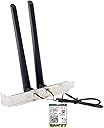
The AX210NGW DTK WiFi Card is a cutting-edge M.2 module featuring Intel’s AX210 chipset, delivering tri-band WiFi 6E connectivity across 2.4, 5, and 6 GHz frequencies with combined speeds up to 5.4 Gbps. It includes Bluetooth 5.3 for enhanced wireless audio and device support, plus Target Wake Time technology to extend laptop battery life. The kit comes complete with high-gain antennas, cables, low-profile brackets, and tools for easy installation, compatible with Windows 10 and 11 systems and designed to future-proof your network experience.


| ASIN | B088NHCX46 |
| Antenna Location | Home, Gaming, Small Office |
| Best Sellers Rank | #17 in Internal Computer Networking Cards |
| Brand | OKN |
| Built-In Media | 1 x Bluetooth Header Cable, 1 x OKN AX210 WiFi 6E Card, 1 x Quick Installation Guide, 1 x Screwdriver, 1x Low Profile Bracket, 2 x 5dbi High Gain Antenna |
| Color | white, black |
| Compatible Devices | Desktop |
| Connectivity Protocol | WiFi 6 / WiFi 6E / 802.11AX |
| Connectivity Technology | WiFi 6 / WiFi 6E / 802.11AX |
| Coverage | Long Range |
| Customer Reviews | 4.4 out of 5 stars 1,371 Reviews |
| Data Transfer Rate | 5400 megabits_per_second |
| Frequency | 2.4 GHz |
| Frequency Band Class | Tri-Band |
| Item Dimensions L x W x H | 4.72"L x 1.18"W x 0.79"H |
| Item Type Name | M.2 WiFi Card AX210NGW.DTK |
| Item Weight | 80 g |
| Manufacturer | UFON |
| Maximum Upstream Data Transfer Rate | 5400 megabits_per_second |
| Mfr Part Number | OKN-AX210D |
| Model Name | AX210 |
| Model Number | OKN-AX200D |
| Operating System | Windows 10 64bit, Windows 11 64bit |
| Other Special Features of the Product | 802.11AX Tri Band, Bluetooth 5.3 |
| Router Network Type | wireless |
| Security Protocol | WPA3 |
| Special Feature | 802.11AX Tri Band, Bluetooth 5.3 |
| UPC | 650728511830 |
| Unit Count | 1 Count |
| Wi-Fi Generation | WiFi 6E |
| Wireless Communication Standard | 802.11ax, Bluetooth |
| Wireless Compability | 802.11ax, Bluetooth |
L**B
A Complete Solution for Adding Bluetooth and Wi-Fi to a Computer
My first go with an M.2 installed peripheral and it was super simple! Windows 11 detected it and even installed/upgraded the drivers to the most recent versions. I installed this on a Dell Optiplex using the provided holes for the antennas in the case. This required threading the studs a little to ensure they would insert all the way, but after that it was super simple. The nuts are 10mm I believe, so if you have a deep socket or a 10mm wrench you'll be able to tighten the antenna studs. The card came with 2 screws, obviously only needing one to secure the card, which was perfect! I REALLY appreciated that, as well as a small screwdriver and a bracket, which I have no idea what that was intended for. It also includes a full and half height bracket, and a case screw to secure either one of those if used. I didn't for my install. I'll submit an update to my review with the performance of the Bluetooth. The Wi-Fi works perfectly, although I'm less than 20' away from the access point. My signal is strong. I haven't streamed much yet, but there have been no issues with the content I did stream. It wasn't 4K as I don't have a 4K setup. If you're using Windows 10 and use this card, the drivers are not the latest and greatest on the disc. You may have to use Windows Update to download them. If you're using Windows 11 and you have the latest updates to the OS, don't use the disc. Again, what comes in the box is a complete solution for anyone adding Wi-Fi or Bluetooth to their computer. If you're mounting the antennas to the case via an default location on the case, you need nothing. If you're mounting the antennas on a bracket, they provide the brackets. The studs are already connected to the M.2 card. They provide all the screws you may need, even one of the tools you may need. It was worth the money for saving all the hassle I might have encountered had it not come with everything. A great purchase.
R**H
Better wireless connection
Easy setup. Works great. Good price. Better choice over those that just plug in externally.
S**S
Works great, easy to install.
Works great, easy to install. The directions were helpful, it only took a few minutes to install and then download the software. Once in I was able to immediately connect to my WIFI network. The connection is good and reliable.
T**E
A PLEASURE TO INSTALL!
This kit is PERFECT for adding WiFi (and BlueTooth) to my refurbished Dell OptiPlex 7060 computers. I have three (3) in the SFF (Small Form Factor mid-sized case) that were traded in by some corporate fleet. None of them had WiFi, which is the norm for corporate installations. I was able to find WiFi installation demonstrations on YouTube; the process is very straightforward. The price is excellent. Compare this COMPLETE KIT to the cost of buying the AX210 card PLUS an antenna kit. This is THE ONE TO BUY...for multiple reasons This kit is a very complete, well-thought-out product that includes EVERYTHING you need. The troublesome antenna-wire connections are already attached to the industry-standard Intel AX210 WiFi card. The kit includes full-height and half-height back plates, but my computers have knockouts that are sized perfectly for the antenna hardware to pass through the case. The antenna mounting hardware is first-rate, as are the antennas. Very importantly in my case, the kit includes the TINY SCREW that affixes the AX210 card to the little metal riser (post) that holds the card in proper relation to its motherboard slot. My computers were sold originally without any WiFi card, so they had no screw, either. Thanks to this very intelligent product/kit, I was not left stranded by the lack of that screw. OUTSTANDING! The kit even includes a little phillips-head screwdriver. I found it impossible to use it though, because the screw is so tiny. Had to break out my tiny precision screwdrivers, which are MAGNETIZED. The magnetization enabled placing that screw EXACTLY where it needed to be.
B**8
No more USB dongles needed and plays well with Linux
This card doles out consistent Wi-Fi speeds and offers greater connection stability vs the Realtek 8832BU USB AX Wi-Fi adapter I was using. It greatly enhanced the performance of my PC and no more dongles are needed for Wi-Fi + Bluetooth for my Dell OptiPlex 7070 MT. If you're a Linux Mint/Ubuntu user, drivers for this card are readily available in the software repositories. I deducted 1 star for the Wi-Fi antennas which come loose easily when nudged and the slot plate was also a loose fit in my PC, so I opted for removing the sma connectors from the slot plate and output them to the rear of my PC case and went with an external Tri-Band WiFi 6E Antenna. If you're tired of trying to get your USB Wi-Fi dongles with work with Linux, go for the Intel AX210 instead.
G**V
Very happy with the purchase
I replaced an old Dell WiFi/Bluetooth card. This one was easy to install and worked right away. It is also an upgrade that adds 5g capabilities. Drivers were a breeze to install too. So far everything works fine and I hope it will continue to do so.
L**M
It works
It was easy to install. I did have to go to Intel’s website to download the drivers. Win11’s driver did not work well. After installing the Intel version, it worked just fine. The speed is also good and connected to my home router with no issue.
L**X
Works but quality is lacking on components
Item is definitely necessary in today’s day and age and helped revive an older thinkcentre pc I had. The main issue is the antennas they provide. These things are CHEAP. They don’t stay upright and they feel beyond flimsy and concerning. Thankfully they work but you’re definitely getting bottom of the barrel.
H**O
Bluetooth機能が大助かり
問題なく快調に使えています。 パソコン側で行う各認証でスマホ連携によるパスキーにBluetoothが使われますが、これを付けていたお陰で最近とても役に立っています♪
M**R
good
working fine.
A**ー
USB子機とは違うな!
一度PCを組んでからの増設になります。 マザーボードはB760 Pro RS/D4です。他のレビューの方もいたので参考になりました。 取り付けは非常に簡単でした。取り付けてから少し時間が経つと、Wi-FiとBluetoothのドライバーがインストールされるのが、デバイスマネージャーを見ると確認ができました。 取り付けてから今まで、一度だけWi-Fiのマークが消えた事がありましたが、Windows UpdateによるものでPCを再起動したら改善されました。 今までUSB子機タイプを使用していましたが、頻繁に接続が途切れてストレスになっていました。 今回のWi-Fi LAN カードにしてからは満足しています。ただルーターがacまでの対応なので、axの接続スピードが出るか確認できないのが残念です。 Bluetoothは一度も不具合なく使えています。ANKERとSONYのイヤホンです。
M**P
もうLANケーブルを犬に噛まれる心配なし。
有線LANの煩わしさから解放されたくて購入。マザーボードはAsrockのB550M Pro4、グラフィックボードを外す手間はあったものの問題なく取り付け出来ました。 付属品はm.2ネジ&ドライバーもあり丁度無くしていたのでとても助かりました。 装着後、早速スピードテストにかけましたが下り200Mbpsと1G光プランであれば十分納得の数値でした。 気が向いたらBluetooth機器も購入しようと思います。
く**ー
AMDCPUでも問題なく使用可能
AMD5600X CPUにて環境構築しましたが問題なく動作しました。 ディスクのドライバよりintelチップ名を検索し最新版を入れましょう TPLinkのUSB Wifi6e子機を使用していましたがM.2 WIFIの方が圧倒的に安定していますね 有線環境が整えられない格ゲーマーには必須だと思います
Trustpilot
2 weeks ago
2 days ago