Buy anything from 5,000+ international stores. One checkout price. No surprise fees. Join 2M+ shoppers on Desertcart.
Desertcart purchases this item on your behalf and handles shipping, customs, and support to Colombia.
๐ Power, Connect, and Conquer Your Workspace Like a Pro!
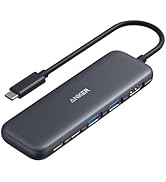
The Anker 8-in-1 USB-C Laptop Docking Station delivers dual 4K HDMI output, 85W power delivery, and 1 Gbps Ethernet connectivity in a compact aluminum design. Compatible with a wide range of USB-C and Thunderbolt laptops, it expands your productivity with multiple ports including USB-A and SD card readers, backed by Ankerโs trusted 18-month warranty.


| Additional Features | HDMIโข๏ธ, Powered |
| Asin | B0874M3KW4 |
| Best Sellers Rank | #43 in Computers & Accessories (See Top 100 in Computers & Accessories) #5 in Laptop Docking Stations |
| Brand | Anker |
| Color | Gray |
| Compatible Devices | Full Functional USB C Lenovo/HP/Dell laptops, Macbook/iMac (For macOS, the displays on the both external monitors are identical) |
| Customer Reviews | 4.3 4.3 out of 5 stars (6,497) 4.3 out of 5 stars |
| Data Transfer Rate | 5120 Megabytes Per Second |
| Enclosure Material | Aluminum |
| Hardware Interface | Ethernet, HDMI, MicroSD, USB 3.0 |
| Item Dimensions L X W X H | 4.65"L x 2.01"W x 0.69"H |
| Item Weight | 0.2 Pounds |
| Manufacturer | Anker |
| Mfr Part Number | A83800A1 |
| Minimum Required Operating System Version | Windows 10 |
| Model Number | A83800A1 |
| Number Of Ports | 8 |
| Operating System | Windows 10 |
| Smart Home Compatibility | Not Smart Home Compatible |
| Total Usb Ports | 3 |
| Unit Count | 1.0 Count |
| Upc | 194644032081 |
| Warranty Description | 18 months |
User
Great All-in-One Hub, With Few Limits
This is a solid USB-C hub if you need to expand your laptopโs ports. It covers all the basicsโdual HDMI, USB ports, Ethernet, and SD card slotsโall in a compact design. Setup is plug-and-play, and itโs been reliable for everyday use. ๏ฟผThe dual monitor support is a big plus, but keep in mind on Mac, both screens will mirror instead of extend. ๏ฟผDownsides: it can get a little warm with heavy use, and youโll need your own power adapter to get full charging performance.Bottom line: Great value and functionality for most usersโjust know the limitations depending on your device.
User
Reliable Dual-Monitor Hub That Adds Useful Ports Without Extra Bulk
Anker PowerExpand 8-in-1 USB-C PD Media Hub Dock is a very practical docking option if you want dual-monitor support without moving to a full desktop dock. The dual HDMI outputs make multi-screen setups easy, the extra USB ports handle everyday accessories well, and pass-through charging helps keep a laptop powered through a single connection. It is compact enough for travel but still feels sturdy for daily desk use. One important advantage is that setup is usually straightforward, though Mac users should know dual external displays may mirror instead of extend because of macOS limitations. Overall it offers strong value for productivity, home office use, and clean cable management.
User
Really solid docking station
Iโve been using this Anker 8-in-1 docking station for a little while now, and honestly, itโs been a great upgrade for my setup. The dual HDMI ports work perfectly with my two monitors, and both displays look sharp in 4K. Plug-and-play was super easy โ my laptop recognized everything right away.The hub itself feels sturdy and well-made, and it doesnโt take up much space on my desk. I also like that it has all the essential ports I need, so Iโm not constantly unplugging and replugging things.My only small complaints are that it gets a bit warm when Iโm running both monitors for a long time, and I wish the USB ports were spaced out a little more. Not huge issues, but worth mentioning.Overall, if you want a simple, reliable docking station for dual monitors, this one is a great choice. Iโm happy with it and would definitely recommend it.
User
Compact, Budget Friendly, Decent Functionality
The design is simple to use, small in size and is very lightweight. The value for your money is good when compared to other usb/hdmi dock hubs. The cable that runs from the device to your PC could be longer as it can be a little awkward depending on your desk configuration.The only problem I had was a small defect in manufacturing specifically with the ethernet port. There was an extra bit of metal casing that made it very hard to remove the ethernet connector after use and/or would scrape the plastic connector until it eventually made clearance in the plastic. It was rectified by simply removing the malleable defect with a small screwdriver. Overall it has been a good buy though and I would recommend it if youโre in need of additional monitor connectivity without breaking the bank.
User
First anker product that has not worked
Updating my review - Anker reached out and provided a new docking station. I'm now a few weeks in and I've not experienced any cutting out of my second monitor. Thanks for the great customer care, Anker!________________I have had a great experience with most Anker products over the last 5+ years. This one is the exception. I've tried multiple (5 or 6) HDMI cables to run dual monitors off my work laptop and this cuts out incessantly from the HDMI attached to the device (monitor goes black for 2-5 seconds). My laptop runs dual monitors at work without issue. The only variable between work and home is this device. It has progressively worsened over the last 2 months to the point I have leave a review.
User
Good docking station - when it works
Generally, this docking station functions well and as expected in the year+ that I've had it. The number of ports works well for my setup of 2 external monitors + camera. The connecting cable from dock to machine is short, but not an issue for me. Unfortunately it will go haywire periodically, ~ 1-2x per month or so. One monitor will display gray, or the other, or neither monitor will be detected. In my favorite case, the entire setup blinked in and out of functioning for about 5 minutes before dying completely... in the middle of an interview. I've updated drivers, rebooted, reconnected, all the things, so I've just decided that my particular docking station is lightly haunted.
User
exactly what i needed
i'm from the era of docking stations that you sat your laptop on top of and clicked into place. this is sooo much easier to use! it works seamlessly to hook up dual monitors and the only thing you need to do is plug this into your laptop and plug your monitor hdmi cords into this station. it's great!
User
Works great!
Works perfectly with Dell XPS laptop. without installation of any driver. Supports the full resolution of 32โ Dell display through HDMI, and charges the laptop + allows usb mouse to work smoothly - all together through 1 USB-C port! As advertised.
User
Nice
As per description
User
Good product but a bit expensive
The product works perfectly. I primarily use it for a dual monitor setup, plugging in 2 HDMIs to the hub. If you are using a it for a dual monitor setup DO NOT buy a cheap Chinese one, it wonโt work as intended. This product does the job perfectly, but is very expensive for what it does. If you can spend the money, go for it.
User
Indispensable product for seamless work experience
So far, it's been a great product. It's practical, works out of the box and just makes sense to have.
User
Very compact, well built & functional (for now)
This is my replacement hub for the Lention that stopped working after 18 months. I had rated that product 5 Star and it was truly great product till one day it decided not to deliver power from the PD port to laptop. Without power supply passing through, it was useless and I scrapped it. Then started my search for a new hub - the biggest challenge though how to identify one that combines good build quality and functionality with longevity. So, I decided to go with known non-chinese brands and Anker came top on the list. So far, the hub is working like a charm, just like Lention. I am hoping that this will last for at least 3 years to justify the price premium. One small gripe is that the USC C cable attached to the hub is too short (15 Cms, I guess). I keep my laptop in a vertical position with lid closed on a stand and work on the monitor. The USB C port on my laptop is on the upper end of the laptop and when I connect the hub, the hub keeps dangling awkwardly. Had to go with 0.5 M extension cable! I will update this review if this fails in less than 3 years!
User
Anker. Always a good pick. Reliable quality
As usual with Anker, this is a high quality product that just does what it promises. Recommend
Trustpilot
1 month ago
4 days ago