Buy anything from 5,000+ international stores. One checkout price. No surprise fees. Join 2M+ shoppers on Desertcart.
Desertcart purchases this item on your behalf and handles shipping, customs, and support to Colombia.
🔥 Dominate your game with precision, power, and style!
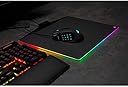
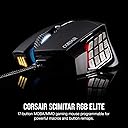
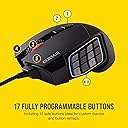
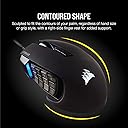
The Corsair SCIMITAR RGB ELITE is a high-performance wired gaming mouse designed for MMO and MOBA players, featuring 17 fully programmable buttons with a patented sliding side panel for ergonomic customization. Equipped with a native 18,000 DPI PixArt PMW3391 optical sensor, it offers precise tracking adjustable in 1 DPI increments. Built for durability, it includes 50 million click-rated Omron switches, a sturdy scroll wheel, and a braided cable. Multi-zone RGB lighting customizable via Corsair iCUE enhances your gaming setup with vibrant effects. Compatible with PC and Mac, this mouse combines comfort, customization, and cutting-edge tech to elevate your gaming experience.


| ASIN | B083JL8CLF |
| Antenna Location | Gaming |
| Are Batteries Included? | No |
| Are Batteries Required | No |
| Best Sellers Rank | 725 in PC & Video Games ( See Top 100 in PC & Video Games ) 32 in PC Gaming Mice 32 in Xbox One Accessories 54 in Xbox Series X & S Accessories |
| Brand | Corsair |
| Brand Name | Corsair |
| Button Quantity | 17 |
| Colour | Black |
| Compatible Devices | Personal Computer, PC, Mac |
| Connectivity technology | USB |
| Country of Origin | China |
| Customer Reviews | 4.1 out of 5 stars 3,375 Reviews |
| Embellishment Feature | Multi-Zone RGB Lighting |
| Enclosure Material | Metal |
| Global Trade Identification Number | 00840006616214 |
| Hand Orientation | Right |
| Hardware Platform | Laptop, Personal Computer |
| Item Dimensions L x W | 12L x 7.8W centimetres |
| Item Type Name | Mouse |
| Item Weight | 122 Grams |
| Manufacturer | Corsair |
| Manufacturer Part Number | CH-9304211-EU |
| Minimum Required Operating System Version | Windows 7 |
| Model Name | SCIMITAR ELITE |
| Model Number | CH-9304211-EU |
| Mouse Maximum Sensitivity | 18000 Dots per Inch |
| Movement Detection | Optical |
| Movement detection technology | Optical |
| Network Connectivity Technology | USB |
| Number of Batteries | Unknown batteries required. |
| Number of buttons | 17 |
| Operating System | Linux, Windows 7, Windows XP |
| Pattern | Scimitar Mouse |
| Power Source | Corded Electric |
| Product Features | Ergonomic Design |
| Product Warranty | 2 year manufacturer |
| Range | 1.8 meters |
| Special feature | Ergonomic Design |
| Style Name | Wired |
| Theme | Gaming |
| UPC | 840006616214 |
| Unit Count | 1.0 stück |
J**Y
Better than a Naga!
Absolutely brilliant, so far. The ability to move the keypad with the included driver is useful even for the one time you will use it. The soft touch texture of the mouse feels amazing and not tacky, also seems like it will last a long time with little marks from oil appearing after a couple of months of heavy use. The mechanical buttons feel good and are easy to differentiate with the variety of texturing on them and they are angled making them feel easy to press but with a normal grip you won't likely accidentally press them (unless you are picking the mouse up a lot). The mouse wheel is tactile and feels as good as any other and the grip on the outer side of the mouse is amazing so far, texture stops any slipping in game and feels like it isn't going to peel off (like the naga does). RGB is really nice and everything is easily customisable with corsair ICUE, while it takes a littler to get the side buttons working it is simple to learn and is much more refined than other mice software. As a Mac user the mouse works perfectly and so does ICUE but switching from Mac to pc or visa versa may require separate profiles. After doing this once on PC and Mac it has worked perfectly every time. The 2 middle mouse buttons below the mouse wheel can be re programmed from profile switch and dpi toggle too, which is very useful as you can set this to what you like then change them to more useful key binds.
C**S
Great mouse if you are an MMO/MOBA player!
I had always been a Razer fan, and used to use a Razer Naga for MMO's but after purchasing a Corsair keyboard a couple of years ago, I have been converted. When it came time to replace my mouse, I decided to take a look at Corsairs offerings and came across the scimitar. I was really interested to see how good the num pad was on it and have found it to be fair superior to the Naga. Being able to adjust the position has been a real game changer as I now find it a lot more comfortable to use. Add to that the num pad light which makes playing in low light much easier and it has a good weight to it as well. The only thing I could complain about is the single moulded Left and Right buttons. Having used similar types before, I am concerned that they will lose clicks sooner than individual buttons, but as it is working fine at the moment, have still given 5 stars
H**Y
Solid Mouse. Shame it only lasts 2-3 years
I used to own the previous "Pro" version of this and it lasted just outside of it's 2 year warranty - numerous left & right mouse button issues and the mouse wheel snapped (made of cheap plastic). Saw the new "Elite" revision and decided why not, maybe they've made improvements. It's almost identical to the "Pro", the only difference I noticed was having clicky side/thumb buttons vs the old mushy ones. Been using it for almost 3 years with no issues until now where the middle click has given out. Not the plastic on the wheel that snapped (still uses the same stuff), just the button itself doesn't work 99% of the time. Overall I do like this mouse a lot it's just disappointing that corsair's scimtar mice only last just outside of warranty period. I imagine this is planned obsolescence to make you buy another. Pros: - Good size for medium hands - All the buttons have good clicky feel - Software has improved quite a lot in the past few years and is no longer a major pain point I used to have Cons: - Expect to replace or fix yourself every 2-3 years
A**S
Best mmo mouse
Best one to date. The adjustable position of mmo buttons is chefs kiss
A**X
iCUE
5 stars for the mouse -4 stars for the software. I have had Corsair products for over a decade and I don’t know why I do this to myself. Stockholm syndrome? I absolutely hate iCUE. it’s the biggest POS software I’ve had the displeasure of using over the last so many years I’ve also got the Corsair K70 mk2 keyboard, but for absolutely no reason, sometimes iCUE just won’t detect the keyboard at all in the software so it doesn’t work. “Error: The device was not found” Get used to seeing this error message. Now you might think it’s a keyboard hardware issue, but no, because if you force quit iCUE and restart the program the keyboard works again and the software detects it. Shocker! It’s supposed to start automatically, but it’s slow as hell. All your settings and config rely on the software running. My OS and iCUE are installed on a Samsung 980 pro NVME. It’s VERY fast. ICUE is not fast. Until iCUE decides to run, I’m dragging my mouse across the desk because the sensitivity reverts to default setting of what feels like 1 dpi until the software finally decides to start up. Then, you find out that the software is actually running some sort of update in the background without telling you, and now it’s decided it needs to restart your pc. You don’t really have a choice here since the mouse barely functions and none of your custom key binds or settings work, so I guess I’ll now wait another 5 mins for all the DDR5 Corsair memory to retrain itself before the PC POSTs. It’s ok I wasn’t in a rush or trying to do something! Thanks iCUE! The software is also clunky as hell, the UI is diabolical. “Let’s make it look cool and gamery for all our hardcore Corsair gamers”. How about make it work. How about make it simple and functional instead of the first page opening to adverts for your “AI voice” changer or a bunch of “mural” options. Like what the hell is even that. 95% of people just want to set the RGB to one simple colour and be done with it. I pray to God that the CEO of Corsair reads this little rant, finds the lead software developer for iCUE, and terminates him on the spot. Either with a P45 form or a sniper rifle.
C**S
My third
On my third mouse in 8 years. They could maybe last longer, but I would not choose any other mouse. My first broke due to the Lazer not picking up movement, the second still works but the mouse wheel cogs have worn in one place and therefore skips when scrolling up and down. Hopefully this one last longer.
X**M
Overkill for casuals
I want to like this mouse, and I got it for the adjustable button placement on the left hand side. My use case for this mouse was for WoW. I have 14 or 15 years of muscle memory at this point with specific key binds for certain actions. I started using mouse buttons recently on healers for a DPS rotation - i.e. SW:Pain, Smite, SW:Death etc, or vice versa This frees up some keys, but I was having trouble finding keybinds that weren't a pain to push on the keyboard but would be useful. Unfortunately, and despite the columns of buttons having a different texture on this mouse, I still struggle to differentiate between the buttons. I don't have the feeling in my thumb to move over them and I end up constantly mis-clicking. I also have big hands, and therefore big thumbs, so moving my thumb to click a button is so minimal. As it turns out, I also don't need 12 side buttons. I just need a few extra buttons, I don't play WoW enough to justify relearning my entire spell book and muscle memory; I find it miserable as it is just to move spells and mis-cast the wrong ability for a week or two. I've also figured that if you have a claw grip, or a half claw/palm grip like I do, going to a palm grip wears my hand out quickly. Moving the mouse feels like real effort as I don't want to click buttons on the left accidentally, given that there is nowhere for my thumb to go when not using them. Lastly, for games outside of MMO's, or just general use, this definitely isn't the mouse. I need a jack-of-all-trades mouse, so I'm now looking at a G604 (despite having so many problems with the switches in these in nearly every mouse I've used). It only has 6 buttons on the side, and space under the buttons for my thumb to rest if it need it. The pro's to this is that I can switch it to Bluetooth for my work laptop instead of having 2 mice on my desk. Having just two rows of buttons should also be easier to adjust to, rather than 3 rows and 4 columns, I find myself getting lost way too much thinking about which button I need to be pressing - and I was only using 4 buttons, having to add in the extra 8 feels way too overwhelming and when realising this, I gave up. If you have the time and/or are quick to adapt, this is probably a great mouse, but I have a child that takes up most of my time. As a casual player, this mouse feels overkill and I don't want to spend the two or three hours in an evening spent relearning not only how to hold this mouse efficiently, but also binds and layout for a month or two.
E**T
MMO mouse review
Setting up the mouse was easy and straightforward. If there were any problems, they could be easily resolved by consulting the instruction booklet or visiting the website to download the software for the mouse. The responsiveness is sharp and does not feel like it's lagging behind any movement. The size and shape fit comfortably within my grip, and I've had no trouble finding a comfortable way to hold it for longer gaming sessions. Additionally, it comes with a small screwdriver that allows you to move the multiple mouse buttons back and forth to accommodate different hand shapes, ensuring you’re not overextending to reach a specific button. This mouse not only functions exceptionally well as an MMO mouse but also excels as an FPS mouse, offering multiple options for remapping buttons.
E**.
Parfaite pour les MMO et ultra durable
Je suis un gros joueur de MMO, et cette souris Corsair Scimitar RGB Elite est la seule qui tient vraiment dans le temps. L’ancienne a tenue 4 ans. Les boutons latéraux programmables tombent parfaitement sous le pouce et rendent les rotations de compétences super fluides. La précision est excellente, le capteur réagit instantanément, et elle ne montre aucun signe d’usure même après des heures de jeu quotidien. Confortable, solide et vraiment pensée pour les joueurs exigeants, je ne jouerai plus sans elle !
N**S
Myszka do MMORPG.
Opłacalna myszka do MMORPD. Macra można zapisać w pamięci myszki dlatego icut iset potem niepotrzebny. Polecam do World of Warcraft i Final Fantasy XIV.
C**N
Su teclado lateral.
Este ratón me encanta, mientras funciona es increible. Pero al estar llegando sus dos años de garantía empieza a fallar. Y siempre es lo mismo, los elementos plasticos internos que accionan los pulsadores se desgastan, hundiendose y adquiriendo su forma. Y la rueda del ratón da un falso movimiento contrario y termina chirriando (en el vídeo lo tenéis). Por ello lo estoy devolviendo y Amazon muy amablemente me realizan el reembolso, ahora lo estoy comprando rebajado. A ver cuánto dura esta vez. Ya lo he adquirido 3 veces y he tenido hasta 2 reemplazos. Y no soy de maltratar mis preriféricos, quizás es por que trabajo y juego y les doy mucho uso, más de lo que el fabricante estipula. Aunque estos periféricos tan caros pasan pruebas de mucho estrés.
M**C
sağlam uzun yol arkadaşı
sağlam ve kaliteli bir ürün uzun yıllar sorunsuz çalışıyor renkl atması led bozulması olmadı çok sağlam bir ürün kablosuz olsa benim için daha iyi olabilirdi..
D**Y
Do not buy
Terrible mouse doesnt work with windows 11
Trustpilot
3 weeks ago
2 months ago