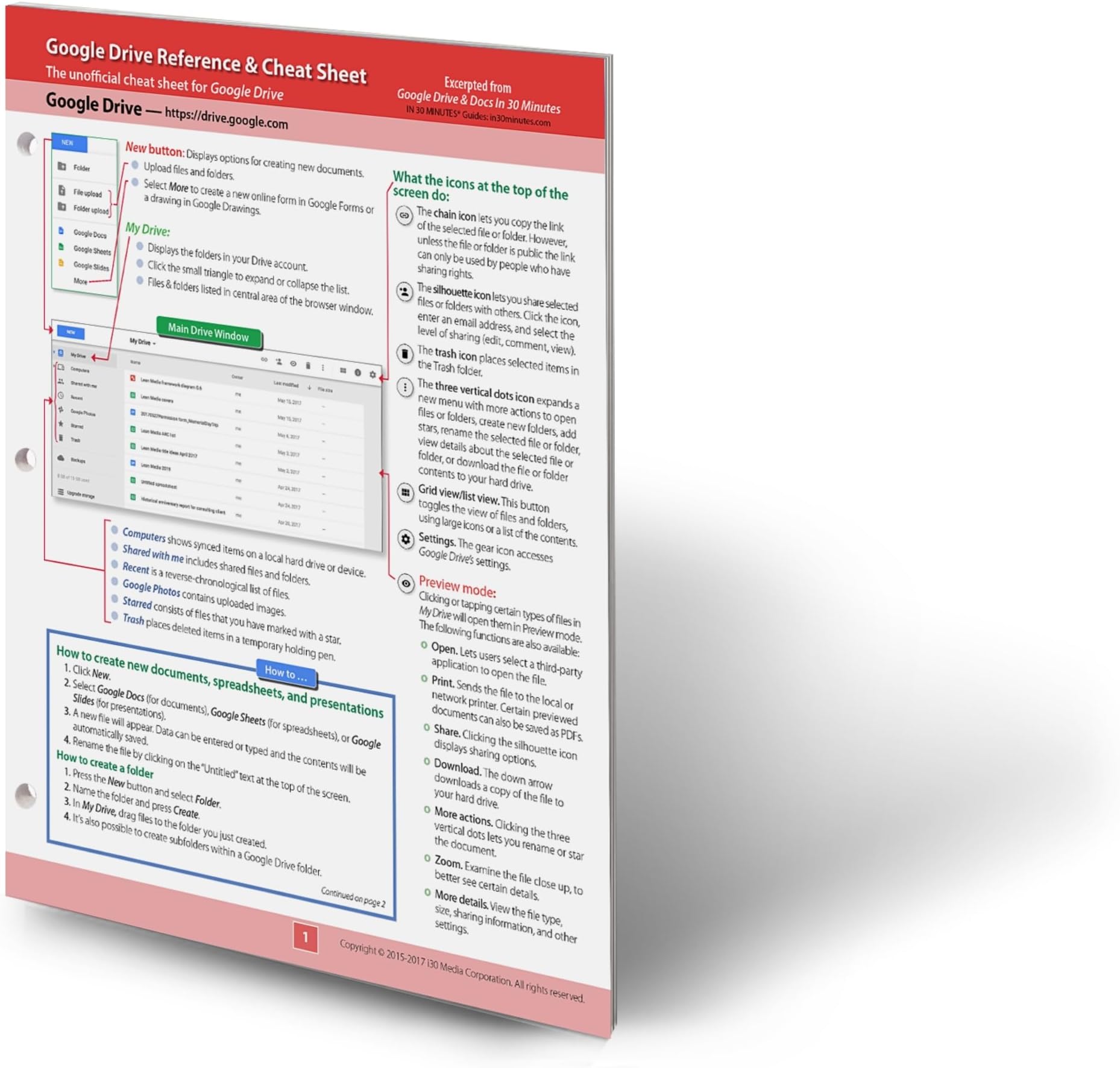
Google Drive Reference and Cheat Sheet: The unofficial cheat sheet reference for Google Drive
Product ID: 17422423
Buy anything from 5,000+ international stores. One checkout price. No surprise fees. Join 2M+ shoppers on Desertcart.
Desertcart purchases this item on your behalf and handles shipping, customs, and support to Colombia.
Whether you are new to Google Drive, switching from a local storage setup, or need a fast reference for organizing and sharing files across Windows, macOS, and ChromeOS, this four-panel desk reference gives you instant answers without searching through help menus or Google support pages. Who this is for: Home users, students, teachers, office workers, and anyone using Google Drive for personal file storage, team collaboration, or classroom projects. Topics covered: The Google Drive interface, including the My Drive window, icons, file and folder uploads, and navigation How to create new documents in Google Docs, spreadsheets in Google Sheets, and presentations in Google Slides How to upload files and folders from a PC, Mac, or Chromebook browser How to access Google Drive using desktop applications including Backup and Sync and Drive File Stream Converting Microsoft Office files including Word (.doc, .docx), Excel (.xls, .xlsx), and PowerPoint (.ppt, .pptx) How to share files and folders with collaborators and control edit, comment, and view permissions How to publicly share documents and generate shareable links How to restrict editors from sharing or changing access permissions How to delete, permanently delete, and restore files and folders Offline access to Google Drive using the Chrome browser on PCs and Macs How to use search in Google Drive including searching by file name, content, file type, owner, and date modified Keyboard shortcuts for Google Drive, Google Docs, Google Sheets, Google Slides, and Google Drawings on Windows, ChromeOS, and macOS What's covered — panel by panel: Panel 1 — The main Google Drive window Annotated guide to the My Drive interface including the New button, My Drive, Shared with me, Recent, Google Photos, Starred, and Trash. What every icon at the top of the screen does. Preview mode functions including open, print, share, download, zoom, and more details. How to create new documents, spreadsheets, and presentations. How to create folders and subfolders. Panel 2 — Uploading, desktop access, and Microsoft Office compatibility Step-by-step instructions for uploading files and folders using a browser. How to access Google Drive files using Backup and Sync for personal accounts and Drive File Stream for G Suite business accounts. How to convert Microsoft Office files including Word, Excel, and PowerPoint formats to Google Docs, Sheets, and Slides. Panel 3 — Sharing and offline access How to invite collaborators and set edit, comment, and view permissions. How to publicly share documents and generate shareable links. How to share a Google Drive folder. How to restrict editors from inviting others or changing access. How to remove collaborators. How to enable public editing for community projects or classrooms. How to delete, permanently delete, and restore files and folders. Offline access setup using Google Chrome on PCs and Macs. Panel 4 — Search and keyboard shortcuts How to search Google Drive by file name, body text, file type, owner, and date modified. Complete keyboard shortcut reference for Google Drive navigation plus Docs, Sheets, Slides, and Drawings shortcuts for Windows, ChromeOS, and macOS. Key features: Covers Google Drive for Windows, macOS, and ChromeOS Includes Microsoft Office conversion instructions for Word, Excel, and PowerPoint formats Complete keyboard shortcut reference for Google Drive and Google Workspace apps on all platforms Annotated screenshots for easy at-a-glance reference Physical dimensions: 11 x 8.5 x 0.2 inches, printed on durable card stock Holes for three-ring binders; designed to sit on a desk, hang on a wall, or fit in a binder Fully recyclable and created by the publisher of the award-winning IN 30 MINUTES guides Note: Apart from file conversion, document creation, and keyboard shortcuts, this reference focuses specifically on Google Drive storage and organization. It does not cover Google Docs, Google Sheets, Google Slides, or other Google Workspace applications in depth. Frequently asked questions: Is this laminated? It is printed on durable card stock, not laminated, and designed for repeated desk use. Is this for beginners? Yes — it is specifically designed for home users, students, and office workers who are new to Google Drive or who need a quick reference for everyday storage and organization tasks. Does it cover Microsoft Office file formats? Yes — it includes three methods for converting Word (.doc, .docx), Excel (.xls, .xlsx), and PowerPoint (.ppt, .pptx) files to Google Docs, Sheets, and Slides. Does it cover sharing and collaboration? Yes — it includes step-by-step instructions for inviting collaborators, setting permissions, sharing folders, restricting editor access, removing collaborators, and enabling public editing. Does it cover offline access? Yes — it covers offline access setup for Chrome browser users on PCs and Macs. Does it cover keyboard shortcuts? Yes — it includes a complete keyboard shortcut reference for Google Drive navigation and for Google Docs, Sheets, Slides, and Drawings on Windows, ChromeOS, and macOS. Review: Valuable information listed in easy to understand format - Love all the information listed Review: Great tool. - A great tool to keep by my computer when I need a little help


| Best Sellers Rank | #731,282 in Books ( See Top 100 in Books ) #11 in Software Suite Books #337 in Enterprise Applications #4,888 in Business Processes & Infrastructure |
| Customer Reviews | 4.4 out of 5 stars 595 Reviews |
B**N
Valuable information listed in easy to understand format
Love all the information listed
V**N
Great tool.
A great tool to keep by my computer when I need a little help
J**N
Decent reference, questionable durability.
Very basic stuff. I was hoping it had a third fold with function references and a better quality of lamination ( this is a coated paper print ). Hopefully the authors will add more info, as I like having these types of quick references handy for the more obscure functions. I'm biased towards 4 stars for this one due to the good coverage of most features. Still, It needs a section on function arrangement and perhaps a quick reference on the relativistic behaviour when pasting functions from existing cells.
K**R
Good tool
Useful in the office for those of us with tech challenges.
G**R
Google Drive Simplified For Beginners
New technology is great for those that had an early start from childhood on computers & cell phones as well as tablets. I am an old tech guy that uses still a flip phone (hate phones smarter than me) basic & slightly advance computer skills. This Google Drive cheat sheet puts you into the new tech age with simple instructions. Highly recommend it to novice chromebook users
M**N
Excellent Resource
This is an excellent resource to have for quick reminders of how to get things done. If I do not use Google Drive for a few days, I tend to forget some shortcuts. This reference gives me a quick and very helpful reminder of the process. It is very well designed and well-worth the price.
S**I
Don't recommend...just Google your questions
Not that informational
M**N
Great reference guide to get your Google Drive projects up and running
Really useful quick reference guide for using Google Drive. After reading the basic start-up instructions on the Google site, I found I still needed some additional information to make using their features easy. This guide provided the information I needed. The list of keyboard shortcuts was especially helpful. And it comes punch-hole cut so it could be inserted into a 3-ring binder.
Trustpilot
1 month ago
2 months ago