Desertcart purchases this item on your behalf and handles shipping, customs, and support to Colombia.
⌨️ Elevate your workflow with ergonomic precision and wireless freedom!
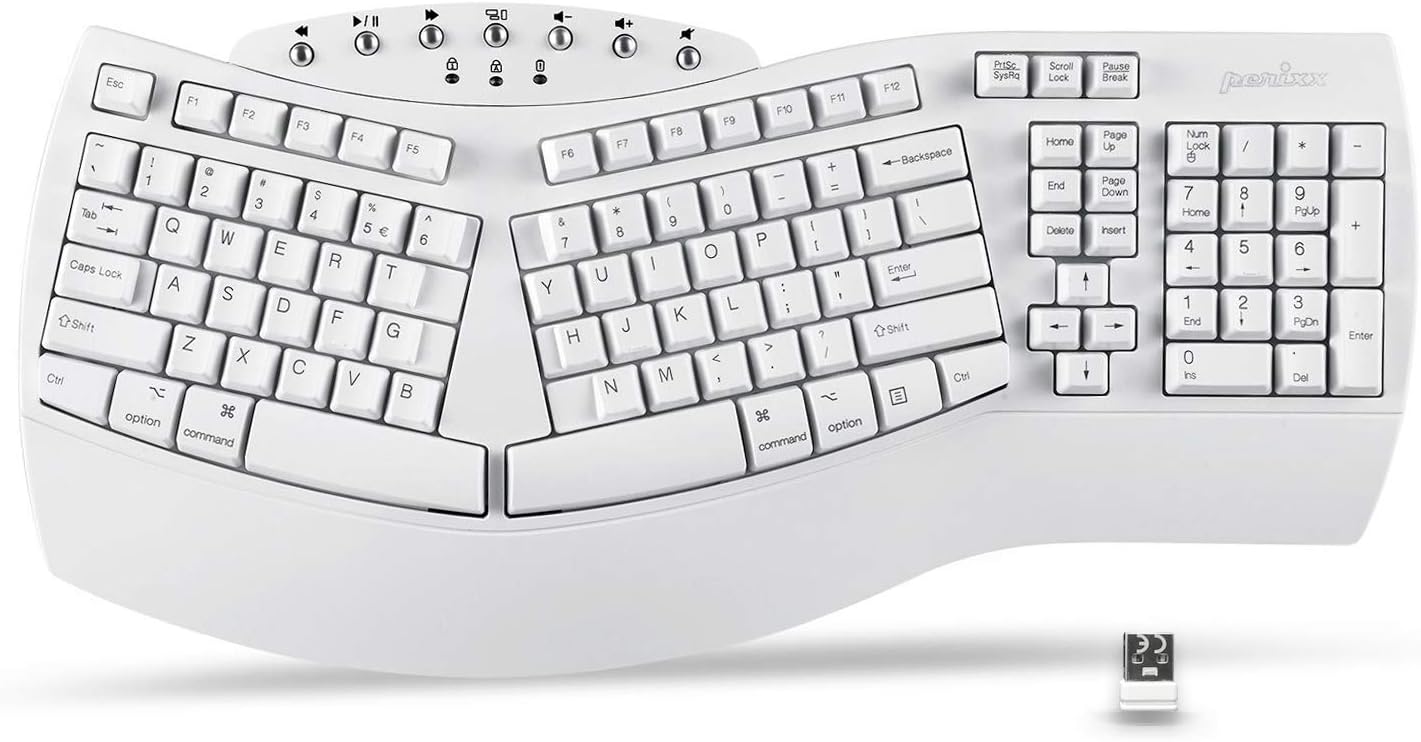
The Perixx Periboard-612 is a wireless ergonomic split keyboard featuring 111 tactile keys with long travel, designed to reduce wrist strain and prevent RSI. It offers dual wireless connectivity via 2.4 GHz nano receiver and Bluetooth, compatible with both Mac and Windows systems. The integrated palm rest and ambidextrous layout promote natural hand positioning for all-day comfort. Durable ABS construction and a 12-month warranty make it a reliable choice for professionals seeking comfort and productivity.


| ASIN | B07TJHDBD1 |
| Additional Features | Ergonomic, Split Keyset Design, Wrist Rest |
| Antenna Location | Office |
| Best Sellers Rank | #32 in Computer Keyboards |
| Brand | Perixx |
| Built-In Media | Keyboard |
| Button Quantity | 2 |
| Color | White |
| Compatible Devices | Laptop, PC |
| Compatible Operating System Family | MacOS, Windows |
| Compatible Tablet Computer Models | Samsung Galaxy Tab S7 FE 12.4" |
| Connectivity Technology | Wireless |
| Customer Reviews | 4.0 out of 5 stars 3,192 Reviews |
| Enclosure Material | Acrylonitrile Butadiene Styrene |
| Generation | 1 |
| Global Trade Identification Number | 04049571002675 |
| Hand Orientation | Ambidextrous |
| Item Dimensions L x W x H | 19.09"L x 8.98"W x 1.57"H |
| Item Type Name | PERIBOARD-612 |
| Item Weight | 1000 g |
| Keyboard Backlighting Color Support | Single Color |
| Keyboard Description | Ergonomic |
| Keyboard Layout | QWERTY |
| Manufacturer | Perixx |
| Mfr Part Number | 11615 |
| Model Name | PERIBOARD-612 US W |
| Model Number | 11615 |
| Number of Batteries Required | 2 |
| Number of Items | 1 |
| Number of Keys | 111 |
| Number of Packs | 1 |
| Power Source | Battery Powered |
| Recommended Uses For Product | Office |
| Special Feature | Ergonomic, Split Keyset Design, Wrist Rest |
| Style Name | Wireless |
| Switch Type | Tactile |
| Theme | Ergonomic Typing |
| Unit Count | 1 Count |
| Warranty Description | 12 Months Limited Warranty |
N**!
Finally wide enough to fit my hands! ALMOST perfect. - UPDATE 60 days in, see below first review!
I have been searching and searching for a good ergonomic keyboard. You may have even read my comments on other like kind keyboards. I used the Microsoft 7000 wireless keyboard/mouse for many, many years (I'm sure at least 15-20 years). I would buy them when I saw them on Ebay just to have when the current one I had died or keys became non-responsive. I LOVED that keyboard. So I went on the hunt. I found one that didn't work at all (tried 2 of them) and also bought the Logitech ergonomic keyboard (a bit pricey, but a good keyboard and worth it). That one had the feel of a laptop style keyboard, low profile, soft to the touch and a bit cramped on the width. I just couldn't get my hands to work with that keyboard although I think many would really like it. I tried for 3-4 months to get my arms and hands to fit it and just kept failing. I read several reviews on this keyboard and finally decided, what could it hurt. It turns out, I like this one the best! It is about and inch wider that the others and my hands are now comfortable with my elbows relaxing on the arms of my chair. So a WINNER! It reminds me a great deal of the feel of the Microsoft 7000. If I had to find something wrong, it would be the the depth of the keyboard to allow for the multimedia keys at the top. I personally don't need those keys and the "perfect" keyboard would take those out and only keeping the Num lock and Cap lock indicators then add that area back into more wrist support. The other thing is the different placement of the movement keys between the letters and num pad. I am getting used to the different layout (much easier than the width reduction of others). If any change, I would put the Delete and Insert Key on the top row instead of the bottom. But that's just me. I keep hitting the insert key instead of the page down key. Take a good look at the keyboard to see what I'm referring to. BUT having said all of this, it IS the keyboard I am using and will continue to use. It was a great fit out of the box. I have a slide out keyboard tray and it sits nicely on there and it just the perfect size for me! I am SO glad I considered and finally bought this unit. After all my searching, I do think this one and the Logitech (K860 I think that's the model) are the two best ones out there. If you're on the fence with this one, consider the height of the keys, the clicking of them and the breadth of them. If these feature are important to you, then buy it. I think you will for the most part like the "feel" of this one. I really depends on what style you like. If you want the low profile, quiet keys on a smaller platform, then this is not the one for you. (use the Logitech K860 instead). I hopes this helps someone. I have been searching and finally have found a suitable replacement! I am so happy with this purchase. UPDATE: 8/23/20 - I had been using this keyboard for about 30 days when the right space bar started acting up. It would stick and put in many unwanted spaced. I continued to use it and it just go worse so at 60 days I tried to get it replaced. It was past Amazon's warranty period so I went to the manufacturer's website and filed for a replacement (their warranty is one year). As instructed by the manufacturer, they said to remove the bar, clean it and replace. That was a fail, while it did reduce the amount of sticking, it then required hard pressure to make the space bar react as it would then not space otherwise. So I contacted them again. They said to use DeOxit on it. They even sent a link to show me what to do. (it was a pictorial guide - funny how they had this already done to send). I had never heard of DeXoit but found it on Amazon and purchased it (it's not inexpensive). I wrote an email to the manufacturer explaining that it was not my position to "fix" their keyboard, but I would try and let them know. They replied and stated they would replace the keyboard. I got the DeOxit and that was a miserable fail! It was awful after that. It would stick and would also not space as before only it was 10 times worse. I got back to Perixx and expressed that and never heard another word from them again. I tried a couple of times and then finally went back to Amazon to report their action. While good initially, when it came time to replace it they (Perixx) disappeared. So I contacted Amazon to report the seller and they listened to my story and I even volunteered to send them the email exchange so they could see it. The representative put me on hold and then came back stating they would replace the keyboard. I got it yesterday and I am using it right now and it is working perfectly. We'll see how it goes. But Amazon - thank you for stepping in where your seller didn't. You went above your call to react and it is greatly appreciated. I had a 5 star rating and left it that way as I really do like this keyboard alot. I just hope it stays working this way!
A**Y
Great keyboard
I've been using this ergonomic wireless keyboard for a while now, and it's made a noticeable difference in my comfort while typing. The ergonomic design helps reduce strain on my wrists, and the keys have a nice, responsive feel that's quiet and comfortable for long work sessions. The wireless connection is reliable, setup was quick and easy, and the battery life has been excellent. I also like that it's full-sized, with a number pad, making it great for both work and everyday use. Overall, it's a well-made keyboard that's comfortable, dependable, and well worth the investment.
J**Y
terrible product, even worse support
I purchased this keyboard in 2022. The bluetooth disconnected frequently, and each time it was a struggle to reconnect, but eventually it connected. I did find the keyboard comfortable to use. At some point I could no longer get the bluetooth to connect, but it was out of warranty so I purchased another. Fool me once, shame on you. This time it was shame on me. The keyboard has a one-year warranty. After ten months of use - again with the frequent bluetooth connectivity issues - I simply couldn't get the keyboard to connect at all. I watched the videos, looked at the manual again and again, moved my computer and the keyboard to different parts of the house, etc. Nothing worked. There is a button on the bottom of the keyboard that you hold for a few seconds. Then a number is supposed to pop up that you type, then enter. Simple, right? I concluded that the button became defective. I contacted Amazon and was told that I had to contact Perixx, which I did. Perixx asked me to confirm purchase info, which I promptly did. Then I began receiving a series of emails from Perixx saying they couldn't confirm the merchant I purchased from. I kept saying I purchased on Amazon, had provided a copy of the invoice, and it was not my problem who the middleman between Perixx and Amazon might be. I kept receiving non-responsive replies; I suspect the messages were AI generated. I will not deal with this company again. The product itself is unstable, particularly the button used for bluetooth connection. Worse, the. company does not stand behind it's warranty. Obviously a one-year warranty is worthless if the company has no intention of honoring it. I found the business practice both annoying and deceptive. I strongly recommend looking at other options.
X**G
Nice Keyboard
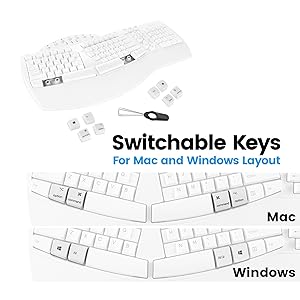
I am a computer programer, and I have been typing all day long almost on every work day in the past 20 years. Yes. it is a well-paid job, BUT, it left me with frequent pain at neck, shoulder, lower back, and especially at wrist and finger joints. I constantly look for "ergonomic" equipments to alleviate those pains. Periboard-612 is one of the keyboards I have tried and liked. The features on this keyboard that I think the most important are: (a) Ergonomic design, allow typing in natural posture. (b) keys are soft and sensitive. If you, like me, type all day long, you would know how important these features are. This keyboard comes with 4 replacement keys for the Windows Logo key and Alt key (left and right) and it turns into a native Mac keyboard after those keys being replaced with Cmd and Option keys. This means, no need to remap keys or memorize the equivalent Mac keys on the windows keyboard. There is a switch at the bottom, switching between 2.4G and Bluetooth for the wireless connections, but I believe the bluetooth function is defective: the keyboard indeed pairs to my macbook pro over bluetooth, and all key works well, but once the computer restarts, the pairing is lost, i.e. no automatic reconnect. This is a big problem, because I can not type in password at the login window. I had to connect a separate wired keyboard to the computer, typing in password, login my account, and redo the bluetooth pairing every single time when the computer restarts. This problem is with Bluetooth ONLY -- the 2.4G does not have this problem, it works all the time. I would really love to see the manufacture fixes the Bluetooth function (that would save me one USB port on the already crowded docking station). No. This keyboard is not back-lit , so do many other great keyboards, and I don't know how long the batteries (2xAA) would last. I care less about these. Overall, apart from the annoying bluetooth glitch mentioned above, Periboard-612 is a very comfortable keyboard (it doesn't hurt my finger joints as much), which is what matters the most.
J**.
Good keyboard for people who want an ergonomic keyboard. If you don't know why you want one, move on
I have been a LONG-time user of Microsoft Natural keyboards. Recently I went to replace one where I have worn the letters off the keyboard. Replacement units were offered at $400+ which does not make sense for me anymore. So have a little research on alternatives I when with the Perixx Periboard-612B Wireless Ergonomic Split Keyboard. Overall, I am quite pleased with it. Not exactly the same but pretty darn good replacement. Key layout in nearly the same so my muscle memory on the keys work well. Yes, there are differences but not on the main typing keys. Keys feel good with the right level of resistance and confirmation sound. Differences that I am adjusting to are minor: * No Calculator key, darn I liked that, but can use alternatives! * The arrow keys and related keys for "End, Delete, ..." have layout changes and my fingers have not yet learned the feel of the layout, so I need to look down at the keys. This is something I will learn and adjust to over time! * I like the wireless version and no wire/cable to the computer! So, if you are looking for a good Ergonomic keyboard give this one a try. Also, give yourself a little time to adjust time to adjust to a new keyboard. That is true with any new keyboard!
G**N
Answers for Common Issues
This is my favorite keyboard that I've been using since like 2017. I've had 2 in that time. Here are some things I see in the 1 star reviews that are easy fixes. "After a few months the keys started stuttering like thissssss sometimes" It does that when the batteries are low. Change the batteries and it will stop doing that. "Ew it's making me use mac shortcuts even though I have a windows computer!" Flip it over. There's a switch on the back that says "WIN OS X". Switch it to WIN and it'll act like a windows keyboard. Switch it to OS and it acts like a mac. Idk what X is for... linux? The reason I have had 2 of these keyboards (and need a third) is that if you spill a single drop of water into the keys, they will stop working. And warranty doesn't cover spills. I had my second one for two days before I spilled water into the number pad and now the 8, 5, 2, and / keys don't work over there. But this is the most comfortable keyboard and I love the clicky clack noises it makes. I have grown attached and won't use another one, plus it's pretty cheap.
A**S
Noisy. No Windows button. Great customer service.
Not the best for use in the US. Perixx is a German company; the biggest drawback for US users is that the keyboard doesn't have a "Windows" button, which can be pretty useful. Ergonomically, it's great. It's pretty noisy when you use the keyboard, so I have to mute myself when taking notes so the clickety-clacking doesn't become a distraction. My keyboard was defective--the Alt key didn't work. It took me a lot of time to figure this out. All I knew at first is that Ctrl-Alt-Del didn't work. I thought it might be a driver and spent a lot of time making sure I had the most recent driver. It was only when I tried to use Alt-Return in a spreadsheet that I put 2 and 2 together. The customer service is great. They were prompt in replying to me and corresponded with me until I learned that the keyboard was no longer under warrant. My two reasons for the "average" review is that it's a noisy keyboard and it doesn't have a Windows button.
B**T
Great keyboard
Great ergonomics, and if you like a clicky keyboard this is for you.
C**A
Highly recommended
Easy set up, great keyboard
井**ス
設定やキーの大きさに癖があるが、惜し心地がいいキーボード
■いいところ ・エルゴノミクスで一体型のパームレスト付き。 ・シンプルな英語キーボード(ローマ字での日本語入力可能) ・メンブレン式でうち心地もよく、メカニカルより静か。 ・レシーバーはUSBとBluetoothの両方に対応。 ・WindowsとMacの両方に対応(キートップ、取り外し器具付) ・音量調節などのマルチメディアボタン付き。 ■悪いところ ・英語キーボードのため、設定が必要(Windows10では設定画面の出し方がわかりにくい) ・記号の配置が日本語キーボードと異なるため慣れが必要(特に丸カッコと鍵カッコの位置が少しずつ違うため押し間違いが多発) ・Enterキーが縦長ではなく、横長のため慣れないと押し間違えが多発する。 ・日本語入力の切り替えも左上のキーとaltキーのため漢字キーひとつというわけにはいかない ・Homeキーなどが文字のキーより小さく押しにくい。 ・矢印キーの配置が縦長で独特かつ小さい。 ・なぜか標準のキートップがMac(optionキーとcommandキー)のため、Windowsユーザーは最初にキートップの変更が必要(なのに、キーボード裏のOSの切り替えスイッチはWindowsが初期設定) ■英語キーボードの設定 ネットで調べても最近のWindows10での設定がなかなか出なかったので備忘録で書いておきます。コントロールパネルのキーボードからではありません。 1.コントロールパネルの「時刻と言語」を開く 2.「言語」をクリック 3.「優先する言語」の「日本語」をクリック 4.「オプション」ボタンが表示されるので「オプション」をクリック 5.「ハードウェア キーボード レイアウト」の「レイアウトを変更する」ボタンをクリック 6.「英語キーボード(101/102キー)」を選択して「OK」をクリック ■購入の経緯 15年ほど前にマイクロソフトのMicrosoft Wireless Laser Desktop 4000を愛用していたが、レシーバー部分がケーブルのため断線して受信感度が悪くなって泣く泣く手放した。それ以来エルゴノミクスキーボードを探し続けたが、現在のエルゴノミクスキーボードは他社も含めてほとんどが薄いパンタグラフ式のため、以前と同じメンブレンを探し続けていた。 ■総合的な感想 このキーボードはメンブレン式のため、大昔のPC98キーボードを彷彿させるうち心地になっている。入力音も静音ではないものの、メカニカル式より静かに打て、想像していたよりも静かに打てる。
C**N
Comodo
Me gusto mucho el diseño, se siente tal cual pensaba. Me recuerda mucho al primero que tuve ya hace bastantes años.. el color muy bonito...
R**N
Great option
This is a great option to the more expensive keyboards, it does exactly what I want it's ergonomic and easy to use with little training. Ok, yes it's not fancy and the keys are not weighted but it works great, and really isn't all that really matters your fingers and shoulders and wrist aren't getting sore and tired anymore.
X**E
Einfach
Gute Tastatur Super
Trustpilot
2 months ago
1 week ago