Buy anything from 5,000+ international stores. One checkout price. No surprise fees. Join 2M+ shoppers on Desertcart.
Desertcart purchases this item on your behalf and handles shipping, customs, and support to Colombia.
🚀 Unlock your data’s full potential—speed, style, and seamless sync in one sleek reader!
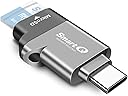
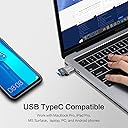
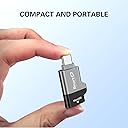
The C356 Type-C MicroSD Card Reader by SmartQ delivers ultra-fast 5Gbps USB 3.0 data transfer speeds with dual USB-C and USB-A compatibility. Its compact, durable design supports microSD, microSDHC, and microSDXC cards across Windows, Mac OS, Android, and iPad devices, making it the ultimate portable solution for professionals needing reliable, high-speed access to large files anytime, anywhere.


| ASIN | B07YGXR8N3 |
| Additional Features | Portable |
| Best Sellers Rank | #72 in Computer Memory Card Readers |
| Brand | SmartQ |
| Color | Midnight Grey |
| Compatible Devices | Smartphone,Laptop,Tablet |
| Connectivity Technology | USB Type C |
| Customer Reviews | 4.5 out of 5 stars 5,835 Reviews |
| Data Transfer Rate | 5 Gigabits Per Second |
| Global Trade Identification Number | 04710836011205 |
| Hardware Interface | USB 3.0 Type C |
| Item Dimensions L x W x H | 1.35"L x 0.87"W x 0.3"H |
| Item Weight | 0.35 Ounces |
| Manufacturer | SmartQ Inc. |
| Media Type | microSD, microSDHC, microSDXC |
| Mfr Part Number | C352 |
| Model Name | C352 |
| Model Number | C352 |
| Operating System | Android, Chrome OS, Mac OS, Linux |
| Slot Count | 1 |
| Special Feature | Portable |
| Unit Count | 1.0 Count |
| Warranty Description | 1-year |
K**R
Absolutely a great little device! A must have
I absolutely love this little thing. I can’t even begin to tell you how useful it is.. I have a dash cam in my car that uses a microSD card and I have the newer iPhone so it uses a type sheet adapter if I’m ever in an accident all I gotta do is take the car out of the dash cam and boom I have the video on my phone, but I’m a videographer. I use my drones for doing videos. I’m gonna begin my trek all around the world here pretty soon, but this little device even sitting in the middle of nowhere I can put the card and transfer the videos to my phone. Do whatever editing I’m gonna do it. It’s absolutely fantastic.! works every single time do not hesitate. To use it on your iPhone, you simply go to the Files tab on your phone that’s where it likes to store files when you plug it in it’ll show up as another folder on your tab and then you just go through each folder and there’s your photos in your videos it’s great
T**N
Very impressed with its performance!
I recently got my hands on the C356 Type-C MicroSD Card Reader with USB 3.0 Super Speed Technology, and I have been thoroughly impressed with its performance and versatility. This card reader has proven to be an invaluable addition to my tech arsenal, and here's why it deserves a positive review. First and foremost, the compatibility of this card reader is outstanding. With its Type-C interface and support for MicroSDXC cards, it seamlessly connects to a wide range of devices, from modern laptops to smartphones. This versatility ensures that I can use it with virtually any device in my tech ecosystem, eliminating compatibility concerns. The USB 3.0 Super Speed Technology lives up to its name by providing lightning-fast data transfer speeds. Whether I'm transferring large files, photos, videos, or documents, this card reader does it swiftly and efficiently. It's a time-saver and productivity booster. The compact and portable design is a standout feature. It's incredibly lightweight and pocket-sized, making it a fantastic travel companion for those moments when I need to access or transfer data on the go. It has become an essential tool for my work and personal life. Furthermore, the build quality is excellent. The card reader feels durable and well-constructed, ensuring that it can withstand regular use without any issues. The C356 Type-C MicroSD Card Reader is a versatile, high-performing, and portable solution for anyone in need of quick and reliable data transfer. Its compatibility, speed, and build quality make it a valuable addition to any tech setup. Whether you're a professional or a casual user, this card reader delivers on all fronts and has become an essential part of my tech toolkit. Highly recommended!
M**Z
Plug-n-play use
This item works very well and have had 0 issues with it. It's very compact and convenient!
E**O
Good card reader for the price.
Works very well, you can attach a key ring to it if you need it with you at all times, very small but doesn't feel cheap. I'd definitely buy again. Be careful, it does get hot if left plugged in too long, at least it did on my galaxy s25
S**.
Tech Options.
Taking your tunes on the road. Cars are turning to Type-C jacks only, if you have a tradition USB your out of luck. Especially rental cars where you have crappy radio stations and you don’t have or Carplay or don't want to pair your Iphone. This device is perfect. Its also a great storage device if you have a laptop that only has Type - C. The transfer rate is great. A must for your gadget bag.
A**N
Great product! Worked exactly as advertised.
Great product
I**O
Less is more
Works easily. Gonna need it for my new Google Pixel phone, since there's no sd card slot. I tested it on my current phone, and its just a simple plug and use. Donnot forget to EJECT your Drive before unplugging completely. Worth the money for this little thing. It can be used as a usb drive. Install whatever size memory card.
S**X
Doesn't work for me
I tried with this one, I am using micro sd cards to replace cd's since my new head unit doesn't have a cd drive. I mounted a usb-a/usb-c receptacle in my ashtray, connected to the head unit. usb-a thumbdrives and usb-a micro sd reader drives work perfect. I have a small usb-c micro sd reader it works perfect as well, but it is tiny and so I bought this usb-c micro sd reader as it's slightly fatter/larger and easier to grab and use in the receptacle. The first one worked once in my desktop pc with a usb-a adapter, but wont work in the receptacle in the car head unit. I emailed the [email protected] email for help, but they didn't answer, so Amazon replaced it. Again with a usb-a adapter in my pc, it read the micro sd card and I loaded two cd albums on the card. took it outside to my card, but no joy, so i pulled the card and inserted it in the smaller reader I also had bought from Amazon, plays the copied cd's perfectly, so there is some kind of flaw in this reader, [maybe because it says usb 3.0 super speed, but it should default to 2.0 if the unit doesn't use 3.0, I dunno] I tried it in my Dell laptop with only usb-c inputs, it failed the first time and Windows said try it again and it worked, so I will keep it, and use it with this Dell or my desktop with an adapter, will have to keep looking for a better larger micro sd card reader than the one I currently use, it is just too tiny
F**R
Très efficace
Très satisfait, permet le transfert de photos depuis une micro SD, vers le téléphone.
S**J
Dont purchase it
This device is make my mmc corrupted.
M**G
excelente producto y comodo
me encantó, es comodo, y facil de usar con la lap que tengo.
A**C
Ottimo lettorw
Utilissima e flow migliorato e velocizzato
M**N
A great microSD to USB-C adapter for laptops, phones and tablets
I bought the SmartQ USB-C MicroSD card reader (or OTG adapter) as I was wanting to access some files on a microSD card that I was using as expandable memory for my windows laptop from my Android tablet. The first thing I noticed was that the card reader has a robust build, with a sleek design. Included in the package is a card from SmartQ asking for feedback and offering contact details for if you have any issues. The adapter has a slot for a microSD card on one side and on the other side is a standard USB Type-C connector. You just plug your microSD card into the one side and then slide the USB-C connector into the USB-C port of your device. It slots in easily. I was using a Samsung Galaxy Tab A9+ which worked great. It also worked on my Samsung Galaxy S24 Ultra mobile phone. Once you've slotted the adapter into the USB-C port, your device should inform you that you've got a new USB device connected and then you can go into your device's file explorer and the microSD will show up as external USB storage. You can then access the folders and files on the microSD card just like you can with any internal memory. I was able to view and copy photos and videos from my microSD card with no issues. It works well. I'm was quite impressed. And then, when you're done, you just unplug the adaptor and you good to go. I would say that this microSD USB-C adapter is perfect for using with laptops, phones and tablets that have a USB-C port.
Trustpilot
1 month ago
4 days ago