Buy anything from 5,000+ international stores. One checkout price. No surprise fees. Join 2M+ shoppers on Desertcart.
Desertcart purchases this item on your behalf and handles shipping, customs, and support to Colombia.
๐ Upgrade your desktop to WiFi 6E โ because buffering is so last decade!
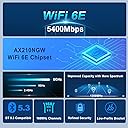
The OKN WiFi 6E AX5400 PCIe Card with Intel AX210 chipset delivers ultra-fast tri-band wireless speeds up to 5400 Mbps, leveraging the new 6GHz band for congestion-free connectivity. Featuring Bluetooth 5.3, MU-MIMO, and OFDMA technologies, it ensures low latency and robust multi-device performance. Compatible with Windows 10/11 and equipped with high-gain external antennas, this card transforms any desktop into a powerhouse of next-gen wireless networking.


| ASIN | B07X462KRK |
| Best Sellers Rank | #11 in Internal Computer Networking Cards |
| Brand | OKN |
| Built-In Media | 1 x Bluetooth Header Cable, 1 x Low-Profile Bracket, 1 x OKN AX210 PCIE WiFi 6E Card, 1 x Quick Installation Guide, 1 x Resource CD, 2 x High Gain Antenna |
| Color | WiFi 6E AX210 PCIE Card |
| Compatible Devices | AMD Ryzen, Desktop, Inrel CPU |
| Compatible Operating System Family | Windows |
| Customer Reviews | 4.5 out of 5 stars 2,605 Reviews |
| Data Link Protocol | 6GHz , BT 5.3 |
| Data Transfer Rate | 5400 Megabits Per Second |
| Hardware Interface | PCI Express x1 , PCI Express x16, PCI Express x4, PCI Express x8 |
| Item Dimensions L x W x H | 4.72"L x 3.15"W x 0.79"H |
| Item Type Name | PCIe WiFi Card |
| Item Weight | 90 Grams |
| Manufacturer | UFON |
| Mfr Part Number | PCE-AX200 |
| Minimum Required Operating System Version | Windows 10 |
| Model Number | PCE-AX210 |
| Product Dimensions | 4.72"L x 3.15"W x 0.79"H |
| Unit Count | 1.0 Count |
R**L
Easy setup, great speeds as advertised.
This Wi-Fi card is so good it is almost as good as my ethernet. My router is kinda far away, but it gets full signal because of its beefy antennas. It was a simple setup; I just had to plug it in to my PC, insert the driver CD and download the drivers that were on it, and I had full Wifi and Bluetooth support. It worked perfect with windows 11, didn't need intel CVNI, which my cpu doesn't support. As for gaming, I get very low ping and can download games fast.
_**S
Great WiFi Performance, Doesnโt Quite Hit Advertised Speeds
Arrived quickly thanks to Prime and was easy to set up. It performs well for WiFi, which is all I currently needโI havenโt used the Bluetooth feature. It doesnโt quite reach the maximum speeds advertised (other devices on my network do), but I still average 650โ750 Mbps on a 1Gb connection. Solid performance overall, and Iโm happy with it.
E**Z
Greate peoduct
The product Works as expected , and easy to install
T**)
Works great but must be in PCIE-1 slot in motherboard
I had a *very hard* time getting this card to work correctly in my PC, but with help from the manufacturer (UFON), I was eventually able to get it configured and operating normally. My symptoms were that the device would be recognized but not start up in Windows 10, especially after any configuration changes. I could sometimes get it to start normally and on a few instances it actually connected to my network, but would disconnect after 5-10 seconds. The sales support staff at UFON responded within a day to my email request for assistance. They key piece of information they provided was that this adapter needs to be in PCIE-1 slot for compatibility AND since it is an INTEL-based card, it may have compatibility issues with AMD-based systems. Fortunately, I have an ASROCK motherboard with an Intel i7 processor. After switching the adapter to the proper PCI slot, configuration was simple. INTEL has good documentation for their driver software which also helps. The card is now connecting on 802.11AC with no issues and I am getting a sold 585 Mbps connection which sometimes ramps up to 650 or even 866 Mbps. This is, of course, highly dependent on the distance to my Xfinity router. YMMV. The Bluetooth network features are a bonus, too! If there had been better instructions or compatibility information, I would have given a 5-star rating, but since I was hours away from returning it back to Amazon, I dropped it down one notch. Very glad to be off of my old 2.4 GHz connection. Life is good!
S**.
Works great! Great Speeds! No Driver Issues Win10
Installed onto windows 10 without having to download drivers, works great. Not sure what else to say! Not sure I will ever use BT functionality but I installed the cable anyway since I had an open header on the motherboard.
E**C
thicc boi antennas, works with Linux out of the box
This OKN WiFi 6E AX5400 PCIe WiFi Card AX210 was just delivered today. I put it in my SFF Optiplex running Kubuntu 22.10. The wi-fi connected quickly and has stronger signal strength than the previous (MIS brand) adapter I was using. Likes: โ thicc boi antennas - I've had expensive routers with smaller antennas than these chungus doohickies. โ minipcie card is easy to remove in case future upgrades are needed. โ low profile bracket included - Factory screws are on really tight. Don't use the included screwdriver to remove the full height bracket, you'll just strip the screw head. โ screwdriver and case screw included - don't need it, but it's a thoughtful gesture that I appreciate. โ driver CD included - Who even does that anymore? Nice people, that's who. Again, didn't need but still appreciate. โ stronger signal strength than any other wi-fi adapter I've had in this location. (Probably due to dem thicc bois!) โ lastly, but most importantly: works with Linux (Kubuntu 22.10) immediately. I wasted HOURS trying to get realtek and broadcom wifi chips to work on newer kernel, without success. As expected, the Intel chip on this wifi adapter worked immediately. Dislikes: Being super, extra, unnecessarily nitpicky; I don't like the thin metal antenna connector retention bracket for where the antenna leads connect to the wifi card itself. It's probably fine but would rather have seen plastic or non-conductive coating on a better quality metal piece. It's really no big deal, but I couldn't think of anything else to put under 'dislike'. Verdict: Based on the first hour of use after installing, I'd recommend this to anyone with a low profile computer and/or anyone wanting a solid Linux compatible wifi adapter. Wifi signal strength is better than expected and speed is what it should be. I can't speak to the Bluetooth yet, as I'm waiting on a header female to USB-A adapter cable to arrive. (no open USB headers on optiplex mobo).
D**C
Works great with Linux
Very recently, I decided to start daily driving Linux on my desktop PC, switching from Windows. Before, I had a TP-Link USB wireless adapter, and that worked perfectly fine in Windows, but it constantly disconnected in Linux. This is not really TP-Link's fault, as the device itself was based on a Realtek chipset, and Realtek has absolutely awful support for Linux. So instead of trying to install custom Realtek drivers and constantly tinker with the wifi, I decided to just pick up a Intel AX210 card, because they work extremely well in Linux. I chose this particular one because my computer does not have a built in antenna for wireless (hence the prior USB adapter.) I installed it, turned on the computer and it worked out of the box, which is expected, because most modern Linux kernels have the driver for the AX210 chipset. As for speed, I'm using an ISP provided AC gateway, so they're about the same as they were before. I don't exactly have a blazing fast home network, nor do I have a blazing fast internet speed (max 100mbps). But I'm sure if I had faster internet and a Wifi 6 router, it would work fine.
T**S
Couldn't get Bluetooth to Work.
I bought this card so that I could stop using a cheap bluetooth 4.0 dongle plugged into my from panel USB port. I recently picked up a VR headset and controllers and thought it would be nice to add Bluetooth 5.0 to my system for when future VR controllers support the standard. I installed this card as instructed, downloaded and installed drivers from Intel's website as instructed. The Wifi worked right away, but the Bluetooth wouldn't work. The bluetooth option in settings in Windows 10 isn't even there. There is no Bluetooth device showing up in the control panel either. The driver installed fine, I tried repairing it just in case. I also checked all Bluetooth services and set them to run automatically. I triple checked the card side cable to make sure it was seated properly(it's either a JST or smaller form Molex, maybe Pico) and it seemed fine. Inspected the solder points on the card and the through hole pins all seemed to be soldered correctly. The cables looked like they were terminated well and they tested fine for continuity with my multimeter. I tried both of my USB 3.0 headers and my other device(RGB lights on my CPU cooler) worked on any of the headers but this card did not work on either. I tried searching support forums but it seems that very few people talk about bluetooth functionality and they just talk about the wifi capabilities. Since this item has free Amazon support I decided to give it a try and the Amazon rep went over all of the troubleshooting steps with me on the phone. We tried everything I had already tried, and he thought that it was either a defective card or the cable. I'm unsure if this is an issue with the PCIe card itself, or the M.2 Intel AX200 chipset. I doubted it was the cable but thought I'd give it a try so I tried reaching out to the manufacturer via their email address that they provided in packaging but they weren't much help. They just stated that this card may not be compatible with AMD systems, which while that may be the case, it's doubtful since there are standards for a reason, and this card should comply with those standards. My Ryzen work laptop from Lenovo has an Intel Wifi chip and it works fine. They wouldn't even send me a replacement USB cable to test at first and only offered after I informed them that the Amazon support guy had suggested it and that I was going to leave a negative review. Regardless, I decided to return the card and buy a more reputable brand with a slightly older standard with Wireless AC and Bluetooth 4.2 instead. Anyway, I cannot recommend this card unless Bluetooth compatibility issues get sorted out. If you're just using it for Wifi then it may work for you, but if you're looking to add Bluetooth you may want to look elsewhere. Here's my system specs for anyone that's curious and/or has similar hardware: AMD Ryzen 1700 @ 3.9ghz Vega 64 8GB ASUS Plime B350M-A 32GB(2x16) Corsair Dominator DDR4 3000 CL15(running at 2933 CL14) A-Data XPG 1TB NVME Seasonic Gold 630W PSU LG 34" Ultrawide 144hz Freesync Monitor Samsung HMD Odyssey Plus WMR Headset
Trustpilot
5 days ago
3 weeks ago