🔐 Simplify security, amplify peace of mind.
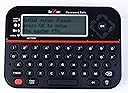
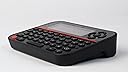
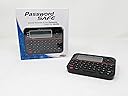
The Deluxe Password Safe securely stores up to 400 account credentials accessible via a single PIN. Featuring a backlit QWERTY keyboard and offline operation, it protects your identity from online threats. Auto-lock engages after 5 incorrect PIN attempts, and 3 AAA batteries (included) power the compact, portable device.

| ASIN | B00FDZVBYG |
| Batteries | 3 AAA batteries required. (included) |
| Best Sellers Rank | #42,897 in Office Products ( See Top 100 in Office Products ) #4,595 in Office Electronics Products |
| Color | One Color |
| Connectivity technologies | Standalone Offline Password Keeper |
| Customer Reviews | 4.3 4.3 out of 5 stars (2,897) |
| Date First Available | September 23, 2013 |
| Human Interface Input | Touchscreen |
| Is Discontinued By Manufacturer | No |
| Item Weight | 6 ounces |
| Item model number | 595 |
| Manufacturer | Getting Fit |
| Other display features | Wireless |
| Product Dimensions | 6.5 x 6.2 x 1.5 inches |
| Special features | Portable |
| Whats in the box | Keypad |
D**E
Password Safety
It is definitely safe and easy to use I love mine so much my sister got one also
C**.
Works fine, very good manual, no lost P/Ws when using Edit, nice backlit function. 4.8 Stars, CDW
Bought Password Safe 090419, delivered 090719. It measures 4-7/8" (12cm) by 3-1/2" (9 cm) wide & about 1" thick (it tapers to 3/8"). Cons: no comma, semi-colon, lower case x looks like H, & I couldn't get the - to work. Pros: Easy to handle & make entries, backlight really helps in a darkened room. Eval: I entered 5 URLs with passwords (recorded elsewhere) and edited each in turn. After entering a new password I turned the device off, then on again. None of the other URLs or passwords were erased or altered in any way (previous complaint). You can enter passwords of 20 to 22 characters (it varies), depending on which characters are used. Since my passwords are longer I often wrote "see below" in the password area and entered the password in the Notes area. I also made comments like "entry #3 is a small X, not an H", or "character = is a dash -" , or " : is a comma"., etc. Screen entries are much easier to read than entries made on the Royal Password Vault, which I evaluate elsewhere. I would have evaluated other competitors, but no one sent me one. Summary: This is a useful, easy to use device for recording spur-of-the-moment passwords. It may also keep you from logging in to untrustworthy networks while traveling. Stars were reduced because the comma, semi-colonand dash were omitted. Worth having, worth the money, glad I bought it. 4.8 Stars. CDW
R**S
Great, but Consider a Mobile App Instead
I work in a secured facility where personal electronics that emit signals such as cellphones and bluetooths are not allowed. At the same time, I have several user accounts that require very long complex passwords that need to be changed every few months. Because of this, I'm constantly forgetting my passwords, or confusing them with other accounts and either lock myself out of my account or have to go through a cumbersome process to manually reset it. I have a great password app, but it is on my phone, which isn't allowed in my office. I came across this while looking through Brookstone, then found it here for a much better price. This is a pretty good password keeper. It's a bit clunky to use; the buttons are mushy and crammed closely so it's easy to hit the wrong key. Typing capital and special characters are also a bit of a pain, and I use both when creating passwords. On its first use, when trying to fill this with my account details, I had to take breaks after every few entries because I could feel my fingers and thumbs cramping up. The interface looks dated and resembles an old calculator. This device isn't pretty, and hand jamming account details can get tiring, but this is great to have if you need to keep track of a lot of different accounts. Granted, if you have a phone, and can have your phone on you at all times, there are mobile apps that offer this and are much easier to use with polished interfaces. There are many different mobile apps that are much cheaper and can even be used across different platforms (Apple/Android/Windows). But if you work in an environment where personal phones are not allowed, such as me and my office, this is great to have.
S**N
Great device and operating system
I actually had a password safe from another store and just recently purchased one from Amazon to have two of these units. I cannot vouch for how long the unit will last, but only that I actually tested everything on the unit and it does work as advertised. I took the battery out to see if the unit will lose its memory, but sure enough, it has flash memory and worked again after reinstalling the batteries. The unit has three important items you need. You can use the website or name of what you intend to file alphabetically by the unit. The second item is usually your user name and last of all a place to store your password. It also has a note section to store notes on that password you have stored. I also owned the password fast that is good for traveling and much harder to input than the password safe. To me, password safe is fun and easy to use. It is a very well thought out device.
C**Y
A must have tool for password/passcode storage!
Love this item! I do not have to store important passcodes on my computer, a it’s super easy to edit the passcodes. This is a must have, if you change your passwords frequently!
J**.
Overall it is a good product and very useful
Overall it is a good product and very useful. I read a previous review indicating a problem with inadvertently shutting it off when trying to use the shift key. That is a problem, but something that you mentally learn to avoid. One thing I found annoying is if you attempt a search, you must hit the caps key to bring up items starting with a capital letter. I would prefer it bring up ALL addresses. I find 400 accounts a bit much. I would prefer that there were more input lines available in the Site,ID and Notes portions. Sometimes your E-mail address as well as an ID are needed and there is not enough room for both in the ID field, so I must add it to the Site or notes field. There is also times where telephone #s or other info is needed and there are not enough lines available in the notes field. The caps key is cumbersome, having to tap to do a caps and re-tap it to undo it, rather than holding down a shift key, type your letter, and then releasing the shift key.
R**O
Very good password secty
works great, a lot of entering your passwords. Dont use your name, bday, kids bday, make a password for this that is complicated but that you can remember.
L**A
Cumple con el propósito para el que fue comprado. Le pongo 4 estrellas porque por el precio considero que los materiales de construcción se sienten no de tan buena calidad.
A**R
Not very easy to navigate
K**1
Bei mittlerweile über 20 verschiedene Passwörter und Zugänge einfach ein tolles Teil! Nie mehr Ersatz Passwörter anfordern :) Sehr zu empfehlen!
L**N
I only received my password safe gadget two days ago , so it's too soon IMO to give it a proper review. So far I am very happy with it and not encountered the problems some have mentioned elsewhere. I do find the symbols on the two top lines a little difficult to read, but I have learned where my most used ones are . Their are two OK buttons , one is in the middle of the direction arrows to the right of the screen, the other is to the right of the space bar at the bottom, it seems to do do exactly the same functions as the top one, but is more handy when you're typing in details. To enter one or more capital letters you have to use the cap lock button. On screen the letters, numbers and symbols are produced by dots, so some do look a bit strange at first, I found the lower case L rather strange but it's very easy to tell o from zero the zero has a diagonal line through it . As mine is so new, I have no idea how long the three AAA battery's last, or the durability of this handy gadget. To use the gadget you have to enter a password, according to the instruction leaflet, which I must add is very east to understand , if you enter the wrong password 5 times, it will lock up for 30 mins.and will keep doing so till you put in the correct one. If you cannot remember the password , you have to insert something like a pen nib where it says erase. Which will then erase all data entered, I think then you have to do the same with the reset button but am not totally sure on that bit, this will free up the gadget for use but you have to set it up from scratch again, I know it is a pain if you ever have to do this, but it does mean that your data is safe, unless of course others know your gadgets password IMO it's to big to fit in a lot of pockets . I have no intention of taking mine outside. But if you need to ,a brief case, bum bag hand or computer bag would be best It does have a good back light which you can turn off, I haven't tried mine out in sunlight. It has a flash memory , so you won't lose anything when you change the batteries If I encounter any faults or problems I will update this review. I am also using it as an address book., by putting names in the web area , telephone nu in the ID area, email in the password area and address in the note area. I'm sure I will find some other uses too. I am pleased I got this one
I**M
It works fine and is very compact.
Trustpilot
2 months ago
2 weeks ago