Buy anything from 5,000+ international stores. One checkout price. No surprise fees. Join 2M+ shoppers on Desertcart.
Desertcart purchases this item on your behalf and handles shipping, customs, and support to Colombia.
⚡ Power your productivity with the ultimate Thunderbolt dock — because your setup deserves the best.
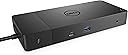
The Dell WD19TB Thunderbolt Docking Station delivers robust 180W power with 130W laptop charging, supports dual 4K displays via DisplayPort and HDMI, and offers 12 versatile ports including Thunderbolt 3 and Gigabit Ethernet. Designed for Dell Latitude and XPS series, it streamlines connectivity in a compact, professional form factor with a 3-year warranty.

| ASIN | B07V867LW4 |
| Best Sellers Rank | #970 in Computers & Accessories ( See Top 100 in Computers & Accessories ) #108 in Laptop Docking Stations |
| Brand | Dell |
| Color | Black |
| Compatible Devices | Latitude 3301, 3390 2-in-1, 3400, 3490, 3500, 3590, 5280, 5285, 5289, 5290, 5290 5300, 5300 5400, 5401, 5480, 5490, 5491, 5500, 5501, 5580, 5590, 5591, 7200 7280, 7285, 7300, 7380, 7389, 7390, 7390 7400, 7400 7480, 7490, Precision 3520, 3530, 3540, 3541, 5520, 5530, 5530 5540, 7520, 7530, 7540, 7720, 7730, 7740, Rugged 5420, 5424, 7424, XPS 9360, 9365, 9370, 9380, 9530, 9560, 9570, 9575. Compatible Devices Latitude 3301, 3390 2-in-1, 3400, 3490, 3500, 3590, 5280, 5285, 5289, 5290, 5290 5300, 5300 5400, 5401, 5480, 5490, 5491, 5500, 5501, 5580, 5590, 5591, 7200 7280, 7285, 7300, 7380, 7389, 7390, 7390 7400, 7400 7480, 7490, Precision 3520, 3530, 3540, 3541, 5520, 5530, 5530 5540, 7520, 7530, 7540, 7720, 7730, 7740, Rugged 5420, 5424, 7424, XPS 9360, 9365, 9370, 9380, 9530, 9560, 9570, 9575. See more |
| Customer Reviews | 3.8 out of 5 stars 1,463 Reviews |
| Global Trade Identification Number | 00884116345930, 05397184187197 |
| Hardware Interface | Ethernet, HDMI , Thunderbolt , USB |
| Input Voltage | 120 Volts (AC) |
| Item Dimensions L x W x H | 8.1"L x 3.5"W x 1.1"H |
| Item Weight | 585 Grams |
| Manufacturer | Dell Computers |
| Mfr Part Number | 9GMPM |
| Model Number | WD19TB |
| Number of Ports | 12 |
| Product Dimensions | 8.1"L x 3.5"W x 1.1"H |
| Smart Home Compatibility | Not Smart Home Compatible |
| Total Number of HDMI Ports | 1 |
| Total USB Ports | 3 |
| Total Usb Ports | 3 |
| UPC | 884116345930 |
| Unit Count | 1.0 Count |
| Warranty Description | 3 YEARS MANUFACTURER |
| Wattage | 180 watts |
A**S
Great for this "road warrior"
Perfect match for a new Dell laptop for traveling...fits perfectly. Now I can plug in 1 cable to my laptop & have full desktop emulation with 2 extra monitors, powered speakers, high quality camera/mic, and full keyboard/mouse capabilities. It makes doing remote work, including Teams meetings, SO much easier. One or two more USB ports (A or C type) would be nice...but everything connects properly.
K**R
Does not charge cell phone unless computer is connected
I never write reviews but I wanted to warn everyone about this POS. I bought this dock for my Dell 7390 laptop, for which it is recommended. And it mostly works when the computer is plugged in (although it doesn't recognize my Logitech webcam). But for some reason, the dock DOES NOT CHARGE connected devices unless the computer is plugged in. Unplug the Thunderbolt cable from your computer, and your cell phone, earbuds, and anything else connected to the dock stops charging. How dumb is that? It is so dumb that I ordered the same unit as a replacement because I couldn't believe it was the intended function. And they both do the same thing. So in the end, I guess I'm dumb. Hopefully this helps you avoid my mistake. After I returned both, I bought the Anker 13-in1 which works like a champ. Save yourself the hassle and just go for a different product.
A**R
Works with 2019 MacBook Pro & Dell Latitude 7490
I purchased this docking station to run two 4K displays and a handful of peripherals from a Dell Latitude 7490 laptop with Thunderbolt 3. As an experiment I plugged in a 2019 15" MacBook Pro to see if it would also work. Initially I had an issue where both 4K displays were mirroring the same activity instead of working independently. The system preferences provided no solution (neither "Detect Displays" worked nor the "Mirror Displays" checkbox—it was unchecked). I reviewed my connections. I was using the two display port connectors on the dock to run the two 4K displays. After some Googling I learned this configuration will not work as both display port connectors are on the same bus. To run both 4K displays each must be on its own bus. I had an extra Thunderbolt 3 to HDMI cable on hand. After removing one of the display port cables then using the Thunderbolt 3 to HDMI cable, which is on a separate bus, the issue was resolved! Now I can simply plug the main Thunderbolt 3 cable that comes out of the dock into either the MacBook Pro or the Dell Latitude 7490 and all the peripherals connected to the dock work with either laptop. This is fantastic!
T**N
Dell WD19TB review
Item came in a timely manor and as expected. It was packaged very well to ensure proper item protection. The docking station was as advertised and worked as expected. After about two weeks started getting a notification that fan had failed. Reached out to seller about the issue and they offered to exchange the defective item. New item was shipped as described in conversation with seller. Arrived as expected and product was as advertised. Item has been working ever since.
A**Y
Thunderbolt Dock Review with improvised mount
I got this dock to replace my WD19... the TB version allows you to run triple monitors with the laptop closed... the USB3 version does not (Dual only, + laptop screen as far as I could figure). Given my triple monitor setup, my desk got pretty crowded so I ended up drilling some 2" holes into the desk, installing grommets, and routing cables. With all that, I wanted to get the dock off my desk top and under the desk. It had two mounting holes designed for the Dell mounting kit. Well, don'tcha know, I can't spend $30 on a mounting kit when I can MacGyver my own for $15. Here's what I did: The mounting holes in the dock are M2.5. So you need a tiny diameter screw to mount it. 2 screws in fact. I got a 12 inch piece of aluminium bar from Home Depot and drilled 2 holes, 88mm apart for the two M2.5 screws. Then I overdrilled the holes to help recess the screws a little. On the ends of the bar, I drilled two larger holes that wood screws would fit through. I installed the bar to the dock (see pic), then screwed the whole assembly under my desk. I was pretty proud of myself, until I plugged the dock into the power adapter... It wouldn't turn on. I tried a different power adapter (180W, 130W) but no dice. Crap. I broke my dock... or did I? I took the whole assembly down and loosened the M2.5mm screws. When I plugged it back up, the fan started spinning. I remounted it loosely with wood screws, hooked up all my stuff, and it fired right up. Moral of the story: don't tighten the mounting screws too much. This thing's a little temperamental.
P**L
Works great
I use just one usb-c connection on my dell laptop. It charges, has ethernet connection, mouse/keyboard (via 2 usb), and two display port monitor connections (extended desktop; both at 2560x1440). Works great. Note: it came in a sealed plastic bag, yet seemed to show minor use: small dime sized smudge, and corners showed some wear. Still, no performance problems after a couple of weeks.
A**R
Selling used, not working items as new
Do not buy this item - it is a scam. The page had options to buy a new one for $96, and a used one for $76. I chose the new one. It arrived, not only was used (visible scuff marks, screws missing), it wont even turn on. Reported it as DOA and used not new. A replacement arrived this evening, and guess what? Same exact thing. Used item with visible stuff marks, and will not power up.
N**S
Excelente producto
Cumplió con las expectativas llegó en buen estado e intacto
S**H
Working flawlessly on Mac OS
Both 1080p ultrawide and 1440p 16:9 144hz in 90 degree orientation working flawlessly. Easily powers my Mac and iPhone and all other peripherals perfectly all day long without much heat output. Highly recommend!
M**U
Entièrement satisfait ! WD19TB avec ordinateur Dell inspiron
J'ai bien reçu le WD19TB, malgré certains commentaires négatifs de d'autres personnes, j'ai décidé de l'acheter quand même et JE NE SUIS PAS DÉÇU ! 🙂 Fonctionne très bien avec mon Dell inspiron 17 7000 ! Je n'hésiterai pas à en commander un autre pour mon travail ! 😀
D**O
Recomendado
Recomendado me llegó en perfecto estado nuevo en caja y con sus cables completos, llego en tiempo, si buscas algo seguro sin que te falle lo recomiendo
D**L
*DO NOT BUY* Wrong item (WD19 not WB19TB) and not a new item.
Do not buy from Canada Connect. I purchased what was advertised as a new Dell WD19TB docking station. What I got was a refurbished WD19 which is not the Thunderbolt version. The WD19 unit is much less expensive than the WD19TB but they did a bait and switch and gave me the cheaper model. To add insult to injury the unit is not new as advertised. It was missing the warranty and the items were repackaged. Reading the reviews this has happened to several other people in Canada. Save yourself the headache and disappointment and do not buy through Amazon. Call Dell and show them the reduced price and they will match it and you can get a legitimately brand new and the correct device for around $300. I called Amazon and they didn't seem to care about this and gave me a $5 coupon which is not worth all the shenanigans and headache.
R**A
Alto voltaje
Compré este producto hace un mes y medio. Funciona bien pero tiene un problema, comenzó a fallar, a tener algo así como "alto voltaje"; cuando conecto mi computadora se siente como la energía está sobre la carcasa de esta, he llegado a tener ligeras descargas eléctricas. Definitivamente hay algo mal con el producto, por desgracia ya no puedo devolverlo ya que ha pasado más de 1 mes.
Trustpilot
2 weeks ago
5 days ago