๐บ Stay connected off-grid with DIRECTV 4K โ because missing out isnโt an option!
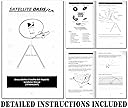
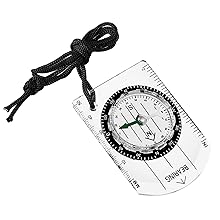
The DIRECTV 4K HD Mobile RV Portable Satellite Dish Tripod Kit SWM SL3S is a rugged, user-friendly satellite solution designed for RV enthusiasts and travelers. Compatible with multiple DIRECTV receivers (H25, HR34, HR44+), it includes a sturdy tripod, 50-foot coax cable, compass, bubble level, and a convenient carrying case. This kit enables reliable 4K HD satellite TV reception in remote or heavily wooded areas where fixed systems fail, empowering users to enjoy premium entertainment on the go.


| ASIN | B00XKETIEW |
| Antenna | Satellite |
| AntennaDescription | Satellite |
| Best Sellers Rank | #717,135 in Electronics ( See Top 100 in Electronics ) #306 in Satellite Dishes |
| Brand | Satellite Oasis |
| Color | Black, Blue, Gold, Grey, Silver |
| Customer Reviews | 4.1 out of 5 stars 634 Reviews |
| Impedance | 50 Ohms |
| Item Weight | 32 Pounds |
| Manufacturer | Satellite Oasis |
| Maximum Range | 50 Feet |
| Mfr Part Number | DTVSWMSKIT |
| Model Number | DTVSWMSKIT |
| UPC | 616043626024 |
M**Y
Worked Great-Solved My Issue
I have an automatic satellite dish dome on my RV, which provides a great TV signal when I have clear overhead. My problem was an upcoming two-week stay at a heavily-wooded site in Wisconsin, where I KNEW there was no way I would be able to find a signal with my fixed system. Before the trip, I ordered this portable unit from Satellite Oasis without knowing for sure I could make it work--but the nominal expense made it worth a try. Sure enough, when I got to the campsite, I was in the middle of heavy tree cover--I tried, but no way would my fixed system work. However, about 30-feet away was an access road that had cleared overhead to the south. I set up the antenna, strung out the 50-foot coax, and was able to reach my DirecTV receiver with room to spare. Although I had never attempted to set up a satellite antenna before, I followed the very good instruction booklet carefully. It even guided me through making the proper on-screen changes to match the antenna system to my receiver, and determine the proper settings (azimuth, elevation and compass heading) needed for the antenna at my location. The bubble level that they included in the kit worked well to level the antenna. The only problem I experienced was that the included compass did not seem to work smoothly enough to get consistent or reliable compass readings (which are pretty critical). Fortunately I remembered that my iPhone had a compass app installed, and that worked like a charm. I immediately got a signal when I set all the settings correctly, and I was able to tweak it slightly from there for great reception. This antenna system is fairly bulky and is a little bit of a hassle to carry with you, but I was able to pitch it in the back of my tow car, so it was out of the way on the road. It is obviously a little more hassle to set up than simply flipping a switch on my automatic built-in system--but in this instance it definitely solved the problem to provide satellite TV for two weeks when otherwise I would have been totally without. Even if I only use it occasionally I consider it a definite winner.
A**R
Great value and not difficult to setup
I was skeptical about buying this item and how much effort and expertise would be required to get assembled and in operation, but I have been very pleased. However, if you aren't somewhat adept at using your Direct TV receiver specifically going into the settings and finding and using the tools you'll need to locate and lock on a signal and/or doing some simple mechanical tasks such as assembling the dish components, tripod stand and running your cabling correctly, then this may not be good for you. But you can do this if you are just average because that's where I would rate myself. Anyhow, before I traveled to a campground and tried to do this for the first time, I read the instruction booklet that comes with the unit, assembled the dish and set it up in my driveway. I then got my camper TV, a 42 inch Samsung smart tv and unhooked my Direct tv DVR/receiver and set it all up on the tailgate of my truck, so I could see my tv screen from the dish about 20 ft away. Hook all the cabling up and ran power to the SWM, the DVR and the TV. After running through the instructions and getting kicked back to the beginning a few times, I figured out (through two more times setting up in campgrounds) how to take a shortcut. Go to the direct tv website and locate the page that provides you the Azimuth (AZ) and Elevation (ELE) per the zip code of where you are setting your dish up. It does not however, give you the dish tilt, which makes me wonder how important that is, but you can get the tilt going though the set up instructions in the menu on your DVR. Using a 7/16 box wrench set the elevation on the dish. if you have the tilt, put the dish in the correct tilt position. This dish package comes with a military style lensatic compass for shooting the AZ to aim your dish at, however, I use a Silva compass that is much easier to use and read. I set the AZ on the silva and after I have balanced the tripod the dish is mounted on, I lay the silva on the ground directly under the tripod stand and aim the dish by glancing down at the silva and hand adjusting the dish. Back on the direct tv DVR, I have gone to the menu/satellite settings/signal strength/individual tuners, and you'll see about 4 or 5 horizontal bars across the screen. My wife would watch the screen while I moved the dish back and forth across the AZ until I got a "tone". When this happens, the bars will show red, yellow or green You need a green bar on all tuners to bring in a picture. Just as the instructions say, shoot for 90% or better to get the most satellite receptions but I have got tv reception in the 80s (you just may not get all of your channels). Once I had tone and signal bars showing green, I would tighten the bolts on the tripod and then using a box wrench turn the fine tune bolts on the dish to bring in the best signal. About the 3d time I went through this procedure I was very comfortable with how to get it up and running. While it is a bit more labor intensify than putting the automatic dome dish out and letting it do the dish pointing for you, you can think about the 500 bucks you saved doing it this way. I read reviews where some people could never get it to connect and other frustrations, but like I said after the 3d time setting it up I felt really comfortable and would even say it was not that hard. Take the time after you get the dish to study the manual and your DVR menu and go for it. You got this.
T**S
Works Great at Tailgates
As long as you have the receiver, this covers everything else you'll need. It was somewhat difficult to setup - took about 90 minutes the first time. However, after that trial run me and my buddies took it to a tailgate and got it going in 30 min. It worked great. However, we did have some issues when the wind picked up blowing the satellite off line - we could never get nuts tight enough to keep it fully secure. But again, that only happened a couple times. Overall, very happy with this kit and so long as you can read instructions and look up a couple YouTube videos, you'll make it through that first setup and it'll be a breeze after that. Not only that, but the expensive automatic satellites don't pick up DirecTV HD Channels - so if you have DirecTV this is the way to go. Cheaper dish and higher quality TV. I can tell you that this is the setup the vast majority of DirecTV Tailgaters are using.
S**E
Tripod mostly useless. Dish came dented.
This tripod does not have adjustable legs (extendable). I had to buy a separate tripod. The new tripod I bought has individually extendable legs. This one in this kit doesnt, and so if your ground isn't perfectly level, you won't get the tripod level. This makes aiming much more time consuming. I use the dish for tailgating. I also received my package with a dented dish. I was mostly hable to pop out the dents. Enough that it works. Just doesn't look great. They way they packed the dish, at the outer edge of the undersized box, makes this inevitable. The dish deformed the box so it's curved on the outside. Obviously any pressure on the box will flatten the dish. i ended up buying a new kit to replace this. I got it on an autction site as Amazon didn't have a good option, again with a good tripod. The dish is quite simple, it's a high quality tripod that will make the experience of setting it up much easier. This tripod is terrible.
J**O
Professional cable installer gives you the clear choice on these dishes. And how to set them up.
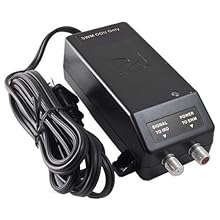
The product is exactly as described, works great, setup is easy. The only thing is that I didn't read well enough to find that there is no SWM splitter included with this kit. Our motorhome has 2 HD TV's so it needs the splitter. You can get one on Amazon for about $7. Just a dual is fine. You can also find them at Walmart and other hardware stores. Make sure it clearly states SWM splitter. I like this unit far better than the old one I had. I had to manipulate two cables with the old one. The SWM only uses one cable to the dish. I also found that I can find the satellite much easier with this one. For those that found this dish to be too large for their RV, I just put a cover on the bed and carry it there. That way I don't have to break it down when we move. If you have a cell phone there is a great app for finding the satellite that you need. It is so easy to use the app. I usually have the satellite setup within 5 minutes of starting the chore. I bought a plastic tool box at Walmart for $12 that has a removable tray. I store all the small items in there. Be sure to have a 13mm open end wrench with this unit, to put it together when you get there. Take two empty milk jugs to fill with water to hold this unit down. Or use a screw in tie down and a bungie cord. This unit catches a lot of air. I use our Genieยฎ system in our RV, with the DVR up front and the mini in the back. I take our internet router with us for ease of setup of wireless. Make sure before you take off, that you have (2) two HDMI (grade 4* or better) cables to connect your TV to your DirecTv STB. Six feet long should do it. * Grade 4 has all the connectors for sound and video open. Older HDMI cables did not. I was a professional computer technician and cable installer and dish installer, so, this comes easy to me.
D**S
It was great until DirecTV started using SWM's
I had one of the automatic Winegard Carryout antenna's. It was great until DirecTV started using SWM's. When using my old, standard def receiver (which was all you needed with the Carryout for DirecTV because the antenna doesn't do DirecTV HD (Dish has much better service for campers). When I had to replace my receiver, the new one no longer worked with the Carryout. I ended up having to buy an SWM kit (as expensive as this entire setup). The SWM kit worked, but only for about 3 days then stopped working. Since the SWM Kit still did not give me HD reception, rather than replace the SWM (which had irritated me by failing so quickly anyway) I went ahead and bought the portable dish. The biggest concern with this kit is aiming. I have installed DirecTV antennas many times myself. It has always been a challenge to get the best signal. Even more since DireTV now uses multiple satellites. DirecTV has made this much more painless. Knowing your coordinates or zip code is enough to get the tilt and elevation angle you need right off the receiver. You also get the direction you need to aim it. The direction is the hardest to tune because the mounting stand and bracket have the tilt and elevation increments marked off. Just get the numbers off the receiver and align the antenna to these readings. Use the compass to get the direction close and loosely secure the mounting nuts. If you have someone with you have them watch the signal meter as you then slowly rotate the dish through a narrow arc. When the signal meter is maxed, tighten the nuts on the mounting bolts. If you don't have someone with you, turn the sound up on the TV connected to the receiver and listen to the tone. As you swing the dish through the directional arc the sound gets higher pitched as you get a better signal. When it is at it's highest pitch, secure the nuts to the mounting bolts. It takes me about 15 minutes to unpack, connect, and aim the dish. I'd say having the HD programming is worth the time investment.
A**R
Product description not factual.
The product description on Amazon is misleading and erroneous. It claims that the antenna is incapable of HD reception, perhaps in the interest to motivate shoppers to buy much higher priced units. I was OK with spending less for degraded performance since I was only going to be using it for occasional RV camping trips where AC hookups were available (don't want to run my generator for hours on end to watch TV, especially when many campgrounds limit use of generators) . However, upon setting it up and finding the satellite, lo and behold I was getting brilliant HD reception. True story. What gives here?
M**C
Works well...but leveling not so easy...
I've had Directv forever...have a 6 digit account number. I've had all kinds of dishes over the years and have never had any issues locating satellites...pointing it in the right direction. Assembling this thing is easy once you've done it a few times. The most important part...and something that makes aiming it correctly...is making the vertical pole (that holds everything) perfectly level or vertical using the little bubble level. The 3 legs on the base don't have any adjustments so when on uneven soils you have to put things under them. It's not easy to add just enough here and there to make it level. So I cut three pieces of plywood, drilled a hole in the middle of each, and added a long bolt from the bottom with a washer and nut on the top to secure it in place. I then added another nut and washer and threaded them all the way down so when I put the 3 legs of the base on the exposed threaded bolt I could adjust the nut underneath up and down to make things level. I added a washer and nut on the top once everything was level. Even in windy days the dish never moved an inch. Once you get the numbers for the area you are in from the receiver (using zip code) you make the basic adjustments to the dish...up and down and tilt...I then spin the dish left and right on the pole until my wife (who's on a cell phone) tells me the percentage of signal. Start to finish after doing this a few times as we stopped on the way to Florida I can set this whole thing up in 15 mins or less. I'm really pleased with it. I take our Genie receiver from our home and with the SWIM it configures everything for you .
Trustpilot
3 weeks ago
4 days ago