


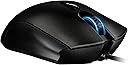


Razer Imperator Ergonomic PC Gaming Mouse
Product ID: 1421323
Details
- BrandRazer
- ColorBlack
- Connectivity TechnologyUSB
- Special FeatureErgonomic
- Movement Detection TechnologyOptical
🎮4G Dual Sensor
👌Ergonomic Design
🖱️Adjustable Buttons
🎯 Unleash Your Inner Gamer with Precision and Comfort!
The Razer Imperator Ergonomic PC Gaming Mouse features a state-of-the-art 4G Dual Sensor System, adjustable side buttons for personalized control, and an ergonomic design that caters specifically to right-handed gamers, ensuring comfort during long gaming sessions.
| ASIN | B0054JGGFK |
| Additional Features | Ergonomic Design |
| Antenna Location | Gaming |
| Are Batteries Included | No |
| Are Batteries Required | No |
| Brand | Razer |
| Button Quantity | 9 |
| Color | Black |
| Compatible Devices | Personal Computer |
| Connectivity Technology | USB |
| Customer Reviews | 3.9 out of 5 stars 210 Reviews |
| Global Trade Identification Number | 00879862003029 |
| Hand Orientation | Right |
| Hardware Platform | PC |
| Item Dimensions L x W | 4.84"L x 2.8"W |
| Item Weight | 50 Grams |
| Manufacturer | Razer Inc. |
| Mfr Part Number | RZ01-00350200-R3U1 |
| Model Number | RZ01-00350200-R3U1 |
| Movement Detection | Optical |
| Movement Detection Technology | Optical |
| Number of Buttons | 9 |
| Operating System | Windows, macOS, Linux |
| Power Source | Corded Electric |
| Range | 5.0 meters |
| Special Feature | Ergonomic Design |
| Style Name | Standard edition |
| UPC | 001910289868 879862003029 |
M**E
Razer Does it Again!
First of all, this mouse is a beauty. The bulk of it is a sort of mottled matte grey, with the Razer logo appearing black when the internal light is inactive. When you do turn the light on, it pulses, which I was not expecting. I haven't found a way to switch it to a steady glow, but it doesn't really bother me in any case. The sides of the mouse have a velvety soft rubber grip, the thumb side in particular being very comfortable - especially when coupled with the movable side buttons. I typically have them on the closest setting because my fingers are not very long. The buttons all seem to work well, and provide a satisfactory click that's not loud enough to be obnoxious. The driver software is excellent, though I was somehow expecting a bit more, and I wish it had been easier to find. All of your settings are stored on the mouse itself, though, which was a pleasant surprise. The ability to separately adjust the tracking vertically and horizontally is especially nice. Cons: Slightly larger than I was expecting, especially in width. The underside of the thumb rest protrudes slightly, and can interfere when I try to glide the mouse towards myself, but I can easily compensate for this; it will just take some getting used to. I do have pretty small hands, so I don't imagine this will be an issue for most. Overall: Solid high quality mouse that fits my needs. I would highly recommend this to a friend!
B**2
Get's the Job Done
I just got a new Macbook Pro Retina and am really happy with the trackpad for most things but still wanted a mouse for the limited gaming that I do. I play World of Warcraft and was happy with the Razer mouse I had always used on my iMac and wanted to try another Razer to use on my MBP. I looked at all of the mice in the Razer line and decided on this one. Didn't want to deal with a wireless mouse and this seemed like something that would suit my needs and be comfortable to use. So far I am very happy with it. Works fine with Mountain Lion--no problems with the OS immediately recognizing the mouse. I also downloaded the drivers from the Razer site and that too seemed to work fine as far as being able to customize the buttons and other functions on the Imperator. Really no complaints--I can't really rate it as far as how well it works as and expert gaming mouse since I just don't play that many games, but as a secondary mouse with great customization options, I can certainly recommend this mouse.
J**D
Sleek, simple, and comfortable.
I picked up the Imperator after returning the Mamba. Unfortunately, the Mamba was a bit too big for my hands and reaching the thumb buttons was a bit of a strain. After researching Razer products more, I chose the Imperator specifically for the ergonomics and the adjustable thumb buttons. I can say that this is one of the most comfortable mice I've ever used. My hands fit comfortably such that my index, middle, and ring fingers rest easily on the left click, scroll wheel, and right click (respectively). My thumb easily reaches the buttons when adjusted on the "Back" setting. Like other Razer mice, the Imperator is now "Synapse 2.0" enabled. This is Razer's configuration software where you can configure each of the mouse's buttons, program macros, manage different profiles, and calibrate the mouse. The Imperator also offers several sensitivity settings depending on your needs, which can also be adjusted by mouse buttons (by default, the two center buttons increase/decrease sensitivity). Finally, profiles can also be linked to a specific program - handy for gamers who require different settings for different games - and they are cloud synced. If you're the sort of person who travels and brings your mouse along with you, then this is extremely useful. All you have to do is install the Razer Synapse program on the new computer, log in, plug in the mouse, and off you go. If there's one criticism, it's that the color of the scroll wheel and logo (a pretty nice Ice Blue) cannot be modified - although you can turn them off. Overall, this is a great mouse that even a casual user, working professional, or gamer can use. Note: the ergonomics are made for right-handed mouse users.
A**E
Razer cords become faulty quickly at connection-point to mouse. 2nd model with this issue.
This is my 2nd razer mouse. Love the look, feel, and performance. However, this is the 2nd that has the cord connection to the mouse become faulty not long after purchase (the most recent of which, this one, happened after only TWO months of use). It disconnects and reconnects constantly with minimal movement of the cord (which is bound to happen when you are gaming with a gaming mouse...imagine that). It's frustrating because it is a terrific mouse, but even if customer service comes through, I don't see myself buying their mice again as it's clearly a design issue. Pretty bummed about this as they are a company I would ideally like to support. I can't pay 60 dollars every few months for a nice looking mouse though. If Razer addresses some basic design stuff, I'm totally back.
M**S
I wanted to love this mouse...
I was using the Razer Deathadder 3.5G for sometime now. I love that mouse and can't say enough good things about it. It is very powerful and very responsive. The only little issue I had with that mouse is that it really is not a truly ergonomic mouse. Because of this, I decided that it may be worth a try to upgrade to the Razer Imperator. I got the Imperator and it had many nice things about it, but I did experience some of what many other negative reviews mentioned when I tried to use this. The mouse itself is smaller than the Deathadder, but higher. I found still comfortable to use. I liked the sliding front/back buttons and I also liked the fact that the mouse wheel was better to click down. The mouse buttons are also clickier than the Deathadder. The surface of the mouse is texturized, and it has rubberized sides. It also has two DPI buttons on the top to raise or lower the DPI settings. It saves it settings on the on-board memory, which is nice because it keeps your settings on the mouse so if you plug it into a different computer, you don't have to reconfigure it. Out of the box, the mouse has some setting enabled that adjusts the calibration continuously dependent on the surface the mouse is on. This is probably very useful if you are using a Razer mousepad, but it caused problems for me. On some surfaces, the mouse would be very fast. Some it would be very slow. Some surfaces would cause the moue to jump around, and others would not work at all. I found the setting to turn off this surface calibration and that fixed the issues that I had, but it would have been nice not to include that feature turned on by default. The driver software for this device is a definite upgrade to the driver software for the Deathadder. It is easy to see the settings and of course contains more options. All of the buttons and settings can be customized. In the end, I experienced three problems that cause me to return this mouse. One was that the mouse would go up and to the left upon lift-off. This is very bad for gaming, because you don't want the mouse to move on lift-off at all as it causes accuracy problems. The second issue was that upon some reboots, the mouse would fail to register at all. You had to unplug and plug back in the mouse to get the OS to recognize it. The last issue that caused me to return the mouse was that I experienced random jumping. It was small at first, but then the mouse cursor would skip more and more until I simply could not use the mouse. These issues have been reported by other users, but in the end I could not take them after becoming used to the Deathadder which worked perfectly. It is a shame, because this was one nice mouse. I hope they come up with something that addresses these problems soon.
G**Y
Amazing Mouse!
I purchased this mouse when I returned my Mamba 4G. It has the same sensor and the same software so I figured I would try it out. I was a bit unsure of how the shape would fit my hand, but it's fantastic! I can use a palm or claw grip comfortably and the tracking is superb. The lift issue that the previous version had seems to be gone, or minimized enough that I don't notice it. The software is easy to program and loads quickly. I hadn't used a Razer product in a few years since my Deathadder 1800DPI and it was nice to see how far they've come with their software. The adjustable side buttons were actually a nice touch, and allowed my to find the perfect fit for my hand (and I thought it was just a gimmick!). LOD is low, but can be adjustable (I always keep mine at 1), and the mouse tracks well whether you use 800 DPI or 6400DPI. I usually have mine set between 800-2000 and have no issues. I definitely recommend this mouse to anyone looking for a comfy shape and superior tracking. I'm glad I took a chance on it!
M**X
Solid mouse, tons of features!
Well I have to say this mouse is great considering all the features it has. 6400 dpi maximum output, optical and laser sensors, nice lit up scroll-wheel which has a solid feeling to it, and the button for switching between sensitivity gives you 5 different dpi settings which is awesome (especially if you're playing a game such as Battlefield 3 where if you switch from playing on foot to going in a tank, the in-game sensitivity changes). Coming from a Logitech G5, it was a quite a change for me, because this Razer is a lot lighter of a mouse, but I got used to using it quickly. Overall, I give the mouse a 4/5 because it is not perfect, yet has great features and is fun to use. Before purchasing, I read many reviews and some people noted after a couple of months of having the mouse they started getting issues, so hopefully none of those issues affect my mouse!
K**L
Razer is not who they were 10 years ago
**UPDATE** 6 months after having the mouse the finish has dissolved to this ugly matte black finish and it feels like sand paper. I originally rated this 3 stars, but now am rating it 2 stars. If it dies completely, I'll update it to a 1 star. -------------------- TL;DR: Adjustable lift-off feature is a gimmick and causes tracking issues that must be corrected by manually "re-calibrating" your mouse (even when Auto is selected). Razer used to be great, but they became money hungry and focused on impressing with form over function (form is great, but not at the cost of function). Full Review: I'm sad to report it appears that Razer is going the way of Logitech. Back many years ago (oldgeek reporting in), I remember purchasing a Logitech speaker set off of Newegg. I loved it so much, and I had other logitech devices like a mouse/keyboard that were overall pretty decent and I really began to like Logitech. Then, all of a sudden the newer products I got from them began dying alarmingly quickly. I remember going through 3 Logitech headsets over the course of less than a year. Then I purchase a new Logitech keyboard which was complete garbage and sealed the deal that I was done with Logitech and have been avoiding them ever since. Enter Razer. I got a Razer diamondback gaming mouse back many many years ago (2005) and talk about an amazing mouse. It fit my hand well, it had amazing response times, the software did what it was supposed to and ONLY what it was supposed to. I was in love, and I even used that mouse for estimated 10 years (I know, some kind of world record perhaps?). Over the course of these 10 years I purchased other Razer products due to the greatness of the first one. I continued to be impressed, until recently when I've gotten some less than exciting Razer products. I finally decided it is time to replace my 10 year old Razer mouse with something new, and after much consideration of what would suit my needs, I reluctantly came across the Imperator. I chose it because it seems to fit the style of mouse I like best, and I like the way it looks. It also wasn't a thousand bucks for a mouse (have they gone insane with their pricing?). As it turns out, this mouse is very unimpressive. It has an adjustable lift-off setting which I wrongly thought would be a nice feature to prevent unnecessary movement while repositioning my mouse. When tuned to the exact limit, I noticed no benefit to it. I decided to disable the feature and turn it back to its default setting which is the so-called automatic surface calibration. Mind you, I have a glass mouse pad (which is responsible for my diamondback lasting 10 years) so it is the definition of a consistent mouse surface. My 10 year old mouse has never once had a problem tracking on it, it truly is the ideal surface in my opinion. This is when I discover that periodically, the mouse will forget how to track the surface. So, I now have to occasionally go into the Synapse and click "CALIBRATE NOW". This fixes the issue with tracking until it decides to stop working again when I repeat this process. I would say that adjustable lift off range of this mouse is the epitome of gaming mouse gimmicks. It effectively handicaps the mouse, making it require "calibration" which has to be maintained no matter what setting you are using (manual/custom or automatic). I suppose Razer thought that the pre-existing method of just work on every surface was too easy and they must somehow complicate it. Sadly, Razer in my eyes has transformed from a genuinely great hardware manufacturer of gaming-centric devices into a money hungry fat bully on the playground enticing his prey with bogus features and space age looking hardware that doesn't work properly. It truly is sad to see you go, but this might be the last Razer product I buy. It was a good run, I hope you come to your roots someday and realize what afforded you the opportunity to be such a prominent brand in the first place. Meanwhile, I'll continue scouring the intertubes for good gaming hardware, since most of it these days is for show only, sadly.
A**ー
高かったし 質も悪いわ
三ヶ月も立ってないのに壊れたww クリック弱すぎsjskwくぁあ
T**G
Just as i expected
The mouse came in a nice box. Plugged it in and works fantastic. Currently waiting on a razer mouse pad as well since people say it works even better with one of those mousepads. but over all great gaming/ everyday use mouse. the extra buttons come in handy and it fits my hand perfectly
N**L
Excelente mouse para gaming
Es un modelo ligeramente viejo, y el segundo que compro después de que mi mouse anterior comenzó a fallar después de 4 años de uso intenso y no dude ni un segundo en adquirir otro. Altamente recomendado si eres diestro y quieres un mouse altamente ergonómico.
G**M
good product
i like the weight and feel of this mouse, the sensitivity is variable (easily), and has done everything well. good mouse.
G**O
rapido
servicio super confiable rapido y sin ningun problema recomendadisiomo comprado en amazon mexico enviado por amazon mexico y en DHL
Trustpilot
2 weeks ago
1 month ago