

Buy anything from 5,000+ international stores. One checkout price. No surprise fees. Join 2M+ shoppers on Desertcart.
Desertcart purchases this item on your behalf and handles shipping, customs, and support to Colombia.
⌨️ Illuminate your Surface, elevate your hustle.
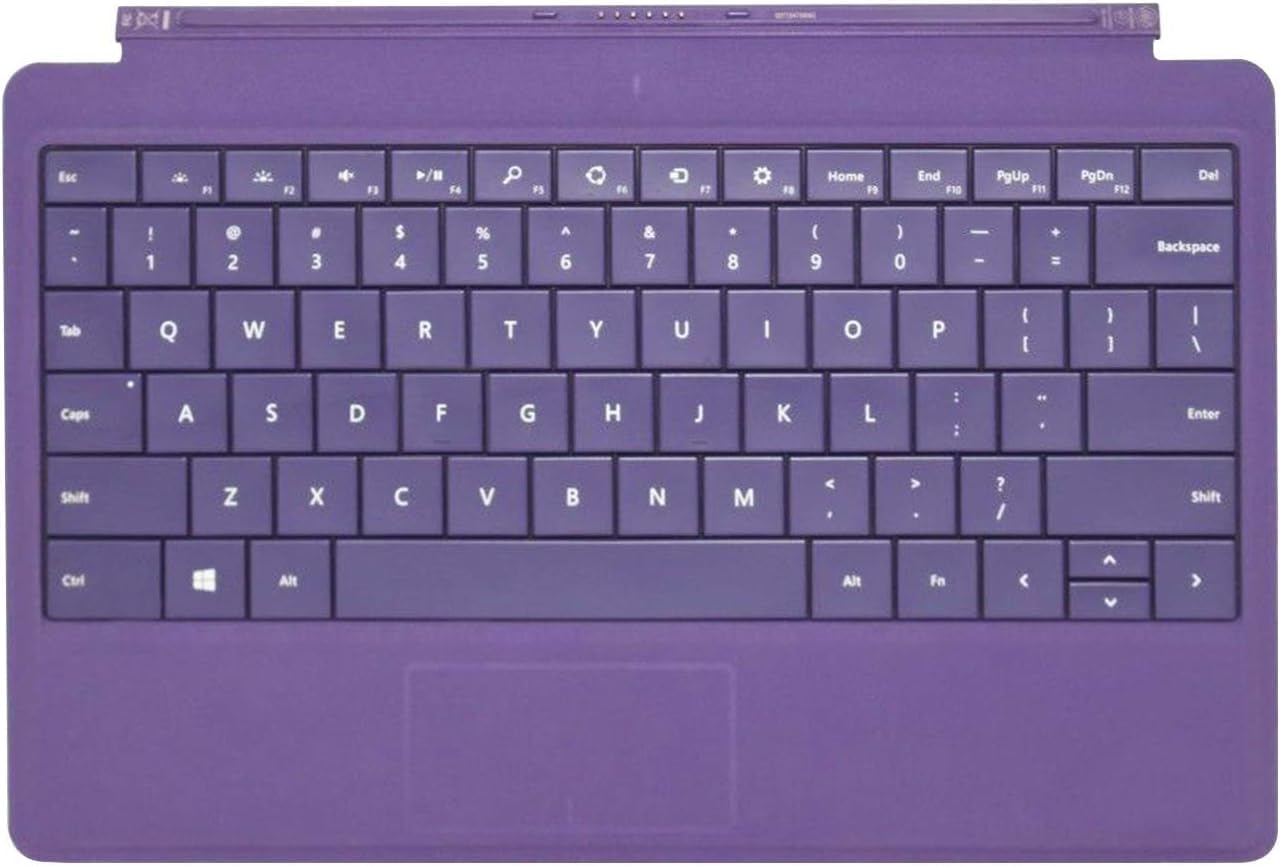
The Microsoft Surface Type Cover 2 in vibrant purple is a sleek, ultra-thin keyboard cover designed for Surface devices. Featuring backlit keys for effortless typing in any light, a magnetic snap-on interface for instant connection, and a built-in trackpad, it transforms your tablet into a versatile productivity powerhouse while protecting your screen on the go.
| ASIN | B00FG7MSAC |
| Additional Features | Lighting |
| Antenna Location | Office |
| Best Sellers Rank | #2,697 in Computer Keyboards |
| Brand | Microsoft |
| Built-In Media | Type Cover 2 |
| Button Quantity | 37 |
| Color | Purple |
| Compatible Devices | Laptop |
| Compatible Operating System Family | Windows |
| Compatible Tablet Computer Models | Microsoft Surface Pro 4, Microsoft Surface Pro 5, Microsoft Surface Pro 6, Microsoft Surface Pro 7, Microsoft Surface Pro 8 |
| Connectivity Technology | USB-C |
| Customer Reviews | 4.3 out of 5 stars 2,621 Reviews |
| Enclosure Material | Plastic |
| Global Trade Identification Number | 00885370648980 |
| Hand Orientation | Ambidextrous |
| Item Weight | 363 Grams |
| Keyboard Description | Multimedia |
| Keyboard Layout | QWERTY |
| Manufacturer | Microsoft |
| Mfr Part Number | N7W-00003 |
| Minimum Required Operating System Version | Windows 10, Windows 11 |
| Model Name | Type Cover 2 |
| Model Number | N7W-00003 |
| Number of Batteries Required | 1 |
| Number of Keys | 37 |
| Power Source | Battery Powered |
| Recommended Uses For Product | Office |
| Special Feature | Lighting |
| Style Name | Classic |
| Switch Type | Mechanical |
| Theme | Office |
| UPC | 885370648980 |
| Unit Count | 1.0 Count |
S**.
Good alternative to touch type keyboard
Nice Backlighting and good quality keys. Tactile feedback is a bit lacking but for how slim and small the construction is, overall this is a great product. This keyboard was for my mother but I don't hate the purple and if you can live with the color there is a considerable price break on it compared to the more standard color options. MY RATING SYSTEM: I try to stick with the same criteria and system when reviewing products and here is how it breaks down… FIVE STARS: Great Product, would feel completely confident in recommending to others and consider the product to be a great overall value with no obvious faults. FOUR STARS: Still a very good product, I consider it to be overall a good satisfying purchase and can still recommend it in good faith but there is one small aspect about the product keeping it from a perfect score. THREE STARS: A good product but not a great one, it operates and appears as advertised but more than one aspect of the item is undesirable. This is an item I would use but probably consider an alternative option. TWO STARS: Product is definitely lacking in quality and or the way it operates. Would not recommend it to others and would seek and alternative elsewhere. It maybe just barely does what it is advertised to do but is probably not worth the money and there are many negative factors about it. ONE STAR: No two ways about it, this is a bad product and I would not recommend anybody purchase it.
S**S
Recommended - Slim but easy to type
The keyboard feels like a real laptop, connects instantly with the magnetic attachment, and the backlight is super useful at night .The trackpad is small but works fine. Overall, it makes the Surface way more functional, highly recommend.
C**E
Much Better!!!
I highly disliked the keyboards that Microsoft released for the original surface, so I decided to hold out until the keyboards that came with the surface 2 were released. I was not disappointed. Pros: 1. The keys are backlit, which is amazing when web-browsing in the evening. The user does have the option to turn the backlit keys off by pressing the selected F-Keys. 2. The user can control how bright the backlit keys are, again by pressing the selected F-Keys 3. The senor on the keyboard automatically turns off the backlit function of the keyboard to conserve power. Smart decision by Microsoft. 4. The keys feel incredibly smooth and user friendly! I learned this keyboard quickly and after about twenty minutes, I was typing just about as quickly as I normally did on my desktop keyboard. Cons: 1. No Volume Control on the keyboard, but it's a rather minor complaint considering the keyboard is physically attached to the surface which does have manual volume control. 2. No ten-key, again minor since many smaller keyboards these days don't have one to begin with. Being a numbers guy, I'm rather disappoint most keyboards fail to produce a ten-key 3. After about 10 minutes of typing, I started to get fingerprint marks on the keyboard, which is a tad disappointing. This holds true even after I wash my hands. None of my other keyboards got dirty this quickly, which tells me how delicate the keyboard can possibly be. Overall great keyboard, Im glad I waited to get it versus the original "PoS" keyboards that were originally released by Microsoft. I can't comment on the mouse, since I hardly use it. However, it does appear more responsive compared to most laptop mice I come across and use. I can definitely say that this keyboard is not for people who tend to be on the messy side and place food and beverages near their keyboards. I sense quick dissatisfaction when it comes to spills. Hence, I wouldn't recommend this to a child, but it's definitely handy otherwise. UPDATE: After seeing the price tag now, I want to add that I only paid $137.00-ish, which is the original $129.99 price plus a little expedited shipping. If you pay anyone more than the original $129.99 price tag, then you shouldn't buy from them.... at all.
B**J
A must-have for any Surface prior to the Surface 3 and Surface Pro 3
I really like this keyboard. It feels surprisingly close to the real thing despite the very thin dimensions. The keys are larger than usual, actually, even if the spacing is slightly cramped. The backlighting is really helpful as I write this review in the dark, so that has turned out to be a big help, and its quite bright. The only thing that really needs improving is the track pad, which isn't that great. Its accurate for movement of the cursor, but it doesn't always recognize taps or clicks. I also own the touch cover, which has keys with no real travel, more like bumps under fabric. This one has much better keys for typing, but the track pads are not great on either. The best thing about the Touch Cover is that it is slightly thinner and water resistant. Still, I prefer this Surface keyboard. The fact that these Microsoft keyboard covers have a track pad and near-full keyboard in such a small device is pretty impressive, and the reverse side has a nice fleece-like fabric feel (weird but nice). It's much better than any keyboard I could find for my iPad, primarily because a track pad is a huge help for typing and editing. The magnetic connection is very strong and works well. While I wouldn't pay full retail price for this (and I didn't), its certainly worth it if you have a surface rt 1, rt 2, pro 1, or pro 2 and you can find it at a discount.
A**R
Great little keyboard for my Surface RT
Hands down the best keyboard ever! I bought my Surface RT (don't laugh) over a year ago as a replacement for an old work computer that was blue-screening me every other day. I was told I needed more RAM or something which would require a lengthy trip to the computer hospital and I have a hectic schedule, just no time for that. Anyhow, I bought the Surface RT and it didn't come with a keyboard. Someone I knew had an extra so I had been using that one. I should have just splurged and spent the $35 to get this Type Cover 2. This thing is brilliant! The keys are sharp and easy to feel as you're pressing them. Whatever model keyboard I had before for my Surface had keys that didn't quite go down as far as these. This feels really amazing on my fingers. Keys are super responsive and I definitely like the sensation that I'm using springy new keys. Hand me down keyboards are the worst. Actually after that hand me down keyboard died, I "borrowed" a keyboard off a Surface Pro at my office and was using that. It was too big for my RT but fit fine as a sub until this new keyboard arrived. Keys on the Surface Pro keyboard are not as nice feeling as the Type Cover 2 in my humble opinion. Another great thing about this one is the backlighting. My other keyboard also had backlighting so this is not new to me but I'm literally in the dark right now sitting by a fireplace writing this review and it's great to be able to see all the keys. Once I stop to think about what I'm going to type next, it fades to dark for a second but as soon as I start moving my fingers it lights up. Great energy saving feature! All in all, super happy with this keyboard. And I should write a separate review for my Surface RT which is also turning out to be the best computer I've ever had. Great for work and super portable! A+'s all around. Thank you, Microsoft!
T**S
Works with Surface RT
I thought I got a bad unit at first as it didn't work on my Surface RT nor my husband's. (The keys lit, the trackpad worked, but the keys would not input characters.) But the solution was to run a "Refresh" on the Surface. After running the Refresh on both RTs, the keyboard works great! I'm loving it. Here are the steps to Refresh from within Windows: Step 1: Plug in your Surface so you don’t run out of power during the refresh. Step 2: Swipe in from the right edge of the screen, and select Settings > Change PC settings. Step 3: Select Update and recovery > Recovery. Step 4: Under Refresh your PC without affecting your files, select Get started. Step 5: Select Next, make sure that your Surface is plugged in, and select Refresh. Step 6: Surface restarts, and the Surface logo appears during the refresh process (this can take several minutes). Keyboard works way better than the Touch Cover. Connection magnet is much stronger too. The lit keys are appreciated in a dim room and light turns off when not in use to conserve power. IMO it's a bit heavier and more bulky than the Touch Cover, but it's still very light and portable. The shade of purple is surprisingly nice. Not bright or garish at all. I'm happy with my purchase.
G**E
BEWARE the ad on this page!
Be careful what you order! Especially dealing with a cut-throat company like Microsoft that likes to bend the acceptable rules of behavior. I freely admit, I'm no techie. This was my first toe in the "device" water. But I do know Amazon, and use it constantly. When a video ad is on a product page advertising a product that looks exactly like the one pictured, it's because it's advertising that product, telling you all its wonders. I became, I feel, understandably confused, misled, and generally ripped-off, because of the thumbnail video on this page that is a total lie; it's only for a Surface 3, despite being on a page for a Surface 2 keyboard that looks just like it. When you shell out and order this, you won't be getting the keyboard in the video that pushes closer to the device and is more stable and rises up at the back to give you the "laptop experience." You're going to get a total piece of garbage that lays uncomfortably and unnaturally flat, flops around when you move it, and has the worst track pad imaginable. Nowhere in the ad does it say that the keyboard being hustled in it will not work on a Surface 2. I bought this thing because I'm a writer, and I needed it to work when I'm on the road. I don't play games or use tons of apps. I write. And I'm sick of hauling a heavy laptop all over, especially since domestic flights are constantly taking my pasteboard away now, so I have to keep the computer on my shoulder. Wanted something small and lightweight. Never, EVER have I seen a company that treats last year's must-have like this year's boat anchor. My husband is still using the Apple phone he bought ten years ago. When I called my local Microsoft Store, lost and disgusted, I was told that there is no such keyboard for the Surface 2, despite their being so similar it doesn't seem it would be a big deal to make one. Why bother for last year's boat anchor? So, there was no exchanging it or fixing the problem. I'd been had. In fact, they treated me like a jerk for buying the model in the first place, wondering why on earth I would do such a thing. (How about it's a lousy economy and the one is $300 while the other over $700?) Nice to know they have that kind of pride in their own product. I want to return it, at least the keyboard, but I've been told that I don't have tons of other choices anyway, which really surprises me. No one else is out there making other options, not many, anyway. I'm stuck with the floppy giant pasteboard with the worst, the absolute WORST track pad I've ever seen in my life, and counter-intuitive to boot, with no way to strike any right or left edge like a key to anchor the pointer. It's hard enough to move the pointer at all. I should have bought some sort of mini-laptop. There aren't many out there, but a few. Think I would have been happier. Which is my fault. The misleading ad on this page is theirs.
A**E
Not very pretty but it gets the job done
Bought this as a keyboard for my Microsoft Surface 3, after refusing to pay over $100 for a newer model of Surface keyboard. It's 100% compatible, but it's a mixed bag of features. First, the good stuff: 1) It snaps right in place and holds tight, even with a thick rubber cover on the Surface 3. It sits about half an inch over the screen since the cover is raised, but it still provides a little more protection and then swings right down without losing connectivity when needed. 2) The keys are pretty good and the backlighting does help in darker rooms. 3) Connectivity is through the magnetic seal and doesn't require wasting a USB port or a bluetooth connection. 4) I don't like the suede feel of the keyboard sides and underside but it's not actual suede and spills wipe off cleanly And the bad: 1) The backlighting or something else in the keyboard drains battery life fairly quickly, it only seems to last about 2/3rd as long as it does when I don't use the keyboard. 2) The touchpad is practically an afterthought, it's tiny and hard to make out by touch alone so unless you look down at the pad you can't tell if you're touching it or if you're hitting either of the buttons. There should have been some sort of physical buttons for the touchpad buttons, or a change of texture (like stiffer or smoother plastic) to allow distinguishing them by touch. 3) The suede texture just seems out of place with the aluminum and glass construction of the Surface itself. There you have it. If you gotta have a Surface-specific keyboard and don't feel like shelling out ridiculous amounts of money, this is pretty much your own choice.
C**N
Top
je l'ai acheté pour ma surface RT et j'en suis super contente. elle s'est tout de suite adapté au format AZERTY pas eu besoin de réinitialiser la tablette. je recommande tout à fait ce produit!
よ**ん
きもちいい
これまで、へこまないキーボードでした。入力した感じはしないし、入力間違いはするしで、ストレスがたまりました。このキーボードにして「普通」に入力できるので、気持ちいいです。
T**!
Be Careful !
received product with one key out of the place. not sure whtr is it original microsoft product. keyboard layout shown in display is english and the one which is delivered is in French !
C**N
Perfetto
Bello il colore proprio come in foto, il materiale è morbido ma la struttura è resistente. Lo uso per il tablet e fa anche da cover.
D**R
Teclado asombroso
Aunque tiene un poco de truco la configuración pero una vez configurado, funciona perfectamente y cómodamente con la SURFACE RT
Trustpilot
2 weeks ago
1 month ago