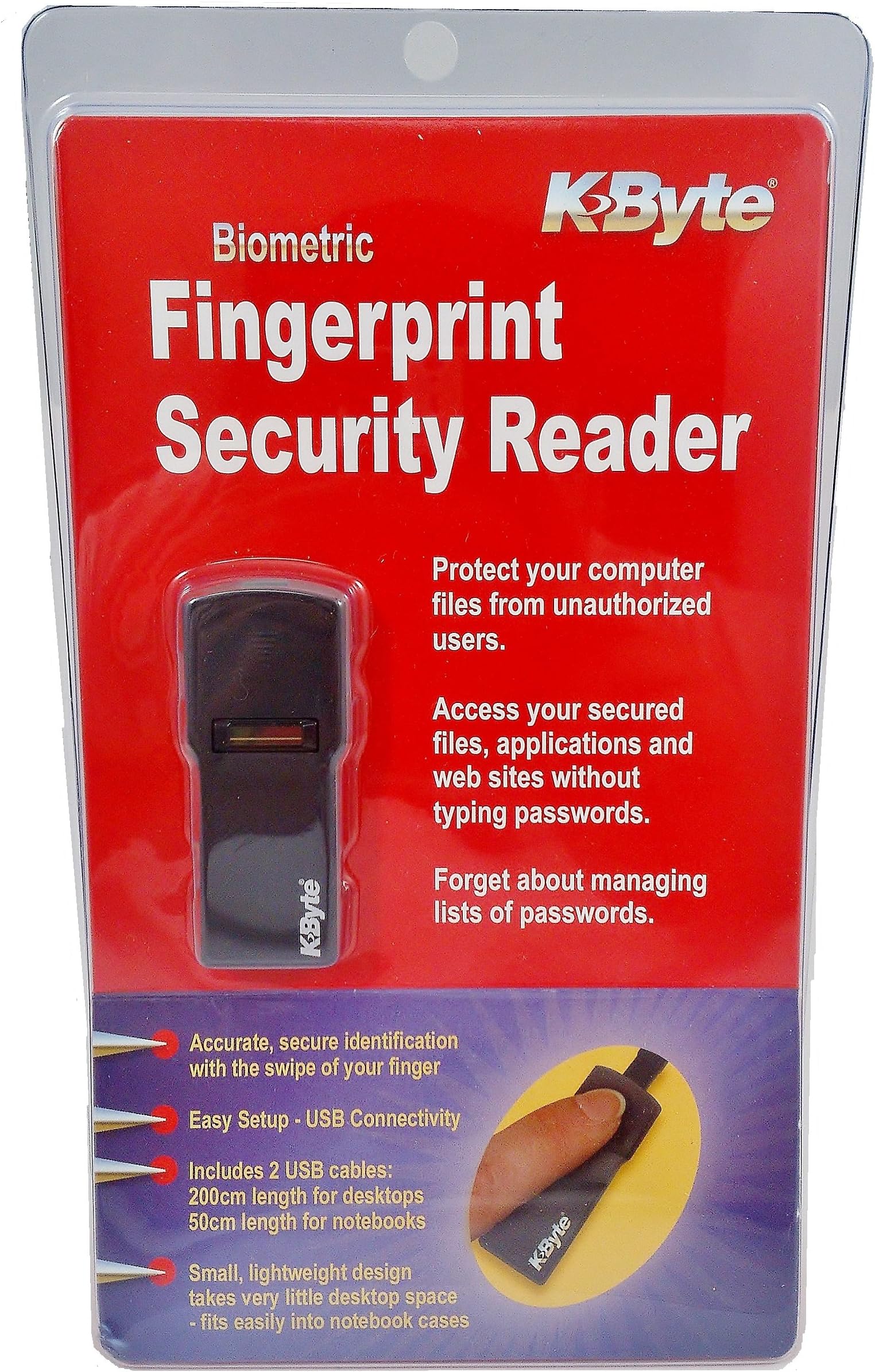


KByte Fingerprint Security Reader
Product ID: 1263542
⚡Fast Recognition
💻USB Compatibility
🔒Secure Access
Buy anything from 5,000+ international stores. One checkout price. No surprise fees. Join 2M+ shoppers on Desertcart.
Desertcart purchases this item on your behalf and handles shipping, customs, and support to Colombia.
🔑 Secure Your Space, One Touch at a Time!
The KByte Fingerprint Security Reader is a cutting-edge USB device that provides fast and secure access through advanced thumbprint recognition technology. Designed for professionals on the move, it offers universal compatibility and a user-friendly setup, making it the perfect solution for enhancing your digital security.
| Best Sellers Rank | #851 in Security & Surveillance Biometrics |
| Customer Reviews | 4.1 out of 5 stars 326 Reviews |
D**Y
Works flawlessly with Windows 8.1 and 10. For Windows 7, issues with browser extensions. Only good for Windows logon.
Works great with Windows 10. It's basically plug and play. It will automatically detect and install the drivers. After that, go to sign in options, create your pin, and enroll your fingers. For Windows 7, you will have to use the latest drivers and disable the browser function. It works for logging in, but not perfect for browser add-on. The irony is that this product is probably discontinued and made before Windows 10, but it works perfectly for that OS. I wouldn't worry about not getting support from the manufacturer. If you are using Windows 10 and can't get this device to work, I'm going to put my money on user error. Either that, you were unlucky and got a DOA. Just return it and get it exchanged. For this price, it's a bargain and should stock up on this. I see other brands selling for way more. This also comes with 2 different length cords. A 20 inch and an 80 inch USB cord.. Are you kidding me? All for 12 bucks? The base of this device is rubber and grips very nicely to the table as you slide your finger. No need to use double sided tape which makes this device portable. So let me summarize this. If you're using Windows 8.1 or 10. Buy this. The only difference between this and others is the price you're paying for. Windows 10 comes with their own software called Windows Hello. You will not be using any software that comes with the reader. This means that all fingerprint readers will be treated as generic. I've tested this to work perfectly with Active Directory and local authentication. It's a different story if you're on Windows 7. You are dependent on the software that this reader comes with. Since this device is pretty old, there's a compatibility issue with Internet browsers. You won't be able to use this to authenticate to certain websites. It's best suited to be used for Windows authentication only. I've tested this with Active Directory and works well. The one negative part about this product is its packaging. The clamshell packaging is thick. Normally you use a scissor to cut open one part and pry the rest with your hands. Not this one. You'll have to cut all 3 sides with some heavy duty scissors. If you don't, you can cut your hands digging the product out.
A**M
An Oldie But A Goodie!
Item works perfectly with my Windows 10. I use it to sign in to my windows account without using a password. It is highly recommended that you swipe your finger on the sensor in a slow and consistent way so that it can read your finger accurately. Otherwise it will have a hard time being able to detect if it is you. If you don't have a pin set-up yet to log-in to windows, not a password, but a pin, it will have you set one up after setting up the fingerprint reader. This is because if there are a number of failed attempts of trying to sign-in with the fingerprint reader, which can happen from things such as moving your finger too fast, moving your finger across at inconsistent angles, unclean fingers, unclean fingerprint reader, etc, it will lock out the option of being able to sigh-in with it. Then, to get into windows, it will require you to type your pin to verify that it is you. Afterwards, your fingerprint reader will be unlocked so that you can use it in the future. The device was packaged in 2005, but the item still works perfectly with windows 10. The item does come with 2 installation drivers on CD's. One is if you have Windows 2000/XP which is sealed with the fingerprint reader. The second driver CD is is external to the packaging as is given to you if you are installing the device for windows 7/8. In windows 10, there is absolutely no need to install any software from the included discs that come with the device. Again that is for windows 10. It's practically plug and play with windows 10. However, you still have to set it up in windows 10 so that you can use the device. To do this in windows 10: 1. Plug fingerprint reader in to your PC with the include USB cable 2. Type "sign-in options" into the "Type here to search" area on the task bar at the bottom of your screen. 3. Click on the best match which is highlighted in blue. You will be brought to "sign-in options" within the settings of windows 10. 4. Under "Windows Hello" there should be the word "Fingerprint" with a grey box under it that says "Set up". Click on the grey "Set up" box. 5. Click on the grey box that says "Get started" 6. If you already created a pin to log-in to windows with, it will ask you to type in our pin. If you have not yet set up a pin, which is different that a password, then just go through what it tells you to do. If no pin has been set-up yet, it will ask you to swipe your finger on the reader. 7. After you are through the setting up the reader, and pin if you haven't already, you are good to go. The next time you start up windows 10, it may ask you for your pin. Ignore this and just swipe your finger over the reader slow in the same way you set it up. If it doesn't work the first time, do it again. It should work if you move your finger as you did when you set it up. I have no problems with this device and it works well for me in windows 10. :)
S**N
... always look for the highest quality item for the best price/value. This is a perfect example
I am a person who is always look for the highest quality item for the best price/value. This is a perfect example. My only complaint is that sometimes I have to do multiple swipes for it to pick up the fingerprint. I like that it lets you use multiple fingerprints. It also comes with some cool software. My gripe about that is, if you are using Windows 10 like I am, you will have to choose between the usefull software that comes with more functionality that Windows Hello or go without the software and just use Windows Hello. I have bought 2 of these. One for my desktop PC and one for my laptop. I'm using it through Windows Hello on my desktop and the software option with my laptop to decide which way is best. I'm thinking that over time companies will start using finger print scanners more often through Windows Hello. I think this has a lot of potential. So, in summary: Pros: 1. MUCH less expensive than comparable items 2. Works well most of the time, I've never had to use my pw instead, I just had to swipe a couple of more times 3. It comes with software that gives you many more functions like using different fingerprints from different fingers to perform certain functions, e.g. locking the computer, unencrypting software, etc. 4. Software works with Roboform 5. Also can work with LastPass 6. Much more convenient than passwords 7. At least in theory, harder to hack without someone being at your computer (that will probably change) 8. Works with Windows 10 and legacy OS's including Windows Hello on Windows 10 9. Small so it leave more room than comparable devices Cons: 1. Windows still gives the option of using a password or PIN (Windows issue not the devices), so unless you create a very strong password, it's still open to hacking through the password. (there may be a way to go into settings and prevent a password from being used) 2. Forces you to set up a PIN if you want to use Windows Hello, I find the argument from Microsoft that PIN numbers are more secure than strong passwords (this is also another Windows Hello issue not the device's) 3. Sometimes fails on the first couple of swipes 4. To use Windows Hello on Windows 10, one must not install the software that comes with the product, they have to plug it into the USB port and then do a Windows update 5. The useful software that comes with the device doesn't seem to allow one to use that and Windows Hello simultaneously (I tried update through Windows Update and then installing the software. The Windows Hello option then vanishes in settings.
N**S
Good Product. Works with Windows 10. READ THE README!!! Setup Installs software that you may not want or need.
Works well in Windows 10. At first I didn't think it was working...everything looked good in device manager, and Windows, it just didn't respond to the initialization/calibration set up scans....It turns out that I just need to apply more pressure to the sensor to activate it. It takes a little more pressure than the sensor on my Thinkpad, but it works great. IMPORTANT: Read the README file from the installer CD!!! It appears that setup.msi file installs a bunch of software that you may not want or need. I did not want Protector Suite, Password Bank, Application Launcher, E-Wallet, or Strong Password Generator. So, I did not install the MSI. All that I installed was the driver for the device so that I could use the fingerprint authentication that's built in to Windows. At first, Windows 10 installed its own driver, and the device appeared to be working in Device Manager. It didn't respond though (likely due to low swipe pressure. So, I did go in to Device Manager and update the driver to use the 64-bit Windows 7 driver that came on the CD. Windows 10 installed this driver, and it looked good in Device Manager, however, in the Windows 10 login settings dialog no longer recognized the device as a bio metric reader, and setting up fingerprint scanning was no longer an option. I returned to Device Manager and clicked the "Roll back driver" option. I had little expectation that it would actually work, but it did. I opened the Windows 10 log in settings again, and fingerprint scanning was once again an option. Same thing again, no response from device. I was getting a little frustrated and inadvertently applied more pressure to the scanner, and it lo and behold it worked. All in all, I think the driver confusion was all my fault. I think the device was probably working just fine with the default Windows 10 driver, it just needs pressure. It's a good product. I'm not certain about any of its bundled software. I didn't want it, need it, trust it, or install it. Again, I only installed the driver and used the built in Windows authentication software. Your mileage may vary.
N**M
Works Fine, But ....
It worked out of the box. It's exactly what I needed for my Desktop computer (because my laptop already has a built-in scanner and I had gotten used to it). The "new" driver CD they sent with the device was heavily damaged and would not play. The old device CD also would not install, correctly. However, Windows 8 includes out-of-the-box support for the device and it works exactly as expected for logging on to Windows. It does not have any option for linking browser shortcuts or logging in to websites with passwords. Since I am a software developer, I may actually work on an updated package that will allow this feature, in the future, but I am pretty busy, lately. Overall, it works (because I run Windows 8), and I am satisfied with my ability to log in to Windows. But the manufacturer is either out of business or doesn't have a live website, because I could find nothing about this online except more options to buy. The packaging is Copyright 2005, so that tells me a great deal. This was probably a very expensive little device to have when purchased way back then.
M**E
No longer sees fingertip swipes-fails 100%
Mine worked for a several weeks, long enough that I could no longer return it. Windows 10 can see it but the scanner doesn't receive or recognize any finger swipes. I want to find one like iphones have where you just place your fingertip on it and it reads it. This little 1/8th swipe thing is a joke. Update, a couple years later I have a new PC so I thought I'd try again. When I plugged the USB cable in the first time a notification appeared that said something like biometric coprocessor installed. Then another one appeared. Each time I clicked the notification and nothing opened. So, I opened Device Manager and it is there under Other Devices with an alert icon (meaning it's not working). I selected the biometric coprocessor and clicked to update drivers automatically. I got this message: Windows was unable to install your Biometric Coprocessor. (...visit manufacturer website to get drivers) So I searched for kbyte biometric coprocessor drivers and there is no official source for drivers--just many sites with driver downloads that don't specifically name this device. No chance finding kbyte drivers. Wasted my time again. Will take it to the range and get some value out of my purchase.
S**E
The Best Biometric Fingerprint Scanner at any price point!
I won't go into great detail on the function of this product as there are already many good technical reviews for it. Suffice it to say you won't find a better Biometric fingerprint scanner on the market at this price. I was blown away by the build quality and the performance of this scanner. In fact this scanner can compete with $100+ scanners with ease. I bought three of them to use on two Windows 8.1 laptops and a Windows 10 PC all three are running Windows Enterprise Editions. I plugged the scanners in, Windows immediately detected and installed the correct drivers from Windows update (TouchChip Fingerprint Coprocessor). Verify that the Windows Biometric service is set to automatic and is started otherwise Windows may not install the driver or allow you to register Fingerprints in Settings | Accounts | Sign-in options | Fingerprint (8.1) or Windows Hello (10). There is no need to use the included drivers for 8.1 and 10. I didn't install the password management suite since Windows 8.1 and 10 both natively handle that with the Windows Biometric framework. I'm sure there are other features the included software provides like launching apps or logging into websites with a finger swipe however my only need was fast authentication to Windows since I have three workstations at my desk. This scanner does that job perfectly. I can swipe all three scanners simultaneous and login to all three workstations in less than a second. No more typing complex passwords to login.
T**R
Worked Mostly as Hoped, even with other browsers
I would limit my rating to 4 stars for the diminished functionality due to lack of current drivers and browser extensions, but for this price, it deserves 5 stars. I read the other reviews. I used the "New" drivers in the discs that were taped onto the outside of the outside of the package, and had good success with the installation. There is an application that stores your fingerprint scans, each finger if you want, and uses them to automatically insert passwords, or to launch apps or programs. Its a well thought-out program. The software allowed me to log-on to my computer with a finger swipe. That was time saving. As I mentioned, you can program different functions for different finger swipes, so your pinky could log you into windows, while your index finger could start your browser, and your middle finger could send off a message to your favorite politician. I haven't checked into the security of the password protection that they have, encryption usage etc. It would be great to have someone comment on that. However, there is some limitation if you wanted to use this with a browser other than internet explorer. The extensions that they provide no longer work with current versions of Firefox. However, you can obtain an extension that will give you some functionality called "FingerFox". It was written for an MS brand reader, not specifically for this fingerprint reader, but still seems to work with this one. Essentially, you perform a "registration" for Fingerfox in which the Fingerprint reader's software inserts the login and password into the Fingerfox pop-up dialogue which comes up when a site requests a password. It can be a trial and error process, but it added some functionality for Firefox.
Trustpilot
2 weeks ago
3 days ago