![Anker Bluetooth Folio Keyboard Case for iPad Air 2 [ONLY] - Smart Case with Auto Sleep/Wake, Comfortable Keys and 6-Month Battery Life Between Charges (Not Compatible with iPad 9.7 inch/iPad Air)](https://m.media-amazon.com/images/I/616UymfuJeL._AC_SL3840_.jpg)

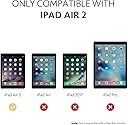
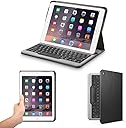
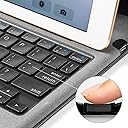



⌨️🔋 Stay productive, stay sleek — the ultimate iPad Air 2 keyboard case that just won’t quit!
The Anker Bluetooth Folio Keyboard Case is a precision-engineered accessory exclusively for iPad Air 2, combining a slim, protective folio with a comfortable Bluetooth keyboard. It features a powerful 6-month battery life, strong magnetic locking for stable typing angles, and an auto sleep/wake cover to maximize efficiency. Crafted with premium materials, it balances durability with lightweight design, backed by an 18-month warranty and renowned Anker customer support.
| ASIN | B00QF5MXFY |
| Additional Features | Magnetic |
| Antenna Location | Office |
| Best Sellers Rank | #7,599 in Tablet Keyboard Cases |
| Brand | Anker |
| Built-In Media | USB Cable |
| Button Quantity | 78 |
| Color | iPad Air 2 |
| Compatible Devices | Tablet |
| Compatible Operating System Family | iPadOS |
| Compatible Tablet Computer Models | Apple iPad Air (2nd generation) |
| Connectivity Technology | Bluetooth |
| Customer Reviews | 4.4 out of 5 stars 2,870 Reviews |
| Enclosure Material | Rubber |
| Hand Orientation | Ambidextrous |
| Item Dimensions L x W x H | 9.9"L x 7.1"W x 0.7"H |
| Item Weight | 13.76 ounces |
| Keyboard Description | Bluetooth |
| Keyboard Layout | QWERTY |
| Manufacturer | Anker |
| Mfr Part Number | A7722 |
| Model Name | A7722 |
| Model Number | A7722 |
| Number of Batteries Required | 1 |
| Number of Items | 1 |
| Number of Keys | 78 |
| Number of Packs | 1 |
| Number of Sections | 1 |
| Power Source | Rechargeable Battery |
| Recommended Uses For Product | Office |
| Special Feature | Magnetic |
| Style Name | Contemporary |
| Theme | Electronics Accessories |
| UPC | 848061074406 |
| Unit Count | 1 Count |
M**E
Just what I wanted.
I've been using this case for a few days now. It is just what I wanted. It provides attractive, basic protection for my ipad air 2. It also provides a nice compact keyboard at the ready any time I need it. I'm using it right now for this review. I knew there would be some compromises in any solution; however, for me, this keyboard case provided the best combination of utility, reasonable protection, professional looks, and keyboard typing feel. The keyboard has the feel of a regular laptop keyboard. It is only limited by the size of the case. So, it can have a cramped feel if you desired a full size keyboard. I knew this going in and I do have standard full size keyboards I can use when I need to work sitting at a desk. However, I love the portability and smooth, seemless connection of this unit. I'm more than happy to adjust to the somewhat cramped layout to gain the always ready, real keyboard. Protection-wise, I also compromised here a bit. This is not an otterbox. I would not trust this case to protect the ipad from a high drop or from water. It will however hold the ipad securely. The edges of the case do extend beyond the edges of the device. There is also a smooth felt that lays against the ipad when closed preventing the keys from touching the glass. Additionally, the case is held closed by magnets; so, no clasp is needed to hold the case closed. I'm happy with the protection level as is, because I knew going in I wasn't looking for the ultimate disaster prevention. I wanted an attractive folio keyboard case with reasonable protection against scratches and minor bumps. And that is exactly what I got. I don't know about durability yet. Haven't had it long enough. But I don't foresee any problems. I'm extremely careful with my devices. They are very expensive and I want them to last. So, I take good care of them. So, I'll repost in a few months with an update for how this case is holding up. To sum up: If you want an attractive, well functioning folio keyboard case, this is one of the best. I highly recommend it. I doubt you will find anything better for the price.
G**N
Best affordable keyboard case and wonderful customer service
Update 5/17/17: Anker customer service had reached out to me to help solve my problem. They offered to send me a replacement and this replacement works very well. The case stayed connected to my Ipad during the whole 2 hours of use, and they immediately paired with my ipad upon opening. Sometimes it takes about 30 seconds to pair, but this is not a long wait time at all. The feeling of the buttons is very comfortable for extensive typing. Despite there is no backlit of the keyboard, I dont find it hard to manuver the keyboard given I am used to typing without looking at the keyboard. For those who have to look at the keyboard, I think turing on some light would be enough. The hooks to hold the ipad down look slim and simple but very sturdy and able to hold on to the ipad surprisingly well. So in general, the item performs exactly how it is advertised ( under product description). I am very happy with this case. I had tried New Trent and Belkin cases as well, and I think Anker give you the best bang for the buck ! Highly recommended this product as well as the company! Original review: I bought this case after doing extensive research on Ipad air cases (full price with no discount if you're wondering). Pros: case is study, magnet works great. Ipad is positioned well and at good angle. Cons: No keyboard back lit ( which is alright when you already know where are all the keys). Pairing is bad. Mine keeps disconnect from the ipad, that during typing a 1 page document, I have to manually go to Settings to re-pair the keyboard 4-5 times. It can get very very inconvenient.
S**N
Edited rating
Edit on 10/12/14 For the past week, there have been some connection problems. I don’t know whether there is something wrong with my iPad (Air 2) or this keyboard - I suspect a bit of both - but I am lowering my rating till I get it sorted out. Edit again - it looks like the problem may have been with my iPad so I am recommending this keyboard case again. If there are any more problems then I know it’s this keyboard and I will re-edit. So below this is my original review. I receive many keyboard cases for review and have usually found some sort problems with them over time. Ironically the ones I usually end up with are the ones I buy, which are the Anker ones. The Anker one I had previous to this was an extremely light bluebtooth keyboard only - you would set the iPad Air 2 - Apple cover on it or not - right on top of it. It was so lightweight I could carry it anywhere. Well, after two (admittedly rough) years it finally stopped working, which in modern tech years means a long time. So I looked to see if I could get another one and they don't make that one anymore. Since I don't plan on upgrading my iPad for awhile I took a look at this Folio Keyboard Case on the Amazon site and decided to give it a try after reading some reviews. I'm glad I did. As with the other Anker bluetooth keyboards, it's super-easy to pair. Once paired, it stays paired and all you have to do is open the case (with the iPad securely and easily snapped into place) and put in down into the slot above the keyboard, as illustrated in the Amazon picture. It's the perfect angle to type on your lap or on a table and you don't have to worry about having to keep repairing your device. The other really nice feature is that the battery life is terrific. I've been using this nonstop for 3 weeks and when I plugged it in to recharge the green light came on almost immediately - it didn't need to be recharged at all. It's advertised to work for 6 months with 2 hours a day usage and wow that may be true. My only criticism would be that it's a little heavy, but that with every keyboard case like this. The reason I liked my old Anker keyboard because it was as light as a feather, but this one is a lot more sturdy and it does serve as a iPad cover as well - making it like a laptop with the magnetic sleep/wake-up feature. I would also like if there was a strap or something to make sure it wouldn't open if you dropped it, bu I haven't found one yet that has it. Other than the minor criticisms above, this is a great keyboard case and I have really been impressed with Anker products.
E**A
It was worth the wait - outstanding keyboard case!
Anker is becoming well known on Amazon for selling top quality products at fair prices with lengthy warranties, and backing their merchandise with excellent customer service. This keyboard case continues that trend (and no, I didn't receive a free case for an unbiased review). Perhaps the most striking feature of the Air 2 is how light and thin it is. A well designed keyboard case should, to the extent possible, allow the Air to maintain at least a modicum of what makes it so striking. This case manages to provide full keyboard functionality with easy bluetooth pairing in an attractive, light and thin package. Design is key here, and it's clear that Anker took their time and thought it through. The front and back of the case are an attractive black faux leather that seems like it should prove durable, while the inside is a grey felt material designed to keep the iPad scratch free. The keys are slightly recessed into the felt, meaning they do not come in contact with the tablet screen. The tablet slides into three black plastic holders (one on the left side and one each at the top corners of the horizontal edges) that hold it firmly in place. This provides a minimal but secure hold, and shows the iPad, unlike cases that slide the iPad into a sleeve and cover a good portion of the front bezel. There is a thin protective material on the inside of the plastic holders to help protect the iPad, and numerous removals from the case have shown no damage to the parts of the tablet that are held by the case. The top tabs hold the tablet roughly half an inch from the edge of the case, helping provide a modicum of protection. Note that when in place, more than half of the sides, all of the bottom, and the entire back of the tablet are not covered when open for typing. For me, this helps the iPad keep its thin, airy feel, unlike more complete (and sometimes more expensive) clamshell cases. Case (no pun :) in point: the Kensington KeyFolio Thin X2 Plus is a fine case with excellent build quality. However, when the iPad is in place, the sense of additional weight and thickness is palpable. A similar comparison can be made with the popular New Trent Airbender. While clearly a product of careful thought, it suffers from the same full-enclosure weight and thickness issues as the KeyFolio (as well as the fact that it feels like it was designed by an origami master :). In the New Trent case, this is further exacerbated by the metal hinge. The iPad Air was so-named for a reason, and, to the extent possible, the Anker case best helps allow that reason to come through. Perceptions and visuals aside, of the three cases discussed here, the Anker is the lightest. The Anker keyboard is wonderful. All of the keyboard cases leave the typist with a slightly cramped feel (it's only as big as the tablet), but this is a minor adjustment, and once made, typing becomes quick, responsive, and effortless. Both the KeyFolio and Airbender have the advantage of a separate row of dedicated hotkeys for volume etc., while the Anker incorporates these with the number keys and requires holding the function key to get the hotkey feature. Yes, the other two cases are easier, but after a small adjustment period, holding the function key became second nature. Like the Airbender, the Anker includes full iPad brightness controls among the hotkey functions, something the KeyFolio lacks as it uses brightness to control the backlit keyboard (a feature I thought would be indispensable, but which in actuality proved more of an attractive but unnecessary addition and a battery drain). The Anker keyboard is not backlit and I don't notice. Yes, if I was flying and if the cabin was dark and the person next to me was sleeping, a backlit keyboard would be wonderful, but so far, that situation hasn't arisen :). Allowing the iPad to easily remove from the case is also important to me. Granted, I don't want the tablet falling out of the case, and none of the keyboard cases I've tried or seen others use have that problem. However, I do have a second, very thin non-keyboard case (the Moko Ultra Thin Smart-shell purchased from Amazon) that sometimes makes more sense to use. Removing the iPad from the two competitors mentioned above was a bit of of a pain and required proceeding slowly to unsnap the tablet without damaging the case or the iPad. Not so with the Anker. You simply lay the case flat and slowly slide the iPad out of the holders. This allows me to easily move the iPad between cases with no hassle. Finally worth mentioning are typing angle and positioning for typing. When typing on a flat surface, the snapped-on the magnet angle of the Anker is fine for viewing while typing. Is it ideal in every situation? No. Is this a laptop with a hinged top? No. However, even when it's not "perfect", the angle of the iPad for typing is fine. The KeyFolio is essentially identical to the Anker in this regard, and while the Airbender provides additional viewing angles, they come at the expense of a design (the adjustable hinge that pulls out and no magnetic hold for the keyboard) that is (for me) unacceptable. Because of the iPad's weight, keyboard cases are going to be top-heavy; a good case should anticipate that and allow for typing in various scenarios. If you type with the iPad on your lap, or in some other position while lying down, this is where the Anker shines through in spades, easily shows the best design, and trumps the competition. When snapped in place on the magnet, the combination of the magnet strength and the strength of the case along the hinge line (at the base of the triangle) provides a wedge that's going to stay a wedge in that position. I can't overemphasize the importance of this. I'm typing this now with the iPad in the Anker case on my lap at an angle to my body. The tablet is firmly locked in position and shows no tendency to tilt back or forward while I type. If I pick it up from my lap, the keyboard magnet/case hinge combination is strong enough to keep everything in place. If typing while lying down with the iPad at a more severe angle, I have the same experience -- the Anker case holds the iPad firmly and it doesn't move. The Kensington KeyFolio becomes almost unusable if not on a flat surface, with the tablet falling backwards because of the lack of strength in the hinged portion of the case. The New Trent Airbender relies on its adjustable hinge -- cumbersome when on your lap or when prone. Anker's solution is the most elegant and clearly reflects time spent testing the case before going to market. More than any other feature (and there's a LOT to like about this case), simple overall usability because of this makes the Anker case the clear winner. If magnetic enclosure is important to you, it's worth noting that the Anker case has magnets that keep the cover securely closed when not in use. Even if holding just the bottom keyboard portion of the case horizontal to the floor, the magnets hold the iPad in the top of the case securely to the bottom and it stays closed. Anker worked on getting this right and they did. Other cases either use a snap to keep the case closed (Airbender), or the magnet simply isn't strong enough to keep the case together (KeyFolio). Anker not only easily keeps the case closed with magnets (like a smart cover), in so doing, it also helps add a degree of protection for the iPad screen. Overall, Anker has taken the time to design a superior case that is functional, attractive, provides a good degree of protection, and is usable in virtually any situation (unless you happen to be on that night flight :). Add in the six month battery life (time will tell on that one), eighteen month warranty, and the reasonable price point, and this case is a clear winner for iPad Air 2 users seeking to add bluetooth keyboard functionality. While my comparisons above are limited to two best-selling competitors because I had the most experience with them, I have no doubt that, when factoring in all elements, the Anker Bluetooth Folio Keyboard Case for iPad Air 2 is the best keyboard case option for the iPad Air 2. Update - 4 years and 3 months later, and this keyboard and the Air 2 keep on keeping on.... (of course, now that I've added that...... :)
R**L
Great folio case/key board.
Great cover, great price, great customer service. I think most people have commented on all the benefits so I won't repeat all that. Definitely read my comment #3 below so you know what to initially expect. And yes, this case does add thickness to the sleek iPad Air 2. But it also protects it, so it depends on what you are looking for. I had previously purchased the Anker ultra slim key board cover but didn't feel it protected my iPad Air 2 enough for me. With the key board cover the iPad itself was open to damage easily so I was carrying it in a soft pouch in addition to the cover. With the folio, all sides of the iPad are covered and I can just carry that. Things to note: 1. This is for the iPad Air 2. 2. I had to watch some very nice person's video instruction on how to put the iPad into the folio. I've only done it once now (no need to take it out) but it felt like you needed to press a lot harder than I was comfortable. It doesn't "click" in place so hard to know you have it in there correctly. 3. At first the folio wouldn't close tightly enough to shut off the iPad. I was about to try to return it but had it in backpack for a weekend and by the time it was Monday the folio worked perfectly. I think the edge/binding/folded part needs to be broken in. So do not get frustrated right away when it seems like the folio pops back open. Place a heavy book on it or something. In a few days it will be fine. 4. Customer service is great. If you have any problem or question just write to them. When I was concerned the folio wasn't going to close and shot off the iPad they asked that I take pictures and describe what was happening. For sure I feel they would make it right if I could not get it to work. Since it started to work right I didn't have to test this theory.
M**S
The synthetic leather like material gives it a professional look
This keyboard is made to last, because it's made of durable materials. The synthetic leather like material gives it a professional look, and I like the feel of it. It was very easy to install and sync with my iPad. I was up and running in less than 5 minutes. The built-in battery came with a charge already, but I plugged into my laptop to fully charge it, which took less than an hour. I really like the magnet strip that keeps my iPad secure during use at about a 45 viewing degree angle. When I need to use it, I don't have to fold my case to find the right position to view the screen. I just open the case and the iPad's edge snaps into place with the magnetic strip of the case, a feature I like very much. If I ever drop my iPad, I know that this keyboard case will protect it from being damaged. I'm glad I resisted buying one of the Logitech keyboards that Apple sells at their stores and ordered this one for less than half the price, which, in my opinion, is better. The only thing I dislike about using the keyboard, and it's not Anker's fault, it's that there's no mouse. I can do just about anything I need with my iPad, so my days of carrying a full size laptop through airports are over. I definitely recommend it...
S**L
Best keyboard case for the price!
I don't think I can find a better deal for a keyboard case for my IPad Air 2. I went with this and never looked back. In fact, I am using the keyboard right now to type this review. I originally reluctantly bought this for when I take my iPad to college with me. I never thought how much I was going to get out of the price I paid for this keyboard. I really enjoy the feel of the keys and the way it types. I have had not a single problem with that. Another great feature of this case is that it is magnetic. When you open the case, your iPad turns on and the opposite when you close it. The magnets go even further when you want to type. You just set it up and it magnetically locks into place. The hold is somewhat durable when typing but if you are moving around you may want to be a little more careful. The only downside I have had with this case is that it only locks into one position when typing and is only able to type when the iPad is stood up on the magnetic strip. The battery life is great on this case and I haven't charged it in over a week with moderate use every day. The way that this is possible is from when it automatically turns on when connected to the magnetic strip when you stand it up and turns off when you remove it, no switches here. Overall the build quality is great and is probably my favorite thing to type on even when I have a $140 keyboard for my PC and my laptop.
L**.
Think it's finally dead. RIP.
My keyboard cover was delivered with a loose caps-lock key. I pressed on it and pressed on it, and it would seem to latch in for awhile but soon dislodge again. Became pretty frustrated as others have been. Then I stumbled on the secret: Place the key over the mechanism, press down on the UPPER LEFT part of the key, then press down on the LOWER RIGHT part of the key. Apparently there are two brackets the key needs to snap into; I’ve not pried up a key to check, but now it works well. A more secure closing mechanism would be useful (even an elastic band would help). Otherwise, the quality is palpable and I’m happy. Update March 2018: Not so happy anymore. The keyboard paired automatically at first; now it has to be manually connected each time at "settings." And the magnet that keeps the iPad upright is too weak, so the pad continually slips off its stand, which means constantly going to "settings" to re-pair it with the keyboard It's gotten so frustrating, I'm actually using a virtual keyboard to type this update. Nor acceptable! Update July 2018: As I recall, rebooting the iPad and re-pairing the Bluetooth connection resolved the last problem. I’ve been using it daily for six months now. Suddenly it stopped a day ago. “Uh oh,” I thought. And then remembered: it needs to be charged! Hadn’t done that before. Hadn’t needed to. Took about an hour for the light to change from red to green, and I expect it’ll go another six months till I have to do it again. Update September 2020: I have loved this keyboard case and mastered all its secrets, or so I thought. But today it threw a new twist at me: suddenly, when I hit "backspace," it keeps on backspacing until all my copy is gone. I've re-paired it twice with new codes and the issue keeps recurring. (I'm typing this using the virtual keyboard, which is really annoying.) Don't know what to do at this point except junk it and get a new one. Sad day.
A**R
Four Stars
This keyboard worked fine
G**D
great bluetooth keyboard and case
I have had a few various cases over the years for my ipads and this is my favourite and I can recommend it too!
T**P
Good item
Product works well. Has not faulted after couple months use.
C**J
Only one fixed position landscape cannot rotate
Good quality product overall and solid construction. Personally I would have preferred the keyboard to be slightly bigger and the ability to move the angle of the screen to more than one position when upright would better and not just landscape.
Trustpilot
3 weeks ago
2 weeks ago