Buy anything from 5,000+ international stores. One checkout price. No surprise fees. Join 2M+ shoppers on Desertcart.
Desertcart purchases this item on your behalf and handles shipping, customs, and support to Colombia.
🖥️ Elevate your dual-monitor game — because your desk deserves the upgrade!
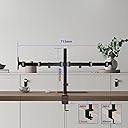
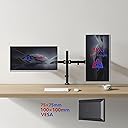
The Duronic DM152 Dual Monitor Stand supports two 13-27” monitors up to 8kg each with VESA 75/100 compatibility. Featuring full-motion arms with tilt, swivel, and 360° rotation, it offers ergonomic positioning to reduce strain. Crafted from durable cold-rolled steel with a matte black finish, it installs easily via clamp or grommet converter, maximizing desk space and enhancing any professional or home office setup.


| ASIN | B07QB7RPYN |
| Best Sellers Rank | 5,453 in Computers & Accessories ( See Top 100 in Computers & Accessories ) 55 in Computer Monitor Arms |
| Brand | Duronic |
| Brand Name | Duronic |
| Colour | DM252 BK |
| Compatible Devices | 24GL600F-B, ASUS TUF Gaming VG259QM, ViewSonic XG2405, Samsung LF24T350FHRXEN, Iiyama G-Master G2530HSU-B1, Acer Predator XB253Q, Philips 241B8QJEB, HP 24f, AOC G2590FX, BenQ EX2510, LG UltraGear 24GN650-B, Dell SE2419HR, ASUS ProArt PA248QV, ViewSonic VP2458, Acer CB242Y, Lenovo D24-20, MSI Optix MAG241C, BenQ PD2500Q, Dell E2420HS, HP 24es, AOC C24G1, hilips 241E1SCA, Lenovo L24q-30, ASUS ROG St… |
| Compatible devices | 24GL600F-B, ASUS TUF Gaming VG259QM, ViewSonic XG2405, Samsung LF24T350FHRXEN, Iiyama G-Master G2530HSU-B1, Acer Predator XB253Q, Philips 241B8QJEB, HP 24f, AOC G2590FX, BenQ EX2510, LG UltraGear 24GN650-B, Dell SE2419HR, ASUS ProArt PA248QV, ViewSonic VP2458, Acer CB242Y, Lenovo D24-20, MSI Optix MAG241C, BenQ PD2500Q, Dell E2420HS, HP 24es, AOC C24G1, hilips 241E1SCA, Lenovo L24q-30, ASUS ROG Strix XG248Q, LG 24MP60G-B, Samsung Odyssey G3 LS24AG300NUXXU, Dell P2421, ViewSonic VX2758-2KP-MHD, Acer ED242QR, BenQ PD2700Q, AOC C24G2AE, MSI Optix G27C5, Philips 246E9QJAB, LG 27UL500-W, Dell S2721HN, ASUS VG278QR, KOORUI 24N1, KOORUI 24E4, KOORUI 24T4, KOORUI 22N1, KOORUI 27N1A, KOORUI 24F4, KOORUI 27E6, KOORUI 24E3, KOORUI 27E3, KOORUI 27C1, KOORUI 22B1, KOORUI 24B1, KOORUI 24C2, KOORUI 22F1, OC U2879VF, HP 27f 4K, LG 27QN600-B, Dell U2720Q, ASUS Designo MX27UC, Samsung Odyssey G5 LC27G55TQWNXZA, ViewSonic VG2755-2K, Acer Predator XB323U GX, Philips 329P9H, BenQ EX3203R, LG 32UN500-W, Dell P3221D, ASUS PA32UCX-K, AOC CU34G2X, Samsung T35F LF24T350FHRXXU, ViewSonic VX3211-2K-MHD, HP 27xq, BenQ EX2710, AOC U2790PQU, Lenovo Q27q-10, LG 27GL83A-B, Philips 276E9QJAB, Dell P2719H, ASUS VZ279HE, Samsung LS24R350FHUXEN, ViewSonic VA2719-2K-SMHD, Acer Nitro VG270UP, BenQ GW2780, HP 27w, AOC 27G2U, LG 27UK650-W, Philips 278E9QJAB, Dell U2719D, ASUS TUF Gaming VG27AQ, Samsung LC27F398FWNXZA, ViewSonic VX3276-MHD, Acer Predator XB271HU, BenQ PD2700U Compatible devices 24GL600F-B, ASUS TUF Gaming VG259QM, ViewSonic XG2405, Samsung LF24T350FHRXEN, Iiyama G-Master G2530HSU-B1, Acer Predator XB253Q, Philips 241B8QJEB, HP 24f, AOC G2590FX, BenQ EX2510, LG UltraGear 24GN650-B, Dell SE2419HR, ASUS ProArt PA248QV, ViewSonic VP2458, Acer CB242Y, Lenovo D24-20, MSI Optix MAG241C, BenQ PD2500Q, Dell E2420HS, HP 24es, AOC C24G1, hilips 241E1SCA, Lenovo L24q-30, ASUS ROG Strix XG248Q, LG 24MP60G-B, Samsung Odyssey G3 LS24AG300NUXXU, Dell P2421, ViewSonic VX2758-2KP-MHD, Acer ED242QR, BenQ PD2700Q, AOC C24G2AE, MSI Optix G27C5, Philips 246E9QJAB, LG 27UL500-W, Dell S2721HN, ASUS VG278QR, KOORUI 24N1, KOORUI 24E4, KOORUI 24T4, KOORUI 22N1, KOORUI 27N1A, KOORUI 24F4, KOORUI 27E6, KOORUI 24E3, KOORUI 27E3, KOORUI 27C1, KOORUI 22B1, KOORUI 24B1, KOORUI 24C2, KOORUI 22F1, OC U2879VF, HP 27f 4K, LG 27QN600-B, Dell U2720Q, ASUS Designo MX27UC, Samsung Odyssey G5 LC27G55TQWNXZA, ViewSonic VG2755-2K, Acer Predator XB323U GX, Philips 329P9H, BenQ EX3203R, LG 32UN500-W, Dell P3221D, ASUS PA32UCX-K, AOC CU34G2X, Samsung T35F LF24T350FHRXXU, ViewSonic VX3211-2K-MHD, HP 27xq, BenQ EX2710, AOC U2790PQU, Lenovo Q27q-10, LG 27GL83A-B, Philips 276E9QJAB, Dell P2719H, ASUS VZ279HE, Samsung LS24R350FHUXEN, ViewSonic VA2719-2K-SMHD, Acer Nitro VG270UP, BenQ GW2780, HP 27w, AOC 27G2U, LG 27UK650-W, Philips 278E9QJAB, Dell U2719D, ASUS TUF Gaming VG27AQ, Samsung LC27F398FWNXZA, ViewSonic VX3276-MHD, Acer Predator XB271HU, BenQ PD2700U See more |
| Country of Origin | China |
| Customer Reviews | 4.5 out of 5 stars 5,132 Reviews |
| Enclosure Material | Metal |
| Global Trade Identification Number | 05060184209915 |
| Item Type Name | desk mount |
| Manufacturer | Duronic |
| Manufacturer Part Number | DM152 |
| Material | Metal |
| Maximum Tilt Angle | 35 Degrees |
| Maximum-Supported Screen Size | 27 Inches |
| Minimum-Supported Screen Size | 13 Inches |
| Model Number | DM152 |
| Mounting Type | Tabletop Mount |
| Mounting type | Tabletop Mount |
| Movement Type | Articulating, Rotate, Swivel, Fixed, Tilt |
| Movement type | Articulating , Rotate, Swivel , Fixed, Tilt |
| Product Warranty | 2 Year Limited Warranty |
A**R
Duronic DM352 Twin Monitor Mount - 11/10 Would Recommend
TL;DR Found below! First off, This product I came upon whilst trying to fulfill a desire to open space up on my seemingly cluttered desk to allow more freedom for my mouse and keyboard placement as I spend hours at my computer researching topics across multiple screens, or the obvious example of playing games, this may seem off topic as this is review is meant to be about the product, but it does relate, I had no particular expectations from a monitor stand to support screens on my desk, and took the risk knowing I can always change the surface it's placed upon in due time. However I cannot stress this enough, the product not only fits the 2 screens flawlessly, with enough room and motion to space them evenly with perfect weight distribution, no wobble or strain in the structure that it scared me a little, it has firmly planted my desk to the floor, which is also a bonus. It offers a great range of mobility, even when in my case, it is only a few inches from a wall, so one of my monitors is completely outstretched from the other, and the range for viewing angles, or vertical to horizontal rotation are easy enough to adjust, but not loose enough to unintentionally change it by accident, which knowing the weight of the item, and how it operates is magnificent, simplistic but incredibly effective! Installation was probably the only "issue" with the product, but most of the fault is entirely with the experience of the person installing it, finding a way to fit the monitor to the stand pre-set up is nearly impossible, I had to install the screens to the arms individually very carefully, and then with the help of another find the best suited placement for them on the desk and fit it to the pole and clamp after wards (it gets a bit heavy at that point, hence the helping hands) All in all, the build quality is amazing and achieves everything I expected from a dual monitor stand and more! I wouldn't shy anyone away from Duronic stands, they are all round suitable for any mounting needs and would definitely recommend trying this product, especially considering it's price. TL;DR PROS: Great viewing angles Easily adjustable range of motion - no accidental adjustments Brilliant build quality - especially considering price Supports two full size monitors without risking structural integrity - No play or wobble in the frame or arms CONS: Can be hard to install efficiently without extra hands to help - you need space, or be able to bare the weight of the arms and monitors by yourself No quick adjust/release for monitor arms - hand tightens via provided Alan/Hex Key
D**Y
Excellent monitor arm
This is an example of the excellent monitor arm. I have T300Chi tablet 12.5-inch and 22-inch monitor which I wanted to remove from the table to free up my desk. The basic principle is - whenever I need my desk it's free out of monitors. I've bought one more piece of kit i-tec USB 3.0 Dual Docking Station to plug in my tablet and have everything in one place at the edge of the desk and the next stage was to remove the actual devices. My priorities were: budget, two arms (once for monitor and one for the tablet), VESA mount system, very sturdy and solid, adjustable by height/arms positions (to move monitors back and forth), compact enough. So I found this DM252 model, read few positive reviews which gave me an idea that the quality is excellent and it does its job, so I gave it a go! I attached few photos to give an idea how the whole thing looks like (sharing our reviews we help each other). The assembly is very simple, screw here, screw there, instructions are great so you'll make it. Just be careful with the monitor when you attach it to the table and base. Do it with someone else to save your nerves. Pros: + Sturdy & solid; + Thoughtful product; + Excellent build quality; + Adjustable arms; + Adjustable heads flexibility (with "Allen key" you can change head tension); + Stylish; + Cable management system (for cables: 4 hooks to put them on arms, 1 hook for centre base, 2 nice straps); + Included screws for head & monitor + Excellent simple and handy instructions Cons: - Arms bend angle is limited with ~85 deg. in other words, you can't put head close to the arm as if you bent your elbow. Thumb up if this review was helpful, hope it helped.
P**V
Good but flawed
First of all, I think this is a good product. It does what it's supposed to do. I used it to successfully raise my two displays (one 20" and one 24") above the desk, freeing some valuable desk real estate in the process. The pillar of this monitor arm feels very sturdy and I had no issues mounting it to my desk top (made of 1" solid hardwood - YMMV especially if you're using a flimsy desk made of recycled cardboard). The arms themselves also feel very robust and I'm pretty sure they will have no trouble holding my monitors over the years. Assembly is very straightforward, it took me about half an hour to get it up and running. Some flaws (but not deal breakers): 1. It's impossible to adjust the height of two arms independently. But this is probably my fault, I should have read user reviews before purchasing this product. 2. You really need to guess the correct height before you mount the displays, because adjusting it afterwards requires four hands. 3. Tilt adjustment is very annoying. It's so tight it's impossible to adjust in small increments. On the other hand, I only needed to do it once, and I suppose tightness beats droopiness every day of the week. 4. It comes with several types of screws, but all of them were too long for one of my monitors (the user's guide for the monitor recommends using 8mm long screws), so I had to supply my own set of washers. No biggie. Overall I'm very happy with this monitor arm for the price, but I definitely wouldn't pay more for it.
K**0
Dual monitor stand works perfectly with two very heavy 24 inch monitors, with a slight modification!
So, this product didn't impress me initially (but quickly realized my own mistake and fixed it!). I followed the instructions exactly in the order that they stated the stand should be assembled (which seems ridiculous, since it's so much easier to mount the monitors and then place the monitors on the desk mount, rather than the opposite suggested by the manual). After it was all installed, the monitors drooped extremely badly. The left monitor was around 20cm away from the desk on the left and around 15cm away from the desk on the right. So why did I give this product a five star review? Because it was my crappy IKEA desk that was to blame, not the stand. The force of the monitors being over the desk mount was forcing the clamp to sink into the desk, causing all the problems I just stated. This was incredibly easy to fix. As other reviews have suggested, place some wooden blocks between the clamp and the desk surface above and if possible below in order to spread the force out over a larger area. After doing this, the monitors sit perfectly straight, at the exact same height, and can be adjusted easily. See product photo for what I mean! Quality wise the construction is excellent. Comes with all the bolts you could need in all the various VESA variants as well as spacers for thin monitors. The desk clamp itself is a little small but will be absolutely perfect if your desk is made out of a hard material that isn't likely to compress. If it is, the wood trick will sort it out. The arms are made out of a metal of some sort and feel very sturdy. No plastic used for anything other than display purposes. You can adjust the height of the monitor (you'll find it difficult to do on your own though, this isn't the kind of stand where the height can be adjusted easily), the orientation of the monitors a full 360 degrees, how close or far away the monitors are from you as well as the horizontal tilt at that position. If I had to nitpick, I would liked to have seen vertical tilt adjustment on this, but feel that this design of stand would not work with that feature, so as long as you like your monitors directly in front of your face, you'll be fine. For the price (I paid £30) a phenomenal product.
S**M
Best thing ever!
I bought this after upgrading my monitor and getting tired of looking at the cardboard box my old monitor stood on. I had such an issue with getting it eye height for how I sit (I'm short) that I didn't want to buy something for it only to be too low/too tall. This fits the bill perfect. Its totally adjustable to your needs. I bought the double one in anticipation of getting another monitor (right now the second hold just has my headset wrapped on it) When you are putting this together don't be worried about how heavy it may be - it will be fine for your desk! Its really solid. Very easy to put together. I tell you what, if we had an earthquake I can 100% see this baby being the only thing left standing! Tips - Be sure that your monitor has the right holes to fit on. My LG 22EA53 does. - If you are putting this together by yourself - getting the monitor on is tricky. You'll need to put it on something to align the screw holes (I used the cardboard box ontop of my desk to do this) - If you look at the instruction book picture of how far to push the arms down onto the pole, push them down as far as you like (for perfect viewing point while sat at desk) - I couldn't for the life of me put the arm on the pole with the cable ties faced down. Even with the screw off it didn't work. You may need to put it upside down (cable ties facing up) - If you need to do it that way, don't worry it still works perfect! - Don't be afraid to put some force into it when trying to get monitors to the right eye level for you. - Be sure to loosen the allan key points on the arm so you can kind of see where the monitor will be placed once on the desk. The cons - - The only thing I can see right now after putting it together is the fact that not all of the allan key holes are there, they seem to be covered up which I'm sure you can get off but I won't worry about that now so just be aware.
D**Y
Good material (Heavy
Good material (Heavy, metal, doesn't bend), easy set up + instructions, supports both my monitors with ease. Clamps very well to my glass desk (has rubber guard you can attach) It even comes with these little "wire holding" bits you can attach along the arms/ stand so that wires connected to your monitor don't just dangle out from this setup. The arm attachments are way more flexible and adjustable than they seem, particularly the bit where the screen attaches to the arm. (It can swivel up and down, left or right, and stays stationary by adjusting the screws on it to make it tight enough to grip reliably while still being able to move it around) Overall it's self explanatory. The downsides are that the instructions don't necessarily elaborate when to use the big or smalls crews, but you are given a full set of 8 of each type so if the big ones don't work you could swap them out. This is extremely minor, it only confused me a little during setup and the whole thing works fine after. And that if I want to place my screens directly next to each other (touching) then I have to bend the back arms in such a way that either they are extending the screens too far forward toward me, or they hit the back wall the desk is up against. One other downside is that if you want to adjust the heights of the monitor it's not really that easy. I have to pull my desk out and use the tool it comes with to loosen it (and hold up the monitors with a pillow or something to make sure it doesn't crash down) But it's obviously like this to make sure the whole thing doesn't slip/ let loose at random, so I can't complain. The one thing I do wish wasn't was as annoying was the wall thing, but oh well. Overall it's great. I really wasn't expecting to enjoy using these clamp stands so much more over my regular monitor stands. My screens feel like they're floating like some futuristic cyber terminal, turning me into a giddy little kid every time I come home to my desk.
C**.
Recommended!
Fully ADJUSTABLE. You can adjust rotation, height(for both monitors together), angle and the distance. Great GRIP, personally did not experience any issues with the feet since i have a sturdy/good quality desktop. CABLE MANAGEMENT came in very handy but the strips provided slightly shorter than it would be practical, still very useful! Delivered on time. The very top was hard to squeeze in but a pair of socks and a hammer solved that. Followed the instructions, they were straight forward, even if not descriptive, and made it very EASY TO ASSEMBLE even when you go solo. I would advice for people to pick up the crews by hand and drive them in. you'll need a screwdriver to fix them in place. One very small thing. The paint on the 'Duronic' had a small aesthetic damage, barely noticeable in my build; doesn't bother me at all. Totally worth it, saved a lot of space on my desk <3
J**T
Fantastic quality for the price.
I have two curved Samsung 24" monitors and so ordered this support arm to hold them accurately next to each other. I am very surprised at the thickness and weight of the steel components and the very high quality of the manufacture, esepecially at this price point. Everything about it is impressive and it works perfectly. My monitors are now in a big smooth arc and I can adjust them exactly as I want them, free at last from the stands underneath that were cluttering the desk. Please don't be put off by the negative reviews, as they seem to have been left by people who were unable to understand how to assemble and operate the arm. The handle for tightening on the pole is fine, you just have to pull it out and rotate it back to be able to tighten (or loosen) a bit more. A few people have not realised this and criticised it because of their error. Similarly the monitors do not sag, it is simply a matter of tightening the joints with the supplied Allen key once you have adjusted the position. The whole thing is very sturdy and comes with loads of bits to clip the wires to the structure and a big bag of nuts and spacers to permit fixing to different sorts of monitors. Very highly recommended.
S**X
Génial !!
🌍 La livraison Livraison dans les délais annoncés. 📦 Le contenu de la boîte - Matériels : 1 support deux écrans 💡 Prise en main Le montage est aisé. Mon bureau fait 3cm d'épaisseur la fixation tiens très bien. Vous pouvez régler à l'horizontal ou vertical les écrans (portrait/paysage), même entre les deux en diagonal. Allé pourquoi pas ^^ 💭 Mes impressions Quand je tape au clavier les écrans ne vibres pas et ça c'est important. Le réglage en hauteur et convenable. La finition est propre. J'ai 2 écrans similaire de 24" de 3.5Kg chacun soit un total de... 7kg. La fixation ne bronche pas. 📃 Conclusion Prix abordable, produit de qualité. Gain de place, plan de travail mieux agencé, ... Il n'y a pas à hésiter ^^ Pour toutes questions sur le produit n'hésitez pas à me contacter :)
C**N
Très bon produit
Conforme a mes attentes. Se monte rapidement et permet de dégager beaucoup de place sur le bureau tout en facilitant la lecture en positionnant l'écran à la hauteur idéale.
E**E
robusto e stabile
Robusto e molto stabile con 2 monitor da 25" (HP 25x). E' possibile anche "accorciare" i bracci smontando un elemento. L'unica pecca è la parte che si fissa all'asta centrale che fa scorrere su e giù i monitor: leggermente ballerina anche stringendo molto forte. Ciò però non preclude la stabilità complessiva del supporto per doppio monitor e non c'è il rischio che con il tempo i monitor scivolino verso il basso.
E**D
Heavy duty and well priced
At this low a price, I wasn't expecting much. Bought for my office and wasn't paying for higher priced ones. Pleasantly surprised when they arrived. Heavy duty, easy to assemble and function as described.
A**O
Lo uso da anni, ed è ancora solidissimo
Questo supporto mi ha cambiato la postazione. Regge due monitor da 27” senza piegarsi, e una volta montato non si muove di un millimetro. Il montaggio è semplice se segui le istruzioni, anche se le prime regolazioni richiedono un po’ di pazienza per bilanciare bene i bracci. Una volta trovato l’angolo giusto, però, resta tutto stabile. La struttura è in metallo pesante, la base si aggancia bene alla scrivania e non lascia segni. Mi piace che i bracci siano indipendenti, così posso inclinare un monitor in verticale per leggere documenti e l’altro tenerlo orizzontale per montare video. Non vibra nemmeno se scrivi come un indemoniato. Pro: super solido, regolabile, tiene monitor grandi, struttura in metallo resistente. Contro: serve un po’ di tempo per regolare bene i bracci, pesa parecchio. Una volta installato non lo tocchi più, e ogni volta che lo guardi pensi: “soldi spesi bene”.
Trustpilot
1 week ago
2 weeks ago