🚀 Label like a pro, anywhere, anytime!
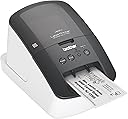
The Brother QL-710W is a compact, wireless thermal label printer delivering ultra-fast printing speeds of up to 93 labels per minute. Compatible with Windows and Mac, it supports mobile printing via the free iPrint&Label app and can print postage labels directly from your desk. Its no-ink technology and automatic cutter ensure cost-effective, professional-quality labels for packages, files, banners, and more.


| ASIN | B00814JRJM |
| Additional Printer Functions | Print Only |
| B&W Pages per Minute | 93 ppm |
| Best Sellers Rank | #225,408 in Office Products ( See Top 100 in Office Products ) #311 in Label Makers |
| Brand | Brother |
| Built-In Media | Printer Accessories, Printer Accessory |
| Color | Black and White |
| Color Depth | 24 bpp |
| Compatible Devices | Laptops |
| Connectivity Technology | Wi-Fi |
| Control Method | App |
| Controller Type | iOS |
| Customer Reviews | 4.2 out of 5 stars 411 Reviews |
| Dual-sided printing | Yes |
| Duplex | Automatic |
| Global Trade Identification Number | 00012502632269, 00012502637035 |
| Hardware Interface | USB |
| Ink Color | Black |
| Item Type Name | Brother QL-710W Label Printer |
| Item Weight | 300 Grams |
| Manufacturer | Brother Printer |
| Maximum Copy Resolution Black and White | 300 dpi |
| Maximum Copy Speed Black and White | 93 ppm |
| Maximum Media Size | 110 millimeters |
| Maximum Print Resolution Black and White | 300 dpi |
| Maximum Sheet Capacity | 93 |
| Model Name | QL710W |
| Model Number | QL710W |
| Model Series | QL710W |
| Number of Drivers | 1 |
| Number of Trays | 1 |
| Other Special Features of the Product | WIFI |
| Output sheet capacity | 93 |
| Paper Size | 110 millimeters |
| Power Consumption | 710 Watts |
| Print media | Labels |
| Printer Connectivity Type | Wi-Fi |
| Printer Output Type | Monochrome |
| Printer Type | Laser |
| Printing Technology | Laser |
| Processor Count | 1 |
| Resolution | 300 x 600 dpi |
| Scanner Type | Sheetfed |
| Series Number | 710 |
| Special Feature | WIFI |
| Specific Uses For Product | package labeling, envelope addressing, inventory management, event organization, file management, remote work |
| UPC | 012502637035 012502632269 |
| Unit Count | 1.0 Count |
| Warranty Description | Manufacturer's two-year limited warranty. |
| Warranty Type | Limited Warranty |
| Wattage | 710 watts |
S**.
Excellent Label Printer with ONE Software Flaw
So after using the DYMO label and stamp printer (which was a terrible label and stamp printer, would always jam and waste my money on printing stamps). So I decided to go with this model by Brother, they have a special deal that you can load money and only print what you need, NO monthly fees or minimum stamp purchases (the special is on the paperwork that came with the printer, its in the box) I love this feature the most because I want to purchase stamps as I need them, not a monthly fee like other services. This label printer works great but the biggest issue I have is that if you are using a Mac computer and you want to pay ahead of time and print stamps through the pbsmartpostage.com website it will not work by using the pbsmartpostage stamp rolls on a Mac computer. When using this label printer to print stamps (one of the main reasons I purchased it) you can only do it through a PC (even if you have Windows running on your iMac by using a program like Parallels or VMware it still doesn't work).....so the other issue is I hooked it up to my full PC system just so I could print stamps from it for my business (I am glad I did not get rid of my PC) and you have to be directly connected when printing stamps through the pbsmartpostage.com website, so this defeats the wireless feature for this purpose. If someone has a solution let me know, the pbsmartpostage.com is all java based so it is very touchy to say the least. I couldn't get IE to work, so I tried Firefox (still wasn't finding printer), Google Chrome finally worked. So bottom line is: It truly is an awesome label printer where if you want to easily change out label sizes you can do it, on a Mac Computer you are limited to only printing labels. If you want to print stamps from this label printer you need a PC and it has to be directly connected. So I have it directly connected to my PC (just for stamp printing) and wireless connected to my iMac for label printing. Hopefully Brother will let customers know about this but I really think it is a pdsmartpostage.com issue in regards to using the stamp rolls with iMac. All that being said, This blows away the DYMO Label printer as far as functionality in printing labels and ease of use. As far as Brother's customer service, it is hit and miss. The first time a I called I got an awesome tech person on the line and he didn't waste any time. He set up a remote desktop session and got it running in a few second, the second time I called when I was trying to get the stamps to work on the Mac, I called tech support at Brother again and honestly the help was not good at all and didn't really even offer to remote in and help troubleshoot...it was basically a bunch of ... hmmm I don't know Mac so I don't really know. Anyway, conclusion... much easier and more flexible than the DYMO and less wasted labels. Of the two companies out there I feel this is the best. I love the add-on label template you can download which will cover just about any need your have for a label...I love the "Do Not Bend', "Fragile" and "This Side Up" templates. Find a work around for the stamp problem and you will love this. Pitney Bowes (pbsmartpostage.com).. you are a big company, take a moment have your designer to make your stamp rolls work on a Mac Computer with this printer, DYMO can do it so I am sure you can too.
V**Y
Brother, it's very nice indeed!
Superb, snappy piece of work. Installation was a snap (I'm using this on Mavericks on an iMac) - I downloaded the drivers and the editor software from the Brother site and didn't use the bundled CD. I like the ability to vary the label length (using the P-touch Editor), so I'm not restricted to the standard address size (when using a continuous roll, naturally). So, I can use it for addresses, or to print out instructions, or lists and so on. I've also embedded my logo using a jpg so when I send something to a customer using this, I get some brand reinforcement. Also nice is the ability to print vertically or horizontally and the auto-cut feature and because it's wireless I only have the power cord to deal with and not an additional USB. (BTW, I'm using this on a 220W power connection so it's plugged into a step-down converter that I bought at the same time off Amazon - no issues so far and it's been a month or so.) The only (minor) fly in the ointment is the P-touch Editor on the Mac - it's not a bad piece of work, just idiosyncratic. You need to get used to its somewhat weird interface and the fact that you can't use Command-Shift-V to paste and match style, and selecting text to edit is not exactly user-friendly and... but these are relatively minor quibbles. It works on my Mac wirelessly and it's fast and clean. Can't ask for much more.
D**T
Great printer, but it gets excited when it's done.
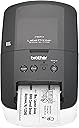
This was a rushed replacement for my old Brother Smart Label Printer 440, which died halfway through printing a shipping label. Partly for a mild case of brand loyalty and partly because of users' reviews in Amazon and elsewhere, I chose this, the middle of this line. The lower model was not wireless, and the higher model had wireless but it also had an added serial port which I stopped needing years ago when Apple switched to its own connection and eventually settled on USB. This label printer made my stock of old label rolls obsolete, since the new printers require printed symbols on the backs of the tapes, particularly when using the very convenient continuous rolls of tape. I've been using only one of the two supplied sample rolls--the wide, continuous tape. This printer can be set to produce labels of any length, as long as the width of the label does not exceed the width of the paper tape. I'd think, since rolls of shipping label widths can come in 50-foot rolls, the length of the tape might only be limited by the printing software (which does not have to be Brother's proprietary software). Tape rolls must be mounted in plastic holders which, depending on manufacturer, might be replaceable/reusable or permanently attached. Compared to the previous model I owned, however, tape replacement is quite straightforward. The new feature I like is that this thermal printer can print on continuous labels that are clear, which I use for return address labels and shipping labels that don't need to be placed on printed envelopes with instructions to "Place Label Here" which would show through the clear label. One annoyance, though, despite the overall excellence of the product, is that another electronics manufacturing company with loyalties to the "other operating system" has not expended the effort and resources to make this "plug and play" with Mac OS X and iOS. This is odd, since the Brother MFC (multi-function printer) we own was quick and easy to get running on our home WiFi network. Not that WiFi-ing this label printer was laborious...it was fairly uncomplicated, though instructions had to be followed, unlike many Mac-attached devices. My guess is that this is the result of software engineers who were trying to adapt software from "other" systems to the Mac. Still, I glanced through the instructions for WiFi-ing the printer using the "other" operating system, and I felt sympathy (and pity, a bit) for how much more complicated it was to be networked on non-Macs. I like the printer very much for being highly technologically advanced compared to my old Brother label printer, but I didn't like how excitedly enthusiastic this printer is when finishing a label. After cutting it off, it does some projectile vomiting of the completed label causing it to fly (not drift) onto the floor or take wing like a glider. (It's still slightly curled from coming off a tight roll, so it's the perfect aerofoil.) Maybe they're planning a new accessory, such as an output bin shaped like a bird cage. The finished label does NOT sit like a tongue sticking out, as shown in the photo displaying the device. It's spit out.
T**8
MAKES CREATING LABELS TOO EASY!
Printer works beautifully. Setup could have been easier if Brother had bothered to provide better Instructions. Included software requires you to create an address list. Very easy to do. After that, simply click on the address you need, then click print and you're done! It is so fast you'll wonder how you managed to get along without it! After shopping around, including EBay, AMAZON.COM had the very best price on the web or in a store. Unfortunately, if you choose the free shipping option, it WILL significantly slow down the shipping process. Brother designed a very well made product.
A**M
Great Label Maker for the Office
We use this in a legal office for address and file labels. Install was pretty easy, but the instructions are a little confusing. Switching out the different sized labels is very easy and quick. The software takes a some getting used to, but overall is straight forward at least for our purposes. We looked at Dymo and many other labelers, but the specs, price and wireless ability of this made it stand out. This label maker has fulfilled all of our needs and the wireless ability has made it so all computers in our office can print to the one machine without lots of cords or a stationary computer. We are very happy with this product.
T**M
N O T W I R E L E S S
I tired connecting this completely wireless. I put the device in Wi Fi hunt mode and my router in hunt mode. They found each other in scones as evidenced by the steady Green wireless indicator on the device. Then, the install routine could not find the device. Doesn't give you any options either, just stops you dead. Next, I tried to set it up wireless, but said I would plug it in Via USB for setup. Everything went fine. Again the happy green light came on indicating the device was connected to the wireless network. Then, the install routine still could not find the device. So... I set it up as a USB printer and it works fine. Nice labels. Trouble is I paid a lot extra for the wireless feature and it's useless. Their support is a nightmare too. When you go to their 'troubleshooting' site, you get a sparsely populated knowledge base. When I clicked on connection issues, wireless connections wasn't even a topic. I left an e-mail with their support but I'm not optimistic.
G**Y
Where are the super App writers? The Raster API is open...
Ah the joys of Amazon dynamic pricing. Price is "50%" today, though I only paid $10 more a week ago. The WiFi setup is not hard if you understand how these things work, and know what security protocols your router is set to, the SSID, WEP/WPA password, and so on. Even with this information, it is pretty essential to connect via USB to configure the printer. The configuration setup wizards on the setup disk will probably work, though they could make the documentation a heck of a lot easier to understand. The Windows P-Touch Editor software is overkill ... but not too difficult to use. Then again, it may be essential to make barcodes or cable wrap labels, etc.. The Android (and iOS) Apps, however, are really pathetic -- reason enough to lose 2 Stars. The basic framework is there, and if you have WiFi working from your PC to the printer, then connecting via the same WiFi LAN from your phone or tablet is not likely to be a problem. The Apps seem to have very few templates, cannot import templates from P-Touch Editor PC or Mac, and, despite the release notes, cannot generate QR (2-D) barcodes. Importing a photo into a template is flaky (the photo displayed upside down for cropping, and then printed sideways). There is a "Hammermill" branded free App in the Play store which can print to many brands of WiFi printers. It fround my QL710W and works! Similarly, the basic Windows driver lets you print from "any" windows program that is able to accept the "tiny" page definition (2.4" wide by quite a long "height" (length)). I doubt you can do variable length. Brother USA Website help pages FAQ have no helpful information on the Apps, so I hope new versions are released soon that fix the most obvious missing features. It is possible to download the developer specifications document PDF from the Brother website which explains the Raster binary codes used to print. This means that custom Apps can be written which will be completely independent of any Brother drivers or Apps. Anybody have ideas to co-develop? I'm tempted to remove yet another Star due to the limited selection of label tapes available (there should be more samples included, especially to compare the removable and the "film" type labels). I've just ordered full rolls of these (~$30 each), and hope they are worth the money. Most photos show the label printed face-up -- that's sadly false. The print head is down in the machine, so the output is always face down. Doh!
S**O
Brother High-Speed Label Printer with Wireless Networking (QL710W)
The QL710W label printer has excellent print quality and super fast speed, literally spits out the Labels. It's USB, Wireless or both. The software Text Editor is good and has many options for size, text, bold, script etc. Printer prints on thermal label paper. You pick a label size with choices such as Standard/Large/Small Address Label, CD/DVD label, 2" Binder spine, etc. You can add style text (font, size, style) as well as add effects such as shadow, outline, and layouts that are vertical, circular, and curved designs. The iPrint Label App works fine on my iPhone 4S and has quite a few choices. I like it, its a real handy label printer to have instead of having to set up a full sheet to print out when you only need a few or one at a time. Prints USPS postage also, plus UPC.
H**.
EXCELENTE IMPRESORA DE ETIQUETAS BROTHER QL-710W.
Excelente impresora para etiquetas. La puedo conectar inalambricamente sin problema, una vez configurada la red inalámbrica WiFi, con una tableta Microsoft Surface Pro3 (con Windows 8.1 Pro), Samsung Galaxy Note 8 (con Android), Asus Transformer (con Android), iPhone 6 Plus, iPad Air & iMac de 21", esta conectada con cable USB (no la he configurado todavía para conexión inalámbrica). En todos los casos imprimió perfectamente bien y sin problemas. Las impresiones son extremadamente nítidas y cuenta con muchos pre-diseños tanto en la aplicación para la Surface Pro3 y la iMac, llamada "P-Touch Editor" que hay que instalar, bajándola preferentemente via Internet, aunque también se puede obtener del disco de software de instalación que viene con la impresora, como con la aplicación para iPhone, iPad & Android, llamada "iPrint&Lable" que se puede bajar sin costo en las "tiendas" de Apple y Android. La impresora viene con dos tipos de etiquetas también de excelente calidad y se pueden comprar otros tipos y tamaños en Amazon-México. LA RECOMIENDO AMPLIAMENTE, ES UN EXCELENTE PRODUCTO. !!!
P**O
Utilissimo prodotto
Non appena configurata sulla rete funziona perfettamente, si può stampare da PC, Mac, Android, iOs. Ci sono i layout inclusi nella app che si possono modificare facilmente. Stampa sempre perfetta e senza intoppi
C**R
Amazing Work Tool
Bought this printer for a warehouse environment and absolutely love it! Easy to install and works great with PC software or mobile App (Iprint&Label). It is about 21x5x5 which makes it just small enough to put anywhere. Printing is fast and clear, never any ink smudge. Stickers are very sticky so even in a dust environment you will not find your labels off the products. App is great to customize and comes with templates. Either you want a bar code or picture or simple text, all is available. It can auto cut off or not. Pros: -Fast printing -No ink smudge -User friendly app -Possibility to customize -Various label size -Easy to change paper roll -No ink or Toner -Very easy WiFi setup Cons: -No Portable battery (would be handy if it did not have to be plugged in all the time)
E**S
Excelente producto !
Es una impresora fiable y versatil, facil de instalar e imprimir. Yo no sabia la diferencia entre la QL-710W y la QL-720NW, ahora la supe, la QL-720NW tiene conectividad via ethernet y la 710w no, mismas caracteristicas operativas.
D**N
TERRIFIC ! (Updated Review)
The wireless feature is very unstable and not user friendly. I am using it with the cable UPDATE: I have been using it for few months now, and all I can say is that, past the setting phase, this is one terrific Label Printer ! Specially after I got the newest model (810W) from work and got to compare the 2. the 710W is much faster, cheaper (Price and on Ink), and just way easier to set up. I also compared it to the 700 (Non WIFI Model) and its worth the few extra $$ !
Trustpilot
2 days ago
1 month ago