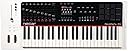

Panorama P4
Product ID: 10221763
Details
- BrandNektar
- Connectivity TechnologyMIDI USB
- Model NamePanorama P
- Number of Keys49
- Special FeatureKeyboard Key
🎹49 semi-weighted keys
💻Deep DAW integration
🎛️100mm motorized fader
🎶 Elevate your studio game with the Nektar Panorama P4 — where pro control meets pure inspiration!
The Nektar Panorama P4 is a premium 49-key USB MIDI controller featuring semi-weighted velocity-sensitive keys with aftertouch, a motorized 100mm ALPS fader, and deep integration with leading DAWs like Reason, Cubase, and Logic. Designed for Mac and PC, it offers comprehensive MIDI functionality and includes PreSonus Studio One Artist DAW, making it a powerful centerpiece for professional music production setups.


| ASIN | B008EY9XPW |
| Additional Features | Keyboard Controller, Velocity Sensitive Key |
| Best Sellers Rank | #124,943 in Musical Instruments ( See Top 100 in Musical Instruments ) #440 in Computer Recording MIDI Controllers |
| Brand | Nektar |
| Brand Name | Nektar |
| Color | White |
| Compatible Devices | Devices with USB or MIDI connectivity and compatible software (e. |
| Connectivity Technology | MIDI, USB |
| Connector Type | USB |
| Control Method | Touch |
| Control Type | Keyboard Controller |
| Customer Reviews | 4.4 out of 5 stars 68 Reviews |
| Global Trade Identification Number | 00859383002152 |
| Hardware Interface | USB |
| Hardware Platform | PC/Mac |
| Human Interface Input | Keyboard |
| Included Components | Panorama P4 Keyboard, PreSonus Studio One Artist License, USB Cable, User Manual |
| Instrument | Keyboard |
| Instrument Key | Any |
| Item Type Name | MIDI Controller |
| Item Weight | 6.4 kg |
| Keyboard Description | MIDI music keyboard |
| Manufacturer | Nektar |
| Manufacturer Part Number | P4 |
| Material Type | Stainless Steel |
| Mixer Channel Quantity | 4 |
| Model Name | Panorama P |
| Model Number | P4 |
| Model Year | 2013 |
| Noise Control | None |
| Number of Items | 1 |
| Number of Keys | 49 |
| Platform | Mac |
| Product Style | 49 Key |
| Size | 49 Keys |
| Special Feature | Keyboard Controller, Velocity Sensitive Key |
| Supported Software | Reason |
| Total USB 2.0 Ports | 1 |
| Total USB Ports | 1 |
| UPC | 859383002152 |
| Unit Count | 1 Count |
| Warranty Description | 2 year manufacturer. |
H**I
Perfect for Reason and Rack Extensions
I got this a few days ago, and I am in love. I tried a bunch of keyboards that are popular as Reason controllers, and they just felt cheap, or didn't have very intuitive controls. This keyboard is just about perfect for me. First, it feels solid. The controls don't stick, and the buttons don't feel cheap. Everything feels top-notch. I hate having to fight my instrument to get control over it. No problems with that here. Sliders slide without a fight, rotaries all glide. Would be nice if rotaries had tactile feedback, but you can't get everything for $499. The keyboard is semi-weighted, and feels almost like a piano keyboard, so it requires some force to play, unlike a lot of cheaper keyboards. I like the feel of the keys a lot. In Reason, the P4 just works. Workflow flows. It makes everything in Reason feel more "real," as opposed to a wall of graphics you have to constantly click on, pulling your attention away from the keyboard. I can sit at the P4 and fiddle with all kinds of settings without turning my head towards the monitor. For example, if I'm trying to get down a track, I can record and re-record it as often as I'd like with just a few button pushes. Transport controls are right there, with an undo button to remove tracks I don't like. Four presses, and I've stopped, deleted, gone back to 1.1.1, and started recording again. If I'm fiddling with an arpeggiator, there's a software hold key that will virtually hold down the keys I've already pressed so I can fiddle with the arp setting without my fingers going numb. (Just one example of many.) It only has 12 pads, but it's stupid easy to work with in Kong, because there's a software button that let's you change the top row on the fly from C (banks 9-12) to D (13-16). Nektar does an excellent job of supporting the latest Rack Extensions. It works well with Antidote, Viking, Korg Polysix, and a bunch of others, and they update pretty frequently. (Looks like about every month or so.) The PX7 Rack Extension synth only has basic control support, not deep support over all 6 operators. Apparently that's Propellerhead's call, not Nektar's. PX7 integration isn't as good as, say, Antidote integration, but the P4 still makes the PX7 easier to play with. I can patch-surf, change the basic controls, or change PX7 algorithms from the P4. Just changing the algorithms from the keyboard is huge for me, because that means each PX7 patch has 32 options to play with. If you want to modify the operators, you have to do that with the mouse. The display makes it really easy to figure out what you want to do, so don't worry about black on black buttons/dials/sliders. After a few days, it becomes intuitive. Setup can be a little bit tricky for newbies (just a little), and the Nektar website could use some streamlining to make the obvious information easier to find, but I'm not taking off a star for that. Just don't auto-add it as a control surface in Reason, or else you'll get errors. Follow the instructions on the Nektar website.
M**L
The very best controller imaginable for Reason
Bottom line if you use Reason you should use this controller. It is so perfectly integrated with every tool in the rack plus all of the RE's. They keep current on a nearly weekly basis with all of the 3rd party RE's to make sure you have total control over every parameter possible. I've loved Propellerheads for years and it is really my only DAW outside of mastering - I use it for all of my creation but I have always tried to cobble together hardware to make the dials and knobs all work - building custom maps, editing automation triggers - it was a lot of work and now, it's all done for you. In fact you more or less almost don't need your keyboard and mouse. The only place I think it's more convenient to use the mouse is when creating a new instrument (although the P4 allows you to do this I find it easier with a mouse) but aside from that you control 100% of the functionality from the workstation. In addition the keys and pads are superb. The weighting on the keyboard feels so incredible to me and the drum pads are the best I have ever used. If you are questioning this versus something like an Axiom to save 50% and you use Reason spend the extra money. There is zero comparison. This is the only tool you will need. I am going to be selling off all of my controllers (keeping my 88 key just in case I want to play a nice 2 handed big range piece but aside from that - see ya - y'all been replaced :). Buy it now! (Oh BTW - they will be releasing a 61 key I believe - that would be the only reason to wait if it means a lot to you. I promise this tool will boost your creativity to all of the potential it can be.
A**R
Best Keyboard For A Reason User By Far!!
Been using Reason for 10+ years & this is by far the best keyboard for using reason I've ever seen, the amount of unique things this keyboard can do with reason still amazes me, there is so much information on the screen & the workflow with this thing is great, the motorized fader is implemented so well, the main drawbacks of the keyboard r the keybed & drum pads aren't the best feeling but they aren't horrible either & the lack of an intuitive arpeggiator (at least afaik) but even without those features I would pick this keyboard over any other keyboard for reason any day, now I just want Nektar to make an updated panorama model & i would buy it day 1!
S**S
Quality Addition To Any Home Studio
There are so many things to love about this midi controller. It's fully integrateable into Presonus Studio One and I can control pretty much all my recording parameters for all tracks from my midi onboard screen. There are so many applications to learn about. Definitely worth the extra cost...you will not be disappointed!
N**Y
Surprised this isn't more popular. Perfect solution for me!
As the heading states, I am really surprised this controller is not more popular especially for those who use Reason for Beat creation. Perhaps the price might shy many away because I have to admit I wished it were about $100 cheaper, but after getting it and using it I have to say that price tag became more palatable for me. I've used Reason, like many others, since version 1.0, but never used it as my main tool because I just could not bet past the clunkiness of using a mouse during the creative phase. It really just got in the way and slowed me down as I spent too much time distracted by all the other activity going on in the Reason interface (was just used to using hardware and to this day do not move quickly in a lot of music software). I stumbled on the Panorama P4 one day while doing some lazy web surfing one day (I think a saw it on Synthiopia or Gearsluts or some other gear site covering one of the music gear conventions) and its description was a fit for my perfect device for using Reason. I had wished someone would make a device that would basically be a direct hardware interface for Reason where I did not have to look at the screen or use the mouse while creating. The description of the Panorama was just that. It leverages the Propellerhead ReMote protocol (I believe) that the Props introduced a few years ago. I remember when they announced ReMote and remembered thinking it was no big deal because you could pretty much map any parameter in Reason to a control on your Midi keyboard, plus Novation had Automap that came out at the same time or shortly after, or maybe even before (I don't remember). The cool thing about the P4 is that pretty much every parameter of every device is available right there from the controller. The biggest thing I like though is that I can create tracks, new lanes/overdubs, undo, toggle looping on/off, navigate, control the mixer, select patches instruments and do rough mixing directly on the device without having to look at the screen or touch the mouse!!! It has been a godsend for me and keeps me in the "creative pocket" so to speak. I haven't figured out if it's possible to work with Blocks from the P4 or if Blocks is accounted for in the ReMote protocol, but that would be an even bigger workflow improvement for me if it were possible. I also recently got an email from them saying they have increased support for a great deal of the Rack Extensions that are out now. I'll add, updating the device is breezy and the process felt stable. The styling of the unit to me looks sleek, but I've heard some remark that it was unattractive. I don't think so at all. I think the design is "gear sexy" and inspiring. The display is easy to read, but I was wishing for a slightly higher resolution if it were possible or an amoled type display like on the little (but expensive) op4 device, but that is a minor thing. The build quality is pretty solid. Nothing felt cheap except for the fader cap. It felt a little on the cheap plastic side, but again not a big deal in the big picture and there might be a standard cap that I could replace it perhaps. I did have one issue when I first turned mine on however. Two of the faders were a little erratic. When pushed to the maximum value, the graphical fader and the corresponding value displayed on the screen would go to 127 and then immediately decrement down to 0 while the physical fader was still at the max position. I don't know if there was some dust or debris on the fader contacts from the factory, but after moving the faders up and down the path a few dozen times the issue seemed to 'fade' away...no pun intended...and has not returned thus far. The website for the Panorama seems to give it away the the company that makes it is fairly small. I like that on one hand because it seems their focus can be on the Panorama, but on the other hand I do worry if they can have staying power with all the controllers out there. I believe the Panorama is unique and highly functional enough at this point in time to be a go to device for many. With Ableton's recent announcement of their dedicated controller for their DAW (in addition to what Akai and NI have sone) I wonder if Props may do the same. If they do I hope they call on the folks who made the Panorama to do their implementation so they can still be around--(selfishly to support the P4 I bought LOL!!!) I've had the P4 for about a month so far and am really enjoying it. I fits my needs perfectly and is a device that was on my wishlist for years that I didn't even know existed. So glad I found it! I'd recommend it in a heartbeat, especially to those to do Beat production who hate using the mouse or who tend to be distracted by the activity in the interface. Oh, forgot to mention...the only thing about owning it that I do not like is the fact that it only comes with a quick start guide and I find the firmware updating process easy, but there are gaps in the documentation with regard to managing your settings once they are backed up. . All the detailed information regarding how to work some of the more detailed aspects of the controller are on the website which I find to be a little rough around the edges in terms of formatting and navigating, but most of the information is there. Except one part regarding the firmware updates. They advise you to backup your settings because the firmware will erase everything (which is no surprise obviously), but I have yet to see in the documentation where I can access to backups to store them elsewhere off the device so I can restore them later. The same seemed to go for the macros. After updating the the latest firmware it gives you a new updater application and rivers and it also seemed to update the macro editor as the macros i had previously created were gone. Not a big deal this time because they can be recreated rather quickly, but I'd tire of having to do that every time I update the firmware. UPDTE: I happened to click a link on the SUpport page regarding using the P4 with Ableton and within that article there was a link to another article about backing up the contents via sysEx for off-line storage. I didn't find this info in the article pertaining to Reason. It may be there , but I did not see it. As I said I think the website needs a little work in terms of better organization and formatting, but otherwise it seems the information ins in there somewhere. Just wish it were in a formal single manual. Just as I was writing this I also noticed the backup and restore procedures are in the FAQ..duh..I should have checked there first. So instead of RTFM, I'd recommend RTFS (Read the friggin site!) first LOL.
F**O
Great Control Surface/Midi Controller build quality is pretty good but ...
Great Control Surface/Midi Controller build quality is pretty good but not better than my M-Audio AxiomPro 49. The P4 doesn't have that premium feel to it that I'm use to but works flawlessly for the DAW's I use Logic Pro X on the New Mac Pro 6.1 and Reason 8. So it gets my approval and a 5 star rating. I had to return it but I will be repurchasing it some time in the next 6 months it's just that good.
K**Z
Better than Expected
I bought the Nektar P4 for use with Reason 7. I thought that the deeper integration with instruments and the sequencer would be useful. The part about the mixer was a secondary reason. Upon setting up and using it, I quickly fell into a natural and intuitive workflow using the P4. After getting a basic track/loop going I visited the mixer and that's where the P4 really hooked me. Access to the mixer from the compressor section to the fader was awesome. The reason for me is that sometimes I would intellectualize settings looking at the knob values, eq curves, etc. That's the power of contemporary recording software, but with the P4 I realized that I used my ears more. Yes, you can scroll to the part of the mixer you are controlling and watch the knobs move as you use the P4, but I found myself looking at the very adequate screen on the P4 and using my ears to make decisions. Very subtle change, but a very welcome one. A tip about the motorized fader is to use an AC phone charger (like from an old iPod) to power the fader and save a USB slot on your computer. Various comments note that a single motorized fader is no big deal, etc., but it is helpful. Making finer adjustments with the longer throw fader is nice. Also, the motorized fader acts as a visual cue when you change tracks and helps you know your location in the mixer. Setting up macros is nice, but I didn't make as many as I thought. Saving your song, copy-paste, and some other functions have been all I have programmed. Edit: When I first reviewed, I was new to Reason. You CAN access all channels with the Nektar. You just need to make sure you add the channel by clicking the SEQ button for the channel. The SEQ button is at the bottom of each channel in the SSL mixer. (Original: The only time I'm disappointed is when creating mixer bus tracks and the P4 doesn't access them. It seems to grab tracks that are in both the sequencer and mixer. Not a huge deal (and it may be that there's a setting I don't know to resolve this) but I find myself not using this feature of Reason so I can get the most of the P4 as a mixing surface. It's worth pointing out in case you do a lot of sub groups with the mixer.) In all, being able to fall deeper into the creative process is amazing and difficult to describe. When you start looking at your keyboard and start creating, not having to grab the mouse/computer keyboard or grabbing less makes a huge difference.
C**E
Does Not Work with Logic Pro
Would love to love this fine looking keyboard, but no matter what I do it will not control the transport or any other part of Logic Pro X other than playing its instruments. I called support and sadly, was greeted by a recording advising me to visit the website, which I did three times without success.
D**H
Great piece of kit. Really helps with work flow.
Great piece of kit. Really helps with work flow as most things in the DAW (Logic X) can be controlled just using the P4. I have set up hot keys for track creation, track duplication (Audio & Instrument) Saving, Deleting....Seems that you can only navigate sound banks for native DAW instruments and effects, third party instruments and effects you can change all the parameters which is great and very useful but you cant flick through the sound banks or presets. I may be wrong and if anyone knows otherwise I would be interested to know how. All in all a very well built quality keyboard and DAW controller in one.
C**F
excellent controller keyboard
this is an excellent controller keyboard, particularly for 'Reason' software it is heavier than expected, but seems quite durable the keys, buttons, dials, and sliders feel great cannot keep my hands off of it very satisfied with this
D**L
Buena maquina, mal distribuida por una tara
Le daria 5 estrellas si no fuera pq venia la caja interior llena de polvo y lo peor, una tecla en mal estado q se queda un poco pulsada.Lo hubiera cambiado pero me urgia trabajar con el. Yo lo uso con la DAW REASON 11 suite y la implementacion con el software creo q es la mejor del mercado junto con una pantalla a color con menus muy claros y faciles.
F**I
Finalmente!
… Usato anni logic pro e questa tastiera mi ha dato veramente la possibilità di non toccare per niente ne mouse ne tastiera del computer ..... Facilissima installazione ..... Perfetta sincronizzazione con logic ....
M**O
Wow!
Semplicemente fantastica. Arrivata puntualissima,esteticamente accattivante e completamente integrata sia con Cubase 5 che Cubase 8 Pro. Alta qualità a prezzi accessibile!
Trustpilot
2 weeks ago
4 days ago