We remain fully operational. Our teams are working around the clock to ensure your deliveries continue safely.

Descargar la aplicación


Servicios al cliente
Sobre nosotros
Copyright © 2025 Desertcart Holdings Limited
Descargar la aplicación

🖊️ Elevate your workflow with the pen mouse that fits your lifestyle and your pocket.
The lychee Wireless Optical Pocket Pen Mouse is a sleek, ultra-portable input device designed for professionals on the move. Featuring adjustable DPI settings (800/1200/1600) for precise control, a natural pen grip for ergonomic comfort, and a 2.4GHz wireless connection with up to 33ft range, it offers seamless plug-and-play compatibility across multiple operating systems. Powered by a single AAA battery with auto-sleep functionality, this mini mouse redefines convenience and style for your PC, laptop, or Mac.


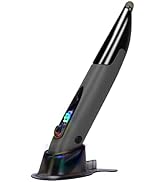

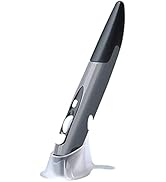


| ASIN | B07D8GYLF7 |
| Batteries | 1 AAA batteries required. |
| Best Sellers Rank | #486 in Computer Mice |
| Customer Reviews | 3.8 3.8 out of 5 stars (2,509) |
| Date First Available | May 23, 2018 |
| Is Discontinued By Manufacturer | No |
| Item Weight | 1.02 ounces |
| Item model number | PR-A18 |
| Manufacturer | Lycheers |
| Product Dimensions | 1 x 0.6 x 0.04 inches |
S**K
I LOVE IT!
I absolutely love this pen and it works great. Better than the mouse that came with my HP Sprout computer even. The only thing that's is annoying is, I keep knocking it off my computer desk. I forget how tall it is and reach for (my regular computer mouse I've been using for years) and it goes flying off the desk. I knocked it off the desk at least 20 times in one day. I'm finally getting accustomed to it now. It even uses easy to find/replace AAA batteries. Great device. Takes time getting used to it but it's worth the effort. So easy to use. No more erratic/temperamental mouse for me. P.S. I must add it's very sturdy too. It's really has taken a lot of abuse from me, knocking it off the desk 20 or more times a day:)
V**R
Nice pen.
Works well but you must ajust the mouse speed.
R**A
Working as expected
Good one comfortable to use.
C**L
Recommend the item whole-heartedly, but maybe not from this seller
This is my second one..I bought it bc I can't find my last one, and I loved it so much I wanted to replace it before I started on my new illustration project. It just makes sense to be holding a pen shape while you're drawing! My mother gave me my first one bc she never opened it, and it just seemed like a gimmick. But nope, I loved it.. It's convenient and I can plug in the dongle in any computer..at work, I can use it to send jobs etc while still standing at the machine so no running back and forth, while the mouse is still there and usable when I sit down. It can stay in my pocket with my other pens. If I had any complaints I'd ask that the button for the right click would be, say, a cm or two down. No big deal. Most importantly, it's cheap! EDIT: I just had to come back and edit this review bc the thing stopped working after maybe 3 uses...I don't know where my 1st one came from so I'll just have to try a different seller :/
A**.
possibly too soon to tell
NB the documentation does not say this, but the pen actually works better if you use it in the stand. The device is very light. It feels flimsy, but maybe the light weigh is good as it may be easier on the hand I was interested in this, because the previous mouse I was using was irritating the arthritis in my right thumb. I am hoping this will be better, but it might be too soon to tell. In any case, it's generally better to switch up hand positions to relieve repetitive use injuries. It did not come with a battery. The battery cover was hard to remove. I had a friction sheet that I use for opening jars. That helped me open the battery cover. The battery was hard to get in, but eventually I did. At first the laptop did not recognize the clicks on this mouse -- but then it seemed to figure it out. Maybe there's a learning curve -- not sure. Otherwise it seems to work. I'll have to get back to this review after I see whether it helps my hand feel better One disadvantage is that I use the mouse on a pull out drawer, below the surface of my workstation. This device is too tall to stay on the drawer when I close it. ----------------- I've been using it for 2 days now. I've knocked it on the floor at least 20 times during that time. So far, it's still working, but I wonder how long it can survive like this. A lot of times I accidentally knock it on the floor when I'm trying to reach for it. Other times, it's because I forget it's there. It's very unstable.
M**I
Easy on the hand
Great alternative to typical mouse. I switch between a vertical mouse when my hand gets cramped. Connected easily, took only a few minutes to adapt.
C**R
No more pain!!
Honestly I'm surprised with how well it works for the price. When I ordered this I was expecting it to perform poorly.... seeing that his was using a cheap sensor. Man was I shocked! This mouse is pretty accurate! It is comfortable to hold, and I have not fatigue using it for hours on end. I even tried gaming with it, which was a awesome experience. I also have more desk space now! Since this mouse doesn't require a mouse pad to track! Also the mouse buttons are not annoying loud, like on mouse "gaming mice". Pros: - Comfortable over long periods of time - Tracks well enough for gaming - Quite clicks - No mouse-pad required Cons: - Mouse acceleration will need to be enabled (it helps when constantly lifting the mouse while gaming) - Right click button on the left side is a little hard to press - No middle click What I would like to see in the future: - Upgraded sensor... like a pix-art sensor - Lighter to press right click - Rubber grips - Higher Pulling rate - Middle click - Include AAA Battery
T**T
great alternative to a regular mouse
This mouse has been great for me. I was having issue with tennis elbow. This keeps my hand in a more neutral position. I bought my coworker one. She loves her also. It also makes more sense for our line of work as it requires drawing. It is much easier to draw with this than a regular mouse. Right clicking was a little difficult but not terrible. I tried using it without the stand and with the stand. I personally like to use it with the stand. However, like others have mentioned I have knocked it over a couple of times. I also tend to pick it up like a pen. One thing I wish it would do is have the roller also click like most mouse. I hope the manufacturer see this and incorporates that along with other suggestions mentioned by other reviewers.
M**A
Configurazione automatica senza alcun problema. Estremamente pratica e di semplice utilizzo. Ottima la rotellina di scorrimento. Un vero mouse dall'utilizzo intuitivo. Molto preciso.
L**O
Fácil instalación
D**I
Não durou 15 dias e já quebrou
N**D
The mouse worked for 2 days only , then it stopped working even changing the batteries it still not working after waiting for two weeks till I received the product, sadly it is not working the mouse is very light which is difficult to control it while writing the structure of the mouse is not that good to be able to write in a proper way
S**K
Waste. Don't buy
Trustpilot
Hace 1 mes
Hace 2 meses