We remain fully operational. Our teams are working around the clock to ensure your deliveries continue safely.

Descargar la aplicación


Servicios al cliente
Sobre nosotros
Copyright © 2025 Desertcart Holdings Limited
Descargar la aplicación




🚀 Scan smarter, work faster, stay ahead.
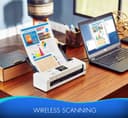
The Brother ADS-1700W is a compact, wireless document scanner designed for busy professionals and home offices. It delivers rapid duplex scanning at up to 25 pages per minute with a 20-sheet auto feeder, supports multiple scan destinations including cloud and mobile, and features a user-friendly 2.8” color touchscreen. Its versatile connectivity options and advanced image optimization make it a top choice for efficient, clutter-free document management.


| ASIN | B07FRBFVDN |
| Best Sellers Rank | #23,754 in Office Products ( See Top 100 in Office Products ) #25 in Document Scanners |
| Brand | Brother |
| Built-In Media | Brother ADS-1700W Scanner,AC Adapter,Quick Setup Guide,Warranty Sheet,Product Registration Sheet |
| Color Depth | 24 bits |
| Connection Type | Wi-Fi |
| Customer Reviews | 4.2 4.2 out of 5 stars (1,652) |
| Global Trade Identification Number | 00012502652007 |
| Greyscale Depth | 8 bits |
| Item Dimensions D x W x H | 4.1"D x 11.8"W x 3.3"H |
| Item Type Name | Brother ADS-1700W Wireless Compact Desktop Scanner, ADS-1700W, Fast Scan Speeds, Easy-to-Use, Ideal for Home, Home Office or On-the-Go Professionals |
| Item Weight | 3.3 Pounds |
| Manufacturer | Brother Printer |
| Media Type | Photo ; Receipt ; Business Card ; Paper |
| Minimum System Requirements | Windows 7 |
| Model Name | Old Model: ADS1700W |
| Optical Sensor Technology | CCD |
| Paper Size | 8.27 x 11.69 |
| Resolution | 600 |
| Scanner Type | Document |
| Standard Sheet Capacity | 20 |
| UPC | 012502652007 |
| Unit Count | 1.0 Count |
| Warranty Description | 1 year |
| Wattage | 9 watts |
R**N
Outstanding scanner! But you might need a micro B USB cable...
This is a slick little scanner that works quickly and very well. If you're planning to connect it to your computer via USB you'll need a micro B cable, as it does not include one. Initially I was bummed about this because though I planned to use the scanner with Wifi, when I went to setup the scan-to-network share feature, the scanner's menu informed me I had to set that up from my computer. So I assumed I would have to plug it in and went searching for a cable and for the right software on Brother's web site. Thankfully, you don't actually have to plug it into a computer to set it up and you don't need to download any Brother software either, depending on your use case. You can setup wifi directly from the scanner's touchscreen, then use any web browser from a computer on the same network to access the scanner over Wifi to complete setup of more advanced features without a USB connection. I had to Google the default password for the scanner's web interface (turns out it's printed on a label on the bottom of each scanner), but once I had that I was able to login and configure the various options. Now all I have to do is drop a sheet of paper (or up to 20) directly into the automatic document feeder on the scanner and it automatically performs a duplex scan, skips blank pages, converts it to a PDF and drops it on a network share without pressing a single button. Once it's all setup it is super fast and very easy to use. I highly recommend this. It's worth the extra money to get a true Wifi scanner if you want wireless scanning to network storage.
R**L
Swift, Accurate, and User-Friendly: A Must-Have for Professionals On-The-Go!
I purchased the Brother Wireless Document Scanner, ADS-1700W, for my home office and it's proven to be an invaluable asset. Right from the unboxing, the setup was intuitive and straightforward, making it operational within minutes. The scanner boasts fast scan speeds which are crucial when dealing with a heap of documents. The wireless feature is a major plus, allowing me to scan documents directly to my mobile device or cloud storage, making it ideal for on-the-go professionals. The quality of scans is impressive with clear, sharp images and text. I appreciate the touchscreen LCD which simplifies the operation, and the automatic document feeder which can handle 20 pages is a time-saver. The compact design of the scanner is a space-saver, yet it does not compromise on the functionality. I also found the dual paper trays and duplex printing features quite useful for different scanning needs. The scanner has a variety of connectivity options which is great for a modern workspace. The only downside I experienced was the initial connectivity setup with my network, but once that was resolved, it's been smooth sailing. The Brother ADS-1700W is a reliable, efficient, and user-friendly scanner that meets the demands of a busy professional. The price is reasonable considering the features and the brand reputation. I would highly recommend this scanner to anyone in need of a high-quality, convenient scanning solution.
O**S
Very nice scanner
It appears to be very well built. Actually pretty heavy for its size. If you had to carry it around every day, like on the road, it might be too heavy. Probably want a wheeled roll around for the scanner and the laptop. But clearly small enough for more intermittent translocation. Had some problems with the feeder. Stop part way thru a 2-4 page document. Just stop in the middle of scanning a page. But it’s very fast. Does double sided scanning about as fast as a printer can churn out multiple copies of the same document. Tried to scan a legal size page and it only scanned the first 11.5 inches. I’m sure there is away around it - just haven’t worked out yet how to do it. Use the Windows scan app and my FixIt PDF app to scan into an app. I still have a 12 year old Brother MFC printer to scan books and magazines and anything that can’t go thru the portable scanner.
L**K
OK machine, way subpar software
This machine is ok. I've been using it for over a year. It's fast when scanning 300dpi and handles slightly bent or creased paper well without jamming. The software is terrible. It is bloated and convoluted. It consumes over 1GB of storage. While storage isn't scarce these days, that's a lot of resources for an application that scans documents. I have not been able to get the "scan to PC" to work on multiple Windows machines. The driver installation is either flaky or broken causing the software not to work as designed. There is no scanning capabilities from the web console, one must use the Brother iPrint&Scan software. While the TWAIN drivers do exist, they don't work very well with Adobe Acrobat Pro (that is installed with Creative Cloud), notably no two-sided scanning. The sheet feeder often allows the page(s) to skew, so all of my scans are angled. I had to rig up something to align the pages so this would be reduced. Some downsides with the machine are no Wi-Fi 5GHz, it only supports 2.4GHz WPA2. It won't connected to SMB v3 network shares, so I have to downgrade my network storage devices to support version 1 or 2, exposing my network to known vulnerabilities with these older SMB versions. There is no paper tray to catch output sheets, I had to build something to keep papers from flying out of the machine onto the floor. Sometimes the feeder mechanism allows pages to become misaligned and skewed. Occasionally, the software completely loses track of the scanner. I can reach the IP, but the software can't. I'm ready to toss this scanner. I would not recommend it to anyone. The painful software, the paper feeder system, and lack of output tray is why.
C**Z
Excelente producto por su facilidad de instalación, velocidad de escaneo muy aceptable y vale la pena por su portabilidad
L**.
O aparelho é portátil, fácil de transportar, instalar e manusear. Trabalha muito rápido e a qualidade das digitalizações é excelente. Fácil configurar e o software é simples, limpo e intuitivo. Com o manual de instruções que acompanha o produto não tem como errar. Excelente custo/benefício.
S**D
Beautiful amazing product
A**.
I like very much this scanner, it is small and fast and produces good quality scans. Product works as per documented features, no issues.
A**R
Product performs as advertised. Easy to use. Perfect for home office or small business.
Trustpilot
Hace 1 mes
Hace 5 días