We remain fully operational. Our teams are working around the clock to ensure your deliveries continue safely.

Descargar la aplicación


Servicios al cliente
Sobre nosotros
Copyright © 2025 Desertcart Holdings Limited
Descargar la aplicación


🔌 Elevate Your Home, Elevate Your Life!
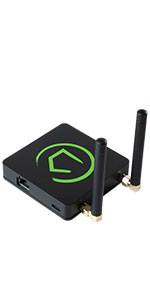
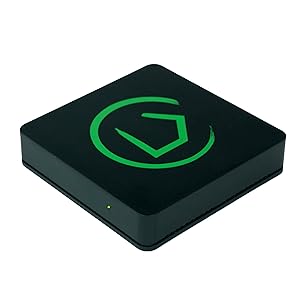
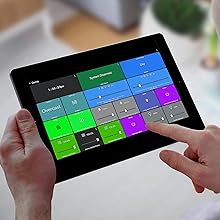
The Hubitat Elevation Home Automation Hub (Model C-7) is a powerful, compact device that enables seamless local processing for fast and reliable home automation. Compatible with a wide range of devices including Zigbee, Z-Wave, and major voice assistants, it offers customizable automation options without relying on cloud servers, ensuring your smart home operates smoothly and securely.






| ASIN | B07D19VVTX |
| Batteries Included? | No |
| Batteries Required? | No |
| Best Sellers Rank | #573,262 in Tools & Home Improvement ( See Top 100 in Tools & Home Improvement ) #472 in Home Automation Hubs & Controllers |
| Color | Black |
| Customer Reviews | 4.0 4.0 out of 5 stars (2,437) |
| Date First Available | May 11, 2018 |
| Included Components | Built-In Automation Apps, Custom Dashboards, Device Compatibility, Mobile App, Hubitat Safety Monitor app |
| Is Discontinued By Manufacturer | No |
| Item Package Quantity | 1 |
| Item Weight | 8.1 ounces |
| Item model number | HC5 |
| Manufacturer | Hubitat |
| Part Number | HC5 |
| Power Source | AC adapter |
| Product Dimensions | 2.95 x 2.95 x 0.67 inches |
| Special Features | WPS |
| Style | Open Box |
| Voltage | 120 Volts |
L**N
My Z-Wave switches finally work!
The Hubitat C-7 is the older version of the company’s smart Bridge. I needed a Z-Wave bridge, and this did not disappoint. I got this on sale and was looking for a “cheap” solution. This was not the cheapest potential solution, but it was by far the most complete solution at its price point. It’s small. It’s lightweight. It runs off the small micro-c usb (cable and plug + Ethernet cable included). I set mine next to my Router and have it direct wired to my network, so I cannot speak to the ease of WiFi set up. Scan the QR code with your phone and follow the instructions. Went really smooth. Once in, now it’s no longer a beginners game. This is a community supported “open source” device that will interface with Alexa (probably others from what I’ve read), but you need to be in the devices network address (if you ever had to log into the admin functions of a router, it’s like that), and then add your devices and enable cross connectivity to your Smart hubs and Smart apps. You can make run routines. You can access all the device features. For example, once my dimmer switch was found, Alexa can turn it on and off, as well as set the level. In the Hubitat account, I can make it flash, pulse, write a run routine program, integrate it to do things with other devices… pretty cool! Let’s face it. You want a lights on, lights off when you come home, and this lets that happen. The rest is fancy distractions. But if you are old like me and want to make your Gen Z kid who knows everything wonder why the new lights you installed are acting “sus”, those fancy distractions are there for you! Background: A couple years ago, I started buying items that would make my old house “upgraded” with smart home features, like LED lighting, dimmers, Smart TV’s… you get the idea. I bought a Ring doorbell, then a hardwired flood light, then went overboard with a whole lighting kit bundle with switches, bulbs, garage door opener, light bridge… what was I thinking! Well, the Ring light Bridge appears to be useless without a Ring security hub and I didn’t want that. Basically, everything with a Z-Wave logo and my garage door opener was useless. I gave up. Over time, I got the garage door opener to work on its own but not integrated with a single Smart interface. Then I started investigating why the switches didn’t work. Well, you need a hub. We had an Echo dot. Turns out, it only has “limited” connection features for WiFi and Bluetooth. I read the bigger and newer Echo 4 had Zigbee (mistook that for Z-wave… or a new name? Naive on my part) which is NOT Z-Wave. After confusing batch of misleading articles and incorrect A.I. generated responses, I found the Hubitat C-7. It was on sale. Online forums were hit or miss on its review, but consensus was I needed a Z-wave mesh network that would talk to Alexa and this was going to do that without a subscription. TL/DR: Z-wave, bridge, not for beginners, Alexa comparable, newer version available, pay subscription available, but not required.
C**S
This is a very flexible and dependable Hub
I have owned a Hubitat C7 for over a year now, and I have been impressed with it. I moved from SmartThings when they shut down the Groovy IDE and the ability to use Webcore, as I had hundreds pistons with all of my automation logic in Webcore. I was able to move all my Webcore automation pistons over when switching to the Hubitat C7, as it runs Groovy code. There is a Rule Machine app to create automations in Hubitat as well, but Webcore is powerful and easy to use and I never played around with Rule Machine. People complain about the need for a subscription to administer the hub outside of their local network. I have never had a reason to subscribe to this, and it really is only needed if you have a hub in a remote location (like a rental property) that you need to administer remotely. In this case the administration subscription gives you access to do administration stuff, like rebooting, adding devices, adding drivers, adding apps, etc. I have never had a need to remotely administer my Hub that is in my house. I can control everything for free from Dashboards remotely as far as actually controlling my home and devices. The Dashboards are available from the internet, and there are links provided on the dashboard setup page to use them remotely. There is a learning curve to really customize the dashboards to make them look nice. If you edit the custom CSS, you can do a lot of things with dashboards like changing text and using custom icons, layering tiles, changing colors, etc. I can run everything in my house from my dashboards, either remotely or on my home network. Over the last six months, I have learned that the true power of this hub for me is the ability to write your own custom apps and drivers, or to find and use (and modify) apps and drivers that the community has written. This hub can become a casual programmers hobby, as if you know the basics of programming you can learn Groovy fairly quickly. I have now written custom apps and virtual drivers to reproduce all my automation logic I had in Webcore down to just a handful of custom apps and custom virtual device drivers to run everything. Most of my automations are based on motion and illuminance sensors with some schedules for changing modes. I have over 200 devices connected and automated, and my Hubitat is never really idle, but the hub has handled all the work like a champ. I have not seen any of the issues other people have reported about devices not staying connected, lock-ups, etc. I have to assume this is user error or a defective hub, but the platform itself is rock solid for me even with taxing it with everything I can throw at it to make it do more work. It handles code exceptions well when developing apps, I've thrown code into it that was not debugged and it reports the exceptions in logging and just continues on without issues, allowing me to find and fix the issues in my code. I highly recommend this for casual users as well, as the UI is not as bad as people make out, and most people should be able to figure it out pretty easily. There will be a learning curve like with any new product, but once you get how it works it if fairly intuitive. Dashboards have their own learning curve, but they are important as they allow you to control everything easily and remotely once they are set up.
V**S
El producto llegó abierto
K**R
Working smoothly, Really great for DIY projects.
Trustpilot
Hace 3 semanas
Hace 3 semanas